
Brecknell SBWLPS400
Brecknell 400 lb Portable Shipping Scale (SBWLPS400)
Manual d’instruccions de l’usuari
Producte acabatview
The Brecknell SBWLPS400 Portable Shipping Scale is designed for accurate weighing in shipping, warehouse, and general-purpose applications. It features a robust four-load cell design, ensuring precise measurements up to 400 lb. This scale offers dual power modes for both portability and permanent installation, making it versatile for various environments. Its compatibility with major shipping software, including UPS, streamlines your workflow.
The large, easy-to-read LCD display can be wall-mounted or desk-mounted for optimal visibility, and its large keyboard switches are designed for ease of use, even with gloved hands. An RS232 link and PC Serial Interface Cable are included for seamless computer integration.
Guia de configuració
1. Desembalatge i verificació del contingut
Traieu amb cura tots els components de l'embalatge. Assegureu-vos que hi hagi els elements següents:
- Plataforma de pesatge
- Unitat indicadora
- Cable RS-232
- 4 x piles AAA
- Mounting Bracket (for indicator)
- Manual d'instruccions (aquest document)

Figure 1: Included components of the Brecknell SBWLPS400 Portable Shipping Scale. This image shows the weighing platform, the digital indicator, connecting cables, and the AAA batteries required for operation.
2. Donant potència a la bàscula
The scale can be powered using the included AAA batteries or an optional AC adapter (not included). For battery operation, open the battery compartment on the indicator unit and insert the 4 AAA batteries, observing polarity.
For continuous operation or when connecting to a computer, it is recommended to use an AC adapter (DC 6V, 500mA, center positive) plugged into the power input port on the indicator unit.
3. Components de connexió
Connect the weighing platform to the indicator unit using the coiled cable. Ensure the connector is securely inserted into the designated port on the indicator.
The indicator unit can be placed on a desk or mounted on a wall using the provided bracket for optimal viewi accessibilitat.

Figura 2: Example setup of the Brecknell SBWLPS400 scale in a typical shipping environment. The weighing platform is on the floor, and the indicator is conveniently mounted on a wall for easy reading.
Instruccions de funcionament
1. Pesatge bàsic
- Col·loqueu la bàscula sobre una superfície ferma i plana.
- Premeu el botó ON/OFF/ZERO button to power on the scale. The display will show "0.00" when ready.
- Col·loqueu l'objecte que voleu pesar al centre de la plataforma de pesatge.
- Llegeix el pes que es mostra a la pantalla LCD.
2. Using the Display and Buttons
The indicator unit features a clear LCD display and several function buttons:
- ON/OFF/ZERO: Powers the scale on or off, and zeros the display.
- UNITATS: Toggles between available weight units (e.g., lb, kg).
- REPELL: Subtracts the weight of a container or packaging, allowing only the net weight of the contents to be measured.
- HOLD/PRINT: Holds the displayed weight or sends the weight data via the RS232 port.

Figura 3: Detallada view of the indicator's LCD display and operator keys. The display shows the weight, and the buttons allow for functions like power, unit selection, tare, and data hold/print.
3. Funció de tara
To use the Tare function:
- Col·loqueu un contenidor buit a la plataforma.
- Espereu que el pes s'estabilitzi.
- Premeu el botó TARA button. The display will return to "0.00", indicating the container's weight has been tared out.
- Afegiu els articles que voleu pesar al contenidor. La pantalla només mostrarà el pes net dels articles.
4. Computer Interface (RS232)
The scale includes an RS232 port for connecting to a computer or compatible shipping systems. This allows for direct weight data transfer to software like UPS Worldship or FedEx Ship Manager.
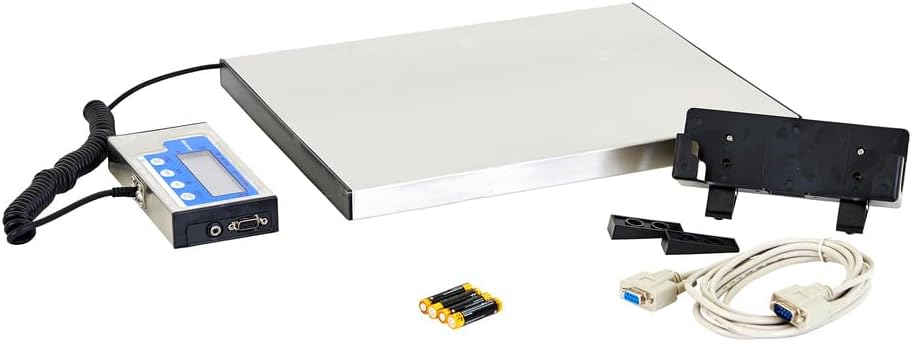
Figure 4: The back panel of the indicator unit, highlighting the RS232 serial port for data communication and the power input jack.
Manteniment
1. Neteja
To maintain accuracy and longevity, keep the scale clean. Wipe the stainless steel platform and indicator unit with a damp cloth. Avoid using abrasive cleaners or excessive water, as this can damage electronic components.
2. Substitució de la bateria
If the display becomes dim or the scale does not power on with batteries, replace all four AAA batteries. Ensure correct polarity when inserting new batteries.
3. Calibració
The scale is factory calibrated. If you suspect calibration issues or experience consistent inaccuracies, it is recommended to contact Brecknell customer support or a certified scale technician for recalibration. Do not attempt to self-calibrate unless specifically instructed by official documentation or support.
4. Emmagatzematge
When not in use for extended periods, store the scale in a dry, stable environment. If using batteries, remove them to prevent leakage and potential damage to the indicator unit.
Resolució de problemes
Problemes comuns i solucions
- Scale does not power on:
- Comproveu la instal·lació de les piles i assegureu-vos que les piles siguin noves.
- If using an AC adapter, ensure it is properly connected and the power outlet is functional.
- Lectures inexactes:
- Assegureu-vos que la bàscula estigui en una superfície plana i estable.
- Verify that nothing is touching the platform or interfering with its movement.
- Check for debris under the platform.
- Consider recalibration if issues persist (contact support).
- Display shows "OVERLOAD" or "Err":
- Remove any excessive weight from the platform. The scale has a maximum capacity of 400 lb.
- Power cycle the scale (turn off, then on again).
Integrating with UPS Worldship (Advanced Configuration)
Some users have reported challenges with initial setup for UPS Worldship. The following steps, derived from user experience, may assist in configuring the scale for proper communication:
- Configuració de l'escala:
- Apagueu la bàscula.
- Mantingueu el ON/OFF/ZERO botó i el UNITATS button simultaneously to enter setup mode.
- Premeu el botó TARA button to navigate through parameters (P1 through P20).
- Vés a P4i, a continuació, premeu UNITATS button to change the setting to 7 (NCI protocol).
- Premeu TARA to save and proceed to P5. Change this to 2 (4800 baud).
- Premeu TARA to save and proceed to P6. Change this to 2 (7E1).
- Premeu el botó ON/OFF/ZERO button to save all settings and exit setup.
- PC Port Settings (Windows):
- Go to Device Manager, then Ports (COM & LPT).
- Double-click on the COM port assigned to your scale (e.g., COM1).
- Go to the "Port Settings" tab and configure as follows:
- Bits per segon: 4800
- Bits de dades: 7
- Paritat: Fins i tot
- Bits d'aturada: 1
- Control de flux: Cap
- Click OK and close Device Manager.
- UPS Worldship Configuration:
- Open UPS Worldship.
- Vés a Eines > Preferències del sistema > Maquinari.
- Change the "Scale port" to the COM port you configured (e.g., COM1).
- Change the "Scale Type" to NCI 3835.
- Feu clic Escala de prova. The weight should now report from the scale.
Especificacions

Figure 5: Key dimensions and features of the Brecknell SBWLPS400 Portable Shipping Scale, including the stainless steel weighing platform and the high LCD display.
| Característica | Detall |
|---|---|
| Número de model | SBWLPS400 |
| Capacitat de pes | 400 lliures (181 kg) |
| Exactitud de lectura | 0.1 lliures (0.005 kg) |
| Dimensions de la plataforma (L x A x A) | 15" x 12" x 1" (38.1 cm x 30.5 cm x 2.54 cm) |
| Dimensions generals del producte | 15.2 x 12.2 x 1.1 polzades |
| Pes de l'article | 10.18 lliures |
| Material | Alloy Steel, Stainless Steel (Platform) |
| Tipus de visualització | LCD (0.65" high) |
| Font d'alimentació | 4 x AAA batteries (included) or optional AC adapter (DC 6V, 500mA) |
| Interfície | Port sèrie RS232 |
| Usos recomanats | Shipping, general purpose, mailroom, manifest, warehouse |
Garantia i Suport
Brecknell products are manufactured to high standards and are backed by a manufacturer's warranty. For specific warranty terms and conditions, please refer to the documentation included with your purchase or visit the official Brecknell weblloc.
For technical support, service, or calibration inquiries, please contact Brecknell customer service. You may also find additional resources and frequently asked questions on the official Brecknell support page.
A comprehensive User Manual in PDF format is also available for download from the product's Amazon listing or the manufacturer's website for further detailed information.
Ask a question about this manual
Ask about setup, troubleshooting, compatibility, parts, safety, or missing instructions. Manuals+ will review the question and use this page’s manual context to help answer it.