
Texas Instruments TI-83 Plus
Manual d'usuari de la calculadora gràfica TI-83 Plus de Texas Instruments
Model: TI-83 Plus
Introducció
This manual provides comprehensive instructions for the operation and maintenance of your Texas Instruments TI-83 Plus Graphing Calculator. Please read this manual thoroughly to ensure proper use and to maximize the functionality of your device.
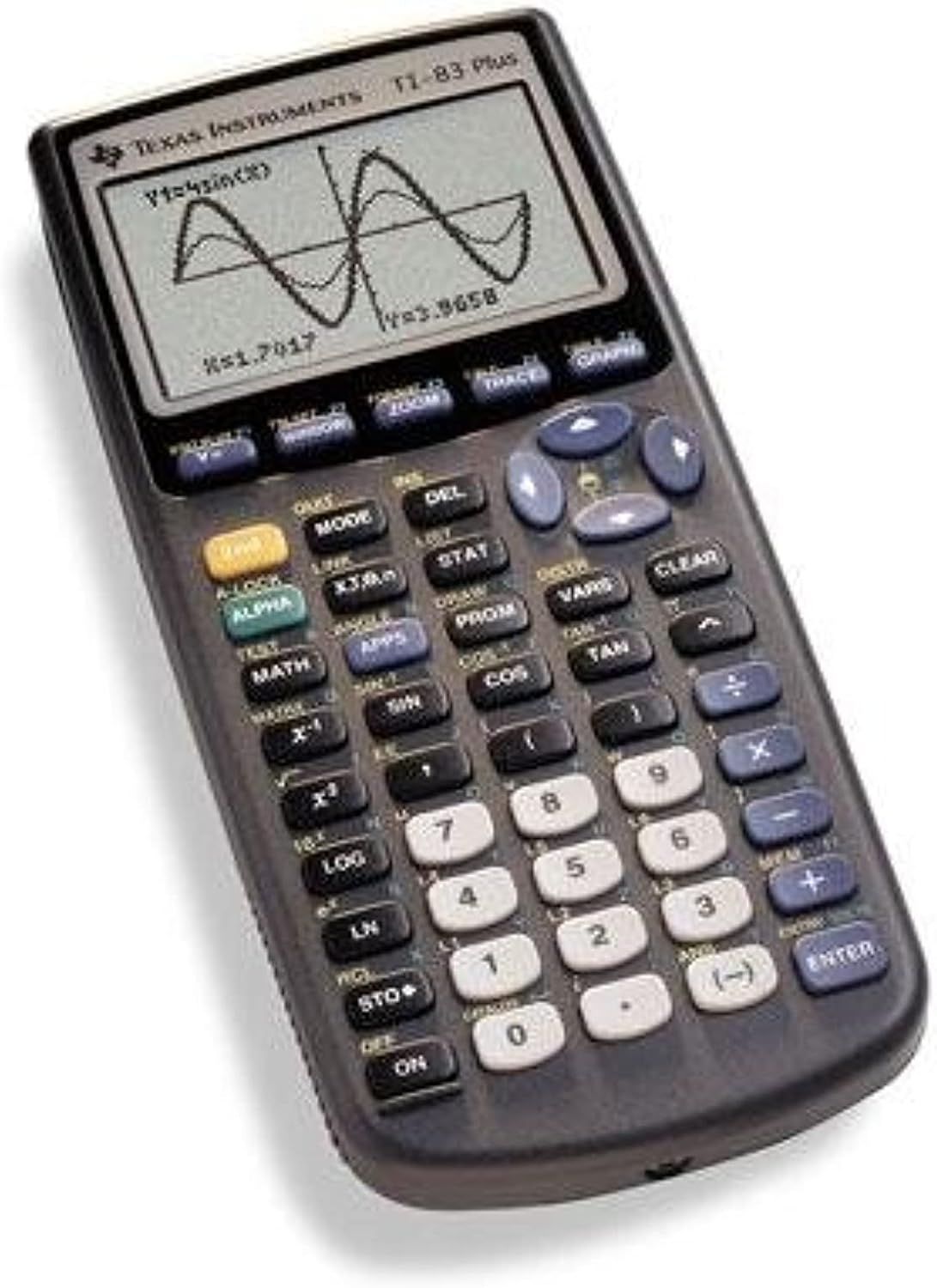
Image: The Texas Instruments TI-83 Plus Graphing Calculator, displaying a graph of a sine wave function on its screen. The calculator features a dark gray casing with a clear LCD screen and an array of black, white, and blue buttons for various mathematical and operational functions.
Configuració
Instal·lació de la bateria
The TI-83 Plus calculator requires four (4) AAA batteries for operation. A small backup battery (CR1616 or CR1620) is also present to retain memory when the main batteries are removed.
- Localitzeu la tapa del compartiment de la bateria a la part posterior de la calculadora.
- Feu lliscar la coberta.
- Insert four AAA batteries, ensuring correct polarity (+ and -) as indicated inside the compartment.
- Substituïu la tapa del compartiment de la bateria.
- If the calculator does not turn on, check battery orientation and ensure they are fresh.
Encès inicial
Premeu el botó ON button located at the bottom left of the keypad. The calculator should display the home screen or a previous calculation.
Instruccions de funcionament
Càlculs bàsics
To perform basic arithmetic, enter numbers and operators using the keypad. Press ENTRAR per mostrar el resultat.
- Addició: Utilitza el + clau.
- Resta: Utilitza el - clau.
- Multiplicació: Utilitza el X clau.
- Divisió: Utilitza el ÷ clau.
- Negative Numbers: Utilitza el (-) key for negative signs, not the subtraction key.
Funcions gràfics
The TI-83 Plus is designed for graphing mathematical functions.
- Premeu el botó Y= button to access the function editor.
- Enter your desired function (e.g., sin(X)) using the appropriate keys. The X,T,θ,n key inserts the variable X.
- Premeu el botó GRÀFICA botó per mostrar el gràfic.
- Ús FINESTRA per ajustar el viewing window (Xmin, Xmax, Ymin, Ymax).
- Ús ZOOM for quick window adjustments (e.g., ZoomStd for a standard -10 to 10 view).
Càlculs estadístics
The calculator supports various statistical functions.
- Premeu ESTADÍSTICA.
- Seleccioneu 1:Edita... per introduir dades en llistes (L1, L2, etc.).
- Després d'introduir les dades, premeu ESTADÍSTICA de nou i, a continuació, navegueu fins a CALC.
- Trieu el càlcul estadístic desitjat (per exemple, Estadístiques d'1-Var per a estadístiques d'una variable).
- Especifiqueu la llista que conté les vostres dades i premeu ENTRAR.
Manteniment
Neteja
To clean the calculator, use a soft, dry cloth. Do not use liquid cleaners or abrasive materials, as they may damage the screen or casing.
Emmagatzematge
Store the calculator in a cool, dry place away from direct sunlight and extreme temperatures. If storing for an extended period, it is recommended to remove the AAA batteries to prevent leakage.
Canvi de bateria
Replace the four AAA batteries when the display becomes dim or the calculator fails to power on. The backup battery (CR1616 or CR1620) should be replaced every few years or if memory is lost frequently.
Resolució de problemes
| Problema | Causa possible | Solució |
|---|---|---|
| La calculadora no s'encén. | Dead or incorrectly installed AAA batteries. | Substituïu les piles AAA, assegurant-vos de la polaritat correcta. |
| Screen is dim or blank. | Low AAA battery power. | Replace AAA batteries. Adjust display contrast (2nd + UP/DOWN arrow keys). |
| Memory is lost after battery replacement. | Backup battery is dead or missing. | Replace the backup battery (CR1616 or CR1620). |
| Es mostra un missatge d'error. | Incorrect syntax, domain error, or memory issue. | Refer to the calculator's built-in error messages for specific guidance. Check input for correctness. Clear memory if necessary (2nd + MEM, then 7:Reset). |
Especificacions
- Model: TI-83 Plus
- Marca: Texas Instruments
- Tipus de calculadora: Gràfics
- Visualització: 8 línies, 16 caràcters per línia
- Memòria: 24 KB de RAM
- Font d'alimentació: 4 x AAA batteries (main), 1 x CR1616/CR1620 battery (backup)
- Material: Plàstic
- Pes aproximat: 0.01 unces (Note: This weight seems unusually low and may refer to packaging or a component, actual calculator weight is typically higher)
- Data de primera disponibilitat: 3 de desembre de 2015
Garantia i Suport
Information regarding the product warranty and customer support for the Texas Instruments TI-83 Plus Graphing Calculator is not available within this manual. Please refer to the official Texas Instruments website or contact their customer service for detailed warranty terms and support options.
Visit the official TI-83 Plus product page per obtenir recursos i suport addicionals.
Ask a question about this manual
Ask about setup, troubleshooting, compatibility, parts, safety, or missing instructions. Manuals+ will review the question and use this page’s manual context to help answer it.