
Zalman ZM-VE350 (SILVER)
Zalman ZM-VE350 USB 3.0 External 2.5" Hard Drive Enclosure User Manual
Model: ZM-VE350 (SILVER)
1. Producte acabatview
The Zalman ZM-VE350 is a versatile external enclosure designed for 2.5-inch SATA I/II/III HDDs and SSDs. It features a USB 3.0 interface for high-speed data transfer and includes a built-in virtual CD emulator, allowing it to function as a virtual optical drive for convenient booting from ISO files. Its aluminum body provides durability and efficient heat dissipation, while the intuitive menu system ensures ease of use for all users. The device also incorporates a one-touch backup function and a safe removal feature to protect your data.

Figure 1.1: The Zalman ZM-VE350 external hard drive enclosure.
2. Configuració i instal·lació
2.1 Contingut del paquet
Abans de començar la instal·lació, comproveu que tots els components siguin presents al paquet:
- Zalman ZM-VE350 Enclosure
- Bossa protectora
- Screws (2 pcs) & Screwdriver
- Cable USB 3.0
- Guia ràpida

Figure 2.1: Included components of the ZM-VE350 package.
2.2 Hardware Installation (HDD/SSD)
- Carefully open the ZM-VE350 enclosure.
- Connect your 2.5-inch SATA I/II/III HDD or SSD to the internal SATA connector within the enclosure. Ensure a firm connection.
- Secure the drive inside the enclosure using the provided screws and screwdriver.
- Tanqueu el tancament de manera segura.
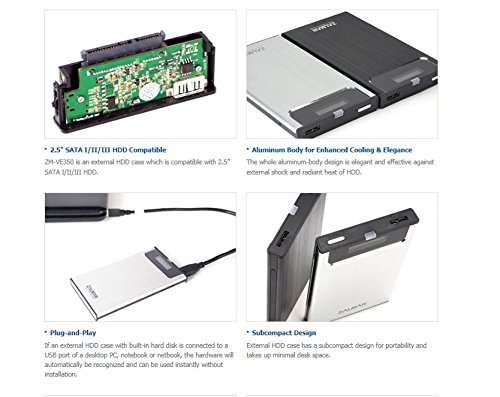
Figure 2.2: Illustration of 2.5" SATA HDD compatibility and internal connection.
2.3 Connexió a un ordinador
The ZM-VE350 is designed for plug-and-play operation. Once a hard drive is installed:
- Connect the ZM-VE350 to your computer using the supplied USB 3.0 cable.
- The hardware will be automatically recognized by your operating system (Windows 2000, XP, Vista, 7, 8, 8.1 / Mac OS / Linux) without requiring additional driver installation.
3. Instruccions de funcionament
3.1 Transferència de dades
The ZM-VE350 utilizes a USB 3.0 interface, providing high-speed data transfer rates up to 5Gbps. For optimal performance, connect the enclosure to a USB 3.0 port on your computer. It is also backward compatible with USB 2.0 and USB 1.1 ports, though at reduced speeds.
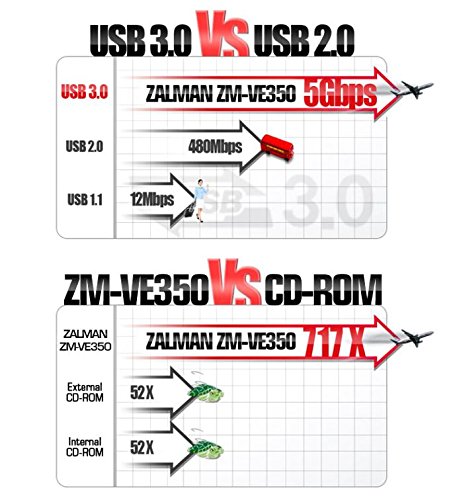
Figure 3.1: USB 3.0 vs. USB 2.0 speed comparison.
3.2 Virtual ODD Function
The ZM-VE350 can emulate an optical disc drive (CD-ROM, DVD, Blu-ray) using ISO image files. This feature is particularly useful for convenient system booting or software installation without a physical disc drive.
- Store your ISO files in a designated folder on the installed hard drive.
- Navigate through the enclosure's intuitive menu system (displayed on the built-in screen) to select the desired ISO file.
- Once selected, the enclosure will present itself to the computer as a virtual optical drive containing the chosen ISO.
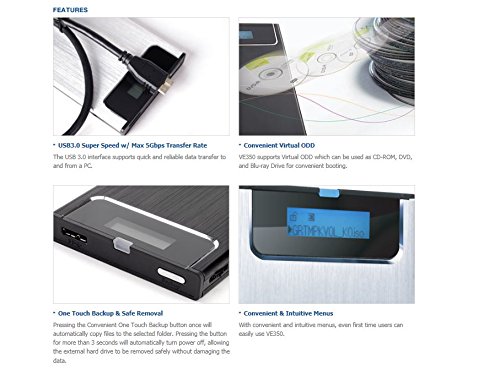
Figure 3.2: Virtual ODD display and menu navigation.
3.3 One-Touch Backup and Safe Removal
The ZM-VE350 features a convenient button for both one-touch backup and safe power off:
- Còpia de seguretat amb un sol toc: Pressing the button once will automatically copy files to a pre-selected folder on the internal drive. Refer to the quick guide for initial setup of the backup folder.
- Eliminació segura: Pressing and holding the button for more than 3 seconds will automatically power off the enclosure. This allows for safe removal of the external hard drive without risking data corruption.
4. Manteniment
4.1 Cura i manipulació
To ensure the longevity and optimal performance of your ZM-VE350 enclosure:
- Keep the device clean by wiping it with a soft, dry cloth. Avoid liquid cleaners.
- The aluminum alloy body is designed to be robust and dissipate heat, but avoid exposing it to extreme temperatures or direct sunlight.
- Utilize the provided leather pouch for additional protection during travel or storage to prevent scratches and minor impacts.
- Avoid dropping the device or subjecting it to strong vibrations, as this can damage the internal hard drive.
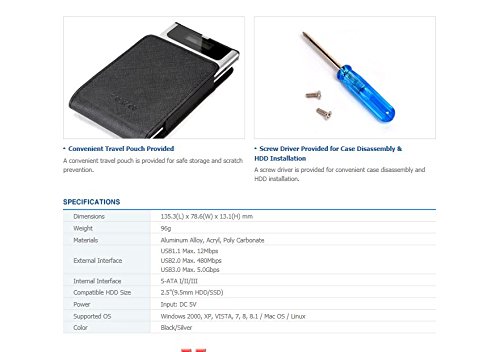
Figure 4.1: Convenient travel pouch for protection.
5. Solució De Problemes
5.1 Problemes comuns i solucions
- Dispositiu no reconegut per l'ordinador:
- Ensure the USB cable is securely connected to both the enclosure and the computer's USB port.
- Proveu de connectar-vos a un altre port USB de l'ordinador.
- Verify that the internal 2.5" HDD/SSD is properly seated and connected within the enclosure.
- Proveu la carcassa amb un cable USB diferent si en teniu.
- Velocitats de transferència de dades lentes:
- Ensure you are connected to a USB 3.0 port on your computer for maximum speed. USB 2.0 or 1.1 ports will result in slower transfers.
- Check if the USB 3.0 cable is functioning correctly.
- Verify the health and speed of the internal HDD/SSD.
- Virtual ODD function not working:
- Ensure the ISO file is not corrupted and is stored in the correct directory on the internal drive as per the quick guide instructions.
- Confirm that the correct ISO file is selected via the enclosure's menu.
- Restart the enclosure and reconnect it to the computer.
- Enclosure does not power off with safe removal button:
- Ensure no active data transfers or file operations are occurring.
- Hold the button for the specified duration (more than 3 seconds).
6. Especificacions
| Dimensions | 135.3 (L) x 78.6 (A) x 13.1 (Al) mm |
| Pes | 96 g |
| Materials | Aliatge d'alumini, acrílic, policarbonat |
| Interfície externa | USB 3.0, USB 2.0, USB 1.1 |
| Interfície interna | S-ATA I/II/III |
| Compatible HDD Size | 2.5" HDD/SSD |
| Entrada de potència | DC 5V |
| Sistema operatiu compatible | Windows 2000, XP, Vista, 7, 8, 8.1 / Mac OS / Linux |
| Color | Negre/Plata |
7. Garantia i Suport
7.1 Informació de la garantia
This product comes with a 0-year warranty. Please retain your proof of purchase for any warranty claims.
7.2 Atenció al client
For further assistance, technical support, or inquiries not covered in this manual, please refer to the official Zalman weblloc web o poseu-vos en contacte amb el seu departament d'atenció al client. Normalment, podeu trobar la informació de contacte al fabricant weblloc o l'embalatge del producte.
Documents relacionats - ZM-VE350 (SILVER)
 |
Guia ràpida del Zalman ZM-VE350 Una guia ràpida de la carcassa per a disc dur extern Zalman ZM-VE350, que inclou precaucions, especificacions, components, instruccions de muntatge i descripcions dels menús. |
 |
Vision ZM 1602-5 Wireless Siren & Strobe Alarm: Installation and Operation Manual Comprehensive installation and operation guide for the Vision ZM 1602-5 Z-Wave enabled wireless siren and strobe alarm. Includes specifications, setup instructions, and operational details for home security. |
 |
Manual de l'usuari de la sèrie AmScope ZM-4: configuració, funcionament i resolució de problemes Manual d'usuari complet per als microscopis estereoscòpics AmScope de la sèrie ZM-4 (ZM-4B, ZM-4T). Cobreix el muntatge, el funcionament, les especificacions, el manteniment i la resolució de problemes per a un ús òptim. |
 |
ZEMISMART Zigbee Smart Switch User Manual - Installation & App Guide Comprehensive user manual for the ZEMISMART Zigbee Smart Switch (Model ZM-808 series). Learn about installation, wiring, pairing with Zigbee hubs, and using the Tuya/Smart Life app for control, scheduling, and automation. |
 |
Manual de la màquina de gelats comercial: funcionament i manteniment Manual complet per a màquines de gelat comercials, que cobreix els paràmetres, la instal·lació, el funcionament, el manteniment i la resolució de problemes. Inclou instruccions detallades per fer gelat i garantir un rendiment òptim. |
 |
Manual d'usuari de la safata plegable d'esmorzar VEVOR Aquest manual d'usuari proporciona instruccions, precaucions de seguretat, especificacions tècniques i informació sobre la garantia de la safata plegable per a esmorzars VEVOR. Apreneu a muntar, utilitzar i mantenir la safata. |
Ask a question about this manual
Ask about setup, troubleshooting, compatibility, parts, safety, or missing instructions. Manuals+ will review the question and use this page’s manual context to help answer it.