
1. Introducció
Thank you for choosing the HUBSAN H501S X4 GPS FPV Drone. This manual provides essential information for the safe and effective operation of your quadcopter. Please read it thoroughly before your first flight and retain it for future reference.
Vídeo 1: Acabatview of the Hubsan X4 Brushless FPV Quadcopter. This video provides a general introduction to the drone's features and capabilities.
2. Què hi ha a la caixa
The HUBSAN H501S X4 package includes the following components:
- HUBSAN H501S X4 RC Quadcopter
- Transmissor (control remot)
- Quadcopter Battery (LiPo)
- Carregador
- Blades (Propellers)
- Camera (Integrated 1080P HD)
- Memory Card (4G TF card, Max support: 64G card)
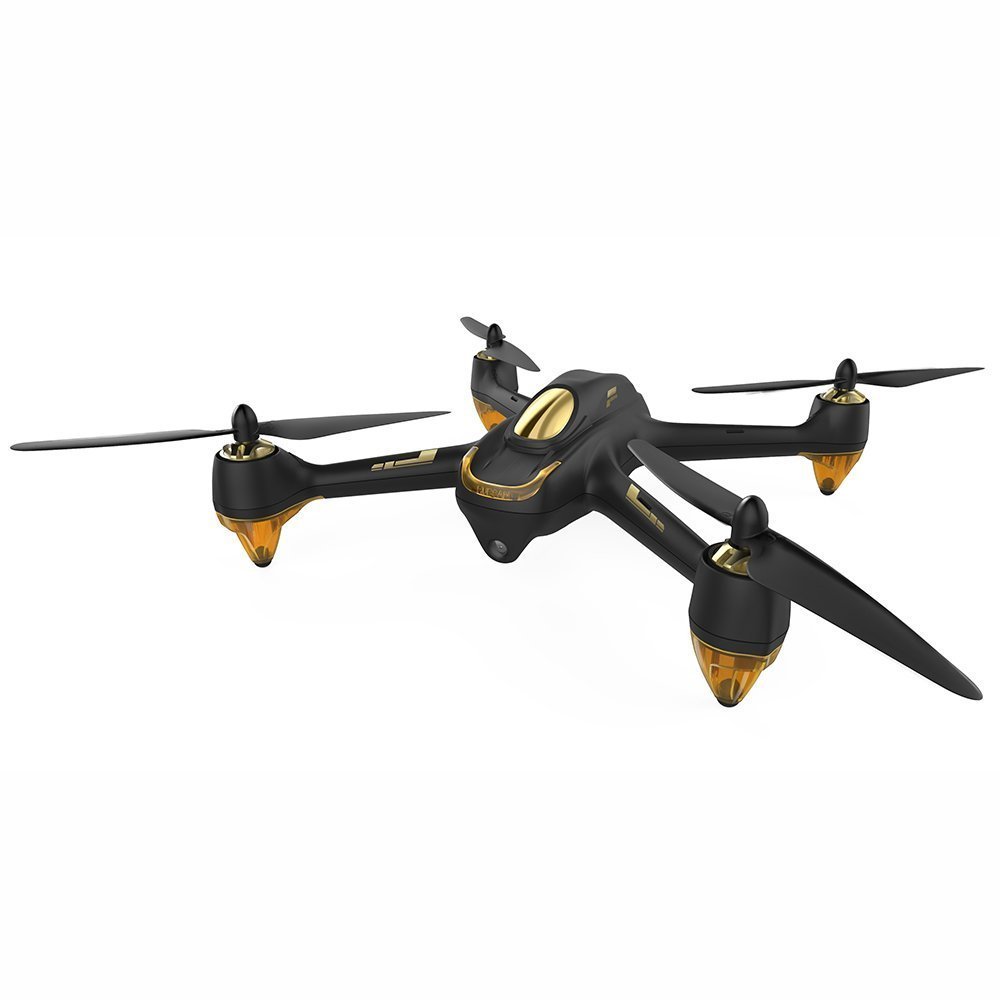
Imatge 1: The HUBSAN H501S X4 GPS FPV Drone. This image shows the complete quadcopter with its propellers.
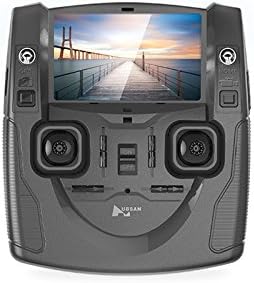
Imatge 2: The HUBSAN H501S X4 Transmitter. This image displays the remote control unit with its integrated LCD screen and control sticks.
3. Configuració
3.1 Càrrega i instal·lació de la bateria
- Ensure the quadcopter's LiPo battery is fully charged using the provided charger before use. Charging time is approximately 150 minutes.
- Install the charged battery into the quadcopter's battery compartment.
- Insert the provided 4G TF card (or a compatible SD card up to 64G) into the quadcopter's SD card slot.
3.2 Instal·lació de la bateria del transmissor
The transmitter requires 4 x 1.5V AA batteries (not included). Install them into the transmitter's battery compartment, ensuring correct polarity.
3.3 Propeller Assembly
The propellers are classified as 'A' and 'B'. Ensure correct assembly:
- Assemble 'A' propellers to motor threads marked 'A' by turning them counter-clockwise.
- Assemble 'B' propellers to motor threads marked 'B' by turning them clockwise.
- Lock and tighten all propellers securely.
3.4 Procediment vinculant
To link the quadcopter with the transmitter:
- Ensure all transmitter switches are in the downward position.
- Turn on the transmitter power while simultaneously holding down the photo button. The transmitter screen will display "Bind to Plane".
- Connect the battery to the quadcopter to power it on.
- Place the quadcopter and transmitter as close as possible for optimal linkage.
- The binding is successful when the video feed appears on the transmitter's LCD, and the quadcopter's LED indicators turn red and blink. The controller screen will flash twice to confirm binding.
Vídeo 2: Hubsan H501S Troubleshooting: How to Bind. This video demonstrates the step-by-step process for binding your H501S quadcopter to its transmitter.
3.5 Calibració de la brúixola
Compass calibration is crucial for accurate flight and should be performed after binding, especially in a new flight location:
- Rotate the quadcopter horizontally (flat) clockwise until the LED indicators turn green and blink.
- Then, point the quadcopter's nose downward and rotate it clockwise slowly.
- Calibration is successful when the green LED indicators are no longer lit.
4. Instruccions de funcionament
4.1 Motor Start and Stop
- To Start Motors: Push the left stick to the left bottom and the right stick to the right bottom simultaneously. Check motor sound and speed for proper function.
- To Stop Motors: Perform the same stick operation (left stick to left bottom, right stick to right bottom).
- Important: When unlocking motors, ensure the RTH (Return to Home) switch is OFF. Otherwise, motors cannot be unlocked.
4.2 Controls bàsics de vol
Familiarize yourself with the transmitter's control sticks:
- Accelerador (joystick esquerre amunt/avall): Pushing up makes the quadcopter rise; pulling down makes it descend.
- Guinyada (joystick esquerre esquerra/dreta): Pushing left rotates the quadcopter counter-clockwise; pushing right rotates it clockwise.
- Pitch (Right Stick Up/Down): Pushing up tilts the quadcopter forward; pulling down tilts it backward.
- Roll (Right Stick Left/Right): Pushing left tilts the quadcopter left; pushing right tilts it right.
4.3 Trim Adjustments
Two black trim buttons are located next to the control sticks:
- One trim button adjusts rotation (yaw) and throttle.
- The other trim button adjusts pitch and roll.
- Use these buttons to fine-tune flight performance if the quadcopter drifts.
4.4 Indicadors LED
The quadcopter's LED indicators provide status information. You can control their power:
- Power Off LEDs: Long press the throttle trim button.
- LED d'encesa: Perform the same long press on the throttle trim button.
4.5 Enregistrament de càmera i vídeo
The camera key is on the left side of the transmitter, and the record key is on the right.
- Fes una foto: Press the camera key. Two beeps indicate a picture has been saved to the SD card.
- Comença a gravar: Press the record key. One beep indicates recording has started. The recording time will display on the transmitter's LCD.
- Atura la gravació: Press the record key again to save the video.
4.6 Modes de vol especials
The transmitter sticks control special flight modes:
- Mode sense cap: Press the throttle stick vertically. Two beeps and "Headless ON" on the LCD indicate activation. One beep indicates deactivation.
- Mode Segueix-me: Press the elevator stick vertically. Two beeps and "Follow ON" on the LCD indicate activation. Pushing the elevator stick will exit this mode.
- Manual Mode (Acrobatic Flight): Pull down the GPS switch. This mode enables acrobatic flight performance.
- Tornada a casa (RTH): The RTH switch is on the right side of the transmitter. Ensure GPS is active when using RTH.
4.7 Parada d'emergència
The following operations are for emergencies only, such as avoiding collisions with airplanes or birds:
- (Specific emergency stop procedure not detailed in provided transcript, but typically involves cutting motor power or initiating an immediate landing. Refer to the full product manual for precise steps.)
5. Transmitter Display Information
The transmitter's LCD provides critical flight data:
- A dalt a l'esquerra: Quadcopter battery capacity, quadcopter battery voltage, quadcopter yaw/pitch orientation, and quadcopter coordinates.
- A dalt a la dreta: Transmitter battery capacity, flight speed, flight height, and flight distance.
- A baix: GPS satellites count and parameters for both the quadcopter and the transmitter.
The transmitter has a built-in antenna and should be pointed towards the quadcopter without obstructions for optimal video transmission.
6. Manteniment
Regular maintenance ensures the longevity and safe operation of your HUBSAN H501S X4 drone:
- Neteja: Gently wipe the drone and transmitter with a soft, dry cloth after each use. Avoid using solvents or harsh chemicals.
- Inspecció de l'hèlix: Regularly check propellers for any cracks, bends, or damage. Replace damaged propellers immediately to prevent flight instability.
- Inspecció de motors: Assegureu-vos que els motors estiguin lliures de deixalles i que puguin girar lliurement.
- Cura de la bateria: Store batteries in a cool, dry place. Do not overcharge or over-discharge batteries. If storing for extended periods, charge batteries to approximately 50% capacity.
- Emmagatzematge: Store the drone and its components in a safe, dry environment, away from direct sunlight and extreme temperatures.
7. Solució De Problemes
| Problema | Causa possible | Solució |
|---|---|---|
| El dron es desvia durant el vol | Improper compass calibration; uneven surface at takeoff; strong winds. | Perform compass calibration before each flight, especially in new locations. Ensure drone is on a level surface for takeoff. Adjust trim buttons for minor drifts. Avoid flying in strong winds. |
| Motors do not start | RTH switch is ON; binding failed; low battery; incorrect motor start procedure. | Ensure RTH switch is OFF. Re-perform binding procedure. Charge quadcopter battery. Follow correct motor start procedure (left stick left-bottom, right stick right-bottom). |
| No video feed on transmitter | Binding failed; drone too far from transmitter; interference. | Re-perform binding procedure. Ensure drone is within control range. Minimize obstructions between drone and transmitter. |
| GPS signal lost/weak | Flying in an area with poor GPS reception (e.g., indoors, near tall buildings, dense trees). | Mou-te a una zona oberta a l'aire lliure amb cel clar view. Wait for at least 6 GPS satellites to be acquired before flight. |
| Quadcopter cannot ascend vertically | Vertical or horizontal angle value is outside normal range (more than 1 or less than -1). | Recalibrate the compass and enter manual mode as described in section 3.5. |
8. Especificacions
| Característica | Detall |
|---|---|
| Marca | HUBSAN |
| Nom del model | H501S X4 |
| Característiques especials | Follow-Me, FPV-Capable, GPS |
| Interval d'edat (descripció) | Adult |
| Color | Negre |
| Resolució de captura de vídeo | 1080p |
| Tecnologia de connectivitat | 5.8 GHz |
| Nivell d'habilitat | Principiant |
| Pes de l'article | 3.35 lliures (1.52 kg) |
| Capacitat de la bateria | 2300 milionsamp Hours (7.4V LiPo) |
| Format de captura de vídeo | MP4 |
| Interval màxim | 300 metres |
| Material | Plàstic |
| Tecnologia de comunicació sense fils | Ràdio Freqüència (RF) |
| Composició de les cèl·lules de la bateria | Polímer de liti |
| Format d'imatge compatible | jpeg, png |
| Resolució de sortida de vídeo | 1920 x 1080 píxels |
| Dimensions del producte | 13.4 cm de llargada x 13.4 cm d'amplada x 4.2 cm d'alçada |
| Fabricant | HUBSAN |
| Primer disponible | 2 de desembre de 2015 |
9. Garantia i assistència
For warranty information and technical support, please refer to the official HUBSAN weblloc web o contacteu directament amb el seu servei d'atenció al client. Conserveu el rebut de compra com a comprovant de compra per a qualsevol reclamació de garantia.
Recursos en línia:
- Visita el HUBSAN Store on Amazon per obtenir informació addicional sobre el producte i accessoris.