
1. Introducció
This manual provides essential instructions for the safe operation, setup, maintenance, and troubleshooting of your World Tech Toys Double Horse Metal 9050 3.5CH Electric RC Helicopter. Please read this manual thoroughly before operating the helicopter to ensure proper function and to prevent damage or injury.
2. Informació de seguretat
WARNING: Failure to follow these safety guidelines may result in injury or property damage.
- Always operate the helicopter in an open, clear area, away from people, animals, and obstacles.
- Do not fly near power lines, trees, or water.
- Keep hands, face, and loose clothing away from rotating blades.
- This product is not a toy and is not intended for use by children without adult supervision.
- Never attempt to modify or repair the helicopter or remote control yourself. Contact customer support for assistance.
- Ensure batteries are charged correctly and handled safely. Do not overcharge or short-circuit batteries.
- Remove batteries from the helicopter and remote control when not in use.
3. Contingut i components del paquet
Before proceeding, verify that all items are present and inspect them for any damage.
3.1 Contingut del paquet
- Double Horse Metal 9050 RC Helicopter
- 3.5CH Remote Control Transmitter
- Cable de càrrega USB
- Spare Parts (e.g., main blades, tail rotor - may vary by package)
- Manual d'instruccions (aquest document)
3.2 Helicopter and Remote Control Overview
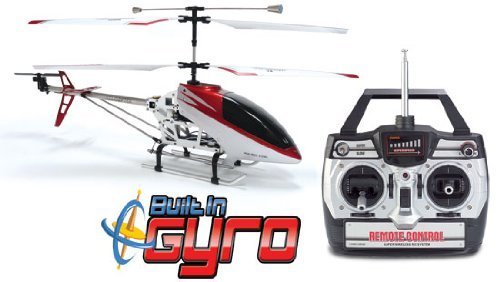
Figure 1: Double Horse Metal 9050 RC Helicopter and Remote Control.
This image displays the Double Horse Metal 9050 RC Helicopter, featuring a red and white body, a visible metal frame for durability, and dual main rotors for stable flight. The helicopter also includes a tail rotor and landing skids. Beside it is the black and silver remote control unit, equipped with two joysticks for flight control, a power switch, and various trim buttons for fine-tuning flight characteristics. The remote control has an extendable antenna.
Helicopter Components: Main Rotor Blades, Tail Rotor, Landing Skids, Battery Compartment, Charging Port.
Remote Control Components: Left Joystick (Throttle/Yaw), Right Joystick (Forward/Backward/Left/Right), Power Switch, Trim Buttons, Antenna, Battery Compartment.
4. Configuració
4.1 Charging the Helicopter Battery
- Ensure the helicopter's power switch is in the OFF posició.
- Connect the USB charging cable to the helicopter's charging port.
- Connecteu l'altre extrem del cable USB a un port USB amb alimentació (per exemple, un ordinador o un adaptador de paret USB).
- The charging indicator light on the USB cable will illuminate (color may vary, typically red) during charging.
- Once charging is complete (indicator light turns off or changes color), disconnect the cable. Charging typically takes 60-90 minutes. Do not overcharge.
4.2 Instal·lació de les piles del comandament a distància
- Obriu el compartiment de la bateria a la part posterior del comandament a distància.
- Insert the required batteries (typically AA, quantity specified on the compartment) observing the correct polarity (+/-).
- Tanqueu el compartiment de la bateria de manera segura.
4.3 Pairing the Helicopter and Remote Control
- Ensure both the helicopter and remote control are fully charged/have fresh batteries.
- Col·loqueu l'helicòpter sobre una superfície plana i anivellada.
- Turn on the helicopter's power switch. The indicator lights on the helicopter will flash.
- Engegueu l'interruptor d'alimentació del comandament a distància.
- Move the left joystick (throttle) all the way up, then all the way down.
- The indicator lights on both the helicopter and remote control should become solid, indicating successful pairing. If not, repeat the steps.
5. Funcionament
5.1 Basic Flight Controls (3.5 Channel)
- Joystick esquerre (accelerador/guinyada):
- Push up: Increase throttle, helicopter ascends.
- Pull down: Decrease throttle, helicopter descends.
- Push left/right: Helicopter rotates left/right (yaw).
- Joystick dret (endavant/enrere/esquerra/dreta):
- Push up: Helicopter flies forward.
- Pull down: Helicopter flies backward.
- Push left: Helicopter flies left (sideways).
- Push right: Helicopter flies right (sideways).
- Botons de retallar: Use these to correct unwanted drift. If the helicopter drifts forward, press the backward trim button until it hovers steadily. Adjust as needed for all directions.
5.2 First Flight Tips
- Start by practicing hovering at a low altitude (1-2 feet) in a calm indoor environment.
- Make small, gentle adjustments to the controls. Sudden movements can cause instability.
- If the helicopter becomes uncontrollable, immediately reduce the throttle to zero to prevent damage.
- Always maintain line of sight with the helicopter.
6. Manteniment
- Neteja: Use a soft, dry cloth to wipe down the helicopter after use. Avoid water or cleaning solvents.
- Inspecció de la fulla: Regularly check main and tail rotor blades for cracks or damage. Replace damaged blades immediately.
- Cura de la bateria:
- Do not store batteries fully charged or fully depleted for extended periods.
- Guardeu les piles en un lloc fresc i sec.
- If the helicopter will not be used for a long time, remove batteries from both the helicopter and the remote control.
- Emmagatzematge: Store the helicopter and remote control in a safe place, away from direct sunlight and extreme temperatures.
7. Solució De Problemes
| Problema | Causa possible | Solució |
|---|---|---|
| Helicopter does not respond to remote control. | Not paired; low battery in helicopter or remote; power switches off. | Ensure both are powered on. Re-pair the helicopter and remote control. Charge helicopter battery. Replace remote control batteries. |
| Helicopter drifts excessively. | Trim settings incorrect; uneven surface during startup; wind interference. | Adjust trim buttons on the remote control. Ensure helicopter is on a level surface when powered on. Fly in calm conditions. |
| L'helicòpter no s'enlaira o té poca sustentació. | Low helicopter battery; damaged main blades. | Charge helicopter battery fully. Inspect and replace damaged main blades. |
| Helicopter spins uncontrollably. | Damaged tail rotor; main rotor imbalance; gyro malfunction. | Check and replace tail rotor if damaged. Inspect main blades for damage. If problem persists, contact customer support. |
8. Especificacions
- Model: Double Horse Metal 9050
- Canals: Canal 3.5
- Tipus de control: Infrared (IR) or 2.4GHz Radio Control (refer to packaging for specific type)
- Power Source (Helicopter): Rechargeable Li-Po Battery (built-in)
- Power Source (Remote Control): Piles AA (no incloses)
- Temps de vol: Approximately 6-8 minutes (may vary based on conditions)
- Temps de càrrega: Aproximadament 60-90 minuts
- Interval: Approximately 10-15 meters (may vary based on environment)
- Característiques: Built-in GYRO for stable flight
9. Garantia i Suport
World Tech Toys products are designed for quality and performance. For specific warranty information, please refer to the warranty card included with your product or visit the official World Tech Toys website. If you encounter any issues or require technical assistance, please contact World Tech Toys customer support.
Atenció al client: Consulteu l'embalatge del producte o el del fabricant weblloc web per obtenir la informació de contacte més actualitzada.