
Infinix x180
Infinix X180 Mobile Phone User Manual
Model: x180
1. Producte acabatview
The Infinix X180 is a compact and reliable feature phone designed for essential communication. It supports dual SIM functionality, allowing you to manage two phone numbers simultaneously. This manual provides detailed instructions to help you get the most out of your device.

Figura 1: Infinix X180 Mobile Phone - Front, Back, and Side Views. This image displays the phone from various angles, highlighting its compact design, physical keypad, and rear camera.
Característiques principals:
- Suport Dual SIM: Use two SIM cards simultaneously.
- Disseny compacte: Lleuger i fàcil de manejar.
- Pantalla de 1.77 polzades: Clear screen for basic navigation.
- 2 MP Rear Camera: For capturing basic photos.
- Bateria de 1000 mAh: Provides extended talk time.
- Emmagatzematge ampliable: Supports MicroSD (TransFlash) cards.
- Bluetooth 4.0: Per a la connectivitat sense fil.
2. Configuració
2.1 Contingut del paquet
Abans de començar, assegureu-vos que el paquet contingui els elements següents:
- Infinix X180 Mobile Phone
- Battery (1 Lithium ion battery)
- Carregador
- Auriculars
- Manual d'usuari
2.2 Installing SIM Cards and MicroSD Card
- Traieu la coberta posterior: Gently pry open the back cover of the phone from the notch usually located at the bottom or side.
- Insereix la bateria: Place the battery into its compartment, ensuring the gold contacts align with the phone's terminals.
- Inserir targetes SIM: Locate the SIM card slots. The Infinix X180 supports two standard SIM cards. Insert your SIM cards into the designated slots with the gold contacts facing down.
- Inseriu la targeta MicroSD (opcional): If you wish to expand storage, insert a MicroSD (TransFlash) card into the dedicated slot.
- Substituïu la coberta posterior: Carefully align and press the back cover until it clicks into place.
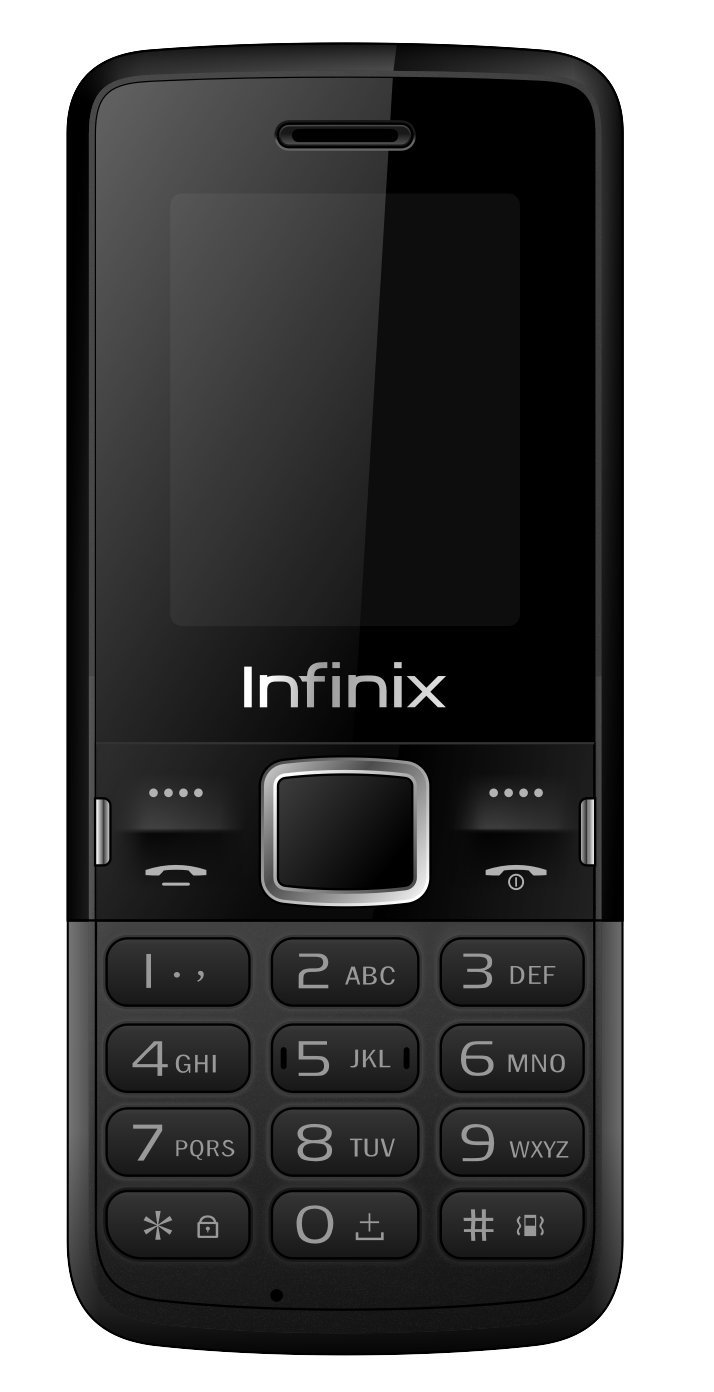
Figura 2: Enrere View of Infinix X180 Mobile Phone. This image shows the rear of the phone, indicating the location of the camera, speaker, and the Infinix branding, where the back cover can be removed to access SIM and battery compartments.
2.3 Càrrega de la bateria
Abans del primer ús, carregueu completament la bateria del telèfon.
- Connect the charger to the phone's Micro USB port.
- Connecteu el carregador a una presa de corrent.
- The charging indicator on the phone will show the charging status. Disconnect the charger once the battery is full.
2.4 Engegada/apagada
- Per encendre: Premeu i manteniu premut el botó d'engegada/finalització de trucada fins que la pantalla s'il·lumini.
- Per apagar: Press and hold the Power/End Call button until the power-off options appear, then select "Power Off".
3. Instruccions de funcionament
3.1 Navegació bàsica
Use the physical keypad and navigation buttons to interact with the phone.
- Tecles de navegació: Use the directional keys (Up, Down, Left, Right) to scroll through menus.
- Center Key: Press the center key to select an option.
- Left/Right Soft Keys: Functions vary depending on the screen, indicated by text above the keys.
- Tecla de trucada: Premeu per fer una trucada o respondre a una trucada entrant.
- End Call/Power Key: Press to end a call or return to the home screen. Long press to power on/off.
3.2 Fer i rebre trucades
- Per fer una trucada: Enter the phone number using the keypad and press the Call key. If using Dual SIM, you may be prompted to select which SIM to use.
- Per respondre una trucada: Quan arribi una trucada, premeu la tecla de trucada.
- Per finalitzar una trucada: Press the End Call key.
3.3 Messaging (SMS)
The phone supports sending and receiving SMS messages. Note that SMS storage is limited to 50 messages on the phone and 50 per SIM card.
- Navegueu fins al menú "Missatges".
- Select "Write Message" to compose a new SMS.
- Enter the recipient's number and your message.
- Seleccioneu "Envia".
3.4 contactes
Store frequently used numbers in your phone's contacts. The phone can store up to 200 contacts, and each SIM card can store up to 250 contacts.
- Go to the "Contacts" menu.
- Select "Add New Contact" to save a number.
- You can choose to save contacts to the phone memory or a specific SIM card.
Funcionalitat de càmera 3.5
The Infinix X180 features a 2 MP rear camera for basic photography and video recording.
- Accediu a la càmera des del menú principal.
- Use the center key to take a photo.
- Video recording resolution is 128 x 160 pixels.
Nota: The actual photo resolution may be limited to 128x160 pixels, despite the 2MP sensor specification. This is typical for entry-level feature phones.
3.6 Connectivitat Bluetooth
The phone supports Bluetooth 4.0 for connecting to compatible devices like headsets or for file transferència.
- Go to "Settings" and then "Bluetooth".
- Activa el Bluetooth i busca els dispositius disponibles.
- Seleccioneu el dispositiu amb què voleu emparellar-lo i seguiu les instruccions que apareixen a la pantalla.
4. Manteniment
4.1 Cura de la bateria
- Eviteu exposar la bateria a temperatures extremes.
- No perforeu ni danyeu la bateria.
- Use only the original or approved charger.
- If the phone will not be used for an extended period, charge it partially before storing.
4.2 Neteja del telèfon
- Use a soft, dry cloth to clean the phone's screen and body.
- Eviteu utilitzar netejadors líquids o materials abrasius.
- Ensure no moisture enters the charging port or headphone jack.
4.3 Emmagatzematge
Guardeu el telèfon en un lloc fresc i sec, allunyat de la llum solar directa i de temperatures extremes.
5. Solució De Problemes
If you encounter issues with your Infinix X180, refer to the following common solutions:
5.1 Phone Does Not Power On
- Assegureu-vos que la bateria estigui instal·lada i carregada correctament.
- Connecteu el carregador i torneu a intentar engegar-lo.
- Comproveu si els contactes de la bateria estan nets.
5.2 Sense senyal de xarxa
- Check if the SIM card(s) are correctly inserted.
- Assegureu-vos que esteu en una zona amb cobertura de xarxa.
- Reinicieu el telèfon.
- Verify with your mobile provider if there are any network issues in your area.
5.3 Cannot Make or Receive Calls/SMS
- Check your SIM card balance or subscription status.
- Ensure the phone is not in airplane mode (if applicable).
- Verify that the recipient's number is correct.
- Check if any call barring or message blocking features are enabled.
5.4 Limited Storage Capacity
- The phone has 32 MB internal memory. Consider installing a MicroSD card to expand storage for photos and other media.
- Regularly delete old messages, photos, or files you no longer need.
6. Especificacions
| Característica | Detall |
|---|---|
| Nom del model | X180 |
| Marca | Infinix |
| Mida de la pantalla | 1.77 polzades |
| Resolució de visualització | 128 x 160 píxels |
| Memòria RAM | 32 MB |
| Capacitat d'emmagatzematge | 32 MB |
| Rear Camera Sensor Resolution | 2 MP |
| Resolució de gravació de vídeo | 128 x 160 píxels |
| Bateria | 1 ió de liti (inclòs) |
| Temps de conversa | 3 hores |
| Connectivitat | Bluetooth 4.0, USB (Micro USB Type B) |
| Tecnologia cel·lular | 2G (GSM 900/DCS 1800 MHz) |
| Ranures per a targetes SIM | Doble SIM |
| Dispositius compatibles | MicroSD (TransFlash) |
| Dimensions del producte | 7.3 x 1 x 14.5 cm; 75 g |
| Sistema operatiu | Proprietary (Note: Not Android 9.0 as sometimes listed, which is likely an error for this feature phone.) |
| Nivell de resistència a l'aigua | No resistent a l'aigua |
| Conector d'auriculars | 1 |
Nota: les especificacions estan subjectes a canvis sense previ avís.
7. Garantia i Suport
7.1 Informació de la garantia
Your Infinix X180 mobile phone is covered by a limited manufacturer's warranty. Please refer to the warranty card included in your product packaging for specific terms and conditions, including warranty period and coverage details. Keep your purchase receipt as proof of purchase.
7.2 Atenció al client
For technical assistance, troubleshooting beyond this manual, or warranty claims, please contact Infinix customer support. Contact details can typically be found on the manufacturer's official weblloc web o a la targeta de garantia.
Fabricant: Infinix
Weblloc: www.infinixmobility.com (Note: This is a general link and may not be specific to your region.)
Ask a question about this manual
Ask about setup, troubleshooting, compatibility, parts, safety, or missing instructions. Manuals+ will review the question and use this page’s manual context to help answer it.