
1. Introducció
Gràcies per la compraasing the PXN 6603 Bluetooth Gamepad. This MFi certified wireless game controller is designed to enhance your gaming experience on iOS devices, including iPhone, iPad, iPod, and Apple TV. Please read this manual carefully before use to ensure proper operation and to maximize the lifespan of your device.
2. Contingut del paquet
Si us plau, comproveu el contingut del paquet en obrir-lo. Si falta algun article o hi ha algun dany, poseu-vos en contacte amb el vostre distribuïdor.
- PXN 6603 Bluetooth Gamepad
- Cl ajustableamp Titular
- Cable de càrrega USB
- Manual d'usuari
3. Producte acabatview
Familiarize yourself with the various components of your PXN 6603 Gamepad.
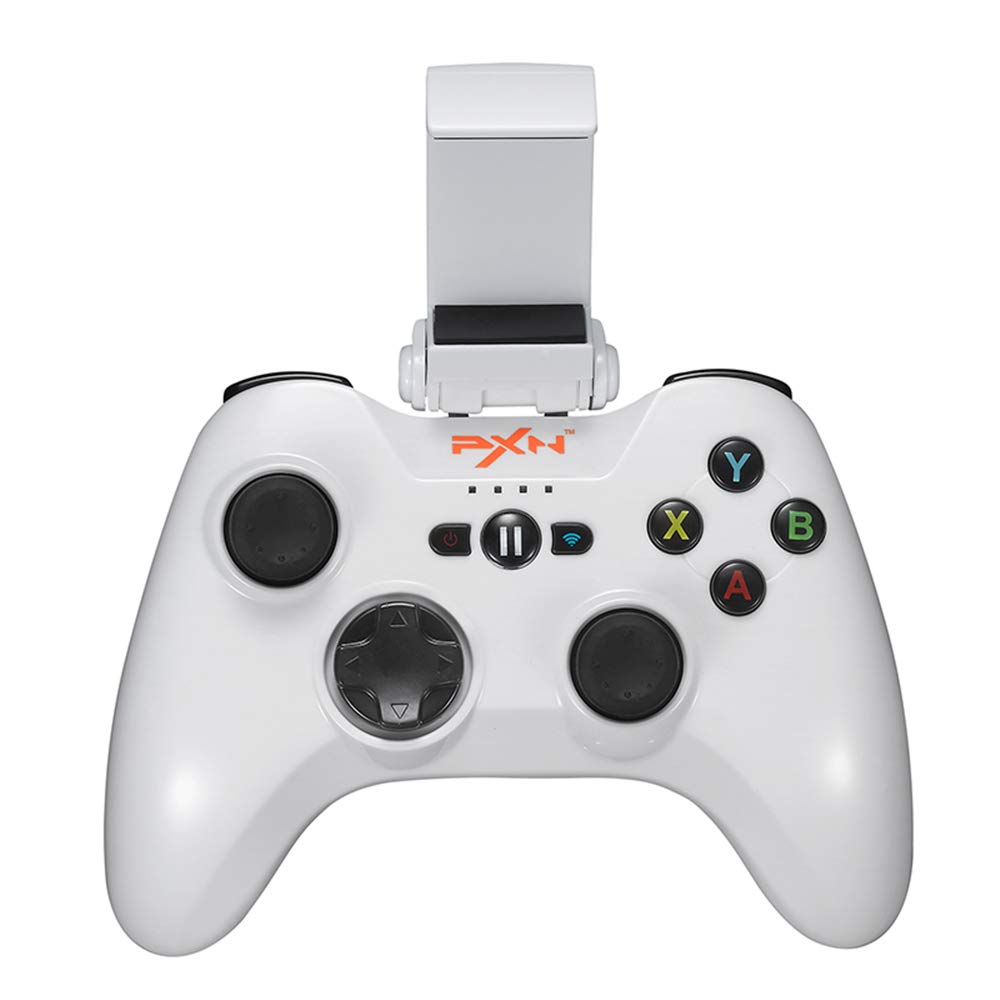
Imatge 1: PXN 6603 Bluetooth Gamepad. This image shows the front view of the orange gamepad with its dual analog sticks, D-pad, action buttons (A, B, X, Y), shoulder buttons (L1, R1, L2, R2), and the adjustable phone clamp holder attached.
3.1 Disseny del controlador
- Stick analògic esquerre: Per al control direccional.
- Stick analògic dret: For camera or additional directional control.
- D-Pad (coixinet direccional): Per a una entrada direccional precisa.
- Botons d'acció (A, B, X, Y): Per a accions dins del joc.
- Botons d'espatlla (L1, R1): Principals desencadenants.
- Botons de disparador (L2, R2): Disparadors inferiors.
- Botó HOME: Powers on/off the controller and returns to iOS home screen.
- Botó PAUSA: Pauses gameplay.
- Llums indicadores de bateria: Shows battery status and connection.
- Port de càrrega: Port micro USB per a la càrrega.
4. Configuració
4.1 Càrrega del controlador
- Connect the small end of the USB charging cable to the charging port on the controller.
- Connect the large end of the USB charging cable to a USB power source (e.g., computer USB port, USB wall adapter).
- The battery indicator lights will show charging status. Once fully charged, the lights will indicate a full battery or turn off.
- Una càrrega completa sol trigar aproximadament 2-3 hores.
4.2 Attaching the Adjustable Clamp Titular
- Locate the slot on the top of the PXN 6603 Gamepad.
- Feu lliscar el claviller ajustableamp holder onto the slot until it clicks securely into place.
- Adjust the angle of the holder as needed.
- Carefully place your iOS device into the clamp, ensuring it is held firmly without obstructing any buttons or ports.
4.3 Bluetooth Pairing with iOS Devices
- Assegureu-vos que el controlador estigui carregat.
- Al dispositiu iOS, aneu a Configuració > Bluetooth i activa el Bluetooth.
- Manteniu premut el botó CASA button on the PXN 6603 Gamepad for 3 seconds to power it on. The indicator lights will flash, indicating it is in pairing mode.
- On your iOS device, look for "PXN 6603" or a similar name in the list of available devices.
- Tap on "PXN 6603" to pair. The indicator lights on the controller will become solid, indicating a successful connection.
- Once paired, the controller will automatically connect to your iOS device when powered on and Bluetooth is enabled on the device.
5. Instruccions de funcionament
5.1 Encès/Apagat
- Encès: Manteniu premut el botó CASA botó durant 3 segons.
- Apagar: Manteniu premut el botó CASA button for 5 seconds until the indicator lights turn off. The controller will also automatically power off after 10 minutes of inactivity to conserve battery.
5.2 Jugar a jocs
The PXN 6603 is an MFi certified controller, meaning it is designed to work seamlessly with games that support MFi controllers on iOS. Many games in the App Store will automatically detect and utilize the controller once connected.
- Launch a compatible game on your iOS device.
- The game should recognize the controller automatically. Refer to the game's settings for controller mapping or customization options.
5.3 Battery Status Indication
The LED indicator lights on the controller provide information about the battery status:
- LEDs intermitents: Low battery or pairing mode.
- LEDs sòlids: Connected and sufficient battery.
- Càrrega: LEDs will cycle or show progress.
- Totalment carregat: LEDs will turn off or show a steady full indicator.
6. Manteniment
6.1 Neteja
- Feu servir un drap suau i sec per netejar la superfície del controlador.
- Per a la brutícia persistent, lleugerament dampNetegeu el drap amb aigua. No utilitzeu productes químics agressius ni netejadors abrasius.
- Avoid getting liquid into the buttons, joysticks, or charging port.
6.2 Emmagatzematge
- Guardeu el controlador en un lloc fresc i sec, allunyat de la llum solar directa i de temperatures extremes.
- Eviteu col·locar objectes pesats sobre el controlador.
- If storing for an extended period, charge the controller periodically (e.g., every 3 months) to maintain battery health.
6.3 Cura de la bateria
- No intenteu substituir la bateria interna vosaltres mateixos. Poseu-vos en contacte amb el servei d'assistència si teniu problemes amb la bateria.
- Eviteu descarregar completament la bateria amb freqüència, ja que això pot reduir-ne la vida útil.
- Use only the provided USB charging cable or a certified equivalent.
7. Solució De Problemes
If you encounter issues with your PXN 6603 Gamepad, please refer to the following common solutions:
7.1 El controlador no es connecta/s'emparella
- Comproveu la bateria: Ensure the controller is sufficiently charged. Connect it to a power source.
- Bluetooth activat: Verifiqueu que el Bluetooth estigui habilitat al vostre dispositiu iOS.
- Torna a emparellar: Go to your iOS device's Bluetooth settings, forget "PXN 6603" if it's listed, then attempt to pair again as described in Section 4.3.
- Reinicieu els dispositius: Try restarting both your iOS device and the PXN 6603 controller.
- Interferència: Allunyeu-vos d'altres dispositius sense fil que puguin causar interferències.
7.2 Els botons/joysticks no responen
- Compatibilitat del joc: Ensure the game you are playing supports MFi controllers. Not all games do.
- Reconnexió: Disconnect and reconnect the controller via Bluetooth.
- Reinicia: Power off and on the controller, then restart the game.
- Obstrucció física: Check for any debris or physical obstruction around the buttons or joysticks.
7.3 Problemes de càrrega
- Comprovació del cable: Ensure the USB charging cable is securely connected to both the controller and the power source. Try a different USB cable if available.
- Font d'alimentació: Try a different USB power source (e.g., a different USB port on your computer or a different wall adapter).
- Neteja del port: Check the controller's charging port for any dust or debris.
8. Especificacions
| Número de model | PXN-6603 |
| Connectivitat | Bluetooth |
| Compatibilitat | iOS (iPhone, iPad, iPod, Apple TV) |
| Dimensions | 7.09 x 5.79 x 3.11 polzades |
| Pes | 1.1 lliures |
| Certificació | Certificat MFi |
| Font d'alimentació | Bateria recarregable (via USB) |
9. Garantia i Suport
PXN products are designed for reliability and performance. For specific warranty information, please refer to the warranty card included with your product or visit the official PXN weblloc web. Conserveu el rebut de compra com a comprovant de compra per a reclamacions de garantia.
If you require technical support or have questions not covered in this manual, please contact PXN customer service through their official weblloc web o la informació de contacte que es proporciona a l'embalatge del producte.


