
Introducció
This manual provides detailed instructions for the setup, operation, and maintenance of your A4tech Bloody Light Strike B314 Gaming Keyboard. Please read this manual thoroughly before using the product to ensure optimal performance and longevity.
Característiques clau
- Bloody 4 Light Strike Mechanical Switches: Experience ultra-fast response times of 0.2ms with infrared optic switches, providing a competitive edge in gaming.
- Durabilitat millorada: Designed for intensive use, featuring A,S,D,W silicon keys with a convex shape for improved control and longevity.
- Neon Glare System LED Backlighting: Customize your gaming environment with vibrant LED backlighting, making keys easy to locate in low-light conditions.
- 9 tecles programables: Personalize your gaming experience by assigning custom functions to 9 individually programmable keys.
- Double Secure Water-Resistance: The keyboard is electronically sealed with a water drain hole, protecting it from accidental spills and extending its lifespan.
Contingut del paquet
Verifiqueu que tots els elements siguin presents al paquet:
- Bloody Light Strike B314 Gaming Keyboard
- Manual d'usuari (aquest document)

Image: The retail packaging for the Bloody Light Strike B314 Gaming Keyboard, showing the keyboard with LED backlighting and key features highlighted.
Guia de configuració
- Connecteu el teclat: Connecteu el connector USB del teclat a un port USB disponible de l'ordinador.
- Instal·lació del controlador: The keyboard is typically plug-and-play. Your operating system should automatically detect and install the necessary drivers. If prompted, follow the on-screen instructions.
- Instal·lació del programari (opcional): For advanced customization, including programming keys and managing backlighting, download and install the official Bloody software from the A4tech weblloc.
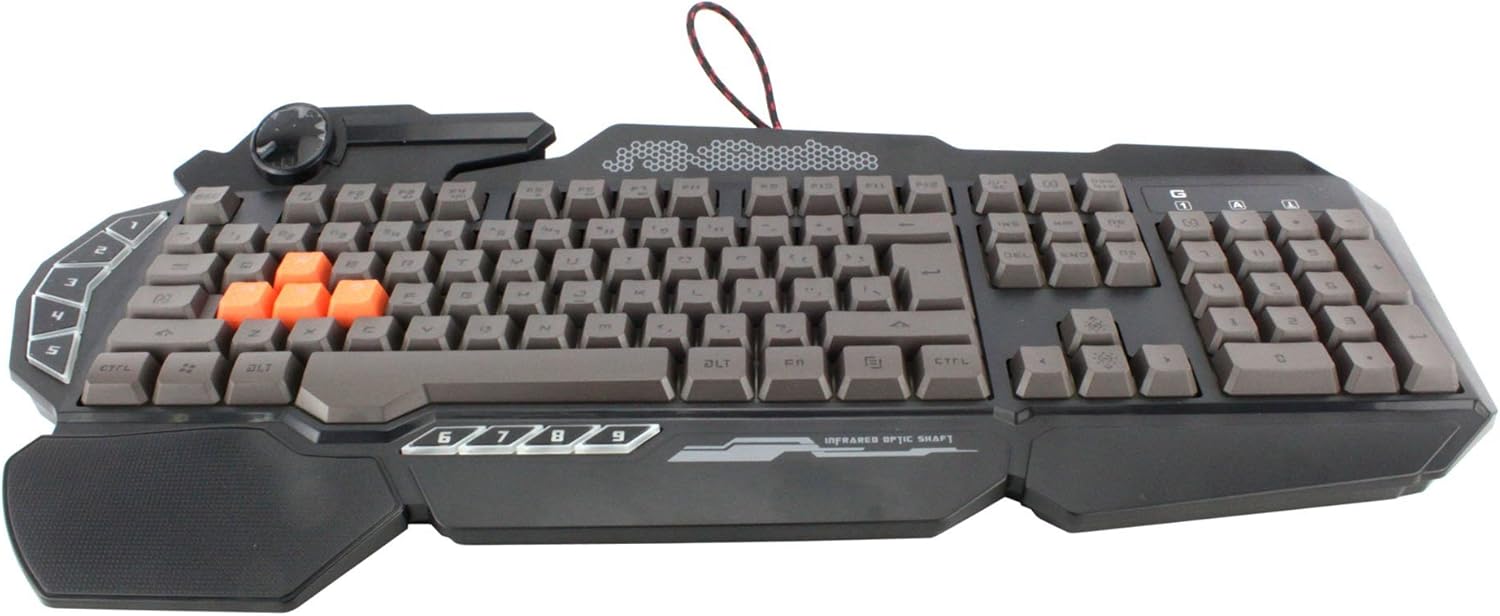
Imatge: Vista de dalt a baix view of the Bloody Light Strike B314 Gaming Keyboard, showcasing the full QWERTY layout with orange WASD keys and dedicated macro keys on the left.
Instruccions de funcionament
Ús bàsic
The Bloody B314 functions as a standard QWERTY keyboard for everyday typing and gaming. Its infrared mechanical switches provide a fast and responsive typing experience.
Tecles programables
The keyboard features 9 programmable keys, typically located on the left side. To customize these keys:
- Install the official Bloody software from the A4tech weblloc.
- Launch the software and navigate to the key customization section.
- Select the desired programmable key (e.g., G1-G9 or similar).
- Assign macros, key functions, or multimedia controls as needed.
- Desa el teu professionalfile per aplicar els canvis.
Control de retroil·luminació LED
The Neon Glare System LED backlighting can be adjusted using function key combinations:
- Fn+F12: Cycle through different backlighting modes (e.g., static, breathing, off).
- Fn + Fletxa amunt/avall: Ajusteu la brillantor de la llum de fons.
- Fn + Fletxa esquerra/dreta: Adjust backlight speed or direction (if applicable to the mode).
Mode de joc
Activate Game Mode to disable the Windows key and prevent accidental interruptions during gameplay.
- Fn+F8: Activa / desactiva el mode de joc.

Imatge: Un angle view of the Bloody Light Strike B314 Gaming Keyboard, highlighting the ergonomic wrist rest and the distinct orange WASD keys.
Manteniment
Neteja
- Desconnecteu el teclat de l'ordinador abans de netejar-lo.
- Utilitzeu un suau, damp cloth to wipe the surface of the keyboard. Avoid harsh chemicals or abrasive materials.
- Per a la pols i les restes entre les tecles, feu servir aire comprimit.
- The water-resistant design helps protect against spills, but it is still recommended to clean up liquids promptly.
Emmagatzematge
Guardeu el teclat en un lloc fresc i sec, allunyat de la llum solar directa i de temperatures extremes quan no l'utilitzeu durant períodes prolongats.
Resolució de problemes
El teclat no respon
- Assegureu-vos que el cable USB estigui ben connectat tant al teclat com a l'ordinador.
- Prova de connectar el teclat a un port USB diferent.
- Reinicieu l'ordinador.
- Check if the keyboard is recognized in your computer's Device Manager (Windows) or System Information (macOS).
La retroiluminació no funciona
- Ensure the backlighting is not turned off using the Fn + F12 combination.
- Adjust brightness using Fn + Up Arrow.
- Si utilitzeu un professional personalitzatfiles, ensure the backlighting settings are correctly configured in the Bloody software.
Programmable Keys Not Working
- Verify that the Bloody software is installed and running.
- Ensure your custom profiles are loaded and active within the software.
- Check for any software updates for the Bloody keyboard utility.
Especificacions
| Característica | Detall |
|---|---|
| Marca | A4tech |
| Número de model | A4TKLA45173 |
| Tecnologia de connectivitat | infrarojos |
| Descripció del teclat | Mecànica |
| Tipus de canvi | Mechanical (Light Strike Optic) |
| Característica especial | Backlit, Programmable Keys, Water Resistant |
| Color | Negre |
| Suport de color de retroil·luminació del teclat | RGB (Neon Glare System) |
| Nombre de claus | 104 |
| Botons programables | 9 |
| Nivell de resistència a l'aigua | Resistent a l'aigua |
| Pes de l'article | 2.9 lliures |
Garantia i Suport
Per obtenir informació sobre la garantia i assistència tècnica, consulteu la pàgina oficial d'A4tech. weblloc web o contacteu directament amb el servei d'atenció al client. Conserveu el rebut de compra com a comprovant de compra per a reclamacions de garantia.
Official A4tech Weblloc: www.a4tech.com