
1. Introducció
Welcome to the Azumi L2Z Smartphone instruction manual. This guide provides essential information to help you set up, operate, maintain, and troubleshoot your device. Please read this manual carefully to ensure proper use and to maximize the functionality of your Azumi L2Z.
The Azumi L2Z is a compact mobile phone designed for essential communication, featuring a 1.7-inch QQVGA display, a Spreadtrum SC6531DA processor, and a 0.3-megapixel rear camera with LED flash.
2. Producte acabatview
Familiarize yourself with the physical components of your Azumi L2Z Smartphone.
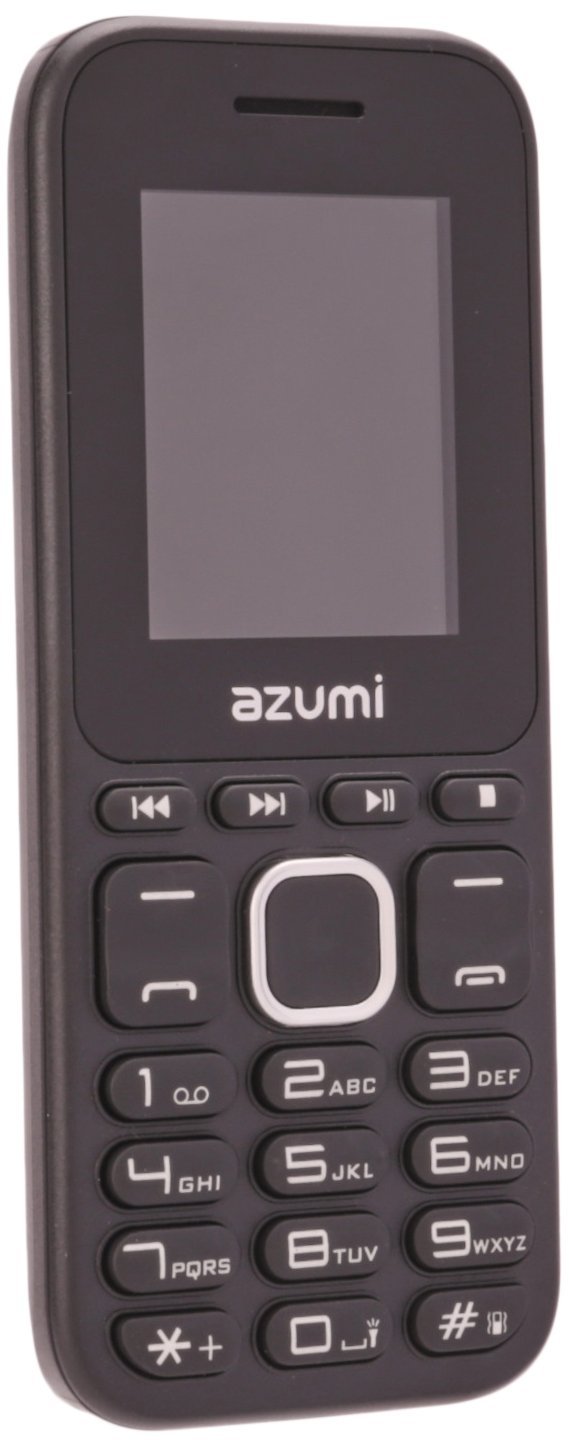
Figura 2.1: Frontal View. This image displays the front of the Azumi L2Z Smartphone, showing its 1.7-inch QQVGA display, physical keypad, and the Azumi brand logo below the screen. The screen shows "Insert SIM" and a clock.

Figura 2.2: Esquena View. This image shows the rear of the Azumi L2Z Smartphone, featuring the 0.3-megapixel camera lens, LED flash, speaker grille, Azumi brand logo, and the Telcel carrier logo at the bottom.

Figura 2.3: lateral View. This image presents a profile view of the Azumi L2Z Smartphone, highlighting its slim design and the texture of its casing.
Característiques principals:
- 1.7-inch QQVGA Display (128x160 pixels)
- Spreadtrum SC6531DA Processor
- 0.3 Megapixel Rear Camera with LED Flash
- Connectivitat Bluetooth
- Micro SD Card Slot (expandable up to 16GB, card not included)
- GSM, LTE, Wi-Fi Network Technology
3. Configuració
3.1. Inserció de la targeta SIM
- Apagueu completament el dispositiu.
- Traieu la coberta posterior i la bateria.
- Localitzeu la ranura de la targeta SIM.
- Insert your SIM card into the designated slot with the gold contacts facing down, ensuring it clicks into place.
- Substituïu la bateria i la coberta posterior.
3.2. Inserció d'una targeta Micro SD (opcional)
- Follow steps 1 and 2 from "Inserting the SIM Card".
- Locate the Micro SD card slot, usually adjacent to the SIM card slot.
- Insert the Micro SD card with the gold contacts facing down until it is securely in place.
- Substituïu la bateria i la coberta posterior.
3.3. Carregant la bateria
- Connect the charger to the charging port on your phone.
- Connecteu el carregador a una presa de corrent.
- L'indicador de bateria a la pantalla mostrarà l'estat de càrrega.
- Un cop estigui completament carregat, desconnecteu el carregador.
3.4. Encès / apagat
- Per encendre: Premeu i manteniu premut el botó d'engegada/finalització de trucada fins que la pantalla s'il·lumini.
- Per apagar: Press and hold the Power/End Call button until the power options appear, then select "Power off".
4. Instruccions de funcionament
4.1. Navegació bàsica
- Use the directional keys (up, down, left, right) to navigate through menus.
- Press the center key (OK/Select) to confirm selections.
- Use the left and right soft keys for context-sensitive options displayed on the screen.
- Press the End Call button to return to the home screen or cancel an action.
4.2. Fer i rebre trucades
- Per fer una trucada: Enter the phone number using the keypad and press the Call button (green).
- Per respondre una trucada: When the phone rings, press the Call button (green).
- Per finalitzar una trucada: Press the End Call button (red).
4.3. Enviament i recepció de missatges
- Navegueu fins al menú "Missatges".
- Select "New Message" to compose an SMS.
- Enter the recipient's number and your message.
- Premeu "Enviar".
- Received messages will appear in your inbox.
4.4. Ús de la càmera
- Al menú principal, seleccioneu "Càmera".
- Enquadra la teva foto utilitzant la pantalla.
- Press the center key (OK/Select) to capture a photo.
- Photos are saved to the phone's memory or the inserted Micro SD card.
4.5. Connectivitat Bluetooth
- Go to "Settings" > "Connectivity" > "Bluetooth".
- Turn Bluetooth "On".
- Selecciona "Cerca devices" to find nearby Bluetooth devices.
- Select the desired device and follow the on-screen prompts to pair.
5. Manteniment
5.1. Neteja del dispositiu
- Use a soft, dry cloth to wipe the screen and body of the phone.
- Avoid using liquid cleaners, aerosols, or abrasive materials.
5.2. Cura de la bateria
- No exposeu la bateria a temperatures extremes.
- Use only the original or approved charger.
- Eviteu sobrecarregar o descarregar completament la bateria amb freqüència.
5.3. Actualitzacions de programari
Periodically check for available software updates in the phone's settings menu to ensure optimal performance and security. Follow on-screen instructions for any updates.
6. Solució De Problemes
If you encounter issues with your Azumi L2Z, refer to the following common problems and solutions:
6.1. Phone Does Not Turn On
- Assegureu-vos que la bateria estigui carregada. Connecteu el carregador i espereu uns minuts abans d'intentar engegar-lo.
- Verifiqueu que la bateria estigui inserida correctament.
6.2. Sense senyal de xarxa
- Comproveu si la targeta SIM està inserida correctament.
- Assegureu-vos que esteu en una zona amb cobertura de xarxa.
- Reinicieu el telèfon.
6.3. No puc fer ni rebre trucades
- Verify that you have sufficient credit or an active plan with your service provider.
- Comproveu la intensitat del senyal de xarxa.
- Ensure call barring or flight mode is not activated.
6.4. Problemes d'emparellament Bluetooth
- Assegureu-vos que tots dos dispositius tinguin el Bluetooth activat i que estiguin dins del rang de cobertura.
- Make sure the other device is in pairing mode.
- Reinicieu els dos dispositius i proveu de sincronitzar de nou.
7. Especificacions
| Característica | Descripció |
|---|---|
| Nom del model | L2Z |
| Mida de la pantalla | 1.7 Inches QQVGA (128x160 pixels) |
| Processador | Spreadtrum SC6531DA |
| Càmera posterior | 0.3 Megapixels with LED Flash |
| Emmagatzematge intern | Not specified, but typically minimal for feature phones. |
| Memòria ampliable | Micro SD up to 16GB (card not included) |
| Connectivitat | Bluetooth, GSM, LTE, Wi-Fi |
| Sistema operatiu | Android (as per specifications, though typically a feature phone OS for this model) |
| Dimensions | 11.2 x 4.7 x 1.3 centímetres |
| Color | Negre |
8. Garantia i Suport
For warranty information, please refer to the warranty card included with your product packaging or contact your point of purchase. Azumi provides customer support for product inquiries and technical assistance.
For further assistance, please visit the official Azumi weblloc web o poseu-vos en contacte amb el seu departament d'atenció al client. Mantingueu a mà el rebut de compra i el número de sèrie del producte quan busqueu assistència.