
1. Introducció
This manual provides detailed instructions for the setup, operation, and maintenance of your Sangean HDR-18 HD Radio. The HDR-18 is a high-quality table top radio featuring HD Digital Radio, FM-Stereo, and AM reception, housed in an acoustically tuned wooden cabinet. It includes 20 memory presets, a real-time clock with alarm and sleep functions, and a comprehensive information display.
2. Instruccions de seguretat
- Llegiu totes les instruccions abans d'utilitzar la unitat.
- Mantingueu la unitat allunyada de l'aigua o la humitat.
- No col·loqueu la unitat a prop de fonts de calor com ara radiadors, registres de calor, estufes o altres aparells (inclosos amplificadors) que produeixen calor.
- Utilitzeu només accessoris/accessoris especificats pel fabricant.
- Desconnecteu aquesta unitat durant les tempestes amb llamps o quan no la feu servir durant llargs períodes de temps.
- Demaneu tot el servei a personal de servei qualificat. El manteniment és necessari quan la unitat s'ha fet malbé d'alguna manera, com ara el cable d'alimentació o l'endoll està danyat, s'ha vessat líquid o han caigut objectes a la unitat, la unitat ha estat exposada a la pluja o la humitat, no funciona amb normalitat. , o s'ha deixat caure.
3. Contingut del paquet
Si us plau, comproveu que els següents elements estiguin inclosos al vostre paquet:
- Sangean HDR-18 HD Radio Unit
- Control remot
- FM Telescoping Antenna
- Cable d'alimentació CA
4. Producte acabatview
4.1 Controls i pantalla del tauler frontal

Figure 4.1: Front Panel of the Sangean HDR-18
The front panel of the HDR-18 features a clear LCD display, a speaker grille, and various control buttons and knobs for easy operation. Key elements include:
- Ponent: Located on the left, providing audio output.
- Pantalla LCD: Shows frequency, station information, time, and settings.
- Power Button (Blue LED): Turns the radio on or off. The blue LED indicates power status.
- Botó BAND: Switches between FM, HD Radio, and AM bands.
- PRESET Buttons (1-10): For storing and recalling favorite stations.
- Botó TUNE: Used for manual tuning of radio frequencies.
- SEEK/SELECT Button: Initiates automatic station seeking or confirms selections in menus.
- Botó de VOLUM: Ajusta el nivell de sortida d'àudio.
- TONE Button: Accesses bass and treble adjustment settings.
- FREQ Button: Toggles display between frequency and station name.
- NAP/T Button: Activates the nap timer or sets the time.
- MONO/S Button: Switches between mono and stereo audio output for FM.
- MENU/D Button: Accesses the system menu or sets the date.
- HD/A/S Button: Toggles HD Radio sub-channels or accesses alarm/sleep settings.
- Auriculars Jack: For private listening with 3.5mm headphones.
- Jack d'entrada auxiliar: Per connectar fonts d'àudio externes.
4.2 Internal Design Highlights

Figura 4.2: Explotat View of HDR-18 Internal Components
The HDR-18 is engineered with several features to enhance performance and sound quality:
- Acoustically Tuned Wooden Cabinet: Designed to minimize resonance and enhance audio fidelity.
- Reception Optimization: Fine-tuning and impedance matching between the RF amplifier and antenna for optimal reception.
- Sistema d'altaveus: Features a high-quality one-way speaker with a neodymium magnet and Kapton coil for clear sound production.
- Electronic Circuit: Incorporates Dual DRC (Dynamic Range Compression), Digital Signal Processor (DSP), and unique noise reduction technologies for superior audio processing and signal quality.
- Passive Cooling System (PCS): Utilizes aluminum base materials for efficient heat dissipation.

Figure 4.3: Speaker System Details

Figure 4.4: Electronic Circuit Details
5. Configuració
5.1 Connexió d'alimentació
- Ensure the radio is placed on a stable, flat surface.
- Connect the AC power cord to the power input jack on the rear of the radio.
- Connecteu l'altre extrem del cable d'alimentació a una presa de corrent estàndard.
5.2 Connexió de l'antena
For optimal reception, connect the supplied FM telescoping antenna to the FM antenna jack on the rear of the unit. Extend the antenna fully and adjust its position for the best FM signal. For AM reception, the radio has a built-in AM antenna. If AM reception is weak, try rotating the radio or consider using an external AM loop antenna (not included) if available.
5.3 Encès inicial
Premeu el botó Poder button (with the blue LED) on the front panel to turn on the radio. The display will illuminate, and the radio will power on to the last selected band and station.
6. Instruccions de funcionament
6.1 Encès/Apagat
Premeu el botó Poder button once to turn the radio on. Press it again to turn the radio off.
6.2 Mode Selection (Band)
Premeu el botó BANDA button repeatedly to cycle through FM, HD Radio (if available), and AM bands.
6.3 Afinació
- Sintonització manual: Gira el SINTONIA botó per ajustar manualment la freqüència.
- Sintonització: Premeu el botó SEEK/SELECT button to automatically scan for the next available strong station.
- HD Radio Sub-channels: When tuned to an HD Radio station, press the HD/A/S button to cycle through available HD1, HD2, HD3 sub-channels.
6.4 estacions preseleccionades
The radio allows you to store 10 FM and 10 AM preset stations.
- Emmagatzematge de valors predeterminats: Sintonitza l'emissora desitjada. Prem i mantén premut un dels botons PRESET buttons (1-10) until the display confirms the station has been saved.
- Recordant presets: Premeu breument el botó desitjat PRESET button (1-10) to recall a stored station.
6.5 Funcions de rellotge i alarma
- Configuració de l'hora i la data: Manteniu premut el botó NAP/T button for time settings or MENU/D for date settings. Use the SINTONIA knob to adjust values and SEEK/SELECT to confirm. The radio can also attempt to synchronize time from RDS (Radio Data System) broadcasts if available.
- Configuració d'alarmes: Premeu el botó HD/A/S button to access alarm settings. Follow the on-screen prompts to set alarm time and source.
- Temporitzador de son: Premeu el botó HD/A/S button repeatedly to cycle through sleep timer options (e.g., 15, 30, 60 minutes).
6.6 Mostra informació
The LCD display provides various information depending on the selected mode:
- Freqüència del canal: The current tuning frequency.
- Call Sign / Station Name: Identifies the broadcast station.
- Text de ràdio: Scrolling text messages from the broadcaster (e.g., song title, artist).
- Mode d'àudio: Indicates Stereo or Mono reception.
- Mode de servei: For HD Radio, indicates the current sub-channel (HD1, HD2, etc.).
- Qualitat del senyal: A visual indicator of reception strength.
- Hora del rellotge: Hora i data actuals.
Premeu el botó FREQ button to toggle between frequency and station name display.
6.7 Ajustaments d'àudio
- Control de volum: Gira el VOLUM botó per augmentar o disminuir el nivell del so.
- Bass and Treble: Premeu el botó TO button to enter bass adjustment mode. Rotate the SINTONIA knob to adjust bass. Press TO again to enter treble adjustment mode, then rotate SINTONIA. Premeu TO a third time to exit.
- Mono/Estèreo: For FM broadcasts, press the MONO/S button to switch between stereo and mono reception. Mono can improve reception quality for weak stereo signals.
6.8 Ús del comandament a distància
The included remote control provides convenient access to most radio functions from a distance. Refer to the remote control diagram (not pictured) for specific button layouts. Functions typically include power, band selection, tuning, presets, volume, mute, and menu navigation.
6.9 Entrada auxiliar
Connecteu un dispositiu d'àudio extern (per exemple, un reproductor MP3, un telèfon intel·ligent) al Entrada auxiliar jack on the front panel using a 3.5mm audio cable. Select the AUX input mode (usually via the BAND button or a dedicated input button) to play audio from the connected device through the radio's speaker.
6.10 Sortida d'auriculars
Plug 3.5mm headphones into the Auriculars jack on the front panel for private listening. The radio's speaker will automatically mute when headphones are connected.
7. Manteniment
7.1 Neteja de la unitat
Wipe the radio's surface with a soft, dry cloth. Do not use abrasive cleaners, waxes, or solvents as they may damage the finish. For stubborn marks, a slightly damp es pot fer servir un drap, seguit d'un drap sec.
7.2 Care for the Wooden Cabinet
The wooden cabinet is a natural material. Avoid placing the radio in direct sunlight or near extreme heat sources, which can cause the wood to fade or warp. Regular dusting is recommended.
8. Solució De Problemes
If you experience issues with your HDR-18, please consult the following common problems and solutions:
| Problema | Causa possible | Solució |
|---|---|---|
| Sense poder | Cable d'alimentació no connectat; Presa de corrent no activa. | Assegureu-vos que el cable d'alimentació estigui ben connectat a la ràdio i a una presa de corrent que funcioni. |
| Poor FM/HD Radio reception | FM antenna not extended or positioned correctly; Weak signal. | Fully extend and adjust the telescoping FM antenna. Try repositioning the radio. Switch to mono mode for weak FM stereo signals. |
| Poor AM reception | Radio orientation; Interference. | Rotate the radio for better AM signal. Move the radio away from electronic devices that may cause interference. Consider an external AM antenna. |
| Clock loses time after power loss | No internal battery backup for clock; RDS time signal inaccurate. | Manually set the time. If using RDS time synchronization, ensure the broadcasting station transmits accurate time. Consider a UPS for power backup if frequent outages produeixen. |
| Sense so | Volume too low; Headphones connected; Mute activated. | Increase volume. Disconnect headphones. Check if mute is active (via remote). |
| El comandament a distància no funciona | Batteries depleted; Obstruction; Remote out of range. | Replace remote control batteries. Ensure no obstructions between remote and radio. Operate remote within effective range. |
9. Especificacions
- Marca: Sangean
- Model: HDR-18
- Tipus de sintonitzador: AM, FM, HD Radio
- Font d'alimentació: Elèctric amb cable
- Bandes de ràdio compatibles: AM, FM
- Tipus de visualització: LCD
- Pes de l'article: Aproximadament 5.1 lliures (2.3 kg)
- Dimensions (L x A x P): Aproximadament 24 cm x 11.2 cm x 19.33 cm
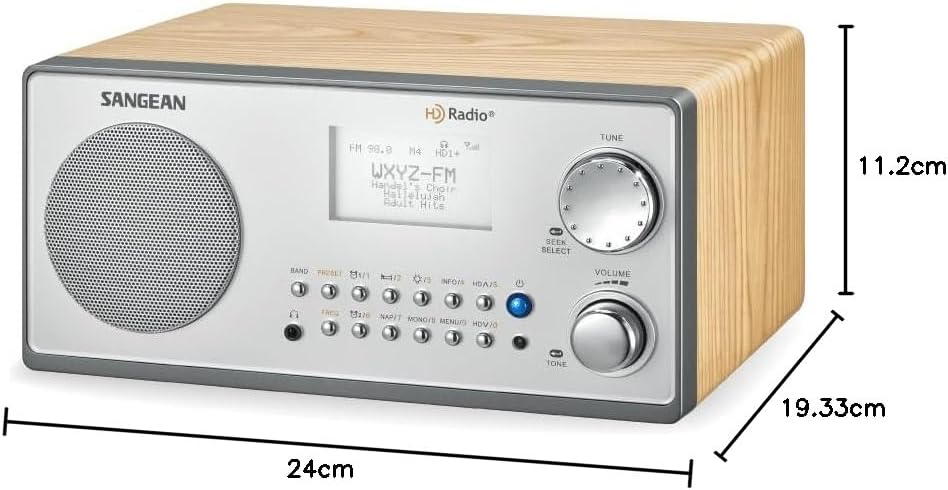
Figure 9.1: Sangean HDR-18 Dimensions
10. Garantia i Suport
For warranty information or technical support, please refer to the warranty card included with your product or visit the official Sangean weblloc web. Conserveu el rebut de compra com a comprovant de compra per a reclamacions de garantia.