
Introducció
This manual provides detailed instructions for the assembly, operation, and maintenance of your Steelcase Gesture Office Chair. Designed for ergonomic support and comfort, the Gesture chair offers a wide range of adjustments to suit individual preferences and promote good posture during extended periods of use. Please read this manual thoroughly before using your chair to ensure proper setup and to maximize its benefits.
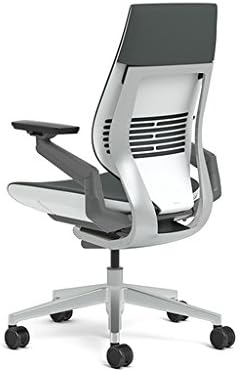
Figure 1: Steelcase Gesture Office Chair in Cogent Connect Graphite.
Característiques
- Connect Fabric: Upholstered with 100% polyester Connect fabric for durability and comfort.
- Hard Floor Caster Wheels: Equipped with wheels suitable for hard flooring surfaces.
- Ajust ergonòmics: Features include adjustable seat depth, fully adjustable arms, pneumatic seat height adjustment, recline tension adjustment, and a 4-position recline lock.
- Wrapped Back and Seat: Provides a sleek aesthetic and enhanced comfort.
- Synchronized System: The seat and back move as a synchronized system, adapting to your body's movements for continuous support.
- Durabilitat: Designed for 24/7 use, ensuring long-term performance and comfort.
- Garantia: Amb una garantia del fabricant de 12 anys.
Configuració
Your Steelcase Gesture Office Chair ships ready to assemble. While specific assembly instructions are typically included in the packaging, the chair is designed for straightforward setup.
Passos de l'Assemblea General:
- Desempaquetar components: Carefully remove all parts from the packaging and lay them out on a clean, flat surface. Verify all components are present against the packing list.
- Fixeu les rodes: Insert the hard floor caster wheels into the base of the chair until they click securely into place.
- Inseriu l'elevador de gas: Col·loqueu el cilindre d'elevació de gas al forat central de la base de la cadira.
- Attach Seat and Back Assembly: Carefully align the seat and back assembly with the top of the gas lift cylinder and press down firmly until it is securely seated.
- Comprovacions finals: Ensure all connections are secure and the chair functions correctly before use.

Figure 2: Steelcase Gesture Chair in a typical office environment.
Operating Instructions: Adjusting Your Chair
The Steelcase Gesture chair is designed with intuitive controls to allow for personalized adjustments. All primary controls are located on the right side of the chair for easy access.
1. Ajust d'alçada del seient
To adjust the seat height, locate the lever on the right side, towards the front of the seat.
- Per elevar: Lift your body weight slightly off the seat and pull the lever up. The seat will rise. Release the lever at your desired height.
- Abaixar: Remain seated and pull the lever up. The seat will lower. Release the lever at your desired height.
Adjust the seat height so your feet are flat on the floor and your knees are at approximately a 90-degree angle.
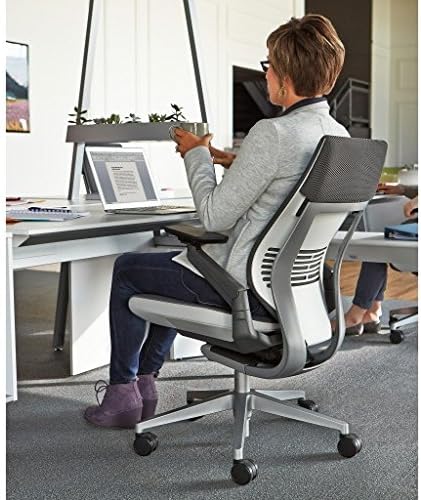
Figure 3: Demonstrating seat height adjustment.
2. Ajust de la profunditat del seient
The seat depth adjustment helps relieve pressure on the back of your legs and improves circulation.
- Locate the knob on the right side, beneath the front of the seat.
- Per estendre: Turn the knob away from you to move the seat forward.
- Per retractar-se: Turn the knob towards you to move the seat backward.
Position the seat depth so there are 2-3 inches between the front edge of the seat and the back of your knees.

Figure 4: Seat depth adjustment mechanism.
3. Back Tension Adjustment and Recline Lock
This control adjusts the resistance of the chair's recline and allows you to lock the backrest in various positions.
- Locate the knob on the right side, towards the back of the seat.
- Recline Tension: Turn the knob forward for more recline resistance, and backward for less resistance.
- Recline Lock: The chair features a 4-position recline lock. Use the lever next to the tension knob to select your desired recline limit or to lock the chair in an upright position.

Figure 5: Back tension and recline lock controls.
4. Armrest Adjustments (360° Arm)
The 360° armrests offer comprehensive adjustability to support the full range of motion of your arms.
- Ajust d'alçada: Lift the lever located under each armrest to adjust the arm height. Release the lever to lock.
- Ajust d'amplada: Push the armrests in or out to adjust their width.
- Depth and Pivot Adjustment: Grasp the arm caps and slide them forward, backward, or pivot them in any direction to find your optimal position.

Figura 6: Detallada view of the 360° armrest controls.
5. Height Adjustable Lumbar Support (Optional)
If your chair is equipped with optional lumbar support, you can adjust its height for personalized lower back comfort.
- Grasp the handles on both sides of the lumbar support.
- Slide the lumbar support up or down to your desired position in the lower back area.
6. Headrest Adjustment (If applicable)
For models equipped with a headrest, adjust its position for optimal neck and head support.
- Ajust d'alçada: Grasp the headrest pad and move it up or down to adjust its height.
- Ajust d'angle: Grasp the supports and pivot the headrest pad forward or backward, and rotate it to adjust the angle for personalized comfort.

Figure 7: Headrest adjustment options.
Video Guide: Steelcase Gesture Features and Adjustments
Video 1: This video demonstrates the various features and adjustment mechanisms of the Steelcase Gesture chair, including seat height, seat depth, recline tension, recline lock, armrest, lumbar, and headrest adjustments. (Source: BACKSTORE)
Manteniment
Proper maintenance ensures the longevity and continued performance of your Steelcase Gesture Office Chair.
- Instruccions de cura del producte: Spot wash the fabric upholstery as needed. Use a mild soap and water solution, gently dabbing the affected area. Avoid harsh chemicals or abrasive cleaners.
- Neteja regular: Dust the chair regularly with a soft, dry cloth. For deeper cleaning, consult the fabric care guide provided with your chair or visit the Steelcase weblloc per obtenir instruccions específiques.
- Manteniment de les rodes: Periodically check the hard floor caster wheels for any accumulated debris (hair, lint, etc.) and clean them to ensure smooth movement.
- Inspeccionar components: Regularly inspect all moving parts and fasteners to ensure they are secure. Do not attempt to lubricate any internal mechanisms unless specifically instructed by Steelcase.
Resolució de problemes
If you encounter any issues with your Steelcase Gesture Office Chair, please refer to the following common troubleshooting tips.
- La cadira no ajusta l'alçada: Ensure the height adjustment lever is fully engaged. If the chair is not moving up or down, check if there is any obstruction or if the gas lift cylinder requires replacement (contact support).
- Recline Not Working: Check the recline tension knob and recline lock lever. Ensure they are not set to a locked position that prevents movement. Adjust the tension to your preference.
- Sorolls de grinyols: Ensure all assembly bolts are tightened. Avoid over-tightening. If squeaking persists, identify the source and contact support if necessary.
- Rodes que no giren suaument: Inspect the caster wheels for debris (hair, dust, etc.) and clean them thoroughly. Ensure the casters are appropriate for your flooring type.
For issues not covered here, please contact Steelcase customer support.
Especificacions
| Atribut | Detall |
|---|---|
| Marca | Steelcase |
| Nom del model | Gest |
| Color | Cogent Connect Graphite |
| Dimensions del producte | 28.75 "P x 28.75" W x 40.25" H |
| Mida | Medium Height Range (16" - 21") |
| Característica especial | Adjustable Height, Arm Rest, Ergonomic, Seat Lock |
| Instruccions de cura del producte | Rentat de taques |
| Usos recomanats | Oficina |
| Recomanació de pes màxim | 400 lliures |
| Material | Textile (Connect fabric is 100% polyester), Foam (Fill Material) |
| Recomanació de superfície | Sòl dur |
| Pes de l'article | 78 lliures |
| UPC | 619084065586 |
Garantia i Suport
Your Steelcase Gesture Office Chair is covered by a 12 any de garantia del fabricant. This warranty covers defects in materials and workmanship under normal use. For specific terms and conditions, please refer to the warranty documentation included with your purchase or visit the official Steelcase weblloc.
For technical support, warranty claims, or replacement parts, please contact Steelcase customer service through their official weblloc web o la informació de contacte que es proporciona a l'embalatge del producte.