
1. Introducció
This manual provides detailed instructions for the safe and effective use of your Rokuhan RC02 Compact Controller. Please read this manual thoroughly before operating the device to ensure proper setup and functionality. The RC02 is designed for controlling Z Scale model trains and accessories.
2. Característiques del producte
- DC Voltage Controller: Utilizes digital voltage control for efficient operation and reduced heat generation.
- Capacitat de sortida: Provides a maximum output of 10V DC at 800mA.
- Digital Circuit Breaker: Automatically cuts power in case of a short circuit or overload, and can be reset.
- Turnout Control: Equipped with two dedicated switches for controlling turnouts.
- Opcions d'alimentació dual: Operates with either an AC adapter (not included) or eight AA batteries (not included) for portable use.
- Accessory Output: Includes terminals for powering auxiliary accessories such as structure lighting.
- Accessory Power Switch: A main switch controls the electric supply to the accessory output.
- Indicadors LED: Two colored LED indicators display the power status (normal or faulty).
- Expandabilitat: Features two terminals for connecting an R023 additional turnout switch (sold separately).
- Fusible de seguretat: Comes with a fuse for enhanced safety.
3. Informació de seguretat
- Always ensure the controller is turned OFF before connecting or disconnecting any wires or power sources.
- Use only the specified power sources (AC adapter or AA batteries). Do not mix old and new batteries, or different types of batteries.
- No exposeu el controlador a l'aigua ni a una humitat excessiva.
- Avoid operating the controller in extremely hot or cold environments.
- Keep out of reach of small children. This product is intended for users aged 14 years and older.
- In case of smoke, unusual odors, or excessive heat, immediately disconnect power and cease use.
- Do not attempt to disassemble or modify the controller. This will void the warranty and may cause damage or injury.
4. Contingut del paquet
Si us plau, verifiqueu que tots els elements siguin presents al vostre paquet:
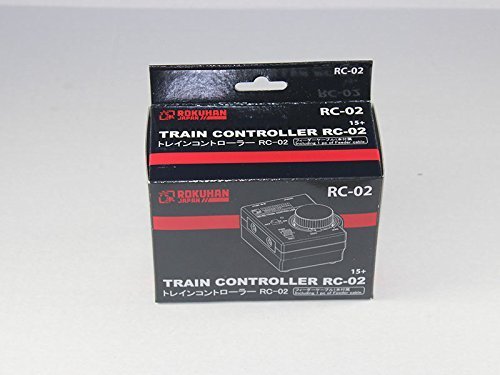
- Rokuhan RC02 Compact Controller
- One Fuse (pre-installed or spare)
Note: AC adapter and 8 AA batteries are NOT included and must be purchased separately.
5. Configuració
5.1 Powering the Controller
The RC02 controller can be powered by either an AC adapter or AA batteries.
Utilitzant un adaptador de CA
- Ensure the controller's main power switch is in the OFF position.
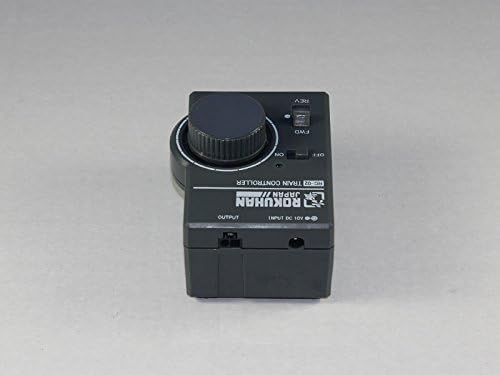
- Connect a compatible AC adapter (not included) to the 'INPUT DC 10V' jack on the controller.
- Connecteu l'adaptador de CA a una presa de corrent estàndard.
Image: Rokuhan RC02 Compact Controller showing the 'INPUT DC 10V' jack.
Ús de piles AA
- Ensure the controller's main power switch is in the OFF position.
- Open the battery compartment cover on the bottom of the controller.
- Insert eight (8) AA batteries (not included), observing the correct polarity (+/-) as indicated inside the compartment.
- Tanqueu bé la tapa del compartiment de la bateria.
Image: Rokuhan RC02 Compact Controller, illustrating the battery compartment.

5.2 Connecting to Track
- Locate the 'OUTPUT' terminals on the controller.
- Connect the track feeder wires from your Z Scale layout to these terminals. Ensure correct polarity for desired initial direction (e.g., red to positive, black to negative).
5.3 Connecting Turnouts and Accessories
- For turnouts, connect the turnout motor wires to the dedicated turnout control terminals.
- For accessories (e.g., lighting), connect their power wires to the 'ACCESSORY OUTPUT' terminals.
Image: Rokuhan RC02 Compact Controller, showing output and accessory terminals.

6. Instruccions de funcionament
6.1 Engegada/apagada
- To power on the controller, slide the main 'ON/OFF' switch to the 'ON' position. The power indicator LED will illuminate.
- Per apagar-lo, feu lliscar l'interruptor a la posició "OFF".
6.2 Controlling Train Speed and Direction
Control de direcció
- Use the 'FWD/REV' toggle switch to select the desired direction of your train.
- 'FWD' for forward movement.
- 'REV' for reverse movement.
Control de velocitat
- Rotate the large control knob to adjust the train's speed.
- Turn towards 'MIN' for slower speeds.
- Turn towards 'MAX' for faster speeds.
Imatge: Superior view of Rokuhan RC02 Compact Controller, highlighting the FWD/REV switch and speed control knob.
6.3 Using Turnout Switches
The two small switches on the controller are for operating connected turnouts. Flip the switch to change the turnout's position.
6.4 Using Accessory Output
If accessories are connected to the accessory output terminals, use the dedicated main switch to control their power supply (e.g., turning lights on or off).
6.5 Indicadors LED
- Funcionament normal: The LED indicator will show a steady color (e.g., green) when power is supplied and the controller is functioning correctly.
- Faulty/Overload: If the digital circuit breaker activates due to an overload or short circuit, the LED indicator may change color (e.g., red) or flash.
7. Manteniment
7.1 Neteja
Wipe the controller with a soft, dry cloth. Do not use liquid cleaners or solvents, as these may damage the unit.
7.2 Canvi de fusibles
The controller includes a fuse for protection. If the unit stops functioning and the troubleshooting steps do not resolve the issue, the fuse may need replacement. Consult a qualified technician or contact customer support for fuse replacement instructions.
8. Solució De Problemes
| Problema | Causa possible | Solució |
|---|---|---|
| Controller does not power on (LED off). | No power supply, batteries depleted, AC adapter not connected, main switch off. | Check AC adapter connection or replace batteries. Ensure main power switch is ON. |
| El tren no es mou. | Track connection issue, speed knob at MIN, direction switch incorrect, circuit breaker tripped. | Verify track connections. Adjust speed knob. Check FWD/REV switch. Reset circuit breaker (if applicable, by cycling power). |
| LED indicator shows faulty status (e.g., red/flashing). | Short circuit or overload on the track or accessory output. | Immediately turn off the controller. Inspect track and connected accessories for short circuits or obstructions. Remove the cause of the overload, then power on again. |
| Turnouts or accessories not working. | Incorrect wiring, accessory power switch off, faulty accessory. | Check wiring to turnouts/accessories. Ensure accessory power switch is ON. Test accessories separately if possible. |
9. Especificacions
- Model: RC02
- Potència d'entrada: AC Adapter (not included) or 8 x AA Batteries (not included)
- Vol. De sortidatage: 10V DC
- Corrent de sortida: 800 mA (màxim)
- Material: Plàstic
- Dimensions (aprox.): 12 x 6 x 6 polzades
- Pes (aprox.): 1 Pound (without batteries)
- Mode de funcionament: Automatic (with manual control)
- Ús interior/exterior: Només a l'interior
- Muntatge requerit: Yes (minor connections)
- Edat recomanada: 14 anys i més
10. Garantia i Suport
For warranty information, technical support, or service inquiries, please refer to the documentation provided at the point of purchase or contact your retailer. Keep your purchase receipt as proof of purchase.


