
Ampire DVX104
AMPIRE DVX104 DVD Player with USB Interface User Manual
Model: DVX104 | Brand: Ampire
1. Introducció
Gràcies per triar el AMPIRE DVX104 DVD Player with USB Interface. This compact 3/4 DIN unit is designed to provide versatile media playback in various installations, supporting a wide range of audio and video formats. This manual provides essential information for proper installation, operation, and maintenance of your device. Please read it thoroughly before use.
2. Informació de seguretat
- Ensure the device is installed by a qualified professional to prevent damage or injury.
- No exposeu la unitat a la humitat, la pluja o les temperatures extremes.
- Desconnecteu l'alimentació abans de realitzar qualsevol manteniment o instal·lació.
- Use only the specified power supply (12V DC).
- No bloquejar les obertures de ventilació.
- Mantenir fora de l'abast dels nens.
3. Contingut del paquet
Si us plau, comproveu que tots els elements siguin presents al paquet:
- AMPIRE DVX104 DVD Player Unit
- Comandament a distància IR
- Receptor IR extern
- Suports i cargols de muntatge
- Manual d'usuari (aquest document)

Image: Included mounting brackets and various screws for installation.
4. Producte acabatview
4.1 Tauler frontal

Imatge: El/La AMPIRE DVX104 DVD player, showing the disc slot, USB port, and control buttons with blue illumination.
The front panel features the disc slot, a USB port, and essential control buttons for power, play/pause, stop, source selection, track navigation, and disc eject. The buttons are illuminated with a blue night design.
4.2 Control remot
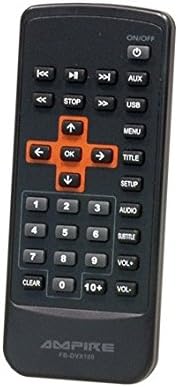
Image: The infrared remote control for the DVX104, featuring navigation, playback, volume, and menu buttons.
The included IR remote control provides full functionality, allowing you to control playback, navigate menus, adjust volume, and select input sources from a distance. Ensure the external IR receiver is positioned correctly for optimal signal reception.
5. Configuració i instal·lació
The DVX104 is designed for flexible installation, supporting both vertical and horizontal mounting positions. It is a 3/4 DIN size unit, suitable for various integration scenarios, including automotive or home entertainment systems.

Imatge: Example installation of the DVX104 unit discreetly integrated into a vehicle's center console.
5.1 Muntatge
- Choose a suitable location for installation, considering ventilation and accessibility for disc insertion/removal.
- Use the provided mounting brackets and screws to secure the unit. The unit can be mounted vertically or horizontally.
- Ensure the mounting surface is stable and can support the unit's weight (approx. 1.6 kg).
5.2 Connexions de cablejat
- Connexió d'alimentació: Connect the unit to a 12V DC power source. The maximum power consumption is 15W. The unit consumes 0W when the ignition is off.
- Sortida AV: Connect the 1 AV output to your display device (e.g., television, monitor) using appropriate cables. The video signal is 1Vp-p, and the audio signal is 6Vss (2.1V RMS).
- Receptor IR extern: Plug in the external IR receiver and position it where it has a clear line of sight to your remote control.
6. Instruccions de funcionament
Reproducció de disc 6.1
- Insert a compatible disc (DVD, SVCD, MVCD, MSVCD, VCD1.0/2.0, CD-DA) into the disc slot. The unit will automatically begin playback.
- Use the remote control or front panel buttons for Play/Pause, Stop, and track navigation.
- The unit features a "last position memory" function for disc operation, allowing you to resume playback from where you left off (not applicable for MPEG4 files).
6.2 Reproducció multimèdia USB
- Insert a USB stick (up to 8GB) or a 2.5-inch hard drive (up to 80GB, FAT32 formatted) into the USB port.
- If the hard drive is not recognized, it may require an external power supply.
- Use the "SRC" (Source) button on the front panel or remote to switch to USB input.
- Navigate through your media files (MPEG4, WMA, MP3, JPEG) using the remote control.
6.3 Menú de visualització en pantalla (OSD)
The unit features a German on-screen operating menu. Use the remote control's navigation buttons to access and adjust settings such as audio output, video settings, and system preferences.
6.4 Formats admesos
- Vídeo: DVD, SVCD, MVCD, MSVCD, VCD1.0, VCD2.0, MPEG4 (Video encoding: MPEG-2)
- Àudio: WMA, CD-DA, MP3, Dolby Digital Audio format
- Imatges: JPEG
7. Manteniment
- Clean the unit's exterior with a soft, dry cloth. Do not use abrasive cleaners or solvents.
- Keep the disc slot free from dust and debris.
- Assegureu-vos una ventilació adequada al voltant de la unitat per evitar el sobreescalfament.
8. Solució De Problemes
| Problema | Causa possible | Solució |
|---|---|---|
| Sense poder | Incorrect power connection; Blown fuse | Check 12V DC power supply and connections. Verify fuse. |
| No disc playback | Disc is dirty or scratched; Incompatible disc format | Clean the disc. Ensure the disc format is supported (DVD, VCD, CD-DA). |
| Dispositiu USB no reconegut | Incorrect format (not FAT32); Device requires external power; USB device capacity too large | Ensure USB device is FAT32 formatted. For HDDs, try with external power. Check capacity limits (8GB for sticks, 80GB for HDDs). |
| Cap resposta del control remot | Batteries are dead; IR receiver blocked or misplaced | Replace remote control batteries. Ensure IR receiver has a clear line of sight to the remote. |
| Sense sortida de vídeo | AV cable not connected properly; Incorrect input selected on display device | Check AV cable connections. Select the correct AV input on your television/monitor. |
9. Especificacions
| Característica | Detall |
|---|---|
| Model | DVX104 |
| Dimensions (W x H) | 159 x 43 mm |
| Profunditat d'instal·lació | 164 mm |
| Pes | 1.6 kg |
| Vol. Operatiutage | 12V DC |
| Màx. Consum d'energia | 15W |
| Power Consumption (Ignition Off) | 0 W (0.0 Ampere) |
| Senyal de vídeo | 1Vp-p |
| Senyal d'àudio | 6Vss (2.1V RMS) |
| Mode de sortida d'àudio | Surround (2.0 Channel) |
| Suport USB | USB sticks up to 8GB, 2.5" HDDs up to 80GB (FAT32) |
| Formats de disc compatibles | DVD, SVCD, MVCD, MSVCD, VCD1.0, VCD2.0, CD-DA |
| Formats de suports admesos | MPEG4, WMA, MP3, JPEG |
| Compliment | RoHS compliant, E8 10R-03 1242 |
10. Garantia i Suport
This product is licensed and approved. For warranty information and technical support, please refer to the documentation provided with your purchase or contact your local Ampire dealer. Keep your proof of purchase for warranty claims.
Ask a question about this manual
Ask about setup, troubleshooting, compatibility, parts, safety, or missing instructions. Manuals+ will review the question and use this page’s manual context to help answer it.