
Introducció
Gràcies per la compraasing the Mitzu Kaiser PAK-8915 Dual Audio System. This system includes an amplified speaker and a passive speaker, designed to deliver powerful and clear sound. This manual provides essential information for the safe and efficient operation of your new audio system. Please read it thoroughly before use and retain it for future reference.
Instruccions de seguretat
- Font d'alimentació: Assegureu-vos que la font d'alimentació coincideixi amb el voltage especificat a la unitat.
- Ventilació: No bloquegeu les obertures de ventilació. Mantingueu un espai suficient al voltant de la unitat per a un flux d'aire adequat.
- Aigua i humitat: Do not expose the unit to rain, moisture, or liquids. Keep away from water sources.
- Calor: No col·loqueu la unitat a prop de fonts de calor com ara radiadors, registres de calor, estufes o altres aparells que produeixin calor.
- Neteja: Unplug the unit before cleaning. Use a dry cloth. Do not use liquid cleaners or aerosol cleaners.
- Manteniment: No intenteu atendre aquest producte vosaltres mateixos. Consulteu tots els serveis a personal de servei qualificat.
- Col·locació: Place the speakers on a stable, level surface. The amplified speaker features a rear knob for stand mounting.
- cables: Use only the provided cables and ensure they are not damaged or pinched.
Contingut del paquet
Si us plau, comproveu que tots els elements següents estiguin inclosos al vostre paquet:
- 1 x Amplified Speaker (with 15-inch woofer)
- 1 x Passive Speaker (with 15-inch woofer)
- 1 x comandament a distància
- Connection Cables (10 meters in length for speaker connection)
- Cable d'alimentació
Producte acabatview
Amplified Speaker Rear Panel
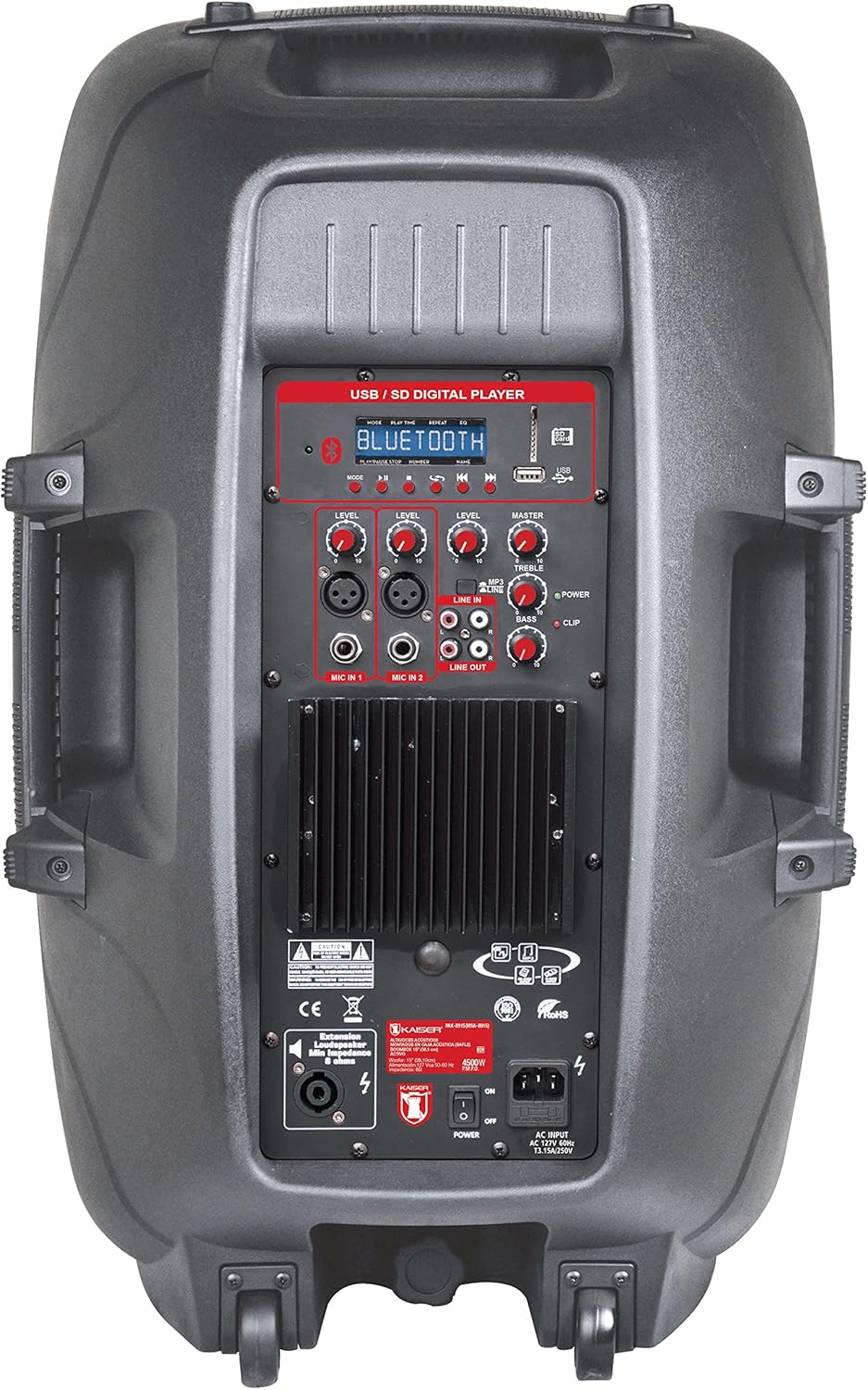
Figura 1: Amplified Speaker Rear Control Panel
El amplified speaker's rear panel houses all primary controls and connection ports:
- USB / SD Digital Player: Ports for USB drives and SD cards, along with a display and playback controls.
- Mòdul Bluetooth: Per a la transmissió d'àudio sense fil.
- Level Knobs: Adjust input levels for MIC 1, MIC 2, LINE IN, and MASTER volume.
- Controls de to: Knobs for TREBLE and BASS adjustment.
- Entrades de micròfon: Two inputs (Cannon and 6.3mm) for connecting microphones.
- Entrada de línia (RCA): Stereo RCA inputs for connecting external audio devices.
- Sortida de línia: RCA output to connect to another amplified speaker or audio system.
- Sortida de l'altaveu: Speakon connector for connecting the passive speaker.
- Interruptor d'alimentació: Interruptor d'encès/apagat per a la unitat.
- Entrada de CA: Per connectar el cable d'alimentació.
- Indicador de clip: Lights up when the audio signal is clipping (distorting).
Passive Speaker Rear Panel

Figura 2: Passive Speaker Rear Panel
The passive speaker features simple input and output connections:
- Entrada: Speakon input for connection from the ampaltaveu informat.
- Sortida: Speakon output for daisy-chaining to another passive speaker (if applicable).
Control remot
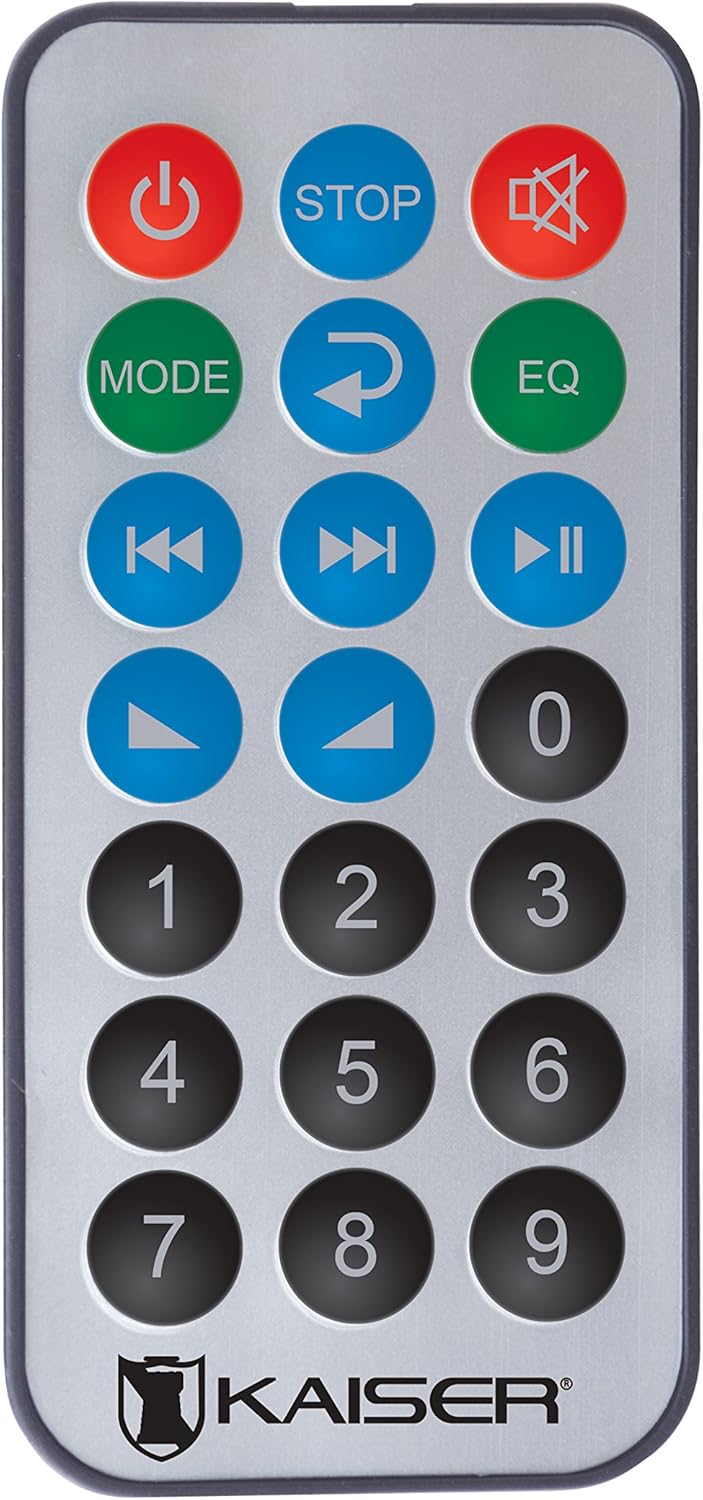
Figura 3: Control remot
The remote control provides convenient access to various functions:
- Botó d'encesa: Encén/apaga la unitat.
- STOP: Atura la reproducció.
- Silenciar: Silencia/activa el so.
- Mode: Switches between input modes (Bluetooth, USB, SD, FM, RCA).
- Repetiu: Repeteix la pista o llista de reproducció actual.
- EQ: Selecciona els preajustos de l'equalitzador.
- Pista anterior/següent: Salta a la pista anterior o següent.
- Reproduir/pausa: Inicia o posa en pausa la reproducció.
- Pujar/baixar el volum: Ajusta el volum mestre.
- Teclat numèric: For direct track selection or FM station tuning.
Configuració
- Col·locació: Col·loca el amplified and passive speakers in your desired location. The amplified speaker has handles and wheels for transport. Both speakers can be mounted on a stand using the rear knob on the ampaltaveu informat.
- Connecteu l'altaveu passiu: Use the provided speaker cable to connect the "Speaker Output" on the amplified speaker's rear panel to the "Input" on the passive speaker's rear panel. Ensure a secure connection.
- Connexió d'alimentació: Connect the power cable to the AC input on the amplified speaker and then plug it into a suitable power outlet.
- Encesa inicial: Ensure all volume knobs are set to minimum before turning on the power switch.
Instruccions de funcionament
Encès/Apagat
Flip the "POWER" switch on the rear panel of the amplified speaker to turn the system on or off. You can also use the power button on the remote control.
Selecting Input Mode
Press the "MODE" button on the control panel or remote control to cycle through available input sources: Bluetooth, USB, SD, FM Radio, and RCA Line In.
Connexió Bluetooth
- Switch the speaker system to Bluetooth mode using the "MODE" button. The display will show "Bluetooth" or a similar indicator.
- Al dispositiu mòbil (telèfon intel·ligent, tauleta, etc.), activeu el Bluetooth i cerqueu els dispositius disponibles.
- Select "Kaiser PAK-8915" or a similar name from the list of devices.
- Once paired, you will hear a confirmation sound, and your device will show a connected status. You can now stream audio wirelessly from up to 30 meters away.
Reproducció USB/SD
- Inseriu una unitat flash USB o una targeta SD que contingui àudio files into the respective port on the amplified speaker's rear panel.
- The system should automatically switch to USB or SD mode and begin playback. If not, press the "MODE" button to select the correct source.
- Use the playback controls (Play/Pause, Previous/Next, Stop) on the speaker panel or remote control to manage your music.
RCA Line In Connection
Connect an external audio device (e.g., DVD player, TV, computer) to the "LINE IN" RCA ports on the amplified speaker using an RCA cable. Select "LINE IN" mode using the "MODE" button.
Ús del micròfon
Plug your microphone(s) into the "MIC IN 1" (Cannon) or "MIC IN 2" (6.3mm) ports. Adjust the individual "MIC LEVEL" knobs to control the microphone volume. Ensure the MASTER volume is also adjusted appropriately.
Ràdio FM
Switch to FM Radio mode using the "MODE" button. The system will automatically scan and store available stations. Use the Previous/Next track buttons to navigate between stations or the numeric keypad on the remote for direct tuning.
Volume and Tone Adjustment
Use the "MASTER" volume knob to control the overall output volume. Adjust the "BASS" and "TREBLE" knobs to fine-tune the audio's low and high frequencies. Individual input levels (MIC 1, MIC 2, LINE IN) can also be adjusted.
Manteniment
- Neteja: Disconnect the power before cleaning. Use a soft, dry cloth to wipe the exterior surfaces. Do not use abrasive cleaners, waxes, or solvents.
- Emmagatzematge: If not in use for an extended period, store the speakers in a cool, dry place, away from direct sunlight and extreme temperatures.
- Ventilació: Regularly check that the ventilation grilles are free from dust and debris to prevent overheating.
Resolució de problemes
| Problema | Causa possible | Solució |
|---|---|---|
| Sense poder | Cable d'alimentació no connectat; Interruptor apagat; Presa de corrent defectuosa. | Assegureu-vos que el cable d'alimentació estigui ben connectat. Engegueu l'interruptor. Proveu la presa de corrent amb un altre dispositiu. |
| Sense sortida de so | Volume too low; Incorrect input mode selected; Audio source not playing; Passive speaker not connected. | Increase MASTER volume. Select the correct input mode. Ensure the audio source is playing. Verify the passive speaker is correctly connected to the ampaltaveu informat. |
| Bluetooth no connectat | Speaker not in Bluetooth mode; Device too far; Device already connected to another speaker. | Ensure the speaker is in Bluetooth mode. Move your device closer to the speaker (within 30m). Disconnect from other Bluetooth devices. |
| L'USB/SD no es reprodueix | Incorrecte file format; USB/SD card corrupted; Speaker not in USB/SD mode. | Assegureu-vos l'àudio files are in a compatible format. Try another USB/SD card. Select USB/SD mode. |
| Distorsió del so | Volume too high (clipping); Input level too high. | Reduce MASTER volume. Adjust individual input levels (MIC, LINE IN) to prevent the CLIP indicator from lighting up. |
Especificacions
| Marca | Mitzu |
| Model | PAK-8915 |
| Amplified Speaker Power | PMPO de 3500 W |
| Passive Speaker Power | PMPO de 3000 W |
| Mida del woofer | 15 polzades (38.1 cm) |
| Impedància | 8 Ω |
| Tecnologia de connectivitat | Bluetooth, RCA, USB |
| Tecnologia sense fils | Bluetooth |
| Interval Bluetooth | Fins a 30 metres |
| Mode de sortida d'àudio | estèreo |
| Resposta de freqüència | 4 kHz |
| Mètode de control | Buttons, Remote Control |
| Font d'alimentació | Cable elèctric |
| Pes de l'article | 34 quilos |
| Usos recomanats | Smartphones, Tablets, Computers, DVD Players, TVs, Surround Sound Systems, Microphones |
Garantia i Suport
Specific warranty information for the Mitzu Kaiser PAK-8915 is not provided in this manual. Please refer to the warranty card included with your purchase or contact your retailer for details regarding warranty coverage and terms.
For technical support or service inquiries, please contact the Mitzu customer service department or your authorized dealer. Keep your purchase receipt as proof of purchase.