
1. Introducció
This manual provides detailed instructions for the operation and maintenance of your Supersonic SC-1495BT Bluetooth AM/FM Boombox. Please read this manual thoroughly before using the device to ensure proper function and to maximize your listening experience.
2. Informació de seguretat
- No exposeu la unitat a la pluja ni a la humitat per evitar incendis o descàrregues elèctriques.
- No bloquegeu les obertures de ventilació. Assegureu-vos que hi hagi prou espai al voltant de la unitat per a un flux d'aire adequat.
- Eviteu col·locar la unitat a prop de fonts de calor com ara radiadors, registres de calor, estufes o altres aparells (inclosos amplificadors) que produeixen calor.
- Utilitzeu només accessoris/accessoris especificats pel fabricant.
- Desendolleu aquest aparell durant les tempestes amb llamps o quan no l'utilitzeu durant llargs períodes.
- Demaneu tot el servei a personal de servei qualificat. Cal fer servei quan l'aparell s'hagi fet malbé d'alguna manera.
3. Contingut del paquet
En desempaquetar, assegureu-vos que hi hagi tots els elements que s'enumeren a continuació:
- Supersonic SC-1495BT Bluetooth AM/FM Boombox
- Cable d'alimentació CA
4. Característiques del producte
The Supersonic SC-1495BT Boombox offers a variety of features for versatile audio playback:
- Bluetooth Version 3.0 for wireless music streaming
- Built-in USB input for media playback
- Built-in SD card and Micro SD card slot for media playback
- 3.5 mm Line-in (AUX) jack for external audio devices
- Four-band radio: AM, FM, SW1, SW2
- Integrated rechargeable battery for portable use
- Pantalla LCD clara
- Fast forward and rewind functions for media playback
- 360-degree rod antenna for enhanced radio reception
- Control de volum rotatiu
- Presa d'auriculars per a una escolta privada
- AC/DC operation for flexible power options
5. Controls i connexions
Familiarize yourself with the various controls and connection ports on your boombox.
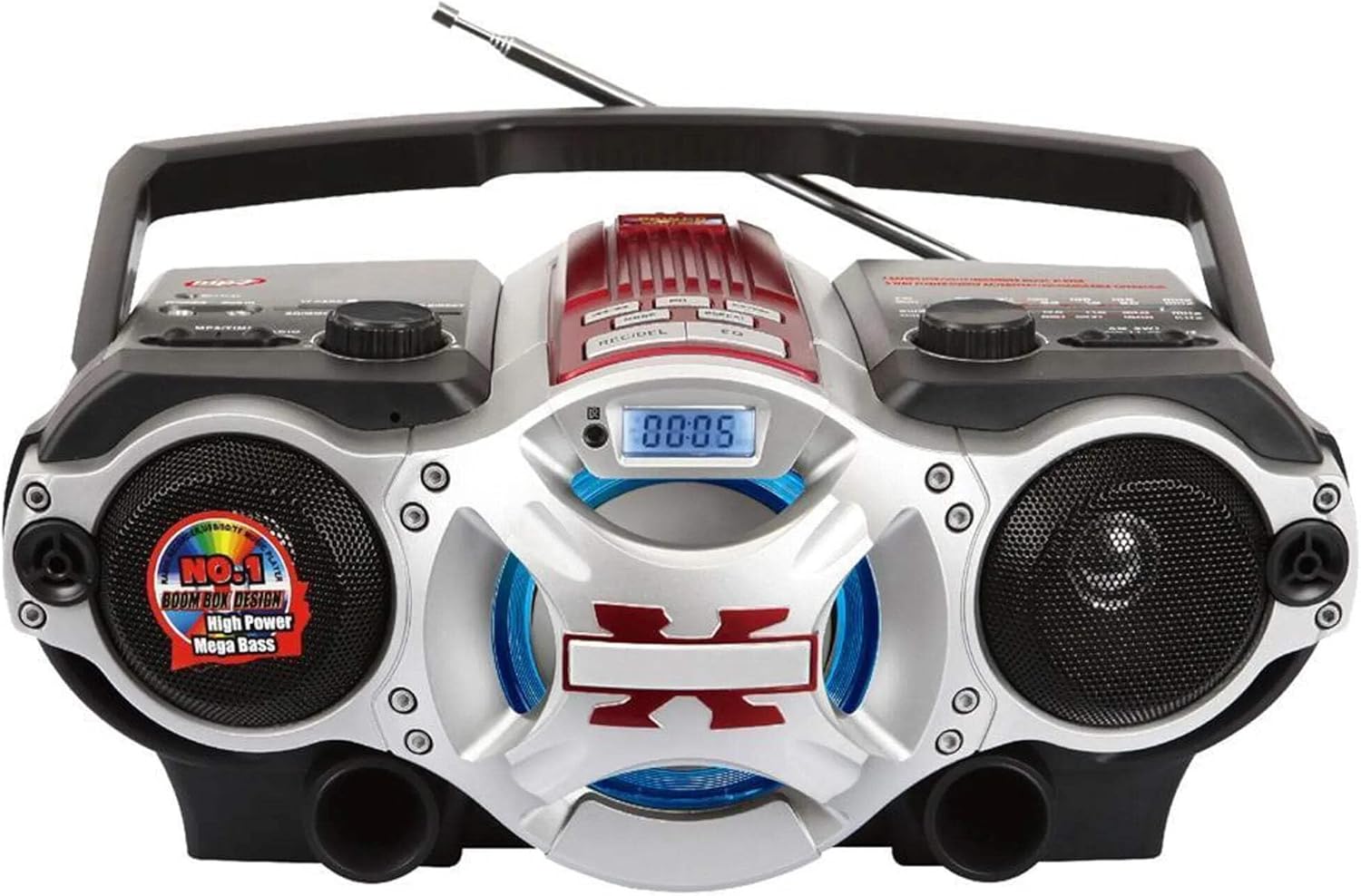
Figura 1: Davant view of the Supersonic SC-1495BT Boombox, showing the speakers, central display, and main control area.

Figura 2: Left side controls, including USB input, SD/Micro SD card slot, AUX IN, PHONES jack, BT/MP3/RADIO mode switch, and Rotary Volume control.

Figura 3: Right side controls, featuring the AM/FM/SW1/SW2 band selector, TUNING knob, and playback control buttons (Play/Pause, Skip, Mode, Clock, EQ).
6. Configuració
6.1 Connexió d'alimentació
- Alimentació CA: Connect the included AC power cord to the AC input on the back of the boombox and then plug it into a standard wall outlet. The internal rechargeable battery will begin charging.
- DC Power (Battery): The boombox has a built-in rechargeable battery. Ensure it is charged before portable use. The unit can also operate on DC power from the internal battery when not connected to AC.
6.2 Ajust de l'antena
Extend the 360-degree rod antenna for optimal radio reception, especially for FM and SW bands. Adjust its position for the clearest signal.
7. Instruccions de funcionament
7.1 Engegada/Apagada i Selecció de Mode
- To power on the unit, slide the BT/MP3/RADIO switch to the desired mode (BT, MP3, or RADIO).
- To power off, slide the switch to the OFF position.
7.2 Funcionament Bluetooth
- Feu lliscar l'interruptor de mode a BT (Bluetooth). The LCD display will indicate Bluetooth mode, and the unit will enter pairing mode.
- Al dispositiu amb Bluetooth (telèfon intel·ligent, tauleta, etc.), activeu el Bluetooth i cerqueu els dispositius disponibles.
- Select "SC-1495BT" from the list of devices. Once paired, the unit will emit a confirmation sound.
- You can now play audio from your device through the boombox. Use your device or the boombox's playback controls (Play/Pause, Skip) to manage music.
7.3 Radio Operation (AM/FM/SW1/SW2)
- Feu lliscar l'interruptor de mode a RÀDIO.
- Select the desired band (AM, FM, SW1, or SW2) using the band selector switch.
- Extend and adjust the rod antenna for optimal reception.
- Gira el TUNING knob to scan for radio stations. The frequency will be displayed on the LCD.
7.4 Reproducció des de targeta USB/SD
- Feu lliscar l'interruptor de mode a MP3.
- Insert a USB flash drive into the USB input or an SD/Micro SD card into the corresponding slot. Ensure the card is inserted correctly.
- The unit will automatically detect and begin playing MP3 audio files del suport inserit.
- Use the playback control buttons (Play/Pause, Skip, Fast Forward, Rewind) to navigate tracks.
7.5 Auxiliary (AUX) Input
- Feu lliscar l'interruptor de mode a MP3.
- Connecteu un dispositiu d'àudio extern (per exemple, un reproductor MP3, un telèfon intel·ligent) al AUX IN connector mitjançant un cable d'àudio de 3.5 mm (no inclòs).
- Play audio from your external device. The sound will be routed through the boombox speakers. Control playback from your external device.
7.6 Control de volum
Gira el VOLUM knob clockwise to increase the volume and counter-clockwise to decrease it.
7.7 Presa d'auriculars
For private listening, plug standard 3.5mm earphones (not included) into the TELÈFONS jack. The main speakers will be muted.
8. Manteniment
- Neteja: Feu servir un drap suau i sec per netejar l'exterior de la unitat. No utilitzeu productes de neteja abrasius ni dissolvents.
- Emmagatzematge: Quan no l'utilitzeu durant períodes prolongats, guardeu el boombox en un lloc fresc i sec, allunyat de la llum solar directa i de temperatures extremes.
- Cura de la bateria: To prolong the life of the built-in rechargeable battery, avoid fully discharging it frequently. Charge the unit regularly, even if not in use.
9. Solució De Problemes
If you encounter issues with your boombox, refer to the following common problems and solutions:
| Problema | Causa possible | Solució |
|---|---|---|
| Sense poder | AC cord not connected; Battery discharged; Power switch off | Ensure AC cord is securely plugged in; Charge the battery; Slide power switch to ON/BT/MP3/RADIO. |
| Sense so | Volume too low; Mute activated (if applicable); Incorrect mode selected; Earphones connected | Increase volume; Ensure correct mode (BT, MP3, RADIO) is selected; Disconnect earphones. |
| Bluetooth no emparellat | Boombox not in pairing mode; Device Bluetooth off; Too far from boombox | Ensure boombox is in BT mode; Enable Bluetooth on your device; Move device closer (within 30 feet/10 meters); Try re-pairing. |
| Mala recepció de ràdio | Antenna not extended/adjusted; Weak signal area | Fully extend and adjust the rod antenna; Try moving the unit to a different location. |
| La targeta USB/SD no es reprodueix | Incorrecte file format; Targeta/unitat no inserida correctament; Corromput files | Assegureu-vos files are MP3 format; Re-insert card/drive; Try a different USB drive or SD card. |
10. Especificacions
- Model: SC-1495BT
- Marca: Supersònic
- Connectivitat: Bluetooth (Ver. 3.0), USB, SD/Micro SD, 3.5mm AUX
- Bandes de ràdio: AM, FM, SW1, SW2
- Formats d'àudio compatibles: MP3
- Font d'alimentació: AC 110-220V, Built-in Rechargeable Battery
- Ponents: 2 (estèreo)
- Dimensions (L x A x A): 15 x 10 x 12 polzades
- Pes: 4.3 lliures
- Fabricant: Capitol Sales Company
- UPC: 639131814950
11. Garantia
This product comes with a 1-year limited warranty. Please retain your proof of purchase for warranty claims. For specific warranty terms and conditions, refer to the documentation included with your purchase or contact Supersonic customer support.
12. Suport
For further assistance, technical support, or inquiries regarding your Supersonic SC-1495BT Boombox, please visit the official Supersonic weblloc web o poseu-vos en contacte amb el seu departament d'atenció al client. Normalment, podeu trobar la informació de contacte al fabricant weblloc o embalatge del producte.

