
1. Introducció
The Philips SHQ7900CL Bluetooth Sports Headphones are designed for active lifestyles, offering wireless freedom and a secure, comfortable fit. These headphones are waterproof and sweatproof, making them ideal for various indoor and outdoor sports activities. This manual provides essential information for setting up, operating, and maintaining your headphones.

Image: Philips SHQ7900CL Bluetooth Sports Headphones, showcasing the in-ear design with ear hooks and inline controls.
2. Què hi ha a la caixa
Carefully unpack the box and ensure all items are present.
- Philips SHQ7900CL Bluetooth Sports Headphones
- Pouch for storage
- Guia d'inici ràpid
- Cable de càrrega USB
- Detachable earhooks (1 pair)
- Rubber ear caps (3 pairs: small, medium, large)

Image: Various sizes of rubber ear caps and detachable ear hooks included with the headphones for a customized fit.
3. Configuració
3.1 Càrrega dels auriculars
Abans del primer ús, carregueu completament els auriculars.
- Locate the USB charging port on the inline control unit.
- Connect the supplied USB cable to the charging port on the headphones.
- Connecteu l'altre extrem del cable USB a un port USB amb alimentació (per exemple, un ordinador o un adaptador de paret USB).
- The LED indicator will show charging status. It typically turns off or changes color when fully charged.
Una càrrega completa proporciona aproximadament 6.5 hores de durada de la bateria.
3.2 Vinculació Bluetooth
Per connectar els auriculars a un dispositiu amb Bluetooth:
- Assegureu-vos que els auriculars estiguin apagats.
- Press and hold the multi-function button (usually the center button on the inline control) for approximately 5-7 seconds until the LED indicator flashes blue and red alternately. This indicates pairing mode.
- Al dispositiu Bluetooth (telèfon intel·ligent, tauleta, etc.), activeu Bluetooth i cerqueu els dispositius disponibles.
- Select "Philips SHQ7900CL" from the list of found devices.
- Un cop emparellats, l'indicador LED dels auriculars parpellejarà en blau periòdicament i sentireu una confirmació audible.
- Si se us demana un codi d'accés, introduïu "0000".
Els auriculars intentaran tornar a connectar-se automàticament amb l'últim dispositiu emparellat quan s'encenguin.
3.3 Fitting the Headphones
For optimal sound quality and a secure fit during exercise:
- Choose the correct ear caps: Experiment with the three sizes of rubber ear caps to find the pair that provides a comfortable and snug seal in your ear canal.
- Attach ear hooks: The detachable ear hooks provide extra stability. Attach them to the headphones and loop them over your ears. Adjust for comfort.
- Position the cable: The cable connecting the two earbuds can be worn behind your neck.

Image: A person wearing the Philips SHQ7900CL headphones, demonstrating a secure fit during a stretching exercise.
4. Instruccions de funcionament
The inline control unit allows you to manage power, music playback, and calls.
| Funció | Acció |
|---|---|
| Encès | Manteniu premut el botó multifunció durant 3 segons. |
| Apagueu | Manteniu premut el botó multifunció durant 3 segons. |
| Reproducció/pausa de música | Premeu el botó multifunció una vegada. |
| Pista següent | Premeu i manteniu premut el botó de pujar el volum (+). |
| Pista anterior | Premeu i manteniu premut el botó per baixar el volum (-). |
| Puja el volum | Premeu el botó Pujar volum (+). |
| Baixa el volum | Premeu el botó per baixar el volum (-). |
| Respondre/Finalitzar la trucada | Premeu el botó multifunció una vegada durant una trucada entrant o una trucada activa. |
| Rebutja la trucada | Premeu i manteniu premut el botó multifunció durant 2 segons durant una trucada entrant. |
| Activa l'Assistent de veu | Double-press the multi-function button (may vary by device). |
5. Manteniment
5.1 Neteja
As these headphones are waterproof and sweatproof, they can be cleaned easily.
- Netegeu els auriculars amb un suau, damp cloth after each use, especially after intense workouts.
- Remove the ear caps and rinse them with water if necessary. Ensure they are completely dry before reattaching.
- Do not use abrasive cleaners, alcohol, or chemical solvents, as these may damage the product.
5.2 Emmagatzematge
Proper storage helps prolong the life of your headphones.
- Store the headphones in the provided pouch when not in use to protect them from dust and damage.
- Eviteu l'emmagatzematge a temperatures extremes o humitat elevada.
- Do not store with heavy objects on top that could crush them.
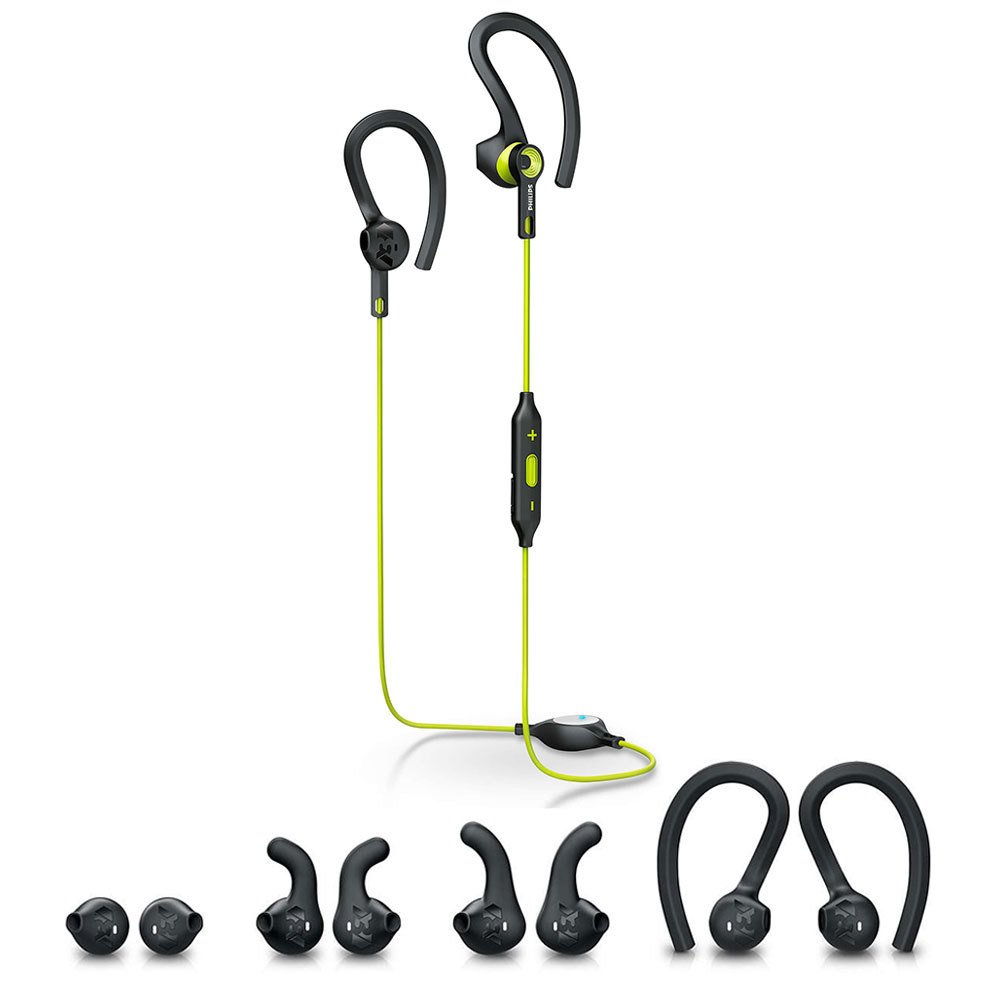
Image: The Philips SHQ7900CL headphones shown alongside their protective storage pouch.
6. Solució De Problemes
Si teniu problemes amb els auriculars, consulteu els problemes i solucions més comuns següents:
- Headphones do not turn on: Assegureu-vos que els auriculars estiguin completament carregats.
- No es pot emparellar amb el dispositiu:
- Make sure the headphones are in pairing mode (flashing blue and red).
- Assegureu-vos que el Bluetooth estigui activat al dispositiu i que es trobi a menys de 10 metres dels auriculars.
- Prova d'oblidar el dispositiu a la configuració de Bluetooth del telèfon i de tornar-lo a emparellar.
- Reinicieu els auriculars i el dispositiu.
- Sense so o volum baix:
- Comproveu els nivells de volum tant dels auriculars com del dispositiu connectat.
- Assegureu-vos que els auriculars estiguin correctament emparellats i connectats.
- Verifiqueu que heu seleccionat la sortida d'àudio correcta al dispositiu.
- Connexió intermitent:
- Assegureu-vos que no hi hagi obstacles entre els auriculars i el dispositiu.
- Apropa't més al dispositiu (a menys de 10 metres).
- Eviteu entorns amb interferències Wi-Fi fortes o altres interferències sense fil.
- Problema de càrrega:
- Ensure the USB cable is securely connected to both the headphones and the power source.
- Prova un altre port USB o adaptador de càrrega.
7. Especificacions
| Característica | Detall |
|---|---|
| Nom del model | SHQ7900CL |
| Marca | Philips |
| Tecnologia de connectivitat | Bluetooth 4.1 |
| abast sense fils | Fins a 10 metres |
| Col·locació de l'orella | A l'orella |
| Impedància | 32 ohms |
| Sensibilitat | 105 dB |
| Control de soroll | Aïllament acústic |
| Durada de la bateria | Aproximadament 6.5 hores |
| Nivell de resistència a l'aigua | Impermeable |
| Característiques addicionals | Sweatproof, Tangle-Free Cable |
| Tipus de control | Volume Control, Touch (via multi-function button) |
| Mida del controlador d'àudio | 13.5 Mil·límetres |
| Pes de l'article | 0.02 quilos |
8. Garantia i Suport
Your Philips SHQ7900CL Bluetooth Sports Headphones come with a 1 year and 3 months warranty des de la data de compra.
For detailed warranty terms, technical support, or further assistance, please visit the official Philips support weblloc o poseu-vos en contacte amb el seu servei d'atenció al client.