
1. Introducció
Thank you for choosing the MaxiAids EZ See Large Print Keyboard. This keyboard is designed to enhance visibility and typing efficiency for users who benefit from larger characters. It features extra-large, high-contrast legends on low-profile keys, making it an ideal solution for individuals with low vision or those who prefer easier-to-read keys. This manual provides essential information for setting up, operating, maintaining, and troubleshooting your new keyboard.
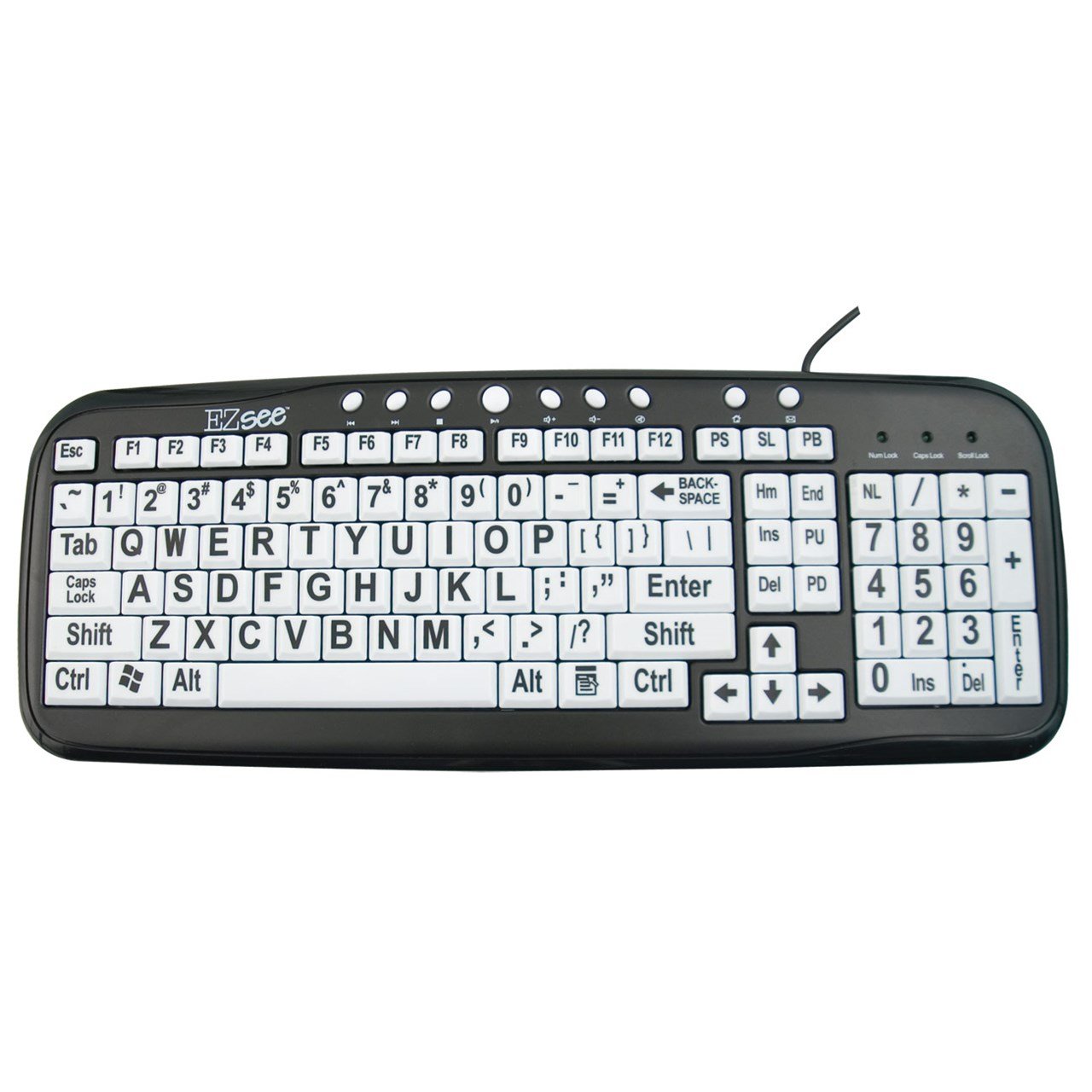
This image shows the MaxiAids EZ See Large Print Keyboard. It features white keys with oversized black characters for enhanced visibility, designed to assist users with low vision.
2. Configuració
The MaxiAids EZ See Large Print Keyboard is a plug-and-play device, requiring no special drivers for most operating systems. Follow these simple steps to connect your keyboard:
- Descomprimir el teclat: Traieu amb cura el teclat del seu embalatge.
- Localitza un port USB: Identify an available USB port on your computer (desktop or laptop).
- Connecteu el cable USB: Insert the USB connector from the keyboard cable firmly into the USB port on your computer.
- Reconeixement del sistema: Your operating system should automatically detect and install the necessary drivers for the keyboard. This process may take a few moments.
- Test the Keyboard: Obriu un editor de text o qualsevol aplicació que accepti entrada de text i escriviu uns quants caràcters per assegurar-vos que el teclat funciona correctament.
If the keyboard does not respond, try connecting it to a different USB port or restarting your computer.
3. Funcionament del teclat
The EZ See Large Print Keyboard functions like a standard 104-key QWERTY keyboard, with the primary difference being the enhanced visibility of its keys.
- Disseny estàndard: The keyboard features a familiar QWERTY layout, including a numeric keypad, function keys (F1-F12), and navigation keys.
- Tecles de lletra gran: Each keycap is designed with oversized, high-contrast characters to reduce eye strain and improve typing accuracy for users with visual impairments.
- Pro baixfile Claus: The keys have a low-profile design, which can contribute to a comfortable typing experience.
- Caps Lock, Num Lock, Scroll Lock Indicators: Standard LED indicators are present to show the status of Caps Lock, Num Lock, and Scroll Lock functions.
Simply use the keyboard as you would any other, benefiting from the improved readability of the key legends.
4. Manteniment
Proper care and maintenance will ensure the longevity and optimal performance of your MaxiAids EZ See Large Print Keyboard.
- Neteja: Per netejar el teclat, desconnecteu-lo de l'ordinador. Feu servir un drap suau i sense borrissol lleugerament humit.ampened with water or a mild, non-abrasive cleaning solution. Avoid spraying liquids directly onto the keyboard or allowing moisture to seep between the keys.
- Eliminació de pols: Feu servir aire comprimit per eliminar la pols i les restes que hi ha entre les tecles.
- Eviteu els vessaments: Keep liquids away from the keyboard to prevent damage. In case of a spill, immediately disconnect the keyboard and allow it to dry completely before reconnecting.
- Emmagatzematge: Quan no l'utilitzeu durant períodes prolongats, guardeu el teclat en un lloc net i sec, allunyat de temperatures extremes.
5. Solució De Problemes
If you encounter issues with your keyboard, please refer to the following common troubleshooting steps:
- El teclat no respon:
- Assegureu-vos que el cable USB estigui connectat correctament tant al teclat com a l'ordinador.
- Prova de connectar el teclat a un port USB diferent de l'ordinador.
- Reinicieu l'ordinador.
- Test the keyboard on another computer, if available, to determine if the issue is with the keyboard or the computer.
- Tecles específiques que no funcionen:
- Check for any debris or obstructions under the non-functioning keys. Use compressed air to clear any particles.
- Assegureu-vos que el teclat estigui net i sec.
- Numeric Keypad Not Working:
- Verify that the Num Lock indicator light is on. Press the 'Num Lock' key to toggle it on or off.
- Some older operating systems or specific software configurations might require additional settings for the numeric keypad. Consult your computer's operating system documentation.
- Entrada lenta o retardada:
- This could be a system performance issue. Close unnecessary applications and check your computer's resource usage.
- Assegureu-vos que el sistema operatiu del vostre ordinador estigui actualitzat.
If these steps do not resolve the issue, please contact MaxiAids customer support for further assistance.
6. Especificacions
| Marca | MaxiAids |
| Número de model | 23570 |
| Tecnologia de connectivitat | USB |
| Dispositius compatibles | Laptop (and Desktop Computers) |
| Descripció del teclat | Teclat USB |
| Característica especial | Ergonomic, Large Print |
| Color | Negre Blanc |
| Estil | Clàssic |
| Material | Plàstic |
| Components inclosos | Teclat |
| Quantitat de botons | 104 |
7. Garantia i Suport
For information regarding the warranty period and terms for your MaxiAids EZ See Large Print Keyboard, please refer to the documentation included with your purchase or visit the official MaxiAids weblloc web. Els detalls de la garantia poden variar segons la regió i el distribuïdor.
If you require technical support, have questions about product functionality, or need assistance with troubleshooting beyond what is covered in this manual, please contact MaxiAids customer service directly. Contact information can typically be found on the manufacturer's weblloc web o a l'embalatge del producte.