
1. Introducció
Gràcies per la compraasing the Silverlit Xion FPV Camera Drone 84765. This drone is designed for outdoor use and offers an exciting First-Person View (FPV) flying experience with its integrated camera. Please read this manual thoroughly before operating the drone to ensure safe and optimal performance. Keep this manual for future reference.

Image 1.1: The Silverlit Xion FPV Camera Drone 84765.
2. Informació de seguretat
WARNING: Failure to follow these instructions may result in injury or damage to the product.
- Always operate the drone in open, clear areas, away from people, animals, buildings, and power lines.
- No voli amb vents forts o condicions meteorològiques adverses.
- Mantingueu les mans, la cara i la roba ampla allunyades de les hèlixs giratòries.
- Assegureu-vos que la bateria del dron i la bateria del control remot estiguin completament carregades abans de cada vol.
- No deixeu mai les bateries carregades sense vigilància.
- This product is intended for children. Adult supervision is recommended.
- No modifiqueu ni desmunteu el dron ni els seus components.
- Always turn off the drone and remote control when not in use.
3. Contingut del paquet
Verifiqueu que tots els elements siguin presents al paquet:
- Silverlit Xion FPV Camera Drone 84765
- Control remot
- Ulleres FPV
- Rechargeable Drone Battery
- USB Charging Cable (for drone battery)
- Hélices de recanvi
- Manual d'usuari

Image 3.1: The Silverlit Xion FPV Drone product box, showing the drone and FPV goggles.
4. Configuració
4.1. Instal·lació de la bateria del control remot
- Obriu el compartiment de la bateria a la part posterior del comandament a distància.
- Insert the required batteries (not included) according to the polarity indicators.
- Tanqueu el compartiment de la bateria de manera segura.
4.2. Drone Battery Installation
- Assegureu-vos que el drone estigui apagat.
- Localitzeu el compartiment de la bateria del drone.
- Carefully insert the charged drone battery, ensuring it is properly seated and connected.
- Tanqueu la tapa del compartiment de la bateria.
4.3. Instal·lació de l'hèlix (si cal)
If propellers are not pre-installed, attach them according to the markings (e.g., A and B) on the propellers and motor shafts. Ensure they are securely fastened.
4.4. Remote Control and Drone Pairing
- Col·loqueu el drone sobre una superfície plana i plana.
- Engega el dron. Els llums indicadors parpellejaran.
- Engegueu el comandament a distància.
- Move the left joystick (throttle) fully up, then fully down. The drone's indicator lights will become solid, indicating successful pairing.
4.5. FPV Goggle Setup
Connect the FPV goggles to your smartphone (if applicable) or power them on as per their specific instructions. Ensure a stable connection for live video feed.

Image 4.1: The remote control and FPV goggles for the Silverlit Xion Drone.
5. Càrrega de la bateria del dron
The drone's battery requires charging before use. A USB charging cable is included, but a compatible USB power adapter (not included) is required.
- Connecteu el cable de càrrega USB a la bateria del dron.
- Plug the other end of the USB cable into a suitable USB power adapter (e.g., a smartphone charger or computer USB port).
- The charging indicator light will show the charging status (refer to the cable's specific instructions for light behavior).
- Charging typically takes 80-100 minutes for a full charge.
- After a flight, allow the battery to cool down for 10-15 minutes before recharging to prolong battery life.
Note: A fully charged battery provides approximately 4-5 minutes of flight time.
6. Funcionament del dron
6.1. Llista de verificació prèvia al vol
- Assegureu-vos que les bateries del dron i del comandament a distància estiguin completament carregades.
- Comproveu que les hèlixs estiguin ben fixades i no estiguin danyades.
- Verify the flight area is clear of obstacles, people, and animals.
- Confirm successful pairing between the drone and remote control.
6.2. Enlairament i aterratge
- Col·loqueu el drone sobre una superfície plana i plana.
- Slowly push the left joystick (throttle) upwards to make the drone ascend.
- To land, slowly pull the left joystick (throttle) downwards until the drone gently touches the ground.
6.3. Controls bàsics de vol
- Joystick esquerre (accelerador): Up/Down for altitude control.
- Left Joystick (Yaw): Left/Right for rotating the drone horizontally.
- Joystick dret (Pitch/Roll): Up/Down for moving forward/backward; Left/Right for moving left/right (sideways).
6.4. Camera Operation and FPV
The drone features a 1080p video recording capability and 0.3 MP effective still resolution. Refer to the remote control diagram for specific camera buttons.
- Gravació de vídeo: Press the designated video button on the remote control to start/stop recording.
- Captura de fotos: Press the designated photo button to take a still image.
- FPV en directe: Once the FPV goggles are set up and connected, you will see the live video feed from the drone's camera, enhancing your flying experience.
7. Manteniment
- Neteja: Feu servir un drap suau i sec per netejar el dron i el comandament a distància. No utilitzeu productes químics agressius ni dissolvents.
- Inspecció de l'hèlix: Regularly check propellers for cracks, bends, or damage. Replace any damaged propellers with spare parts provided.
- Emmagatzematge: Store the drone and its components in a cool, dry place, away from direct sunlight and extreme temperatures. Remove batteries from the remote control if storing for extended periods.
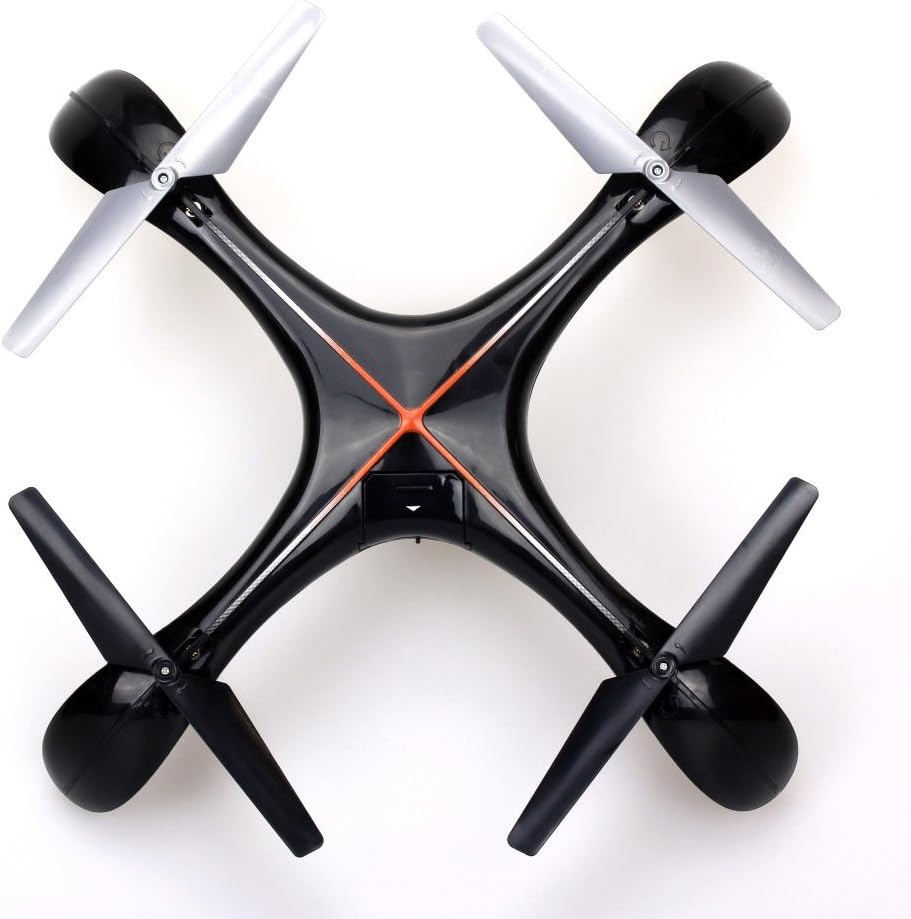
Imatge 7.1: Part superior view of the Silverlit Xion FPV Drone, showing propeller orientation.
8. Solució De Problemes
| Problema | Causa possible | Solució |
|---|---|---|
| El dron no respon al comandament a distància. | Low battery in drone or remote; not paired correctly. | Charge drone battery, replace remote control batteries, re-attempt pairing process. |
| El dron vola de manera erràtica o a la deriva. | Drone not calibrated on a flat surface; damaged propeller. | Ensure drone is placed on a level surface during pairing/initialization. Check and replace damaged propellers. Refer to manual for calibration steps if available. |
| Poor video quality or no FPV feed. | Weak signal; FPV goggles not connected properly. | Ensure drone is within range. Check FPV goggle connection and battery. |
| Temps de vol curt. | Bateria no completament carregada; bateria antiga. | Ensure battery is fully charged (80-100 minutes). Consider replacing the battery if it's old and performance has degraded. |
9. Especificacions
- Marca: Silverlit
- Nom del model: 84765
- Franja d'edat: Nen
- Resolució de gravació de vídeo: 1080p
- Resolució fixa efectiva: 0.3 MP
- Nivell d'habilitat: Professional (Note: This may refer to advanced features, but basic operation is suitable for children with supervision)
- Tipus de control: Control remot
- Bateries incloses: No (for remote control)
- Comandament a distància inclòs: Sí
- Pes del producte: 1.5 quilos
10. Garantia i Suport
For warranty information or technical support, please refer to the documentation provided with your purchase or contact Silverlit customer service. Keep your proof of purchase for any warranty claims.