
1. Introducció
Thank you for choosing the LB-LINK BL-WN2210 300 Mbps Wi-Fi USB Adapter. This user manual provides detailed instructions on how to set up, operate, and maintain your new wireless adapter. Please read this manual thoroughly before using the product to ensure proper installation and optimal performance.
2. Producte acabatview
The LB-LINK BL-WN2210 is a compact and efficient USB Wi-Fi adapter designed to provide high-speed wireless connectivity for your desktop or laptop computer. It supports the latest wireless standards, offering a reliable and fast internet experience.
2.1. Components
- Connector USB: For connecting to your computer's USB port.
- Adapter Body: Contains the wireless chipset and internal antenna.
- Tapa protectora: Covers the USB connector when not in use.
- Botó WPS: Per a una connexió ràpida i segura a encaminadors compatibles amb WPS.

Figura 2.1: Frontal view of the LB-LINK BL-WN2210 USB Wi-Fi Adapter with its protective cap removed, showing the USB connector.

Figure 2.2: The LB-LINK BL-WN2210 USB Wi-Fi Adapter with its protective cap in place, showing its compact form factor.
3. Característiques
- Connectivitat d'alta velocitat: Achieves up to 300Mbps wireless transmission rate.
- Compatibilitat àmplia amb sistemes operatius: Supports Windows 2000, XP, Vista, Win7, Win8, Win10, CE, Linux, and MAC operating systems.
- Suport WPS: Features Wi-Fi Protected Setup (WPS) for easy and secure wireless connection.
- Antena integrada: Equipped with an internal antenna for a streamlined design.
- Compliment estàndard: Complies with IEEE 802.11n, IEEE 802.11g, and IEEE 802.11b wireless standards.
- Dissipació de calor eficient: Designed with ventilation for effective heat management.

Figure 3.1: Illustration highlighting the heat dissipation design of the LB-LINK BL-WN2210 adapter, showing ventilation holes.
4. Contingut del paquet
Si us plau, reviseu atentament el contingut del paquet. Si falta algun article o hi ha algun dany, poseu-vos en contacte amb el vostre distribuïdor.
- 1 x LB-LINK BL-WN2210 300 Mbps Wi-Fi USB Adapter
- 1 x Driver CD (may vary by package)
- 1 x Quick Installation Guide (may vary by package)
5. Configuració
5.1. Instal·lació del controlador
- Inseriu el CD del controlador: If your package includes a driver CD, insert it into your computer's CD-ROM drive.
- Executar configuració: Navigate to the CD drive and run the setup executable (e.g., "setup.exe" or "autorun.exe").
- Seguiu les instruccions a la pantalla: Follow the prompts to complete the driver installation. You may need to restart your computer after installation.
- Download Drivers (if no CD): If your computer does not have a CD drive or if the CD is not included, visit the official LB-LINK website to download the latest drivers for your specific operating system (Windows, Linux, Mac).
Nota: For some operating systems (e.g., Windows 10), the driver may install automatically upon connecting the adapter.
5.2. Instal·lació de maquinari
- Identify an Available USB Port: Locate an unused USB port on your desktop or laptop computer.
- Inseriu l'adaptador: Carefully insert the LB-LINK BL-WN2210 USB adapter into the USB port. Ensure it is fully seated.
- Reconeixement del sistema: Your operating system should detect the new hardware. If drivers were installed correctly, the adapter should be recognized as a wireless network device.
5.3. Connexió a una xarxa Wi-Fi
- Accés a la configuració de xarxa:
- Windows: Click the Wi-Fi icon in the system tray (bottom right corner).
- macOS: Click the Wi-Fi icon in the menu bar (top right corner).
- Linux: Access network settings through your desktop environment's network manager.
- Seleccioneu la xarxa: Apareixerà una llista de xarxes sense fil disponibles. Seleccioneu la xarxa desitjada (SSID).
- Introduïu la contrasenya: Si la xarxa està protegida, introduïu la contrasenya del Wi-Fi (clau de seguretat) quan se us demani.
- Connectar: Feu clic a "Connecta" per establir la connexió sense fil.
5.4. Ús de WPS (configuració protegida Wi-Fi)
WPS allows for a quick and secure connection to a WPS-enabled router without manually entering the password.
- Press WPS Button on Router: Locate the WPS button on your wireless router and press it. The WPS indicator light on the router may start blinking.
- Press WPS Button on Adapter: Within two minutes, press the WPS button located on the side of the LB-LINK BL-WN2210 adapter.
- Connection Established: The adapter and router will automatically establish a secure connection. The adapter's indicator light (if present) may change to solid, indicating a successful connection.

Figura 5.1: Primer pla view of the LB-LINK BL-WN2210 adapter, indicating the location of the WPS button for quick setup.
6. Instruccions de funcionament
Once connected, the LB-LINK BL-WN2210 adapter functions as your computer's primary wireless network interface.
- Accés a Internet: You can now browse the internet, stream media, and perform other online activities.
- Estat de la connexió: The Wi-Fi icon in your system tray (Windows) or menu bar (macOS) will indicate the connection status and signal strength.
- Desconnexió: To disconnect from a network, click the Wi-Fi icon, select the connected network, and choose "Disconnect".
7. Manteniment
To ensure the longevity and optimal performance of your LB-LINK BL-WN2210 adapter:
- Mantingueu l'adaptador net i sense pols. Feu servir un drap suau i sec per netejar-lo.
- Eviteu exposar l'adaptador a temperatures extremes, humitat o llum solar directa.
- No intenteu desmuntar ni reparar l'adaptador vosaltres mateixos. Això anul·larà la garantia.
- When not in use, store the adapter with its protective cap on to prevent damage to the USB connector.
8. Solució De Problemes
8.1. No Wireless Connection
- Comprova la connexió de l'adaptador: Ensure the adapter is securely plugged into a working USB port. Try a different USB port.
- Verifiqueu la instal·lació del controlador: Confirm that the drivers are correctly installed. Check Device Manager (Windows) or System Information (macOS/Linux) to see if the adapter is recognized without errors. Reinstall drivers if necessary.
- Estat del router: Ensure your wireless router is powered on and broadcasting a Wi-Fi signal.
- Contrasenya correcta: Comproveu que esteu introduint la contrasenya Wi-Fi correcta.
- Reinicieu els dispositius: Reinicieu l'ordinador i el router sense fil.
8.2. Slow Connection Speed
- Intensitat del senyal: Check the signal strength. A weak signal can lead to slow speeds. Try moving closer to the router or reducing obstacles.
- Interferència: Other electronic devices (cordless phones, microwaves) can cause interference.
- Configuració del router: Ensure your router is configured for optimal performance (e.g., using 802.11n mode if supported).
- Congestió de la xarxa: Too many devices on the same network can slow down speeds.
9. Especificacions
| Característica | Descripció |
|---|---|
| Model | BL-WN2210 |
| Brand (Manufacturer) | AKORD (LB-LINK) |
| Estàndards sense fil | IEEE 802.11n, IEEE 802.11g, IEEE 802.11b |
| Velocitat de transferència de dades | Fins a 300 Mbps |
| Interfície | USB |
| Sistemes operatius | Windows 2000/XP/Vista/Win7/WIN8/10/CE, Linux, MAC |
| Dispositius compatibles | Ordinador portàtil, escriptori |
| Dimensions (L x A x A) | 3.7 x 2 x 0.7 cm |
| Pes | 11 g |
| Color | Blanc |
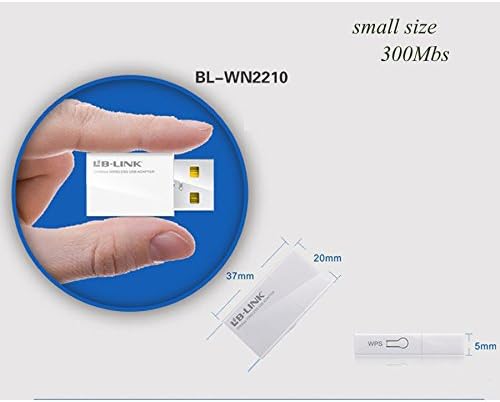
Figure 9.1: Diagram illustrating the compact dimensions of the LB-LINK BL-WN2210 USB Wi-Fi Adapter (37mm x 20mm x 5mm).
10. Garantia i Suport
The LB-LINK BL-WN2210 USB Adapter comes with a standard manufacturer's warranty. Please refer to the warranty card included in your product packaging for specific terms and conditions, including warranty period and coverage.
For technical support, driver updates, or further assistance, please visit the official LB-LINK website or contact their customer support. Contact information can typically be found on the product packaging or the manufacturer's weblloc.