
1. Producte acabatview
The Hubsan X4 H502E Desire is a compact and feature-rich GPS quadcopter designed for both beginners and experienced pilots. It includes a 720P HD camera for capturing aerial photos and videos, a 4-channel transmitter for precise control, and advanced features like GPS positioning, altitude hold, and automatic return to home.
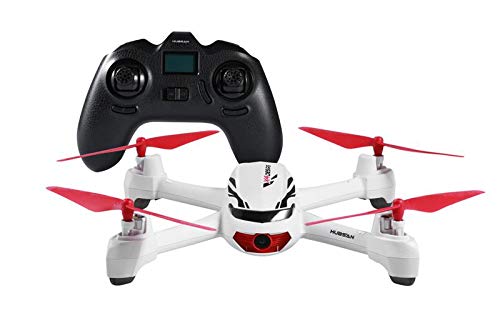
Figure 1: Hubsan X4 H502E Desire Quadcopter
2. Configuració
2.1 Propeller Assembly
Ensure all propellers are correctly assembled before flight. Match the propeller to the motor thread classified with the same letter (e.g., 'A' propeller to 'A' motor). Screw and tighten the propellers securely.
Video 1: Hubsan X4 H502E Desire Tutorial Video (includes propeller assembly)
2.2 Battery Installation and Linking
Install 4 AAA batteries into the remote controller. Insert the LiPo battery into the quadcopter's battery compartment. Turn on the controller, then power on the quadcopter. Place the quadcopter and transmitter as closely as possible for optimal linkage. The LED indicators on the quadcopter will blink regularly once the linkage is successfully established.
Video 2: Hubsan 502E Desire - How to Bind (includes battery installation and linking)
3. Instruccions de funcionament
3.1 Llista de verificació prèvia al vol
- Ensure propellers are securely attached.
- Verify controller and quadcopter batteries are charged.
- Perform linkage between controller and quadcopter.
- Fly in an open area, away from obstacles, people, and animals.
- Wait for the controller to indicate at least 6 GPS satellites are found for stable flight and RTH functionality.
3.2 Controlador passatview
The remote controller features two main sticks and various buttons for flight control and functions. The LCD display shows important flight information.
- Left Stick (Throttle/Rudder): Controls altitude (up/down) and yaw (left/right rotation).
- Right Stick (Elevator/Aileron): Controls pitch (forward/backward movement) and roll (left/right sideward movement).
- Throttle Trimming Buttons: Adjusts the throttle to prevent unwanted drift.
- Elevator/Aileron Trimming Buttons: Adjusts pitch and roll to prevent unwanted drift.
- Botó de foto/enregistrament: Located on the top left, used to take photos or start/stop video recording.
- Botó RTH: Located on the top right, activates the Return to Home function.
3.3 Controls bàsics de vol
- Enlairament: Push both sticks according to the instruction to start the motors. Push the left stick up to rise.
- Aterratge: Pull the left stick down to descend.
- Yaw (Rotation): Push the left stick left or right to rotate the quadcopter counter-clockwise or clockwise.
- Pitch (Forward/Backward): Push the right stick up or down to tilt the quadcopter and fly forward or backward.
- Roll (Sideward): Push the right stick left or right to tilt the quadcopter and fly left or right.
3.4 Modes de vol avançats
- Mode sense cap: Press the throttle stick vertically to enter headless mode. The headless icon will display on the LCD screen. Press the stick again to exit.
- Mode expert: Press the elevator stick vertically to enter expert mode. The expert icon will display on the LCD screen. Press the stick again to exit.
3.5 Funcionament de la càmera
To take photos, press the photo/record button. The camera icon will blink once on the LCD screen, indicating the photo is saved. To start recording video, press and hold the photo/record button for one second. The record icon will blink continuously. To stop recording, press and hold the button again. The record icon will become solid, indicating the video is saved.
3.6 Tornar a casa (RTH)
Press and hold the RTH button to activate the Return to Home mode. The quadcopter will automatically return to its take-off position (where 6 GPS satellites were found). Any movement of the elevator stick or pressing and holding the RTH button again will exit RTH mode.
3.7 Procediments d'emergència
In emergencies, such as avoiding collisions with aircraft or birds, you can force the quadcopter to drop down using specific stick combinations. Refer to the tutorial video for these operations. These operations are only for emergencies.
Video 3: Hubsan X4 H502E Desire Flight Demonstration (includes various flight operations)
4. Manteniment
- Neteja: Regularly clean the quadcopter body and propellers with a soft, dry cloth. Avoid using harsh chemicals.
- Inspecció d'hèlixs: Check propellers for any damage (cracks, bends) before each flight. Replace damaged propellers immediately.
- Cura de la bateria: Store LiPo batteries in a cool, dry place. Do not overcharge or over-discharge. Disconnect batteries when not in use.
- Cura del motor: Keep motors free from dust and debris.
5. Solució De Problemes
- Sense poder: Ensure batteries are fully charged and correctly installed in both the quadcopter and controller.
- Failure to Bind: Ensure the quadcopter and controller are close together during the binding process. Follow the binding steps precisely.
- Erratic Flight/Drifting: Calibrate the compass as instructed in the full manual. Check for sufficient GPS satellite lock (at least 6 satellites). Ensure propellers are correctly installed and undamaged. Adjust trim settings on the controller.
- Poor Camera Quality: Ensure the camera lens is clean. Check that the SD card is properly inserted and has sufficient space.
- Loss of Control/Out of Range: The quadcopter is designed to enter RTH mode if it goes out of control range, provided GPS signal is strong.
6. Especificacions
| Característica | Detall |
|---|---|
| Marca | HUBSAN |
| Nom del model | X4 H502E Desire |
| Resolució de captura de vídeo | 720p |
| Resolució de fixes efectius | 2 MP |
| Pes de l'article | 1.54 lliures |
| Capacitat de la bateria | 610 milionsamp Hores |
| Tipus de control | Control remot |
| Tecnologia de comunicació sense fils | Wi-Fi |
| Material | Plàstic |
| Dimensions de l'article (L x A x A) | 6.5 cm de llargada x 6.5 cm d'amplada x 2.36 cm d'alçada |
7. Garantia
Aquest producte es ven amb Sense garantia. Please refer to the retailer's return policy for any issues.
8. Suport
For any questions or further assistance regarding your Hubsan X4 H502E Desire GPS Quadcopter, please feel free to contact the manufacturer or your retailer's customer support. Always refer to the full product manual for detailed instructions and safety guidelines.