
1. Introducció
Gràcies per la compraasing the Forever BS600 Bluetooth Speaker. This portable wireless speaker combines powerful audio with versatile playback options, including Bluetooth, FM radio, USB, and SD card support. It also features a built-in microphone for hands-free calling. Please read this manual carefully to ensure proper use and maintenance of your device.
Components inclosos:
- Forever BS600 Bluetooth Speaker
- Cable Jack de 3.5 mm
- Cable de càrrega USB
- Lithium Battery (pre-installed)

Image 1.1: Forever BS600 speaker with its accompanying 3.5mm audio cable and USB charging cable.
2. Informació de seguretat
To ensure safe and optimal operation, please observe the following precautions:
- No exposeu el dispositiu a temperatures extremes, llum solar directa ni humitat elevada.
- Eviteu deixar caure o sotmetre l'altaveu a forts impactes.
- No desmunteu, repareu ni modifiqueu el dispositiu vosaltres mateixos. Envieu totes les tasques de manteniment a personal qualificat.
- Mantingueu l'altaveu allunyat de l'aigua i altres líquids. No és impermeable.
- Use only the provided or approved charging cables.
- Desfeu-vos de les piles d'acord amb la normativa local. No exposeu les piles a una calor excessiva.
3. Producte acabatview
Familiaritzeu-vos amb els controls i els ports de l'altaveu:
Botons de control:
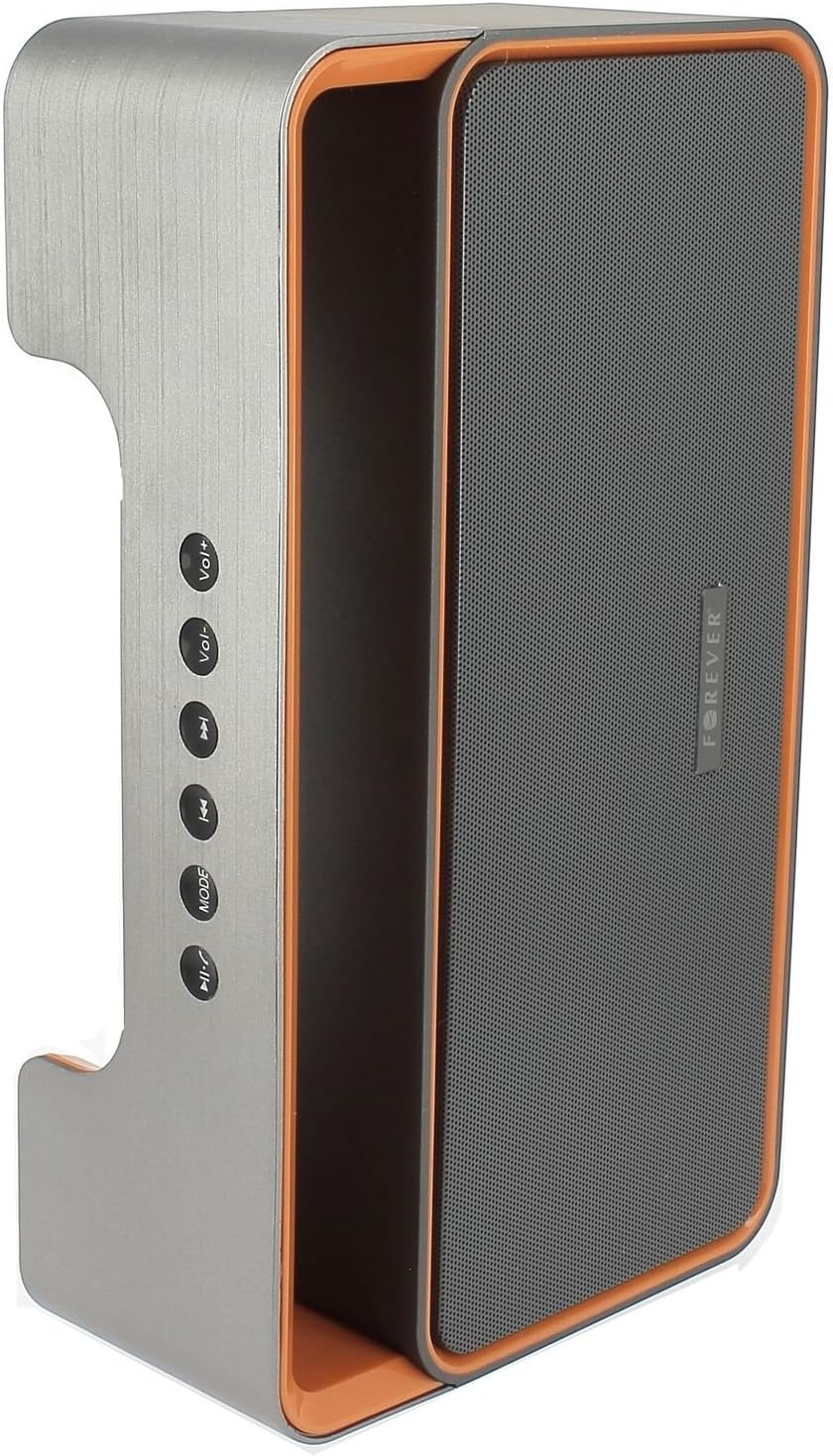
Image 3.1: Side panel with control buttons.
- Vol+ / Vol-: Ajusta el volum.
- Pista anterior / Pista següent: Navigate between tracks in playback modes or stations in FM mode.
- MODE: Switch between Bluetooth, FM Radio, USB, SD Card, and AUX modes.
- Reproduir/Pausa: Play or pause audio. Answer or end calls.
Ports i connectors:

Image 3.2: Rear panel with ports and power switch.
- Entrada AUX: For connecting external audio devices via 3.5mm cable.
- Ranura per a targeta Micro SD: For playing music from a Micro SD card.
- Port USB: For playing music from a USB flash drive.
- Port de càrrega micro USB: Per carregar la bateria interna de l'altaveu.
- Interruptor ON/OFF: To power the speaker on or off.
4. Configuració
4.1 Càrrega de l'altaveu
- Connect the small end of the USB charging cable to the Micro USB port on the back of the speaker.
- Connecteu l'extrem més gran del cable USB a un adaptador de corrent USB (no inclòs) o al port USB d'un ordinador.
- El llum indicador de càrrega s'il·luminarà (el color pot variar) per indicar que l'altaveu s'està carregant.
- Un cop completament carregat, l'indicador lluminós canviarà o s'apagarà. Desconnecteu el cable de càrrega.
Note: For first-time use, fully charge the speaker for approximately 3-4 hours.
4.2 Engegada/apagada
- To power on, slide the ON/OFF switch on the rear panel to the 'ON' position. You will hear an audible prompt.
- Per apagar-lo, feu lliscar l'interruptor ON/OFF a la posició 'OFF'.
5. Instruccions de funcionament
5.1 Selecció del mode
Premeu el botó MODE button repeatedly to cycle through the available modes: Bluetooth, FM Radio, USB, SD Card, and AUX.
5.2 Vinculació Bluetooth
- Engegueu l'altaveu. Entrarà automàticament en mode d'emparellament Bluetooth, cosa que s'indicarà amb un llum LED intermitent i un missatge audible.
- Enable Bluetooth on your mobile device (smartphone, tablet, computer).
- Cerca available Bluetooth devices. You should find "BS600" in the list.
- Select "BS600" to connect. Once paired, the LED light will stop flashing, and you will hear a confirmation sound.
- Ara pots reproduir àudio des del teu dispositiu a través de l'altaveu.
5.3 Mode de ràdio FM
- Canvieu l'altaveu al mode de ràdio FM amb el botó MODE botó.
- Manteniu premut el botó Reproduir/Pausa per iniciar una cerca automàtica d'emissores FM. L'altaveu desarà totes les emissores trobades.
- Utilitza el Pista anterior i Pista següent botons per navegar entre les emissores desades.
5.4 Reproducció des de targeta USB/SD
- Insert a USB flash drive or a Micro SD card (with MP3 audio files) into the corresponding port on the rear panel.
- The speaker will automatically switch to USB or SD card mode and begin playing music. If not, press the MODE botó per seleccionar el mode correcte.
- Utilitza el Pista anterior, Pista següent, i Reproduir/Pausa botons per controlar la reproducció.
5.5 Mode AUX
- Connecteu un extrem del cable d'àudio de 3.5 mm al port d'entrada AUX de l'altaveu.
- Connect the other end of the cable to the headphone jack of your external audio device.
- Canvieu l'altaveu al mode AUX amb el botó MODE botó.
- Controla la reproducció des del teu dispositiu d'àudio extern.
5.6 Gestió de trucades (mode Bluetooth)
- Respon a la trucada: When a call comes in during Bluetooth mode, press the Reproduir/Pausa button once to answer.
- Finalitzar la trucada: During a call, press the Reproduir/Pausa button once to end the call.
- Rebutja la trucada: When a call comes in, press and hold the Reproduir/Pausa botó per rebutjar la trucada.
5.7 Control de volum
Premeu el botó Vol+ botó per augmentar el volum i tornar botó per baixar el volum.
6. Manteniment
6.1 Neteja
- Assegureu-vos que l'altaveu estigui apagat i desconnectat de qualsevol font d'alimentació abans de netejar-lo.
- Use a soft, dry, lint-free cloth to wipe the exterior surfaces of the speaker.
- No utilitzeu netejadors abrasius, dissolvents ni esprais químics, ja que poden danyar l'acabat o els components interns.
6.2 Emmagatzematge
- Quan no l'utilitzeu durant períodes prolongats, guardeu l'altaveu en un lloc fresc i sec, allunyat de la llum solar directa i de temperatures extremes.
- It is recommended to charge the battery at least once every three months to maintain its lifespan.
7. Solució De Problemes
| Problema | Causa possible | Solució |
|---|---|---|
| L'altaveu no s'encén. | La bateria està esgotada. | Carregueu l'altaveu amb el cable USB. |
| Sense so. | El volum és massa baix; s'ha seleccionat un mode incorrecte; el dispositiu no està connectat. | Increase volume; press MODE button to select correct source; ensure Bluetooth/AUX connection is active. |
| L'aparellament de Bluetooth falla. | Speaker not in pairing mode; device too far; Bluetooth not enabled on source. | Ensure speaker is in Bluetooth mode and flashing; move device closer; enable Bluetooth on your device. |
| Mala recepció de ràdio FM. | Senyal feble; interferències ambientals. | Recol·loca l'altaveu a una zona amb millor recepció. |
| La targeta USB/SD no es reprodueix. | Incorrecte file format; card/drive not inserted correctly; corrupted media. | Assegureu-vos files are MP3 format; reinsert media; try a different USB drive/SD card. |
8. Especificacions
| Nom del model | BS600 |
| Marca | Per sempre |
| Tecnologia de connectivitat | Bluetooth, Auxiliar, USB |
| Tipus d'altaveu | Altaveu Bluetooth portàtil |
| Característiques especials | FM Radio, USB Reader, SD Card Reader |
| Potència de sortida màxima | 10 watts (2 x 5 W) |
| Mode de sortida d'àudio | Mono |
| Font d'alimentació | Alimentat per bateria (ió de liti) |
| Mètode de control | Tactile Buttons |
| Dimensions (aprox.) | Height: 13 cm, Width: 24 cm |
| Color | Gris / Taronja |
| Impermeable | No |
9. Informació de la garantia
The Forever BS600 Bluetooth Speaker comes with a limited warranty. Please refer to the warranty card included with your purchase or contact your retailer for specific terms and conditions. This warranty typically covers manufacturing defects but does not cover damage caused by misuse, accidents, unauthorized modifications, or normal wear and tear.
10. Suport
If you encounter any issues not covered in the troubleshooting section or require further assistance, please contact the retailer where you purchased the product or visit the official Forever website for support resources. Please have your product model (BS600) and purchase details ready when seeking support.


