
1. Producte acabatview
The Midiplus Studio M is a compact and high-performance USB audio interface designed for studio recording. It features one input and two outputs, supporting high-quality microphone input and 24-bit/192kHz high-precision sampling. The device is powered via PC USB and includes 48V phantom power for condenser microphones. Its small, exquisite design is compatible with both Mac and Windows operating systems, making it a versatile tool for musicians and producers.
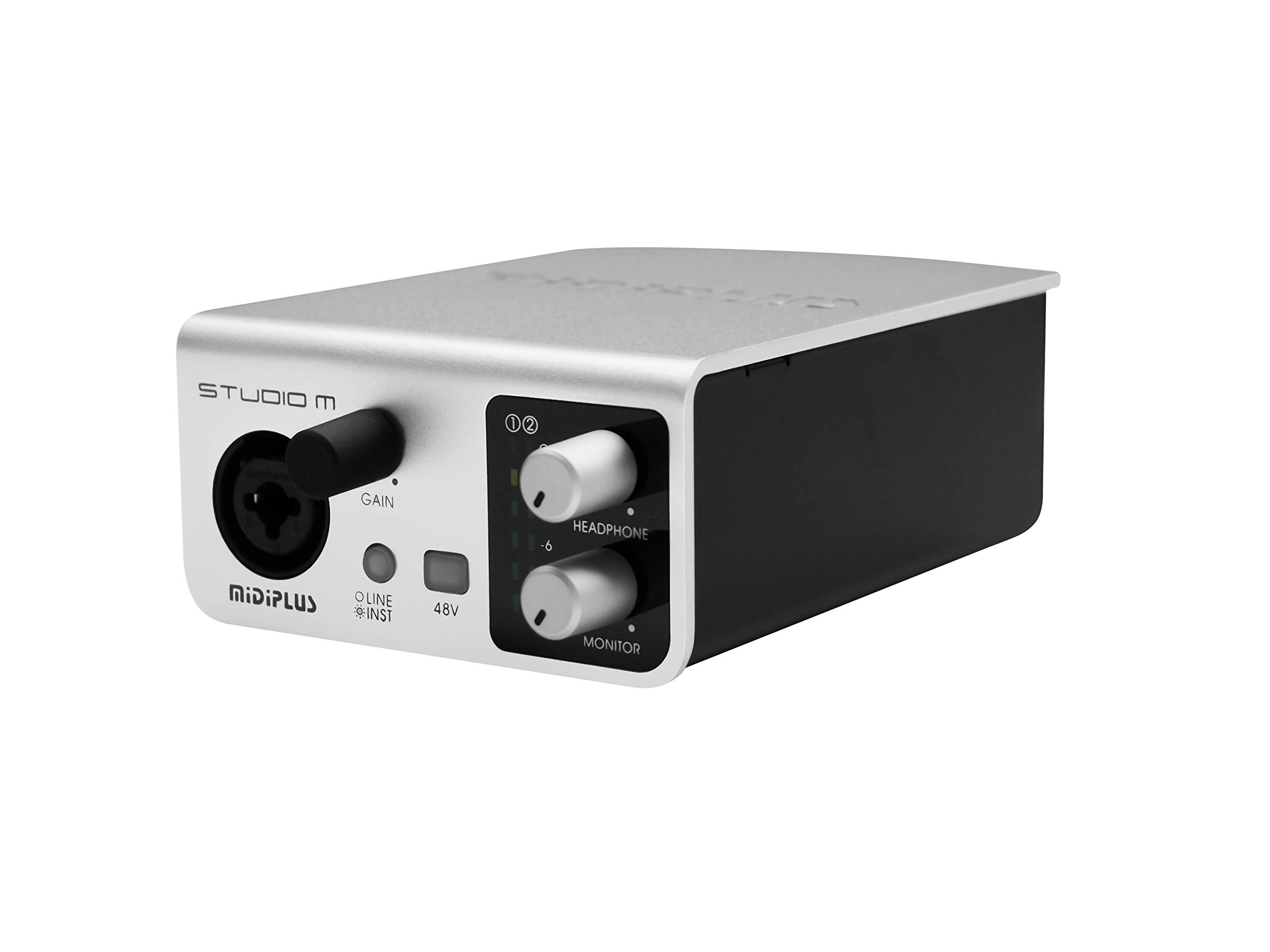
Figura 1: Davant i darrere view of the Midiplus Studio M USB Audio Interface.
2. Guia de configuració
2.1 Contingut del paquet
- Midiplus Studio M USB Audio Interface
- Cable USB
- Manual del propietari (aquest document)
- Targeta informativa
2.2 Requisits del sistema
- Sistema operatiu: Windows, macOS
- Compatible Devices: Personal Computer with USB port
2.3 Connexió del dispositiu
- Connect the Midiplus Studio M to your computer using the provided USB cable. The device is USB-powered.
- Ensure your operating system (Windows or macOS) recognizes the device. Drivers may be required for optimal performance; refer to the Midiplus weblloc web per a la descàrrega dels controladors més recents.
- Connect your microphone or instrument to the Input (MIC/Line/Hi-z) interface on the front panel.
- Connect your headphones to the headphone interface on the front panel, or your studio monitors to the Output interface (Left/Right) on the rear panel.

Figure 2: Midiplus Studio M connected to a computer, showing input and output cables.
3. Instruccions de funcionament
3.1 Controls del panell frontal
- Input Gain Control Knob: Adjusts the input level for the connected microphone or instrument.
- Switch (Mic/Instrument) Button: Toggles between microphone and instrument input modes.
- 48V Phantom Power ON/OFF: Activates or deactivates 48V phantom power for condenser microphones.
- Headphone Volume Control Button: Adjusts the output volume for connected headphones.
- Output Volume Control Button: Adjusts the main output volume for connected studio monitors.

Figure 3: Midiplus Studio M in a studio setup, demonstrating its compact size and integration.
3.2 Connexions del panell posterior
- Interfície USB: USB2.0 port for connection to your computer and power supply.
- Output Interface (Left/Right): Connects to your studio monitors or other output devices.
- Extensible Device Interface: Provides additional connectivity options for other devices.
4. Manteniment
- Mantingueu el dispositiu net netejant-lo amb un drap suau i sec. Eviteu utilitzar productes químics agressius o materials abrasius.
- Assegureu-vos que tots els cables estiguin connectats correctament per evitar pèrdues o danys al senyal.
- Store the interface in a cool, dry place away from direct sunlight and extreme temperatures.
- Eviteu col·locar objectes pesats a la part superior de la unitat.
5. Solució De Problemes
5.1 Sense sortida de so
- Check all cable connections (USB, input, output, headphones).
- Ensure the device is powered on and recognized by your computer.
- Verify that the output volume controls (headphone and main output) are turned up.
- Check your computer's sound settings to ensure the Midiplus Studio M is selected as the output device.
5.2 Input Signal Issues
- Adjust the Input Gain Control Knob.
- Ensure the correct input mode (Mic/Instrument) is selected.
- If using a condenser microphone, verify that 48V Phantom Power is enabled.
- Check the microphone/instrument cable for damage.
5.3 Device Not Recognized by Computer
- Proveu de connectar el cable USB a un port USB diferent de l'ordinador.
- Reinicieu l'ordinador.
- Ensure the latest drivers for the Midiplus Studio M are installed from the official Midiplus weblloc.
- Prova amb un altre cable USB si està disponible.
6. Especificacions tècniques
| Característica | Detall |
|---|---|
| Número de model | Studio M |
| Marca | Midiplus |
| Tecnologia de connectivitat | USB (USB2.0) |
| Resolució d'àudio | 24 bits / 192 kHz |
| Entrades | 1 (MIC/Line/Hi-z) |
| Sortides | 2 (Left/Right) |
| Poder fantasma | 48V (commutable) |
| Sistemes operatius compatibles | Windows, macOS |
| Dimensions del producte | 5.28 x 3.54 x 1.89 polzades |
| Pes de l'article | 14.1 unces (0.4 quilograms) |
7. Garantia i Suport
For warranty information and technical support, please refer to the official Midiplus website or contact your local dealer. Keep your purchase receipt as proof of purchase for any warranty claims.