
1. Introducció
This manual provides essential information for setting up, operating, maintaining, and troubleshooting your Toshiba Satellite S55 laptop. Please read this manual thoroughly to ensure proper use and to maximize the performance and longevity of your device.
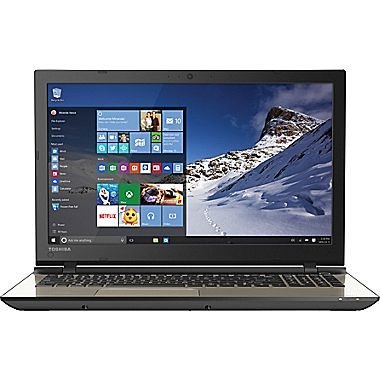
Figure 1.1: Toshiba Satellite S55 Laptop. This image shows the laptop in a closed position, highlighting its sleek design and silver finish.
2. Contingut del paquet
Verifiqueu que tots els elements siguin presents al paquet:
- Toshiba Satellite S55 Laptop
- Adaptador de CA i cable d'alimentació
- Documentació (Guia d'inici ràpid, Informació de garantia)
The laptop includes built-in Harman/Kardon speakers, a backlit keyboard, DVD-SuperMulti drive, MultiMediaCard, SD Memory Card, SDHC Memory Card, SDXC Memory Card slots, and an HDMI port.
3. Configuració
3.1 Connexió de l'adaptador de CA
- Connecteu l'adaptador de CA al connector d'alimentació del lateral del portàtil.
- Connecteu el cable d'alimentació a una presa de corrent.
- Deixeu que la bateria es carregui completament abans del primer ús.
3.2 Encès inicial
- Obriu la tapa de l'ordinador portàtil.
- Press the power button located above the keyboard on the right side.
- Follow the on-screen instructions to complete the Windows 10 setup process. This includes setting up your user account, network connection, and basic preferences.
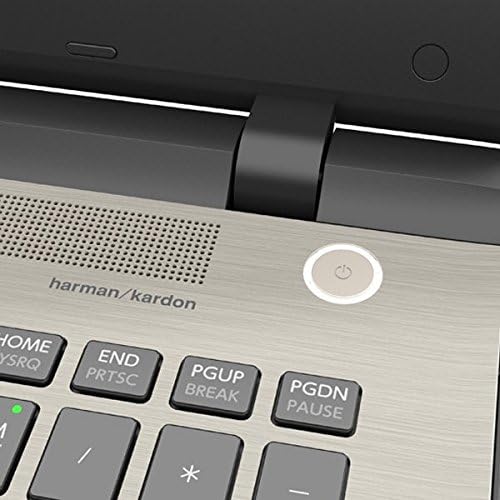
Figure 3.1: Power Button Location. This image provides a close-up view of the power button, located on the top right of the keyboard deck, next to the Harman/Kardon speaker grille.
4. Com fer servir el portàtil
4.1 Teclat i touchpad
The Toshiba Satellite S55 features a frameless TruType LED backlit keyboard with a 10-keypad for comfortable typing in various lighting conditions. The click pad pointing device supports multi-touch gestures for intuitive navigation.
- Teclat retroil·luminat: Use the dedicated function keys to toggle the keyboard backlight on or off.
- Gestos multitàctils: Refer to Windows 10 settings for customizing touchpad gestures such as scrolling, zooming, and switching applications.
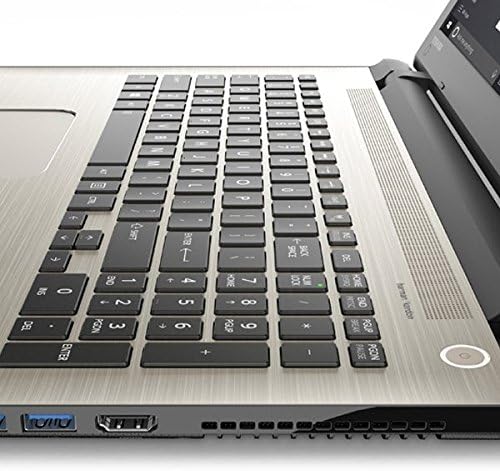
Figure 4.1: Keyboard and Touchpad. This image provides a detailed view of the backlit keyboard, 10-keypad, and the multi-touch click pad.
Unitat òptica 4.2
The laptop includes a DVD-SuperMulti drive (+/-R double layer) supporting up to 11 formats. To open the drive tray, press the eject button located on the drive itself or use the eject function within Windows Explorer.
4.3 Ports i connectivitat
The Satellite S55 offers various ports for connecting external devices:
- Ports USB 3.0: Three USB 3.0 ports are available, with one supporting USB Sleep and Charge for powering devices even when the laptop is off or in sleep mode.
- Port HDMI: Connect to external displays or TVs with 4K Ultra HD output capability.
- Port LAN (RJ-45): For wired network connections (10/100/1000 Ethernet).
- Presa per a auriculars/micròfon: A shared port for audio output and input.
- Memory Card Reader: Supports MultiMediaCard, SD Memory Card, SDHC Memory Card, and SDXC Memory Card.
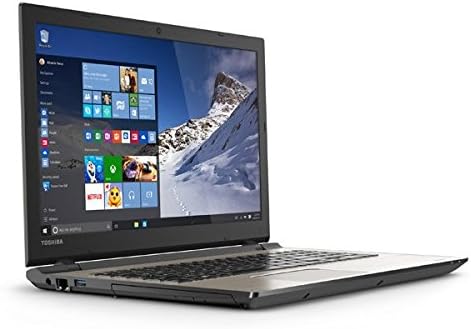
Figure 4.2: Left Side Ports. This image displays the left side of the laptop, showing the power input, LAN port, HDMI port, and USB 3.0 ports.
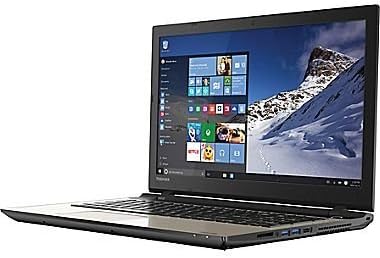
Figure 4.3: Right Side Ports and Optical Drive. This image shows the right side of the laptop, featuring the DVD-SuperMulti drive, additional USB ports, and the headphone/microphone jack.
4.4 Comunicació sense fil
The laptop supports Intel Dual Band Wireless-N 7265 2x2 AC (802.11AC) for high-speed Wi-Fi connectivity and Bluetooth (4.1) for connecting wireless peripherals.
- Wi-Fi: Connect to available wireless networks through the Windows 10 network settings.
- Bluetooth: Pair Bluetooth devices such as headphones, mice, or keyboards via Windows 10 Bluetooth settings.
4.5 Webcàmera i àudio
An HD webcam with TruTalk dual microphones is integrated for video conferencing and voice commands. The laptop features harman/kardon stereo speakers with DTS Sound™ for enhanced audio experience.
5. Manteniment
5.1 Cura de la bateria
The Lithium Ion (45Wh, 4-Cell) battery is not user-replaceable. To prolong battery life (up to 6 hours), avoid extreme temperatures and fully discharge and recharge the battery periodically. For optimal performance, keep the laptop connected to the AC adapter when possible.
5.2 Neteja
- Feu servir un drap suau i sense borrissol per netejar la pantalla i les superfícies exteriors.
- Eviteu utilitzar productes químics aggressivs o netejadors abrasius.
- Gently clean keyboard keys and touchpad with a slightly damp tela.
5.3 Actualitzacions de programari
Regularly check for and install Windows updates and Toshiba driver updates to ensure system stability, security, and optimal performance.
6. Solució De Problemes
6.1 Problemes d'energia
- El portàtil no s'encén: Ensure the AC adapter is securely connected and the power outlet is functional. Check if the battery has sufficient charge.
- La bateria no es carrega: Verify the AC adapter and power cord are not damaged. Try a different power outlet.
6.2 Problemes de visualització
- Pantalla en blanc: Connecteu un monitor extern per comprovar si el problema és a la pantalla del portàtil. Ajusteu la configuració de la brillantor.
- Resolució incorrecta: Adjust display settings in Windows 10 to the recommended 1366x768 resolution.
6.3 Connectivitat de xarxa
- No es pot connectar a Wi-Fi: Ensure Wi-Fi is enabled in Windows settings. Restart your router and the laptop. Verify network password.
- No internet access: Check your internet service provider's status. Ensure your router is functioning correctly.
7. Especificacions
| Característica | Detall |
|---|---|
| Model | S55 |
| Sistema operatiu | Windows 10 Home de 64 bits |
| Processador | Intel Core i7-5500U Dual-Core (2.0GHz up to 2.9GHz) |
| RAM | 12 GB de DDR3L a 1600 MHz |
| Disc dur | 1TB (5400rpm) HDD |
| Mostra | 15.6" TruBrite LED Backlit (1366x768 HD) |
| Gràfics | Mobile Intel HD 6000 Graphics |
| Unitat òptica | DVD-SuperMulti drive |
| Sense fil | Intel Dual Band Wireless-N 7265 2x2 AC (802.11AC), Bluetooth 4.1 |
| LAN | Ethernet 10/100/1000 |
| Ports USB | 3 x USB 3.0 (1 with USB Sleep and Charge) |
| HDMI | Yes, with 4K Ultra HD output capability |
| Àudio | harman/kardon stereo speakers, DTS Sound™ |
| Weblleva | HD webcam with TruTalk dual microphones |
| Bateria | Lithium Ion (45Wh, 4-Cell), up to 6 hours |
| Pes | 4.85 lliures (2.2 kg) |
| Dimensions (LxWxH) | 14 x 1 x 12 polzades |
| Color | Brushed Aluminum Finish (Silver) |
8. Garantia i Suport
For warranty information, please refer to the documentation included with your product. For technical support, driver downloads, or service inquiries, please visit the official Toshiba support weblloc o poseu-vos en contacte amb el seu departament d'atenció al client.
Podeu trobar recursos addicionals i informació de contacte a Botiga Toshiba a Amazon.