
1. Producte acabatview
The Ergotron LX Monitor Arm is a versatile single monitor desk mount designed to enhance your workspace ergonomics and free up valuable desk space. It supports flat, curved, and ultrawide computer monitors up to 34 inches diagonal and weighing between 7 to 25 lbs. The arm features extensive adjustability for optimal viewing comfort and includes integrated cable management for a clean setup.

Figure 1: Ergotron LX Monitor Arm (5-Inch Pole, White)
2. Informació important de seguretat
Please read this manual thoroughly before installation and use. Failure to follow these instructions could result in property damage or personal injury. Keep this manual for future reference.
- Assegureu-vos que la superfície de l'escriptori sigui prou resistent per suportar el pes combinat del braç del monitor i del monitor.
- No supereu la capacitat màxima de pes de 25 lliures (11.3 kg).
- Always install the monitor onto the arm before adjusting the monitor pivot or tension.
- Use appropriate tools and hardware as specified in the installation steps.
- Mantingueu els nens i les mascotes allunyats de la zona d'instal·lació.
3. Què hi ha a la caixa
The Ergotron LX Monitor Arm Kit includes the following components:
- LX Monitor Arm Assembly (5-Inch Pole, White)
- Two-piece Desk Clamp
- Mounting Hardware (screws, washers, Allen wrenches)
- Manual d'instruccions

Figure 2: Contents of the Ergotron LX Monitor Arm Kit.
4. Configuració i instal·lació
The LX Monitor Arm offers versatile mounting options, including a desk clamp and an optional grommet mount (sold separately). Follow the steps below for installation.
4.1 Escriptori Clamp Instal·lació
- Adjunta el clauer de l'escriptoriamp: Secure the two-piece desk clamp to your desk. The clamp accommodates desk thicknesses from 0.4 to 2.4 inches (1 to 6.1 cm). Tighten the clamp securely using the provided knob.
- Inserir pol: Place the monitor arm pole into the secured desk clamp.
- Fixar el braç: Slide the arm assembly onto the pole.
- Monitor de muntatge: Attach your VESA-compatible monitor (75x75mm or 100x100mm) to the arm's mounting plate using the provided screws. Ensure the monitor is securely fastened.

Figura 3: Clau d'escriptoriamp attachment, showing compatibility with various desk thicknesses.
Video 1: Detailed guide on how to install and adjust the Ergotron LX Monitor Arm.
4.2 Grommet Mount Installation (Optional)
If using a grommet mount (sold separately), ensure your desk has a suitable hole (0.31" - 2" diameter) and the desk thickness is less than 2.25" (57 mm). Follow the grommet mount instructions provided with the accessory.
5. Funcionament del braç del monitor
The Ergotron LX Monitor Arm allows for effortless adjustment to achieve your ideal viewing position. Always ensure your monitor is securely attached before making adjustments.
5.1 Adjusting Height and Extension
- Ajust d'alçada: Gently lift or lower the monitor to your desired height. The arm provides up to 17.3 inches (44 cm) of vertical lift.
- Extensió/Retracció: Push or pull the monitor to extend or retract it from your viewing position. The arm offers up to 25.6 inches (65 cm) of extension.

Figure 4: Monitor mounted on the LX arm, demonstrating side-to-side movement.

Figure 5: Visual representation of the arm's extension capabilities.
Video 2: Demonstration of the LX Monitor Arm's full range of motion.
5.2 Tilt and Rotation
- Inclinació: Adjust the monitor's tilt up to 75 degrees (70° back, 5° forward) to reduce glare and optimize viewangles d'ajust.
- Rotació: Rotate the monitor 360 degrees for portrait or landscape viewing.
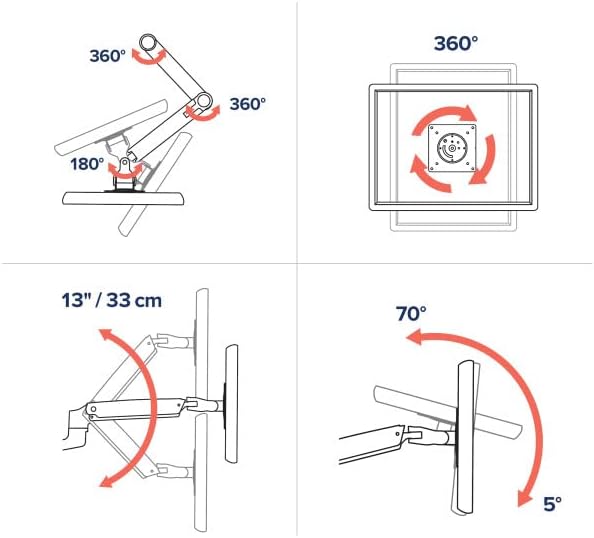
Figure 6: Illustrates 360° rotation, 13" (33cm) lift, and 75° tilt capabilities.

Figure 7: Monitor displayed in portrait orientation using the LX arm.
5.3 Gestió de cables
Route cables through the integrated cable management channels along the arm to maintain a clean and organized workspace.
6. Manteniment
- Neteja: Wipe the arm and monitor with a soft, damp drap. Eviteu productes químics agressius o netejadors abrasius.
- Comprovacions periòdiques: Reviseu periòdicament tots els cargols i connexions per assegurar-vos que estiguin ben ajustats i segurs.
- Ajust de tensió: If the monitor sags or is difficult to move, adjust the tension using the provided Allen wrench. Refer to the installation video for guidance.
7. Solució De Problemes
- Monitor Sags/Drifts: The arm tension may be too low for your monitor's weight. Increase the tension using the appropriate Allen wrench.
- Monitor is Difficult to Move: The arm tension may be too high. Decrease the tension using the appropriate Allen wrench.
- Balanç: Ensure all mounting screws and clamp connections are securely tightened. A stable desk surface is also crucial.
8. Especificacions
| Característica | Detall |
|---|---|
| Marca | Ergotron |
| Model | LX Monitor Arm Kit (5-Inch Pole, White) |
| Tipus de muntatge | Suport de taula (suport d'escriptori)amp included, Grommet Mount optional) |
| Tipus de moviment | Articulant |
| Material | Metall |
| Color | Blanc |
| Dispositius compatibles | Monitors up to 34 inches diagonal |
| Capacitat de pes | De 7 a 25 kg (3.2 a 11.3 lliures) |
| Compatibilitat VESA | 75x75mm, 100x100mm |
| Ascensor Vertical | Fins a 17.3 polzades (44 cm) |
| Extensió | Fins a 25.6 polzades (65 cm) |
| Angle d'inclinació | 75 Degrees (70° back, 5° forward) |
| Rotació | 360 Degrees (Portrait to Landscape) |
| Escriptori Clamp Gruix | De 0.4 a 2.4 polzades (de 1 a 6.1 cm) |
9. Garantia i Suport
9.1 Informació de la garantia
The Ergotron LX Monitor Arm is backed by a Garantia limitada d'10 any, ensuring quality and durability. This warranty covers defects in materials and workmanship under normal use.
9.2 Atenció al client
For technical assistance, troubleshooting, or warranty claims, please visit the official Ergotron website or contact their customer support team. You can find more information and resources at the Ergotron Store on Amazon.