
Introducció
The Konftel EGO is a compact and portable personal speakerphone designed for crystal-clear audio conferencing. Featuring OmniSound audio technology, it is suitable for small meetings, individual use, and travel. This manual provides instructions for setting up, operating, and maintaining your Konftel EGO.
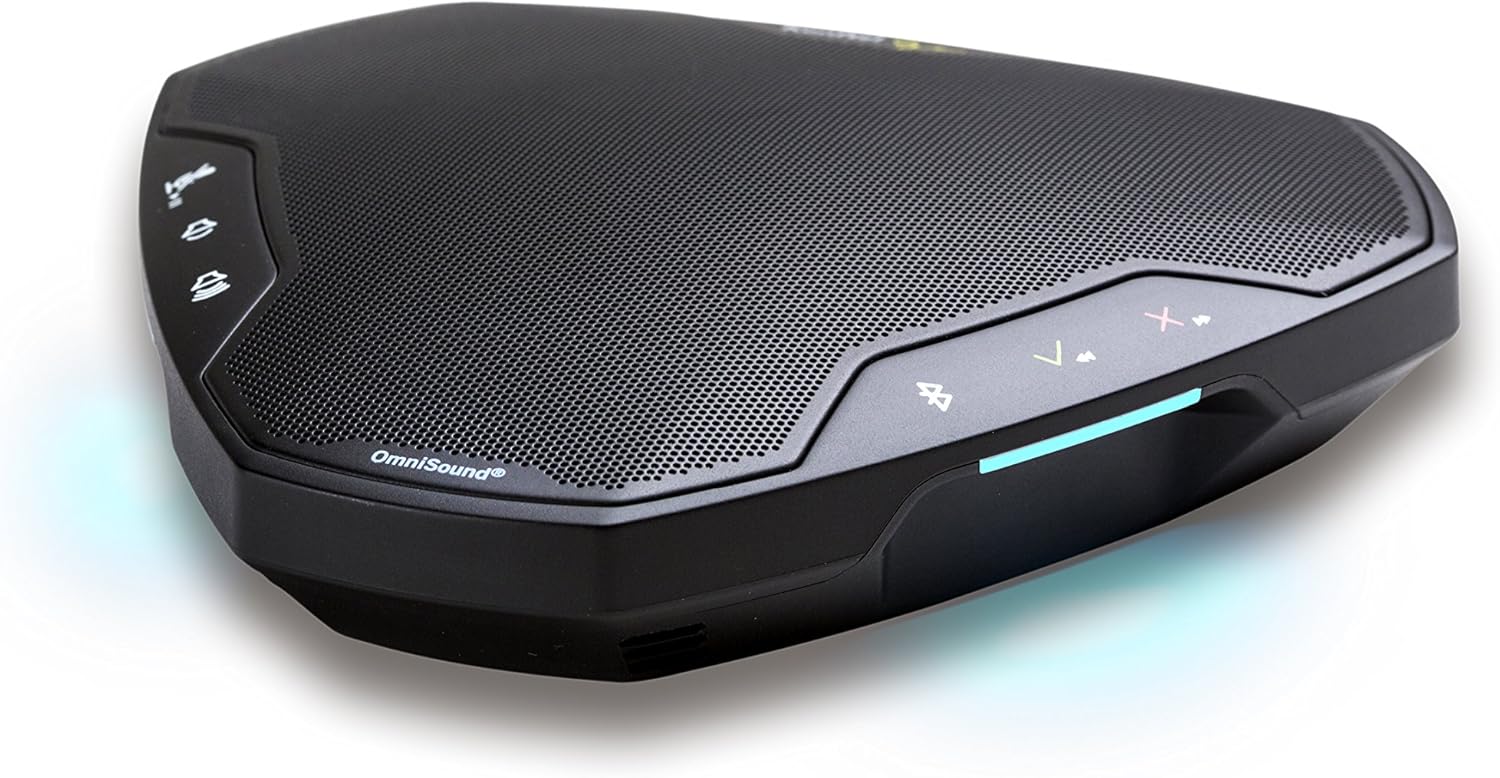
Image: The Konftel EGO in use during a small group meeting, demonstrating its portability and ease of integration into various environments.
Què hi ha a la caixa
- Konftel EGO Conferencing Unit
- Maleta de transport
- Cable USB
- Manual d'usuari (aquest document)
Producte acabatview
The Konftel EGO features intuitive controls and essential ports for connectivity. Familiarize yourself with the device's layout before use.

Imatge: Superior view of the Konftel EGO, highlighting the touch-sensitive control panel and OmniSound branding.

Imatge: Part posterior view of the Konftel EGO, displaying the headset port, USB connection, and power button.
Components clau:
- Controls tàctils: For call answer/end, volume up/down, mute, Bluetooth pairing.
- Pantalla LCD: Mostra informació d'estat.
- Port USB: For connecting to a computer and charging.
- Port dels auriculars: For connecting a personal headset (disables internal microphone).
- Botó d'encesa: Per encendre/apagar el dispositiu.
- NFC Tag: For quick Bluetooth pairing with compatible devices.
Configuració
1. Càrrega del dispositiu
Before first use, fully charge your Konftel EGO. Connect the supplied USB cable to the USB port on the device and to a computer or a USB power adapter (not included). The LCD screen will indicate charging status. A full charge provides approximately 12 hours of talk time.
2. Connexió mitjançant USB
- Connect the Konftel EGO to your computer using the supplied USB cable.
- The device will be recognized as an audio device. Select "Konftel EGO" as your speaker and microphone in your computer's audio settings or conferencing application.
- The device will draw power from the USB connection during use.
3. Emparellament per Bluetooth
The Konftel EGO supports Bluetooth pairing with mobile phones and other compatible devices.
Standard Bluetooth Pairing:
- Ensure the Konftel EGO is powered on.
- Manteniu premut el botó Botó Bluetooth on the device until the Bluetooth indicator flashes.
- On your mobile device, go to Bluetooth settings and select "Konftel EGO" from the list of available devices.
- Once paired, the Bluetooth indicator will glow steadily.
Emparellament NFC (comunicació de camp proper):
- Assegureu-vos que l'NFC estigui activat al vostre dispositiu mòbil.
- Tap your NFC-enabled mobile device against the NFC tag on the Konftel EGO (located near the "Konftel Ego" logo).
- Confirm the pairing request on your mobile device.
Operating the Konftel EGO
Gestió de trucades:
- Respon a la trucada: Premeu el botó Botó de resposta (green phone icon).
- Finalitzar la trucada: Premeu el botó Botó Finalitzar trucada (red phone icon).
- Silenciar el micròfon: Premeu el botó Botó de silenci (microphone icon). Press again to unmute.
- Ajust de volum: Utilitza el Puja el volum (+) i Baixar el volum (-) botons.
Transmissió de música:
When connected via Bluetooth, the Konftel EGO can stream music in HD quality from your mobile device. Use your mobile device's controls for playback (play, pause, skip tracks).
Using a Headset:
Connect a 3.5mm headset to the headset port on the Konftel EGO for private conversations. When a headset is connected, the internal microphone and speaker of the EGO are disabled.
Manteniment
Neteja:
Wipe the device with a soft, dry cloth. Do not use liquid cleaners or abrasive materials, as these can damage the surface and internal components.
Cura de la bateria:
- Eviteu descarregar completament la bateria amb freqüència.
- Store the device in a cool, dry place if not used for extended periods.
- Charge the device periodically if stored for a long time to maintain battery health.
Resolució de problemes
| Problema | Causa possible | Solució |
|---|---|---|
| Sense so ni volum baix |
|
|
| No es pot connectar mitjançant Bluetooth |
|
|
| El micròfon no capta el so |
|
|
Especificacions
- Número de model: 910101081
- Dimensions del producte: 5.71 x 5.31 x 1.26 polzades
- Pes de l'article: 8.1 unces
- Bateria: 1 bateria de ions de liti (inclosa)
- Connectivitat: Bluetooth with NFC, USB
- Tecnologia d'àudio: OmniSound with HD audio
- Fabricant: Konftel
Garantia i Suport
For warranty information and technical support, please refer to the official Konftel website or contact your local Konftel reseller. Keep your proof of purchase for warranty claims.
Official Konftel Weblloc: www.konftel.com