
Introducció
This manual provides detailed instructions for the setup, operation, and maintenance of your Philips SpeechMike Premium Touch Dictation USB Microphone (SMP3700). Designed for professional dictation, this device offers superior audio quality and intuitive controls to enhance your workflow. Please read this manual thoroughly to ensure proper use and to maximize the performance of your SpeechMike.
Producte acabatview
The Philips SpeechMike Premium Touch (SMP3700) is a state-of-the-art dictation microphone engineered for clarity and precision. It features a decoupled studio-quality microphone, an integrated noise reduction filter, and a motion sensor, all contributing to exceptional speech recognition results.
- Decoupled Studio-Quality Microphone: Ensures clear recordings by isolating the microphone from handling noise and background sounds.
- Optimized Microphone Grille: Hexagonal openings allow maximum sound capture for crystal clear audio.
- Filtre pop integrat: Reduces pop and hiss noises for perfect recording quality.
- Large Speaker Area: Provides premium playback quality for reviewenregistraments.
- Disseny ergonòmic: Shaped for comfortable handling, reducing accidental button presses.
- Wear-Free Push Buttons: Designed for comfortable and durable operation.
- Sensor tàctil: Facilitates easier navigation through recordings without needing a mouse.
- Sensor de moviment integrat: Automatically mutes the microphone when placed on a desk and unmutes when picked up.
- Freely Configurable Keys: Customize buttons to streamline your dictation workflow.

The Philips SpeechMike Premium Touch (SMP3700) dictation microphone.
Contingut del paquet
Verifiqueu que tots els elements siguin presents al paquet:
- Philips SpeechMike Premium Touch Dictation Microphone (SMP3700)
- Guia d'inici ràpid
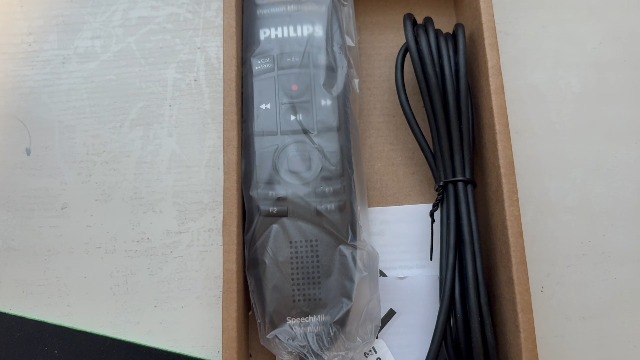
The Philips SpeechMike Premium Touch and its included USB cable in the packaging.
Configuració
Follow these steps to set up your SpeechMike Premium Touch:
- Connecteu el cable USB: Plug the USB connector of the SpeechMike into an available USB port on your computer.
- Instal·lació del controlador: Your operating system (Windows or macOS) should automatically detect the device and install the necessary drivers. If prompted, follow the on-screen instructions.
- Instal·lació del programari (opcional): For advanced features and customization, install the Philips SpeechControl software from the official Philips website or the provided installation media. This software allows you to configure buttons, adjust microphone settings, and update firmware.
- Prova el micròfon: Open a dictation application (e.g., Dragon NaturallySpeaking, Windows Voice Recognition, or a simple sound recorder) and test the microphone's functionality. Speak clearly into the microphone to ensure proper audio capture.

The SpeechMike Premium Touch connected to a computer via its USB cable.
Instruccions de funcionament
The SpeechMike Premium Touch is designed for intuitive operation. Familiarize yourself with its controls:
Enregistrament i reproducció
- Botó de gravació: Press the red record button to start and pause dictation.
- Botó Reproduir/Aturar: Use the central play/stop button to listen to your recordings.
- Avançar/rebobinar ràpid: The arrow buttons allow you to navigate quickly through your audio.
- Insert/Overwrite (Ins/Ovr): Toggle between inserting new audio or overwriting existing audio.
Touch Sensor Navigation
The integrated touch sensor allows for precise cursor control and navigation within documents or applications, similar to a mouse. Simply glide your thumb over the sensor for movement and press to click.

The touch sensor provides easy navigation without a mouse.
Programmable Function Keys (F1-F4)
The four programmable function keys (F1-F4) can be customized using the Philips SpeechControl software to perform specific actions or launch applications, optimizing your workflow.
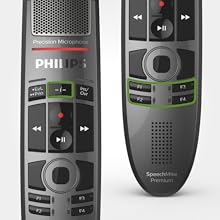
Customize the F1-F4 keys for personalized functions.
Sensor de moviment
The integrated motion sensor detects when the device is picked up or put down. It automatically mutes the microphone when it's resting on a surface and reactivates it when you pick it up, preventing unwanted background noise from being recorded.
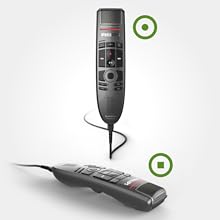
The motion sensor automatically mutes the microphone when not in use.
Manteniment
To ensure the longevity and optimal performance of your SpeechMike Premium Touch, follow these maintenance guidelines:
- Neteja: Regularly wipe the device with a soft, dry cloth. For hygienic cleaning, especially the microphone grille and buttons, use a disinfectant wipe. Avoid harsh chemicals or abrasive cleaners.
- Emmagatzematge: Store the SpeechMike in a clean, dry environment away from extreme temperatures and direct sunlight.
- Cura del cable: Eviteu doblegar o girar excessivament el cable USB per evitar danys.

The hygienic surface of the SpeechMike Premium Touch is easy to clean.
Resolució de problemes
If you encounter issues with your SpeechMike, refer to the following common solutions:
- Dispositiu no reconegut:
- Ensure the USB cable is securely connected to both the SpeechMike and your computer.
- Proveu de connectar-vos a un port USB diferent.
- Reinicieu l'ordinador.
- Consulta el Gestor de dispositius (Windows) o la Informació del sistema (macOS) de l'ordinador per veure si el dispositiu apareix a la llista.
- Sense entrada d'àudio:
- Verify that the microphone is not muted (check the motion sensor status or any mute buttons).
- Ensure the SpeechMike is selected as the default recording device in your operating system's sound settings and within your dictation software.
- Adjust microphone input levels in your sound settings.
- Mala qualitat d'àudio:
- Speak directly into the microphone grille from a consistent distance.
- Minimitza el soroll de fons a l'entorn de gravació.
- Update the device drivers and SpeechControl software to the latest version.
- Botons que no responen:
- Ensure the SpeechControl software is running and the device is properly configured.
- Restart the SpeechControl software or your computer.
- Check for any conflicting software that might be interfering with button assignments.
Especificacions
| Característica | Detall |
|---|---|
| Marca | Philips |
| Nom del model | SpeechMike Premium Touch |
| Número de model | SMP3700 |
| Tecnologia de connectivitat | USB |
| Tipus de connector | USB |
| Color | carbó vegetal |
| Patró polar | Unidireccional |
| Sensibilitat d'àudio | 90 decibels |
| Impedància | 200 ohms |
| Ràtio senyal / soroll | 70 dB |
| Resposta de freqüència | 20 kHz |
| Interval de freqüència | 200 – 12 000 Hz |
| Pes de l'article | 0.12 quilos |
| Dimensions de l'article (LxWxH) | 7.2 x 1.77 x 1.26 polzades |
| Material | Metall |
| Fabricant | Philips |
| UPC | 858783000188 |
Garantia i Suport
For warranty information, technical support, or service inquiries, please refer to the official Philips website or contact Philips customer support. Keep your purchase receipt as proof of purchase for warranty claims. Product registration may be available and is recommended to receive updates and support.
Podeu trobar recursos addicionals i informació de contacte a Philips Store.