
1. Introducció
The Rain Bird XC-801I-E is an advanced indoor electric irrigation programmer designed for efficient residential watering systems. This unit provides simple, reliable control for up to 8 irrigation stations. It features three independent programs, each capable of four daily start times, offering flexible scheduling options. The XC-801I-E is engineered for compatibility with the intelligent Solar Sync sensor, allowing for automatic adjustments to irrigation schedules based on local climate conditions, thereby optimizing water usage. Additionally, it supports connection with other sensors for enhanced control. This manual provides essential information for the installation, operation, and maintenance of your irrigation programmer.
2. Informació de seguretat
Please read all safety instructions before installing or operating the Rain Bird XC-801I-E irrigation programmer. Failure to follow these instructions may result in electric shock, fire, or damage to the product.
- Seguretat elèctrica: This device operates on 24 Volts. Ensure the power supply is disconnected before performing any wiring or maintenance. Only use the provided external transformer. Do not expose the unit to water or extreme moisture.
- Instal·lació: Install the programmer indoors, away from direct sunlight, rain, or excessive humidity. Ensure proper ventilation around the unit.
- Nens: Mantingueu el dispositiu fora de l'abast dels nens.
- Manteniment: Refer to the maintenance section for cleaning and care instructions. Do not attempt to repair the unit yourself; contact qualified service personnel.
3. Contingut del paquet
Verifiqueu que tots els components siguin presents al paquet:
- Rain Bird XC-801I-E Indoor Irrigation Programmer
- External Transformer (Power Supply)
- Manual d'usuari (aquest document)
- Maquinari de muntatge (cargols, ancoratges)
4. Configuració i instal·lació
Follow these steps for proper installation of your irrigation programmer.
4.1 Muntatge del controlador
- Choose an indoor location near a standard electrical outlet, protected from extreme temperatures and moisture.
- Use the provided mounting hardware to securely attach the controller to a wall. Ensure it is at a convenient height for programming and viewing.
4.2 Wiring the Valves
The XC-801I-E supports up to 8 irrigation zones and operates with 24V solenoid valves.
- Desconnecteu l'alimentació: Ensure the external transformer is unplugged from the electrical outlet.
- Connecteu el cable comú: Connect one common wire from all your solenoid valves to the 'COMMON' terminal on the controller.
- Connecteu els cables de zona: Connect the individual control wire from each solenoid valve to its corresponding station terminal (e.g., Station 1, Station 2, etc.) on the controller.
4.3 Connexió del sensor (opcional)
The controller allows for the installation of a sensor, such as the Rain Bird Solar Sync or other compatible sensors.
- Refer to your sensor's instruction manual for specific wiring details.
- Connect the sensor wires to the designated sensor terminals on the XC-801I-E controller.
4.4 Connexió d'alimentació
- Plug the external transformer into a standard 230V AC electrical outlet.
- Connect the transformer's output cable to the power input port on the XC-801I-E controller.
- The controller display should illuminate, indicating power is supplied.
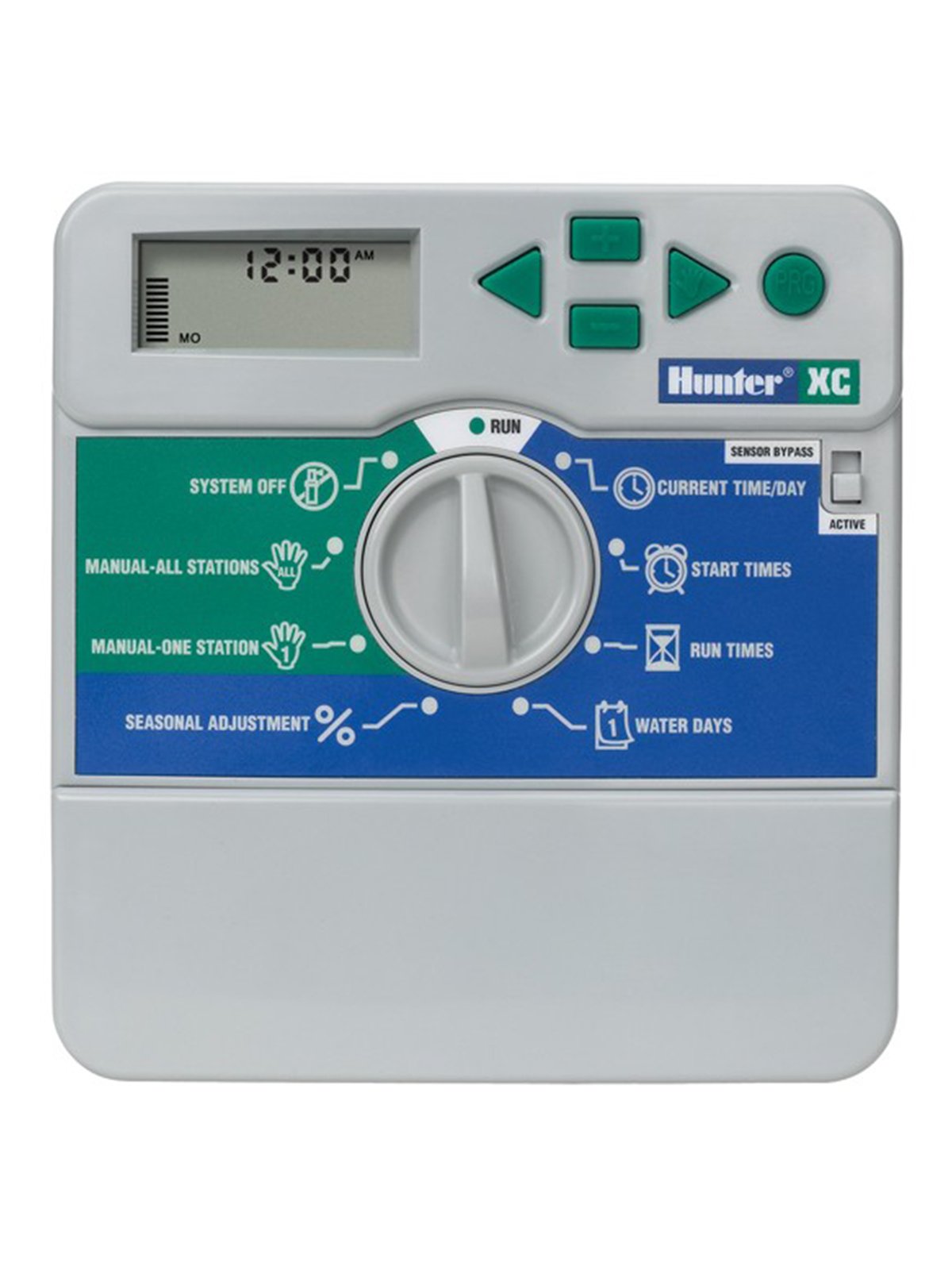
Figura 1: Davant view of the Rain Bird XC-801I-E Indoor Electric Irrigation Programmer. This image shows the display, programming buttons, and the dial for mode selection.
5. Instruccions de funcionament
The XC-801I-E features a user-friendly interface for programming your irrigation schedules.
5.1 Configuració de la data i l'hora actuals
- Turn the dial to the 'SET TIME/DATE' position.
- Use the arrow buttons to adjust the current time and date.
- Press the 'NEXT' button to move between settings (hour, minute, day, month, year).
5.2 Programació de programacions de reg
The controller offers three independent programs (A, B, C) and four start times per program.
- Seleccioneu el programa: Turn the dial to 'PROGRAMS'. Use the 'PROGRAM' button to select Program A, B, or C.
- Estableix els horaris d'inici: For the selected program, use the arrow buttons to set up to four start times. Each start time initiates the watering sequence for all zones assigned to that program.
- Set Zone Run Times: Turn the dial to 'RUN TIMES'. Select the desired program and then use the arrow buttons to set the watering duration for each individual station (zone).
- Establir dies de reg: Turn the dial to 'WATER DAYS'. Select the desired program and then choose the specific days of the week for irrigation, or select an interval schedule (e.g., every 2 days).
5.3 Funcionament manual
Per operar manualment una sola estació o totes les estacions:
- Single Station: Turn the dial to 'MANUAL SINGLE STATION'. Use the arrow buttons to select the station and set its run time. Press 'START'.
- Totes les estacions: Turn the dial to 'MANUAL ALL STATIONS'. Set the run time for each station sequentially. Press 'START'.
5.4 System Off / Rain Delay
To temporarily suspend irrigation:
- Sistema apagat: Turn the dial to 'SYSTEM OFF' to halt all automatic irrigation.
- Retard per la pluja: Turn the dial to 'RAIN DELAY'. Use the arrow buttons to set the number of days for the delay. Irrigation will resume automatically after the set period.
6. Manteniment
Regular maintenance ensures the longevity and optimal performance of your irrigation programmer.
- Neteja: Netegeu l'exterior del controlador amb un drap suau iamp tela. No utilitzeu netejadors abrasius ni dissolvents.
- Connexions: Reviseu periòdicament totes les connexions del cablejat per assegurar-vos que estiguin ben fixades i que no presentin corrosió.
- Hivernització: In regions with freezing temperatures, it is recommended to disconnect the controller and store it indoors during winter months to prevent damage. Drain all water from the irrigation system.
- Bateria (si escau): If your model includes a backup battery for settings retention during power outages, check and replace it as recommended by the manufacturer (typically every 1-2 years).
7. Solució De Problemes
If you encounter issues with your Rain Bird XC-801I-E, refer to the following common problems and solutions:
| Problema | Causa possible | Solució |
|---|---|---|
| La pantalla del controlador està en blanc | No power; faulty transformer; internal fuse (if applicable) | Check power outlet; ensure transformer is securely connected; test transformer output; consult a technician if fuse is suspected. |
| Zones que no reguen | Rain delay active; system off; faulty wiring; valve issues; low water pressure | Check rain delay/system off settings; inspect wiring connections; manually test valves; check water supply. |
| Incorrect watering times | Incorrect programming; sensor interference | Review program start times, run times, and water days; check sensor operation and settings. |
| Missatge d'error a la pantalla | Wiring fault; sensor fault; internal error | Note the error code and refer to the full product manual or contact support. Check wiring for shorts. |
Si el problema persisteix després d'intentar aquestes solucions, poseu-vos en contacte amb l'atenció al client.
8. Especificacions
| Característica | Especificació |
|---|---|
| Model | XC-801I-E |
| Marca | Caçador |
| Fabricant | Rain Bird |
| Nombre de zones | 8 |
| Programes | 3 (A, B, C) |
| Horaris d'inici per programa | 4 |
| Vol. Operatiutage | 24 volts de corrent altern |
| Material | Plàstic |
| Color | Gris |
| Pes de l'article | 1.57 quilos |
| Temperatura de funcionament | 20 graus centígrads |
| Compatibilitat amb la llar intel·ligent | Compatible with smart home systems (via sensor integration) |
9. Garantia i Suport
For warranty information, technical support, or service inquiries, please contact your authorized dealer or the manufacturer directly. Keep your purchase receipt as proof of purchase.
Fabricant: Rain Bird
Marca: Caçador
For further assistance, visit the official Rain Bird weblloc web o consulteu el vostre distribuïdor local.