
Introducció
Thank you for choosing the Kaiser MSA-6515BT Amplified Speaker System. This manual provides essential information for the safe and efficient operation of your device. Please read it thoroughly before use and retain it for future reference.
Instruccions de seguretat
Per garantir un funcionament segur i evitar danys, observeu les precaucions següents:
- Do not expose the speaker to rain or moisture to prevent electric shock or fire.
- No bloquegeu les obertures de ventilació. Assegureu-vos que hi hagi un flux d'aire adequat al voltant de la unitat.
- Col·loqueu l'altaveu sobre una superfície estable i plana per evitar que caigui.
- Desconnecteu el cable d'alimentació durant tempestes amb llamps o quan no l'utilitzeu durant períodes prolongats.
- No intenteu fer el manteniment de la unitat vosaltres mateixos. Encarregueu totes les tasques de manteniment a personal qualificat.
- Mantingueu l'altaveu allunyat de fonts de calor com ara radiadors, registres de calor, estufes o altres aparells que produeixin calor.
- Utilitzeu només accessoris/accessoris especificats pel fabricant.
- Avoid placing heavy objects on the power cord or speaker.
Contingut del paquet
Verifiqueu que tots els elements siguin presents al paquet:
- Kaiser MSA-6515BT Amporador qualificat
- Suport d'altaveus ajustable
- Micròfon per cable
- Control remot
- Cable d'alimentació
- Cable de càrrega de bateria
Producte acabatview
Davant View

Figura 1: Frontal view of the Kaiser MSA-6515BT amplified speaker, featuring the main speaker grille and the KSR brand logo at the bottom.
lateral View and Portability Features

Figura 2: lateral view of the speaker, illustrating the robust side handle and the wheels located at the bottom for convenient portability.
Tauler posterior i controls
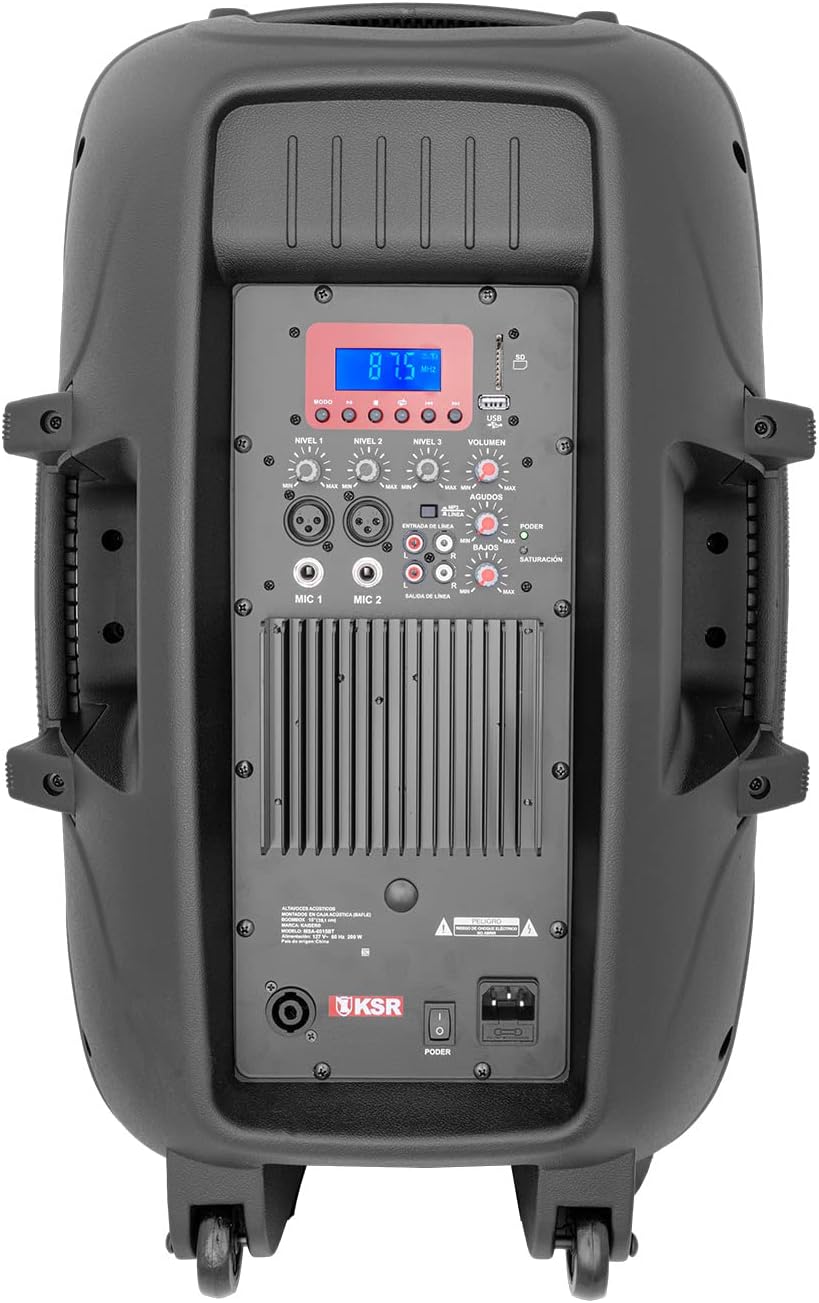
Figura 3: Detallada view of the rear control panel, including the digital display, various input/output jacks, and independent volume and tone controls.
The rear panel houses all essential controls and connection ports. Familiarize yourself with these components:
- Pantalla digital: Mostra el mode actual, la informació de la pista o la freqüència FM.
- Ranures per a targetes USB/SD: Per reproduir àudio files from memory devices.
- Controls de reproducció: Play/Pause, Skip Forward/Backward, Mode selection.
- Entrades de micròfon (MIC 1, MIC 2): XLR (Cannon) and 6.3mm (1/4 inch) jacks for connecting microphones.
- Entrada de línia (RCA): For connecting external audio devices like CD players or mixers.
- Sortida de línia (RCA): For connecting to another amplifier o altaveu.
- Speakon Output: For connecting to a passive speaker.
- Controls de volum: Independent knobs for Master Volume, Microphone Volume, Line Input Volume, Bass, and Treble.
- Power Switch and AC Input: For connecting the power cable and turning the unit on/off.
Configuració
Desembalatge i col·locació
- Traieu amb cura l'altaveu i tots els accessoris de l'embalatge.
- Place the speaker on a stable, level surface. For optimal sound projection, use the included adjustable speaker stand.
- Ensure there is adequate space around the speaker for ventilation.
Potència de connexió
- Assegureu-vos que l'interruptor d'alimentació de l'altaveu estigui en la posició OFF.
- Connect the included power cable to the AC input on the rear panel of the speaker.
- Connecteu l'altre extrem del cable d'alimentació a una presa de corrent estàndard.
Instruccions de funcionament
Encès/Apagat
- To turn on the speaker, flip the power switch on the rear panel to the ON position. The digital display will illuminate.
- To turn off the speaker, flip the power switch to the OFF position.
Connectivitat Bluetooth
- Enceneu l'altaveu.
- Press the "Mode" button on the rear panel or remote control until "Bluetooth" appears on the display.
- Al dispositiu amb Bluetooth (telèfon intel·ligent, tauleta, ordinador portàtil), activeu el Bluetooth i cerqueu els dispositius disponibles.
- Select "MSA-6515BT" from the list of devices. Once paired, a confirmation sound will be heard.
- You can now play audio from your device through the speaker. Optimal range is up to 2 meters.
Funcionament de la ràdio FM
- Press the "Mode" button until "FM" appears on the display.
- Press the Play/Pause button to initiate an automatic scan for FM stations. The speaker will save all found stations.
- Use the Skip Forward/Backward buttons to navigate between saved stations.
Reproducció de targetes USB/SD
- Insert a USB flash drive or SD card (with audio files) into the corresponding slot on the rear panel.
- The speaker should automatically switch to USB/SD mode and begin playback. If not, press the "Mode" button to select USB/SD.
- Use the playback controls (Play/Pause, Skip Forward/Backward) to manage your audio.
Microphone and Line Inputs
- Micròfon: Connect the wired microphone to either the XLR (Cannon) or 6.3mm (1/4 inch) MIC input. Adjust the "MIC Volume" knob to control the microphone's level.
- Entrada de línia: Connect external audio sources (e.g., mixer, CD player) to the RCA Line Input. Adjust the "Line Volume" knob.
- Control de tons: Use the "Bass" and "Treble" knobs to adjust the overall sound characteristics.
- Volum mestre: Adjust the "Master Volume" knob for the overall output level of the speaker.
Connecting Additional Speakers
- Sortida RCA: Use the RCA Line Output to send the audio signal to another amplified speaker or an external ampmés viu.
- Speakon Output: Connect a passive speaker to the Speakon output for expanded sound coverage. Ensure the passive speaker's impedance matches the MSA-6515BT's output requirements (8 ohms).
Manteniment
- Neteja: Feu servir un drap suau i sec per netejar l'exterior de l'altaveu. No utilitzeu productes de neteja abrasius ni dissolvents.
- Emmagatzematge: Quan no l'utilitzeu, guardeu l'altaveu en un lloc fresc i sec, allunyat de la llum solar directa i de temperatures extremes.
- Ventilació: Regularly check that the ventilation grilles are free from dust and debris.
Resolució de problemes
| Problema | Causa possible | Solució |
|---|---|---|
| Sense poder | Cable d'alimentació no connectat; Interruptor apagat; Mal funcionament de la presa de corrent. | Ensure power cable is securely connected. Turn power switch ON. Test outlet with another device. |
| Sense sortida de so | Volum massa baix; Mode d'entrada incorrecte seleccionat; Dispositiu no connectat correctament. | Increase Master Volume. Select correct input mode (Bluetooth, USB, FM, Line). Check all cable connections. |
| Error de vinculació de Bluetooth | Device too far; Bluetooth not enabled on source device; Speaker not in pairing mode. | Move device closer to speaker. Ensure Bluetooth is enabled on your device. Select Bluetooth mode on speaker. |
| El micròfon no funciona | Microphone volume low; Microphone not connected; Faulty microphone. | Increase MIC Volume. Ensure microphone is securely connected. Test with another microphone if available. |
| Problemes de reproducció amb USB/SD | Sense suport file format; Corromput files; La targeta USB/SD no s'ha inserit correctament. | Assegureu-vos l'àudio files are in a supported format (e.g., MP3). Reinsert USB/SD card. Try a different USB/SD card. |
Especificacions
| Nom del model | MSA-6515BT |
| Tipus d'altaveu | Professional Amporador qualificat |
| Mida de l'altaveu | 15 polzades |
| Potència de sortida d'àudio | 33W PMPO / 2W RMS |
| Impedància | 8 ohms |
| Tecnologia de connectivitat | Bluetooth, RCA, USB, SD |
| Interval Bluetooth | Up to 2 meters (optimal link) |
| Entrades | RCA (audio), 6.3mm (microphone), Cannon (microphone), USB, SD |
| Sortides | RCA (amplifier), Speakon (passive speaker) |
| Font d'alimentació | Cable elèctric |
| Average Battery Duration | 5 hores |
| Dimensions (P x A x A) | 40 cm x 49 cm x 75.5 cm |
| Pes | 21 quilos |
| Components inclosos | Amplified speaker, wired microphone, remote control, adjustable stand, power cable, battery charging cable. |

Figure 4: Dimensions of the Kaiser MSA-6515BT speaker.
Garantia i Suport
This Kaiser MSA-6515BT Amplified Speaker System comes with a limited warranty. Please refer to the warranty card included in your package for specific terms and conditions.
For technical support, service, or warranty claims, please contact Kaiser customer service through their official channels. Keep your purchase receipt as proof of purchase.