
La Crosse Technology C86224
La Crosse Technology C86224 Dual USB Charging Alarm with Nap Timer User Manual
Model: C86224 | Brand: La Crosse Technology
Introducció
This manual provides comprehensive instructions for the La Crosse Technology C86224 Dual USB Charging Alarm with Nap Timer. It covers setup, operation, maintenance, and troubleshooting to ensure optimal use of your device. This alarm clock features a dynamic LCD screen, dual USB charging ports, an alarm with multiple settings, and a nap timer, along with displaying time, full calendar view, room temperature, and humidity.
Característiques clau
- Ports de càrrega USB duals: Two USB ports (1 Amp i 2 Amp output) for charging devices, includes a dual-tip tangle-free USB to micro-USB/lightning cable.
- Pantalla LCD en color: Bright, dynamic color LCD screen with adjustable backlight (Hi/Lo/Off) for clear visibility.
- Temporitzador de migdiada: Programmable nap timer with duration settings from 5 minutes to 120 minutes.
- Indoor Environment Monitoring: Displays indoor temperature (Fahrenheit/Celsius) and humidity (%RH).
- Customizable Alarm: Crescendo alarm with settings for single, Monday-Friday, and weekend alarms.
- Full Calendar View: Displays full day, month, and year.
Contingut del paquet
- La Crosse Technology C86224 Alarm Clock
- Adaptador de corrent alterna
- 2 AAA Alkaline Batteries (for backup)
- Instructional Manual (this document)
Producte acabatview
Familiarize yourself with the components of your C86224 alarm clock.

Figura 1: Frontal View of the C86224 Alarm Clock
This image displays the main screen with time (12:34 PM), day (Wednesday), date (Oct 24), indoor temperature (72°F), and humidity (45%). Below the screen are two USB charging ports, labeled 1 Amp i 2 Amp.
Botons superiors:
- Botons +/-: Adjust values during setting, or change display options.
- Alarm Button (Bell icon): Access and set alarm times.
- NAP Button: Activate and adjust the nap timer.
- Botó SET: Enter and confirm settings for time, date, and other functions.
- Zz/Light Button: Snooze active alarm or adjust display backlight brightness (Hi, Lo, Off).
Panell frontal:
- Pantalla LCD: Shows time, date, temperature, humidity, and charging indicators.
- 1 Amp Port de càrrega USB: Per carregar dispositius més petits.
- 2 Amp Port de càrrega USB: Per a una càrrega més ràpida de dispositius compatibles.
Panell posterior:
- Presa d'alimentació DC 5V: Connects to the included AC power adapter.
- Compartiment de la bateria: Holds 2 AAA batteries for time and setting backup during power outages.
- Ganxo de cable: Helps manage charging cables.
Configuració
- Instal·leu bateries de reserva:
Open the battery compartment on the back of the clock. Insert 2 new AAA alkaline batteries, observing the correct polarity (+ and -). These batteries provide backup power to maintain time and settings during a power outage.
- Connect AC Power Adapter:
Plug the AC power adapter into the DC 5V power jack on the back of the clock, then plug the adapter into a standard wall outlet. The display will illuminate.
- Initial Settings (Time, Date, Temperature Unit):
Manteniu premut el botó SET button for 3 seconds to enter the settings menu. Use the +/- buttons to adjust values and the SET button to confirm and move to the next setting. The sequence is typically: 12/24 Hour Format → Hour → Minute → Year → Month → Date → Fahrenheit/Celsius → Snooze Duration.
Video 1: Setting Time and Date on La Crosse Technology C86224
This video demonstrates how to navigate the settings menu using the SET and +/- buttons to adjust the time, date, and other preferences on the alarm clock. - Selecció d'idioma:
The clock may offer English and Spanish language options for the calendar and menu. Navigate through the settings using the SET button until the language option appears, then use +/- per seleccionar el vostre idioma preferit.
Funcionament
Lectura de la pantalla:
The multi-color LCD display shows the following information:
- Hora: Large digits at the top, with AM/PM indicator.
- Day & Date: Full day of the week, month, and day.
- Temperatura interior: Current room temperature in °F or °C.
- Humitat interior: Current room humidity in %RH.
- USB Charging Indicators: Icons illuminate when devices are connected and charging.
Configuració d'alarmes:
- Premeu el botó Alarma button (bell icon) to view l'hora actual de l'alarma.
- Manteniu premut el botó Alarma durant 3 segons per entrar al mode de configuració de l'alarma. L'hora de l'alarma parpellejarà.
- Utilitza el +/- botons per ajustar l'hora i, a continuació, premeu Alarma per confirmar.
- Repetiu durant minuts.
- Select alarm type: Single, Monday-Friday, or Weekend. Use +/- to cycle through options, then press Alarma per confirmar.
- Per activar/desactivar una alarma, premeu la tecla Alarma repetidament fins que aparegui o desaparegui la icona d'alarma desitjada a la pantalla.
Using the Nap Timer:
- Premeu el botó NAP button to activate the nap timer. The default nap time is 10 minutes.
- To adjust the nap time, press the NAP button repeatedly to cycle through preset times (e.g., 10, 20, 30, 60, 90, 120 minutes).
- The nap timer will count down, and an alarm will sound when it reaches zero.
- To cancel the nap timer, press and hold the NAP botó.
Ajust de la brillantor de la pantalla:
Premeu el botó Zz/Light button repeatedly to cycle through the backlight brightness settings: High, Low, and Off. This allows you to customize visibility for different lighting conditions.
Ús dels ports de càrrega USB:
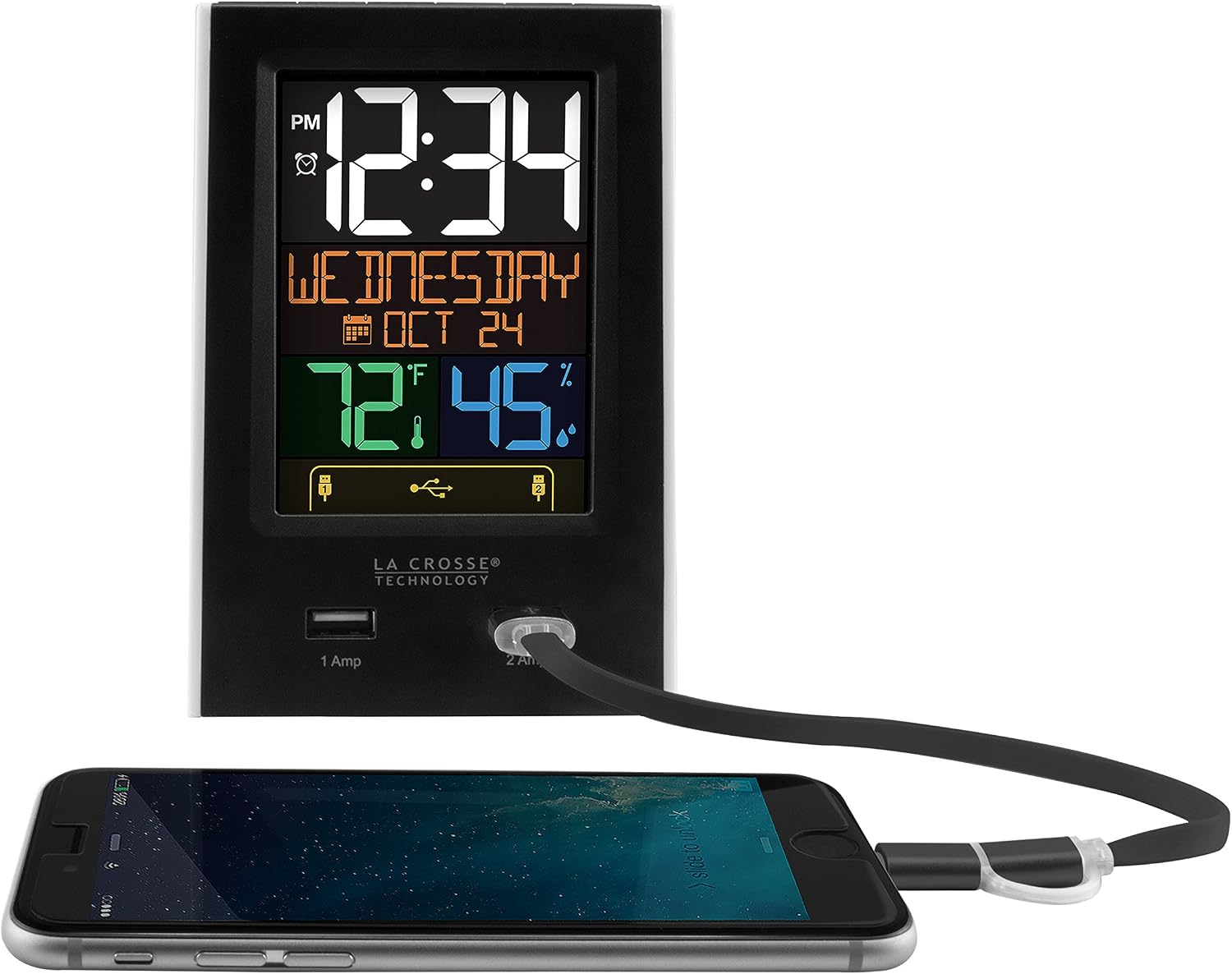
Figure 2: USB Charging in Use
This image shows a smartphone connected to the 2 Amp USB port on the C86224 alarm clock, indicating active charging.
The C86224 features two USB charging ports on the front:
- 1 Amp Port: Suitable for charging smaller electronic devices like smartphones.
- 2 Amp Port: Provides faster charging for compatible devices, including tablets or larger smartphones.
Simply connect your device's USB charging cable to the appropriate port. The display will show an indicator when a device is connected and charging.
Manteniment
- Neteja: Utilitzeu un suau, damp cloth to clean the display and casing. Eviteu netejadors o dissolvents abrasius.
- Substitució de la bateria: Replace backup batteries annually or when the low battery indicator appears to ensure settings are retained during power outages.
- Col·locació: Place the clock on a stable, flat surface away from direct sunlight, heat sources, or excessive moisture.
Resolució de problemes
| Problema | Solució |
|---|---|
| Display is dark or unreadable. |
|
| Time is incorrect or losing minutes. |
|
| Els ports de càrrega USB no funcionen. |
|
| L'alarma no sona. |
|
Especificacions
| Característica | Detall |
|---|---|
| Número de model | C86224 |
| Marca | Tecnologia La Crosse |
| Tipus de visualització | Digital, Color LCD |
| Font d'alimentació | Cable elèctric (adaptador de CA) |
| Còpia de seguretat de la bateria | 2 piles AAA (incloses) |
| Ports de càrrega USB | 1 Amp (x1), 2 Amp (x1) |
| Dimensions del producte | 3.74 cm d'amplada x 5.24 cm d'alçada |
| Pes de l'article | 0.4 lliures |
| Material | Plàstic |
| Característiques especials | Adjustable brightness, Alarm, Programmable, Charging port, Temperature, Calendar, Nap timer |
Garantia i Suport
The La Crosse Technology C86224 comes with a 1-year limited parts and labor warranty del fabricant.
For further assistance, troubleshooting, or to explore other products, please visit the official La Crosse Technology Store.
Documents relacionatsC86224


Ask a question about this manual
Ask about setup, troubleshooting, compatibility, parts, safety, or missing instructions. Manuals+ will review the question and use this page’s manual context to help answer it.