
1. Introducció
The Arturia MatrixBrute is a powerful analog matrix synthesizer designed for advanced sound creation and performance. This manual provides essential information for setting up, operating, maintaining, and troubleshooting your instrument. Please read this manual thoroughly to ensure proper use and to maximize your experience with the MatrixBrute.
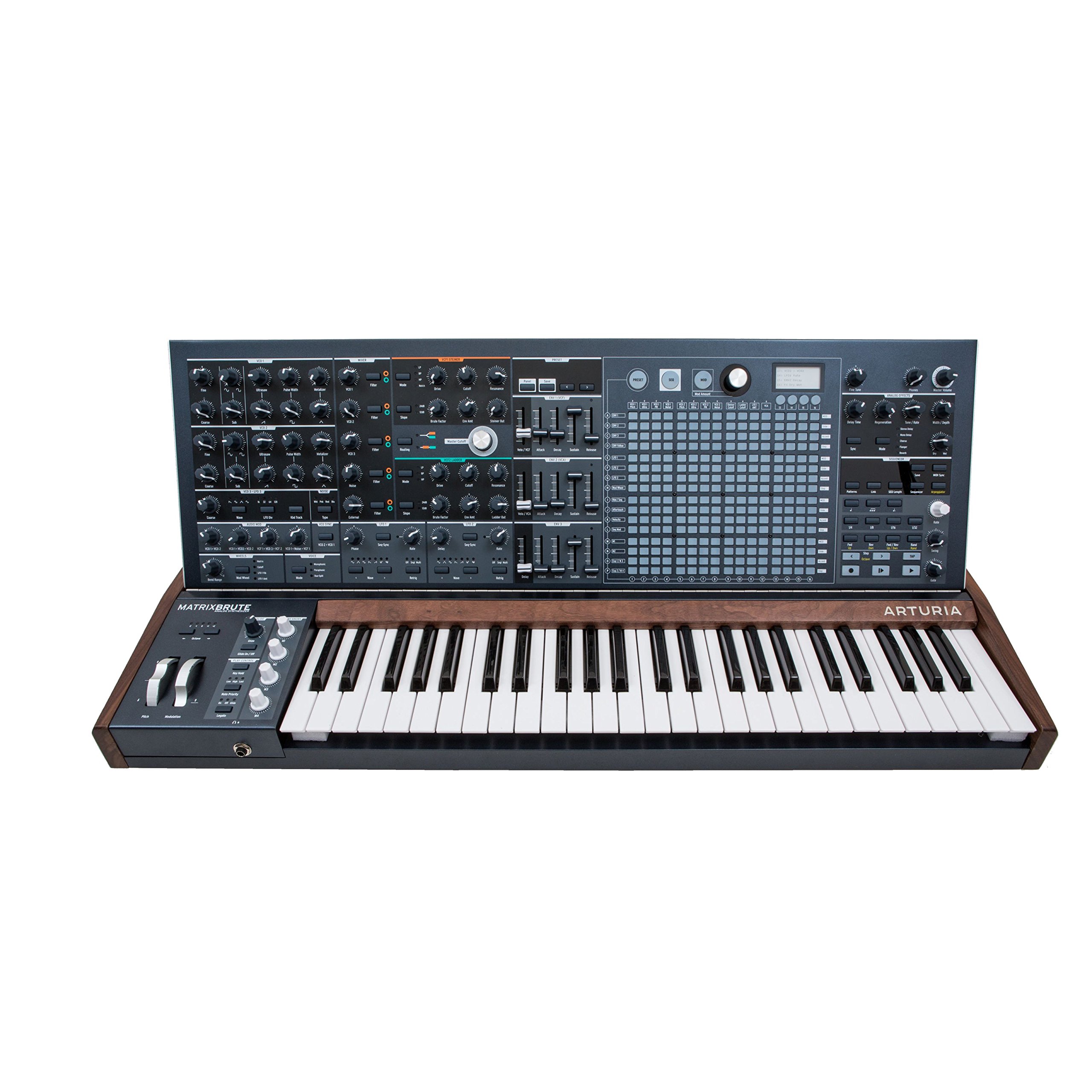
Figura 1: Frontal view of the Arturia MatrixBrute Analog Matrix Synthesizer.
2. Configuració
2.1 Desembalatge
Carefully remove the MatrixBrute from its packaging. Retain all packaging materials for future transport or storage. Verify that all included components are present:
- Arturia MatrixBrute Synthesizer
- Cable d'alimentació
- Manual d'usuari (aquest document)
- Targeta de registre
2.2 Connexions
Before connecting the MatrixBrute, ensure all audio equipment is powered off. Connect cables firmly to prevent signal loss or damage.

Figure 2: Rear panel showing various input and output connections.
- Connexió d'alimentació: Connect the supplied power cable to the AC IN socket on the rear panel and then to a suitable power outlet.
- Sortida d'àudio: Connect the main audio outputs (LEFT/MONO, RIGHT) to your mixer, audio interface, or amplifier using 1/4-inch TS cables.
- Connexions MIDI: Use standard 5-pin DIN MIDI cables to connect the MIDI IN, OUT, and THRU ports to other MIDI devices.
- Connexió USB: Connect a USB Type B cable from the MatrixBrute's USB port to your computer for MIDI communication and firmware updates.
- CV/Gate Connections: Utilize the various CV/Gate inputs and outputs for integration with modular synthesizers and other compatible equipment.
- Auriculars: Connect headphones to the 1/4-inch stereo headphone jack for private monitoring.
2.3 Encès inicial
After all connections are made, power on your audio system first, then the MatrixBrute using the power switch on the rear panel. The display will illuminate, indicating the unit is ready for use.
3. Operating the MatrixBrute
The MatrixBrute offers extensive control over its analog synthesis engine. This section covers the primary operational aspects.

Figura 3: Detallada view of the control panel, showing knobs, faders, and the matrix interface.
3.1 Controls bàsics
- Teclat: The 49-key velocity-sensitive keyboard with aftertouch is your primary interface for playing notes.
- Oscil·ladors: The MatrixBrute features three voltage-controlled oscillators (VCOs) with various waveforms (Saw, Square, Triangle) and sub-oscillators. Adjust the Onada, Amplada del pols, i Sintonitza controls to shape the initial sound.
- Filtres: Two filters (Steiner-Parker and Ladder) provide distinct tonal characteristics. Use the Tallar, Ressonància, i Condueix controls to sculpt the sound.
- Sobres: Three ADSR (Attack, Decay, Sustain, Release) envelopes control the amplitude, filter cutoff, and other parameters over time.
- LFOs: Three Low-Frequency Oscillators (LFOs) can modulate various parameters, adding movement and complexity to your sounds.
3.2 Using the Matrix
The central matrix is a versatile tool for sequencing, arpeggiation, and modulation routing.
- Seqüenciador: The 64-step sequencer allows for complex melodic and rhythmic patterns. Use the dedicated sequencer controls to record, edit, and playback sequences.
- Arpegiador: Create dynamic arpeggios from held notes.
- Modulation Matrix: The matrix serves as a powerful modulation router, allowing you to assign sources (e.g., LFOs, envelopes) to destinations (e.g., filter cutoff, oscillator pitch) with adjustable intensity.
3.3 Onboard Effects
The MatrixBrute includes analog effects such as Delay, Chorus, and Flanger. Adjust the dedicated controls in the effects section to integrate them into your sound design.
3.4 CV/MIDI Integration
The MatrixBrute offers extensive connectivity for integrating with other gear:
- MIDI: Control the MatrixBrute from an external MIDI controller or sequence it from a DAW via MIDI IN. Send MIDI data from the MatrixBrute via MIDI OUT/THRU.
- CV/Porta: Connect to modular synthesizers using the dedicated CV/Gate inputs and outputs for pitch, gate, and modulation control.
4. Manteniment
4.1 Neteja
To maintain the appearance and functionality of your MatrixBrute, follow these guidelines:
- Netegeu la superfície amb un drap suau i sec.
- Per a la brutícia tossuda, utilitzeu una mica damp drap amb sabó suau i després eixugueu-lo immediatament.
- Avoid abrasive cleaners, solvents, or waxes, as these can damage the finish.
- Do not spray liquids directly onto the instrument.
4.2 Actualitzacions de programari
Arturia periodically releases firmware updates to improve performance, add features, or fix bugs. Visit the official Arturia weblloc (www.arturia.com) for the latest firmware and instructions on how to update your MatrixBrute.
4.3 Emmagatzematge
When not in use for extended periods, store the MatrixBrute in a dry, dust-free environment. If possible, use the original packaging or a dedicated flight case for protection during transport or storage.
5. Solució De Problemes
This section addresses common issues you might encounter. If you experience problems not covered here, please contact Arturia support.
| Problema | Causa possible | Solució |
|---|---|---|
| Sense sortida de so |
|
|
| El MIDI no respon |
|
|
| Unexpected behavior / Glitches |
|
|
6. Especificacions
| Característica | Detall |
|---|---|
| Marca | Artúria |
| Nom del model | Arturia MatrixBrute |
| Número de model | 550101 |
| Dimensions de l'article (L x A x A) | 40.5 x 22.5 x 7.5 polzades |
| Pes de l'article | 19 quilos |
| Material del cos | Metall |
| Components inclosos | Cymbal (Note: This may be a listing error, typically includes power cable and documentation.) |
| UPC | 779177280095, 713803231419 |
| Tipus de connector | USB tipus C (Note: Product images show USB Type B, please verify.) |
Note: Specifications are subject to change without notice. Please refer to the official Arturia weblloc per obtenir la informació més actualitzada.
7. Garantia i assistència
7.1 Garantia del producte
Arturia products are covered by a limited warranty against defects in materials and workmanship. The specific terms and duration of the warranty may vary by region. Please register your product on the Arturia website to activate your warranty and for detailed information regarding warranty coverage.
7.2 Atenció al client
For technical assistance, troubleshooting, or any questions regarding your Arturia MatrixBrute, please visit the official Arturia support page:
You can find FAQs, knowledge base articles, and contact information for direct support.