
Conceptes bàsics d'Amazon K001575
Amazon Basics LCD Computer Monitor Stand Riser User Manual
Model: K001575 | Brand: Amazon Basics
1. Introducció
This user manual provides comprehensive instructions for the assembly, operation, maintenance, and troubleshooting of your Amazon Basics LCD Computer Monitor Free-Standing Desk Stand Riser. Designed to enhance your ergonomic workspace, this stand allows for flexible adjustment of your monitor to achieve optimal viewangles i comoditat.

Figura 1.1: Frontal view of the Amazon Basics LCD Computer Monitor Stand Riser.
2. Característiques
- Ajust d'alçada: Set the height of your LCD for a comfortable computing experience.
- Multi-directional Movement: With fingertip effort, raise or lower your display, pan left/right, tilt, and rotate.
- Capacitat de pes: Supports monitors weighing between 6-16 pounds.
- Compatibilitat de la mida de la pantalla: Designed for screens up to 24 inches.
- Vertical Height Adjustment: Offers 5 inches of monitor height adjustability.
- Rotació: Monitor can be used in portrait or landscape orientation (360° rotation).
- Rang inclinat: +25/-5 degree tilt capability.
- Gamma de panell: 270° right/left pan from the base.
- Compatibilitat VESA: Supports VESA 100 x 100 mm and 75 x 75 mm mounting patterns.
- Gestió de cables: Integrated cable pass-through channel near the base keeps cables organized.
3. Contingut del paquet
Assegureu-vos que tots els components estiguin presents abans de començar el muntatge:
- Monitor Stand Base and Arm Assembly
- Placa de muntatge VESA
- Mounting Screws (various sizes for VESA 75x75mm and 100x100mm)
- Allen Key (for adjustments and assembly)

Figure 3.1: Typical components included with the monitor stand.
4. Instruccions de configuració
- Prepara el suport: Place the monitor stand base on a stable, flat surface. Ensure the Allen key is accessible, often stored at the bottom of the base.
- Col·loqueu la placa VESA al monitor: Carefully lay your monitor face down on a soft, clean surface to prevent scratches. Align the VESA mounting plate with the screw holes on the back of your monitor. Use the appropriate mounting screws (M4 or M5, depending on your monitor) to secure the plate to the monitor. Do not overtighten.
- Mount Monitor to Stand: With the VESA plate attached to your monitor, carefully lift the monitor and slide the VESA plate onto the arm of the stand. Ensure it clicks securely into place.
- Adjust Tension (if necessary): If the monitor sags or is too stiff to adjust, use the included Allen key to adjust the tension screws on the arm. These are typically located near the VESA plate attachment point or along the arm's pivot points. Turn clockwise to increase tension (stiffer movement) and counter-clockwise to decrease tension (looser movement).
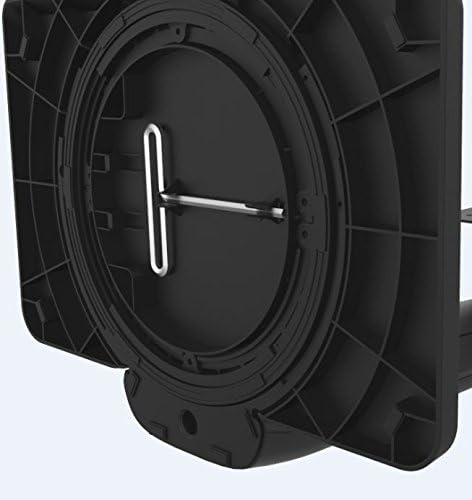
Figure 4.1: Allen key storage on the underside of the stand base.
5. Instruccions de funcionament
The Amazon Basics LCD Monitor Riser offers a range of adjustments for optimal viewcomoditat:
- Ajust d'alçada: Gently push or pull the monitor up or down to your desired height. The stand is designed to hold its position once released.
- Ajust d'inclinació: Grasp the top and bottom edges of your monitor and gently tilt it forward or backward to achieve the perfect viewangle de ing.
- Ajust de panoràmica: Rotate the entire stand base left or right on your desk for horizontal viewajustos.
- Rotació (Retrat/Paisatge): Rotate the monitor 360 degrees to switch between landscape and portrait orientations. Ensure no cables are tangled during rotation.

Figure 5.1: Monitor on stand in landscape orientation.

Figure 5.2: Monitor on stand in portrait orientation, side view.
5.1. Vídeo oficial del producte
Video 5.1: An official product video demonstrating the features and adjustments of the Amazon Basics LCD Monitor Stand Adjustable Riser.
6. Manteniment
- Neteja: Feu servir un drap suau i sec per netejar el suport. Per a marques difícils, netegeu lleugeramentamp Es pot utilitzar un drap amb sabó suau i assecar-lo. Eviteu netejadors o dissolvents abrasius.
- Comprovacions periòdiques: Periodically check all screws and connections to ensure they are secure. Retighten if necessary using the provided Allen key.
- Gestió de cables: Ensure cables are routed neatly through the cable pass-through channel to prevent strain or damage.
7. Solució De Problemes
- El monitor s'enfonsa o no es manté despert:
This indicates that the tension on the arm is too loose. Use the Allen key to tighten the tension screws on the arm until the monitor holds its position securely. Refer to Section 4, Step 4 for guidance.
- Monitor is Too Stiff to Adjust:
The tension on the arm may be too tight. Use the Allen key to loosen the tension screws slightly until movement is smooth but still holds position.
- El monitor oscil·la:
Ensure the stand is placed on a stable, flat surface. Check that all assembly screws are tightened securely, including those attaching the VESA plate to the monitor and the monitor to the stand.
- Els cables estan enredats:
Utilize the integrated cable pass-through channel at the base of the stand to route cables neatly. This prevents tangling and keeps your workspace tidy.
8. Especificacions
| Atribut | Valor |
|---|---|
| Número de model | K001575 |
| Marca | Conceptes bàsics d'Amazon |
| Material | Alumini |
| Color | Negre |
| Pes de l'article | 5 lliures (2.27 kg) |
| Dimensions del producte (LxWxH) | 12 x 10.2 x 15.8 polzades (30.5 x 25.9 x 40.1 cm) |
| Max Screen Size Supported | 24 polzades |
| Weight Adjustable Range | 6-16 pounds (2.7-7.2 kg) |
| Ajust d'alçada | 5 polzades (12.7 cm) |
| Angle d'inclinació | +25/-5 graus |
| Angle de panoràmica | 270 degrees (right/left from base) |
| Rotació | 360 graus (retrat/horitzontal) |
| Compatibilitat VESA | 75x75mm, 100x100mm |
9. Garantia i Suport
This product is backed by an Amazon Basics 1-Year Limited Warranty. For detailed warranty information or technical support, please refer to the official Amazon Basics weblloc web o contacteu directament amb el servei d'atenció al client d'Amazon.
Assistència en línia: Visita Atenció al client d'Amazon
Ask a question about this manual
Ask about setup, troubleshooting, compatibility, parts, safety, or missing instructions. Manuals+ will review the question and use this page’s manual context to help answer it.