
1. Introducció
Thank you for choosing the Avidsen Digital Pocket Multimeter, Model 107100. This manual provides essential information for the safe and efficient operation of your device. Please read these instructions thoroughly before use and retain them for future reference. This multimeter is designed for measuring AC/DC voltage, DC current, resistance, diode and continuity testing, and temperature.
2. Informació de seguretat
Avís: Failure to follow these safety instructions may result in electric shock, fire, or damage to the device.
- Assegureu-vos sempre que el multímetre estigui configurat a la funció i al rang correctes abans de fer mesures.
- No intenteu mesurar el voltage or current exceeding the specified maximum limits.
- Extremeu les precaucions quan treballeu amb circuits en tensió. Alt volumtagpoden ser perillosos.
- Inspect test probes for damage before each use. Do not use if insulation is compromised.
- The device features double insulation for enhanced safety. Do not defeat this protection.
- Substituïu la bateria immediatament quan aparegui l'indicador de bateria baixa per garantir lectures precises.
- Only replace the fuse with one of the specified type and rating (0.5A 250V fast-acting).
- Avoid using the multimeter in wet environments or in the presence of explosive gases or dust.
3. Producte acabatview
The Avidsen Digital Pocket Multimeter is a compact, handheld device designed for various electrical measurements. It features a 3.5-digit LCD display for clear readings and a rotary switch for function selection.
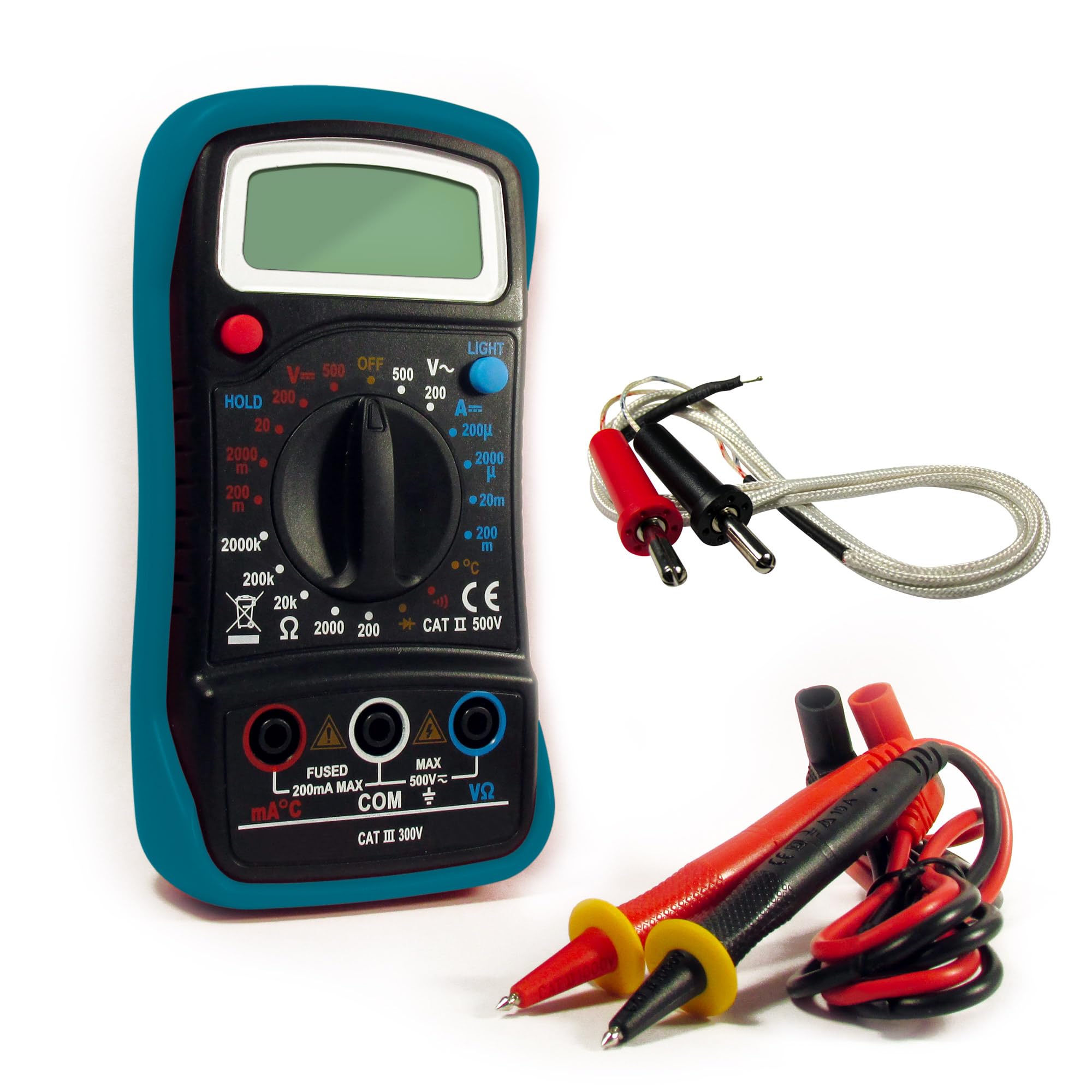
Figure 1: Avidsen Digital Pocket Multimeter, Model 107100. This image shows the front view of the compact multimeter, featuring its LCD display, rotary function switch, and input jacks for test probes.
Components clau:
- Pantalla LCD: 3.5-digit screen for displaying measurement values.
- Function/Range Switch: Rotary dial to select measurement type (Voltage, Current, Resistance, Diode, Continuity, Temperature).
- Preses d'entrada: Ports for connecting the red and black test probes.
- Sondes de prova: Insulated leads with sharp tips for making contact with circuits.
- Sonda de temperatura: (If included) For temperature measurements.
Funcions:
- Volum AC / DCtage Mesura
- Mesura de corrent DC
- Mesura de Resistència
- Prova de díode
- Prova de continuïtat
- Mesura de la temperatura
4. Configuració
4.1 Instal·lació de la bateria
- Localitzeu la tapa del compartiment de la bateria a la part posterior del multímetre.
- Feu servir un tornavís (si cal) per obrir la tapa.
- Insert the supplied 9V battery, observing the correct polarity (+ and -).
- Substituïu la tapa del compartiment de la bateria i fixeu-la.
4.2 Connecting Test Probes
- Inseriu el cable de prova negre a la presa d'entrada "COM" (comú).
- Insert the red test lead into the "VΩmA" input jack for voltage, resistance, and current measurements (up to 200mA). For higher current measurements (if applicable to a specific model variant, though this model is pocket-sized and typically limited), refer to specific markings.
- Assegureu-vos que les connexions siguin fermes i segures.
5. Instruccions de funcionament
Before taking any measurement, ensure the multimeter is correctly set up and the test probes are securely connected. The measurement sequence is approximately 2 times per second.
5.1 Mesurar AC/DC Voltage
- Turn the function switch to the desired ACV (Alternating Current Voltage) or DCV (Direct Current Voltage) range. Start with the highest range if the voltage es desconeguda.
- Connecteu les sondes de prova en paral·lel al component o circuit que s'ha de mesurar.
- Llegeix el voltage valor a la pantalla LCD.
5.2 Mesura de corrent continu
- Avís: To measure current, the multimeter must be connected in series with the circuit. This requires breaking the circuit.
- Turn the function switch to the desired DCA (Direct Current Amperes) range.
- Open the circuit where current is to be measured.
- Connect the red probe to the higher potential side and the black probe to the lower potential side of the break in the circuit.
- Llegiu el valor actual a la pantalla LCD.
5.3 Mesura de la resistència
- Avís: Ensure the circuit or component is completely de-energized before measuring resistance.
- Turn the function switch to the desired Ohm (Ω) range.
- Connecteu les sondes de prova al component del qual es vol mesurar la resistència.
- Llegiu el valor de la resistència a la pantalla LCD.
5.4 Diode Test / Continuity Test
- Avís: Ensure the circuit or component is completely de-energized.
- Turn the function switch to the Diode/Continuity (symbol often looks like a diode and a sound wave).
- Prova de díode: Connecteu la sonda vermella a l'ànode i la sonda negra al càtode del díode. Un voltatge directetagEs mostrarà una gota. Invertiu les sondes; s'hauria de mostrar un circuit obert (OL).
- Prova de continuïtat: Connect the probes across the circuit or component. If continuity exists (low resistance), the multimeter will emit an audible beep and display a low resistance value.
5.5 Mesura de la temperatura
- If your multimeter includes a temperature probe, connect it to the appropriate input jacks (refer to specific markings if different from VΩmA/COM).
- Turn the function switch to the Temperature (°C or °F) setting.
- Place the tip of the temperature probe on or near the object whose temperature is to be measured.
- Llegiu el valor de la temperatura a la pantalla LCD.
6. Manteniment
6.1 Neteja
Netegeu el multímetre casing amb anunciamp cloth and mild detergent. Do not use abrasive cleaners or solvents. Ensure the device is powered off and probes are disconnected before cleaning.
6.2 Substitució de la bateria
When the low battery indicator appears on the display, replace the 9V battery as described in Section 4.1. Always use a fresh 9V battery.
6.3 Canvi de fusibles
If the current measurement function stops working, the fuse may need replacement. Ensure the multimeter is off and probes are disconnected. Open the casing (refer to the battery compartment or specific fuse access if different) and replace the fuse with a 0.5A 250V fast-acting type. Never use a fuse with a different rating.
6.4 Emmagatzematge
When not in use for extended periods, remove the battery to prevent leakage. Store the multimeter in a cool, dry place, away from direct sunlight and extreme temperatures.
7. Solució De Problemes
| Problema | Causa possible | Solució |
|---|---|---|
| Sense pantalla o pantalla tènue | Bateria baixa o esgotada | Substituïu la bateria de 9V. |
| Lectures incorrectes | Incorrect function/range selected; poor probe contact; damaged probes | Verify function/range; ensure firm probe contact; inspect and replace damaged probes. |
| La mesura de corrent no funciona | Fusible cremat | Replace the 0.5A 250V fast-acting fuse. |
| Es mostra "OL" (sobrecàrrega) | Measurement exceeds selected range or maximum input | Select a higher range or ensure measurement is within device limits. |
8. Especificacions
- Número de model: 107100
- Fabricant: Avidsen
- Visualització: LCD de 3.5 dígits
- Taxa de mesura: Aproximadament 2 vegades per segon
- Font d'alimentació: 9V battery (supplied)
- Fusible: 0.5A 250V fast-acting
- Dimensions (L x A x A): 14 cm x 5.5 cm x 4 cm (5.5 x 2.2 x 1.6 polzades)
- Pes: 150 grams (aprox. 5.3 oz)
- Característiques: Double insulation, overload protection, low battery indicator
- Funcions: Volum AC / DCtage, DC Current, Resistance, Diode Test, Continuity Test, Temperature
- País d'origen: Xina
9. Garantia i Suport
Avidsen products are manufactured to high-quality standards. For information regarding warranty coverage, technical support, or service, please refer to the warranty card included with your purchase or visit the official Avidsen weblloc web. Si us plau, tingueu a mà el número de model (107100) i la data de compra quan us poseu en contacte amb el servei d'assistència.
