
Introducció
This manual provides instructions for the proper setup, operation, and maintenance of your Edifier K550 Computer Headphones with Microphone. Please read this manual thoroughly before using the product to ensure optimal performance and longevity.
Contingut del paquet
- Edifier K550 Headphones with integrated cable
Producte acabatview
Familiarize yourself with the components of your Edifier K550 headset.

Figura 1: Edifier K550 Computer Headphones. This image displays the overall design of the white headset, including the adjustable headband, earcups, and the microphone boom.
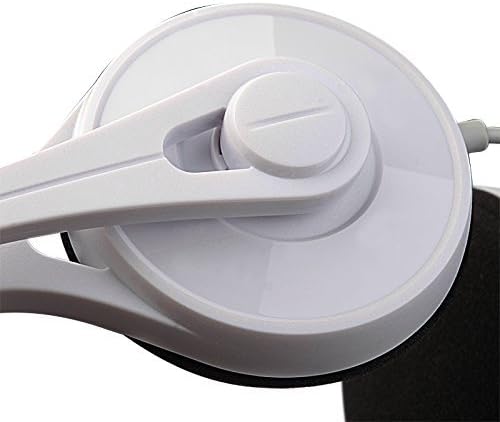
Figura 2: Ear Cup Pivot Point. This image highlights the flexible pivot mechanism connecting the ear cup to the headband, allowing for comfortable adjustment.
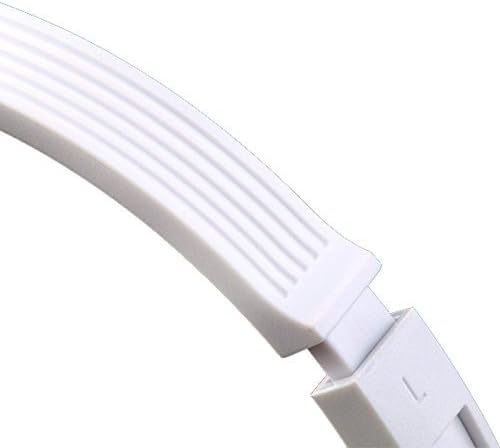
Figura 3: Adjustable Headband. This image shows the ribbed design of the headband, indicating its adjustability for various head sizes.

Figura 4: Inline Control. This image details the inline control unit on the cable, featuring a volume slider and a microphone on/off switch for easy access.
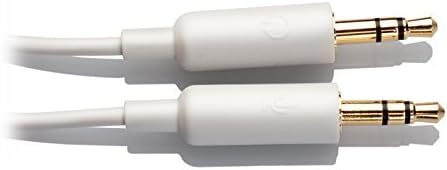
Figura 5: Dual 3.5mm Jacks. This image shows the two distinct 3.5mm connectors: one for audio output (headphones) and one for microphone input.
Configuració
- Connecta't al dispositiu: The Edifier K550 headset features two 3.5mm jacks: one for audio (headphone icon) and one for the microphone (microphone icon).
- For computers with separate audio input and output ports, plug the corresponding jacks into their respective ports.
- For laptops or devices with a single combined 3.5mm audio jack, a Y-splitter adapter (not included) may be required to use both headphone and microphone functions simultaneously. Connect the headset's two jacks to the splitter, then plug the splitter into your device's single audio port.
- Ajustar la diadema: Gently slide the headband to extend or retract it until the earcups rest comfortably over your ears. The K550 is designed for a secure yet comfortable fit for various head sizes.
- Posició del micròfon: Rotate the microphone boom to position the microphone near your mouth for optimal voice capture. The microphone is flexible and can be adjusted up to 120 degrees.
Instruccions de funcionament
- Control de volum: Use the slider on the inline control unit (refer to Figure 4) to adjust the headphone volume. Slide it up to increase volume and down to decrease volume.
- Activació / desactivació del micròfon: The inline control unit also features a switch to enable or disable the microphone. Ensure the switch is in the 'ON' position for the microphone to function during calls or recordings.
- Reproducció d'àudio: Once connected, your device should automatically recognize the headset. Play audio from your computer or device, and sound will be routed through the headphones.
- Comunicació per veu: For online calls, meetings, or gaming, ensure the microphone is enabled and selected as the input device in your software settings.
Manteniment
- Neteja: Use a soft, dry cloth to clean the exterior surfaces of the headphones and earcups. Do not use liquid cleaners or abrasive materials.
- Emmagatzematge: When not in use, store the headset in a clean, dry place away from direct sunlight and extreme temperatures. Avoid wrapping the cable tightly around the headset to prevent damage.
- Cura del cable: Handle the cable gently. Avoid pulling on the cable when disconnecting the jacks.
Resolució de problemes
- Sense so dels auriculars:
- Assegureu-vos que el connector d'àudio de 3.5 mm estigui completament inserit al port correcte del dispositiu.
- Check the volume level on the inline control and on your computer.
- Verify that the Edifier K550 is selected as the default audio output device in your computer's sound settings.
- If using a single combined jack, ensure you have a compatible Y-splitter adapter.
- El micròfon no funciona:
- Ensure the 3.5mm microphone jack is fully inserted into the correct port.
- Check that the microphone switch on the inline control is in the 'ON' position.
- Verify that the Edifier K550 microphone is selected as the default input device in your computer's sound settings and in any communication software you are using.
- If using a single combined jack, ensure you have a compatible Y-splitter adapter.
- Qualitat de so baixa:
- Assegureu-vos que totes les connexions siguin segures.
- Prova els auriculars amb un altre dispositiu per descartar un problema específic del dispositiu.
- Check your device's audio settings for any equalization or sound enhancements that might be affecting quality.
Especificacions
| Nom del model | K550 |
| Tecnologia de connectivitat | Amb cable |
| Conector d'auriculars | 3.5 mm Jack (Dual) |
| Dispositius compatibles | Laptops, Desktops, Tablets, Cellphones (with appropriate adapter) |
| Tipus de control | Volume Control, Microphone On/Off Switch |
| Característiques especials | Lightweight, Microphone Included, 120-degree rotatable microphone |
| Col·locació de l'orella | A l'orella |
| Pes de l'article | 89 grams (3.14 unces) |
| Fabricant | Edificador |
Garantia i Suport
For warranty information and technical support, please refer to the official Edifier website or contact your local Edifier distributor. Keep your purchase receipt for warranty claims.
Edifier Official Weblloc: www.edifier.com


