
Techage 6708FN-4*BT508-20SC/P
Techage Full HD 1080p PoE CCTV Security Camera System User Manual
Model: 6708FN-4*BT508-20SC/P
1. Introducció
This manual provides detailed instructions for the installation, operation, and maintenance of your Techage Full HD 1080p PoE CCTV Security Camera System. This system is designed for reliable surveillance with high-definition video capture, suitable for both indoor and outdoor environments.
2. Contingut del paquet
Si us plau, verifiqueu que tots els articles que s'enumeren a continuació s'inclouen al vostre paquet. Si falta algun article o hi ha algun malmès, poseu-vos en contacte amb el servei d'atenció al client.
Imatge: Més deview of the package contents, including the NVR, cameras, cables, power adapter, mouse, and user guide.
- 1 x 4-Channel 1080p NVR (Network Video Recorder) with built-in 4 PoE ports
- 4 x 2.0 Megapixel 1080p Bullet IP Cameras (Outdoor/Indoor Waterproof)
- 4 x 20-meter CAT5 Network Cables (Plug and Play for camera video)
- 1 x Power Supply for NVR
- 1 x USB Mouse for NVR operation
- 1 x Manual d'usuari
- Note: Hard drive for NVR storage is not included.
3. Característiques del producte
NVR (Network Video Recorder) Features:
- Alta resolució: Supports 1080p (1920x1080) video recording.
- PoE (alimentació per Ethernet): Built-in 4 PoE ports for simplified camera connection and power.
- Multi-channel Recording: Simultaneous real-time recording across multiple channels.
- Modes d'enregistrament: Supports manual, alarm, dynamic detection (motion detection), and timed recording.
- Emmagatzematge: Supports 1 SATA hard drive (up to 6TB per disk, hard drive not included).
- Sortida: VGA and HDMI full HD output.
- Interfície d'usuari: True color 16-bit graphical menu interface with mouse operation.
- Funcions de xarxa: Cloud technology support, network penetration, alarm information push to mobile devices.
IP Camera Features:

Image: A close-up of a Techage IP camera, highlighting its IP66 waterproof rating and resistance to rain and snow.
- Resolució: 2.0 Megapixel (1080p) with 2400TVL.
- Sensor: 1/6.9 inch F02 CMOS sensor.
- Visió nocturna: Clear night vision with IR-cut filter for continuous clarity in low light.
- Resistent a la intempèrie: IP66 rated for outdoor and indoor use, resistant to water and snow.
- ONVIF Support: Compatible with ONVIF standards for integration with third-party NVRs.
- Mobile Surveillance: Supports multiple mobile surveillance platforms (iOS, Android).
4. Guia de configuració
4.1 Diagrama de connexió del sistema
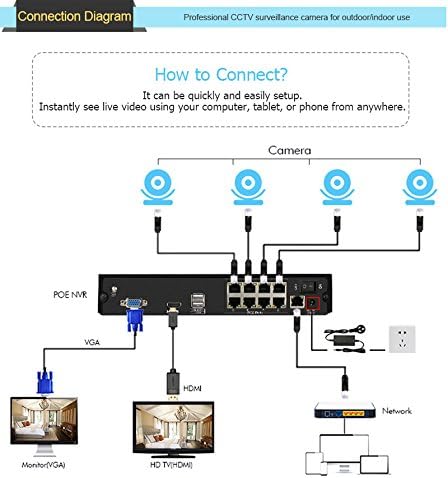
Follow the diagram below to connect your NVR and cameras. The PoE ports simplify wiring by providing both power and video transmission through a single Ethernet cable.

Image: A visual guide showing how to connect the PoE NVR to cameras, a monitor (via VGA or HDMI), and a network router.
- Connect the IP cameras to the PoE ports on the back of the NVR using the provided network cables.
- Connect the NVR to a monitor or TV using either the VGA or HDMI port.
- Connect the NVR to your network router using an Ethernet cable for remote viewcapacitats d'ingrés.
- Connect the power adapter to the NVR and plug it into a power outlet.
- Connect the USB mouse to the NVR's USB port for navigation.
4.2 Instal·lació de la càmera
The cameras are designed for both indoor and outdoor use. Choose a location that provides optimal viewing angles and is within the range of the provided network cables. Ensure the cameras are securely mounted.
4.3 Telèfon mòbil ViewConfiguració
A view your security feed remotely on your smartphone, follow these steps:
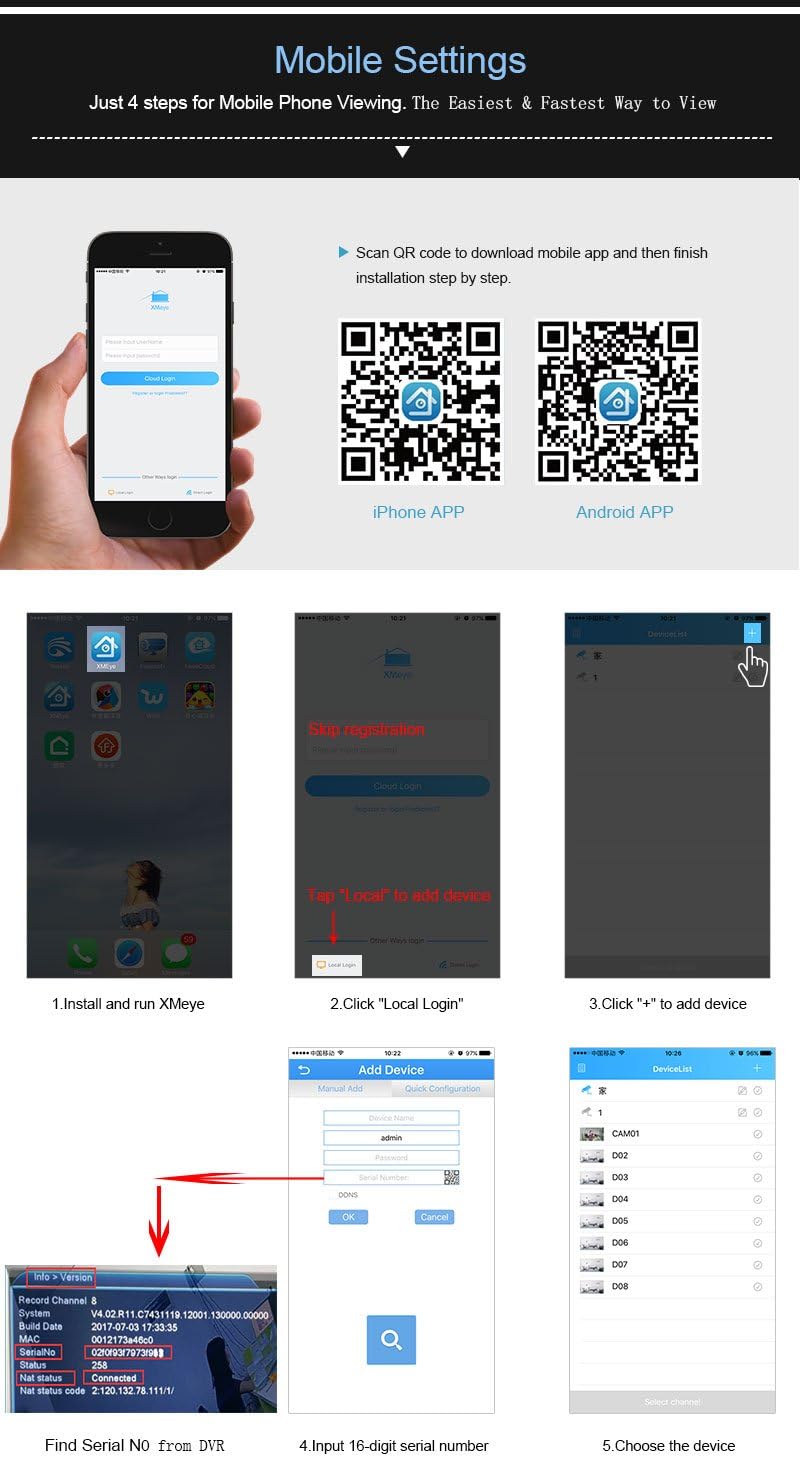
Image: A step-by-step visual guide for setting up the xmeye mobile application, including QR codes for iOS and Android app downloads, and instructions for adding devices.
- Descarrega l'aplicació: Scan the QR code below or visit the respective app store to download the xmeye mobile application.
iOS App Store Link
Android APK Download Link - Install and Run: Install the app on your smartphone and launch it.
- Local Login: Tap "Local" to proceed without registration.
- Afegeix un dispositiu: Toqueu la icona "+" per afegir un dispositiu nou.
- Find Serial Number: Locate the 16-digit serial number (SN) from your NVR's system information.
- Input SN: Enter the 16-digit serial number into the app.
- Seleccioneu el dispositiu: Choose the device from the list to start viewing.
5. Instruccions de funcionament
5.1 Modes d'enregistrament
L'NVR admet diversos modes d'enregistrament:
- Enregistrament manual: Start and stop recording manually.
- Enregistrament d'alarma: Recording triggered by external alarm inputs (if connected).
- Gravació de detecció de moviment: Recording starts automatically when motion is detected in the camera's view.
- Gravació temporitzada: Schedule specific times for continuous recording.
5.2 Remot Viewing i notificacions
Once the mobile app is set up, you can view live feeds and recorded footage from anywhere with an internet connection. The system also supports push notifications for events like motion detection.
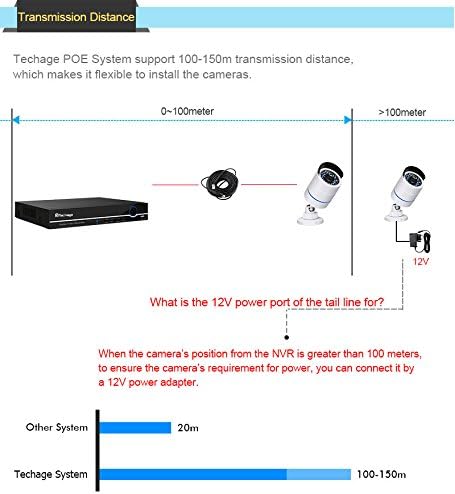
Image: Illustration of the motion detection feature, showing how the system can send email notifications with screenshots to your smartphone when motion is detected.
To enable email notifications for motion detection, navigate to the NVR's menu: Main Menu > Alarm > Motion Detect. Configure the detection area, sensitivity, and enable email alerts with screenshots.
6. Manteniment
Un manteniment regular garanteix un rendiment òptim i una major longevitat del vostre sistema de seguretat.
- Objectius de càmera: Periodically clean camera lenses with a soft, lint-free cloth to ensure clear image quality. Avoid abrasive cleaners.
- Connexions de cable: Check all cable connections (PoE, network, power) regularly to ensure they are secure and free from damage.
- NVR Ventilation: Ensure the NVR is placed in a well-ventilated area to prevent overheating. Keep vents clear of dust and obstructions.
- Actualitzacions de programari: Comproveu el del fabricant website periodically for firmware updates for the NVR and cameras to ensure the latest features and security patches.
- Còpia de seguretat de dades: Feu còpies de seguretat regularment dels vídeos importantstage to an external storage device.
7. Solució De Problemes
This section addresses common issues you might encounter with your Techage security system.
No Video Display on Monitor:
- Assegureu-vos que l'NVR estigui encès i que l'adaptador de corrent estigui connectat correctament.
- Check the VGA or HDMI cable connection between the NVR and the monitor/TV.
- Verify the monitor/TV input source is correctly selected (VGA/HDMI).
Sense imatge de càmera:
- Check if the camera's network cable is securely connected to the NVR's PoE port.
- Ensure the camera is receiving power (check if IR LEDs illuminate in the dark).
- Verify the camera is enabled in the NVR's channel settings.
- If the camera is more than 100 meters from the NVR, ensure a 12V power adapter is used for the camera's tail line power port.
Remot Viewing Not Working:
- Ensure the NVR is connected to your router via an Ethernet cable and has internet access.
- Verify your smartphone has a stable internet connection.
- Double-check the serial number entered in the mobile app.
- Ensure the xmeye app has necessary network permissions on your phone.
La detecció de moviment no s'activa:
- Check the motion detection settings in the NVR menu (sensitivity, detection area).
- Ensure the recording schedule for motion detection is correctly configured.
- Comproveu que la lent de la càmera estigui neta i lliure d'obstruccions.
8. Especificacions
| Característica | Especificació |
|---|---|
| Número de model de producte | 6708FN-4*BT508-20SC/P |
| Canals NVR | 4 CH |
| NVR Video Output | VGA, HDMI (Full HD) |
| NVR Hard Drive Support | 1 SATA (up to 6TB) |
| Resolució de la càmera | 2.0 MP (1920x1080p) |
| Sensor de càmera | 1/6.9 inch F02 CMOS |
| Camera Minimum Illumination | 0.1Lux @ F1.2 (Color), 0.01Lux @ F1.2 (Black/White) |
| Camera Ingress Protection | IP66 (impermeable) |
| Camera Power Input | DC12V/2A (via PoE or separate adapter) |
| Camera Main Stream Output | 1920*1080 (15fps), 1280*720 |
| Camera Sub-stream Output | 704*576 |
| Dimensions del sistema | 37.46 x 25.4 x 22.61 cm |
| Pes del sistema | 4.99 kg |
9. Garantia i Suport
For warranty information and technical support, please refer to the documentation included with your purchase or visit the official Techage weblloc web. Conserveu el rebut de compra com a comprovant de compra per a reclamacions de garantia.
Ask a question about this manual
Ask about setup, troubleshooting, compatibility, parts, safety, or missing instructions. Manuals+ will review the question and use this page’s manual context to help answer it.