
1. Introducció
Thank you for choosing the Jabra Evolve 30 UC Mono Headset. This headset is designed for unified communications, offering clear audio and passive noise cancellation to enhance your concentration and communication experience. This manual provides detailed instructions on how to set up, operate, and maintain your headset.
2. Contingut del paquet
Assegureu-vos que tots els elements estiguin presents al vostre paquet:
- Jabra Evolve 30 UC Mono On-Ear Headset
- USB Cable with Control Unit
3. Configuració
The Jabra Evolve 30 UC Mono Headset features plug-and-play installation, allowing you to use it immediately with most leading communication systems. Simply connect the headset to your device.
Connecting to a Computer (USB-A)
Connect the USB-A connector of the control unit cable to an available USB-A port on your computer. The headset will be automatically recognized and ready for use.
Connecting to a Mobile Device (3.5mm Jack)
For mobile devices, connect the 3.5mm jack from the control unit cable to the headphone jack on your smartphone or tablet. Note that call control functions on the unit may be limited when connected via 3.5mm jack.
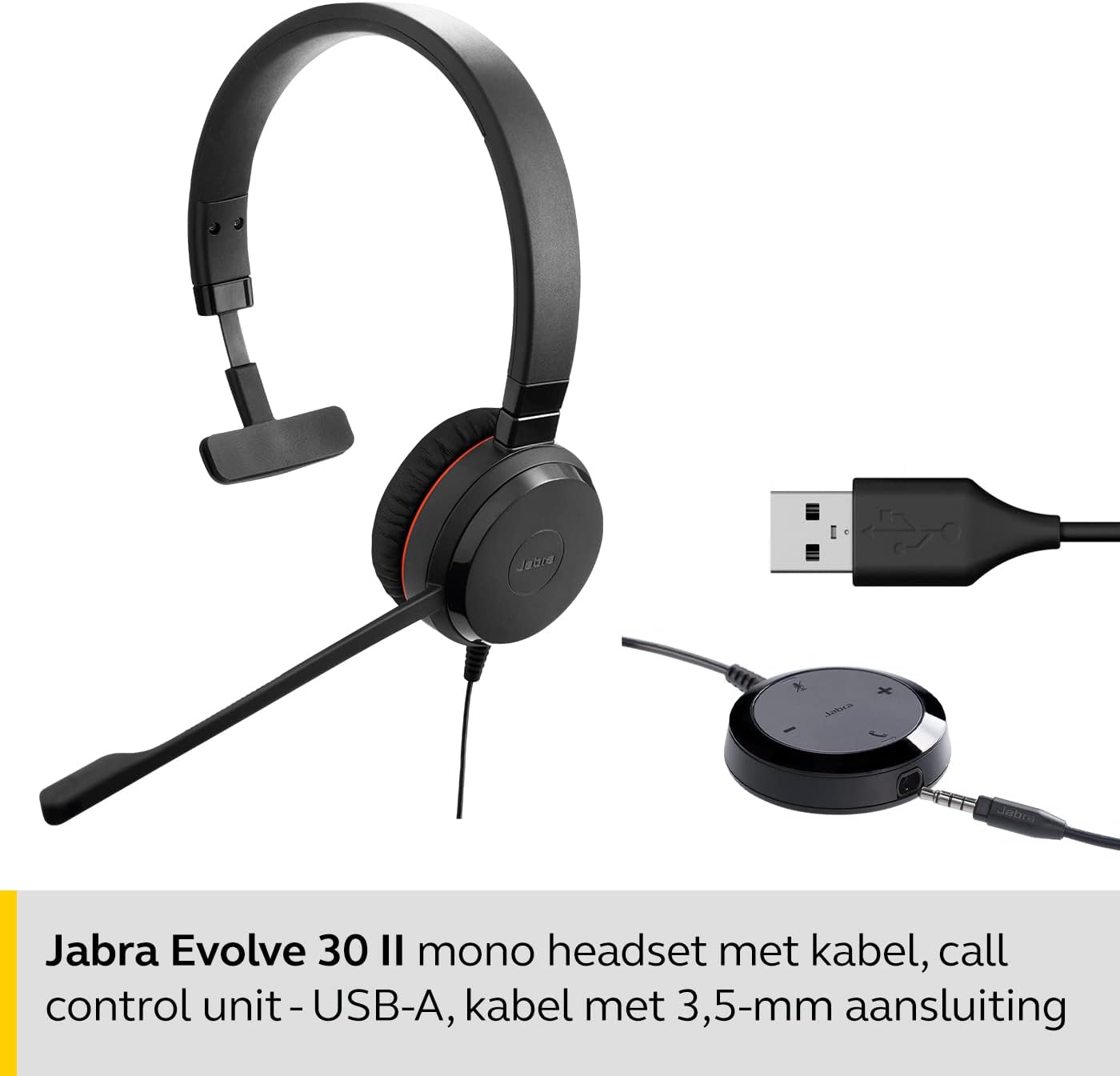
4. Instruccions de funcionament
The inline control unit provides easy access to call management functions.
Call Control Unit Functions
- Respondre/Finalitzar la trucada: Press the 'Answer/End' button (typically a phone icon) to accept or finish a call.
- Pujar/baixar el volum: Feu servir els botons '+' i '-' per ajustar el volum d'escolta.
- Silenciar el micròfon: Press the 'Mute' button (microphone icon) to mute or unmute your microphone during a call. An LED indicator on the control unit may show the mute status.

Portant els auriculars
Adjust the headband for a comfortable fit. Position the microphone boom approximately two fingers' width from your mouth for optimal voice pickup.

5. Característiques
- Cancel·lació passiva de soroll: The headset is designed to block high-frequency sounds, such as human voices, providing a better sound experience and enabling more efficient collaboration in various environments.
- Optimized for Unified Communications: This headset is optimized for use with all major communication platforms, ensuring seamless integration and performance.
- Disseny còmode: Features a stylish and comfortable design with soft leatherette ear cushions and an adjustable headband for a perfect fit during extended use.
- Connectivitat dual: Offers flexible connectivity options via USB-A for computers and a 3.5mm jack for personal mobile devices.

6. Manteniment
Per garantir la longevitat i el rendiment òptim dels auriculars, seguiu aquestes pautes de manteniment:
- Neteja: Gently wipe the headset, including ear cushions and microphone, with a soft, dry cloth. Avoid using harsh chemicals or abrasive materials.
- Emmagatzematge: Guardeu els auriculars en un lloc fresc i sec, allunyat de la llum solar directa i de temperatures extremes.
- Cura del cable: Eviteu doblegar el cable bruscament o estirar-lo massa per evitar danys.
7. Solució De Problemes
If you encounter issues with your Jabra Evolve 30 UC Mono Headset, try the following troubleshooting steps:
| Problema | Solució |
|---|---|
| No hi ha so dels auriculars |
|
| El micròfon no funciona |
|
| Mala qualitat d'àudio |
|
8. Especificacions
| Especificació | Detall |
|---|---|
| Marca | Jabra |
| Nom del model | Jabra Evolve 30 |
| Número de model de l'article | 5393-829-309 |
| Color | Negre |
| Dimensions del producte | 24.13 x 19.05 x 5.08 cm |
| Pes | 142 g |
| Col·locació de l'orella | A l'orella |
| Factor de forma | A l'orella |
| Control de so | Cancel·lació passiva de soroll |
| Sensibilitat | 93.6 dB |
| Conector d'auriculars | Jack de 3.5 mm |
| Tecnologia de connectivitat | Wired (USB-A, 3.5mm jack) |
| Material | Polipiel |
| Interval de freqüència | 20 Hz - 20,000 Hz |
| Dispositius compatibles | Avaya, Unify, Cisco (and other major communication platforms) |
| Fabricant | Jabra |
| País d'origen | Xina |
9. Garantia i Suport
The Jabra Evolve 30 UC Mono Headset comes with a Garantia d'2 any (24 mesos) des de la data de compra. Aquesta garantia cobreix els defectes de fabricació i garanteix un rendiment fiable.
For technical support, warranty claims, or further assistance, please visit the official Jabra support weblloc web o poseu-vos en contacte amb el servei d'atenció al client. Conserveu el comprovant de compra per validar la garantia.
10. Vídeo del producte
Mireu aquest vídeo oficial del producte per obtenir una visió generalview of the Jabra Evolve 30 UC Mono Headset.


