
1. Introducció
Gràcies per la compraasing the Metronic Gulli 477148 CD-MP3 Player with USB Port. This portable audio device is designed for ease of use, allowing you to enjoy your favorite music from various sources including CDs, CD-R/RW, MP3 discs, and USB flash drives. This manual provides detailed instructions to help you set up, operate, and maintain your device for optimal performance.

Figura 1: Frontal view of the Metronic Gulli 477148 CD-MP3 Player.
2. Informació de seguretat
Si us plau, llegiu atentament totes les instruccions de seguretat abans d'utilitzar aquest producte. Conserveu aquest manual per a futures consultes.
- Font d'alimentació: Feu servir només l'adaptador de corrent o les piles especificades. Assegureu-vos que el volumtage coincideix amb els requisits del dispositiu.
- Aigua i humitat: Do not expose the device to rain, moisture, or immerse it in water.
- Calor: Mantingueu el dispositiu allunyat de fonts de calor com ara radiadors, registres de calor, estufes o altres aparells (inclosos amplificadors) que produeixen calor.
- Ventilació: No bloquegeu cap obertura de ventilació. Instal·leu-ho d'acord amb les instruccions del fabricant.
- Neteja: Netegeu només amb un drap sec.
- Manteniment: No intenteu atendre aquest producte vosaltres mateixos. Consulteu tots els serveis a personal de servei qualificat.
- Auriculars: Eviteu escoltar a nivells de volum elevats durant períodes prolongats per evitar danys auditius.
3. Producte acabatview
Familiarize yourself with the various parts and controls of your CD-MP3 player.
3.1 Controls i ports del panell frontal

Figure 2: Front panel with controls and ports.
- Volume Up/Down Buttons (V+/V-): Ajusta el volum de reproducció.
- Pantalla LCD: Shows track number, time, mode, and ID3 tag informació.
- Botó de mode: Switches between CD, USB, and other available modes.
- Botó Reproduir/Pausa: Inicia o posa en pausa la reproducció.
- Botó d'aturada: Atura la reproducció.
- Botó Anterior/Rebobinar: Salta a la pista anterior o rebobina la pista actual.
- Botó Següent/Avançament ràpid: Salta a la pista següent o avança ràpidament la pista actual.
- Presa d'auriculars (3.5 mm): Connecteu els auriculars per a una escolta privada.
- Entrada AUX: Connecteu dispositius d'àudio externs.
- Port USB: Connect a USB flash drive for MP3 playback.
3.2 Panell posterior

Figure 3: Rear panel with power input.
- Entrada d'alimentació de CA: Connect the provided AC power adapter.
- Compartiment de la bateria: (Located on the bottom, not visible in this image) Insert batteries for portable use.
4. Configuració
4.1 Alimentació del dispositiu
The Metronic Gulli 477148 can be powered by either an AC adapter or batteries.
- Alimentació CA: Connect the supplied AC power adapter to the AC power input on the rear of the unit and plug the other end into a standard wall outlet.
- Potència de la bateria: Open the battery compartment (usually on the bottom of the unit). Insert 6 x 1.5V C-type batteries (not included), ensuring correct polarity (+/-). Close the battery compartment securely.
4.2 Encès inicial
Premeu el botó Encès/Apagat button (if available, otherwise the Mode button usually powers it on) to turn on the device. The LCD display will illuminate.
5. Instruccions de funcionament
5.1 Reproducció de CD
- Obriu la tapa del compartiment del CD.
- Place a CD (CD, CD-R/RW, or MP3 CD) onto the spindle with the label side facing up.
- Close the CD compartment lid securely.
- Premeu el botó Mode botó per seleccionar el mode CD.
- Premeu el botó Reproduir/Pausa per iniciar la reproducció.
- Utilitza el Anterior/Rebobinar i Següent/Avançar ràpid botons per navegar per pistes.
- Ajusteu el volum amb el botó V+/V- botons.
5.2 Ús del port USB
- Inseriu una unitat flash USB que contingui MP3 files al port USB.
- Premeu el botó Mode button to select USB mode. The device will automatically scan and begin playing MP3 files.
- Utilitza el Anterior/Rebobinar i Següent/Avançar ràpid botons per navegar per pistes.
- Ajusteu el volum amb el botó V+/V- botons.
5.3 Ús dels auriculars
Connect any standard 3.5mm headphones to the headphone jack for private listening. When headphones are connected, sound will typically be muted from the built-in speakers.
5.4 Entrada AUX
Connect an external audio device (e.g., smartphone, tablet) to the AUX input using a 3.5mm audio cable (not included). Press the Mode button to select AUX mode. Audio from the external device will play through the CD-MP3 player's speakers.
5.5 Special Playback Functions
- ID3 Function: Quan es reprodueix MP3 files from a CD or USB, the LCD display will show information such as album name, artist, and track title.
- Funció de repetició: Premeu el botó Repetiu button (if available, often combined with Mode or a dedicated button) to repeat the current track or all tracks.
- Funció del programa: Allows you to program a specific order of tracks for playback. Refer to the device's specific button for programming.
- Funció aleatòria: Reprodueix les pistes en ordre aleatori.
- Intro Function: Plays the first 10 seconds of each track on a CD or USB, allowing for quick song preview.
6. Manteniment
6.1 Neteja
- Netegeu l'exterior de la unitat amb un drap suau i sec.
- No utilitzeu netejadors abrasius, ceres o dissolvents, ja que poden danyar l'acabat.
- Per a la lent del CD, feu servir un disc netejador de lents de CD especialitzat.
6.2 Emmagatzematge
When not in use for extended periods, store the device in a cool, dry place. Remove batteries if storing for a long time to prevent leakage.
7. Solució De Problemes
| Problema | Causa possible | Solució |
|---|---|---|
| Sense poder | L'adaptador de CA no està connectat correctament; les piles estan esgotades o inserides incorrectament. | Comproveu la connexió de l'adaptador de CA; substituïu les piles o assegureu-vos que la polaritat sigui correcta. |
| Sense so | Volum massa baix; Auriculars connectats; Mode incorrecte seleccionat. | Increase volume; Disconnect headphones; Select correct mode (CD, USB, AUX). |
| El CD no es reprodueix | CD inserted incorrectly; CD dirty or scratched; CD compartment not closed; Incorrect mode. | Insert CD with label side up; Clean or replace CD; Close lid firmly; Select CD mode. |
| No es reprodueix l'USB | USB drive not inserted correctly; USB drive not formatted correctly; No MP3 files on USB; Incorrect mode. | Reinsert USB drive; Ensure USB is FAT32 formatted; Transfer MP3 files to USB; Select USB mode. |
| La pantalla no funciona | Device off; Faulty unit. | Turn on device; If problem persists, contact support. |
8. Especificacions
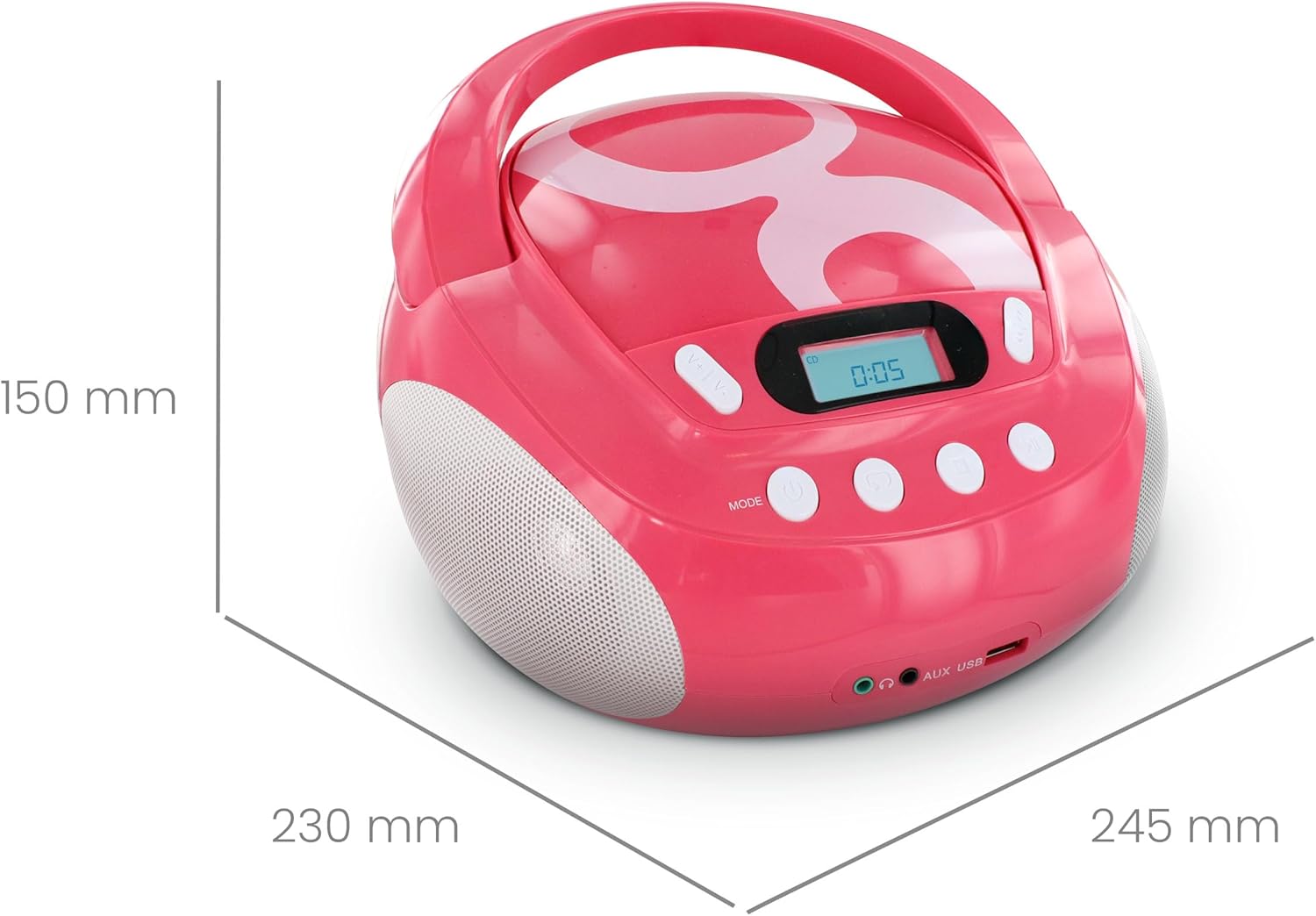
Figura 4: Dimensions del producte.
| Marca | Metrònic |
| Número de model | 477148 |
| Color | Gulli Rose |
| Mitjans compatibles | CD, CD-R/RW, MP3-CD, USB (MP3 files) |
| Tecnologia de connectivitat | Auxiliar, USB |
| Conector d'auriculars | 3.5 mm |
| Tipus d'altaveu | estèreo |
| Potència de sortida | 2 watts |
| Font d'alimentació | AC Powered, Battery Powered (6 x 1.5V C-type batteries) |
| Dimensions (L x A x A) | 28 x 24 x 16 cm (aproximadament 11 x 9.4 x 6.3 polzades) |
| Pes de l'article | 1900 Grams (1.9 kg / 4.19 lbs) |
| Mostra | LCD amb llum de fons |
9. Garantia i Suport
9.1 Garantia del fabricant
Aquest producte ve amb un Garantia del fabricant de 2 anys des de la data de compra. Si us plau, conserveu el comprovant de compra per a reclamacions de garantia. La garantia cobreix defectes de materials i fabricació en condicions d'ús normal.
9.2 Atenció al client
For assistance with installation or use of this product, please contact the manufacturer's support line:
Telèfon: 0892 350 315
(Note: This number may incur charges depending on your service provider and location.)