
WINGONEER 12V Hi-Fi Stereo Digital Audio Ampmés viu
WINGONEER 12V Hi-Fi Stereo Digital Audio AmpManual d'usuari més viu
Model: 12V Hi-Fi Stereo Digital Audio Ampmés viu
1. Introducció
Gràcies per la compraasing the WINGONEER 12V Hi-Fi Stereo Digital Audio Amplificador. Aquest compacte i versàtil amplifier is designed to provide high-quality audio for various applications, including car, motorcycle, boat, or home use. It features multiple input options such as Bluetooth, USB, SD card, and auxiliary input, along with an integrated FM radio tuner. This manual provides detailed instructions for setup, operation, and maintenance to ensure optimal performance and longevity of your device.
2. Instruccions de seguretat importants
- Llegiu atentament totes les instruccions abans d'utilitzar el dispositiu.
- Conserveu aquest manual com a referència futura.
- No exposar el amplifier to rain, moisture, or extreme temperatures.
- Ensure proper ventilation to prevent overheating. Do not block any ventilation openings.
- Use only a 12V DC power supply. This amplifier does not include a power adapter.
- Desconnecteu l'alimentació abans de fer qualsevol connexió o desconnexió.
- No intenteu reparar ni modificar el dispositiu vosaltres mateixos. Envieu totes les tasques de manteniment a personal qualificat.
- Mantenir fora de l'abast dels nens.
3. Contingut del paquet
Si us plau, comproveu el paquet per veure si hi ha els elements següents:
- 1x WINGONEER 12V Hi-Fi Stereo Digital Audio Ampmés viu
- 1x comandament a distància
- 1x Manual d'usuari (aquest document)
Nota: A 12V DC power adapter is not included and must be purchased separately.
4. Producte acabatview
4.1 Panells frontal i posterior
Familiarize yourself with the controls and connections on the amplifier's front and rear panels.
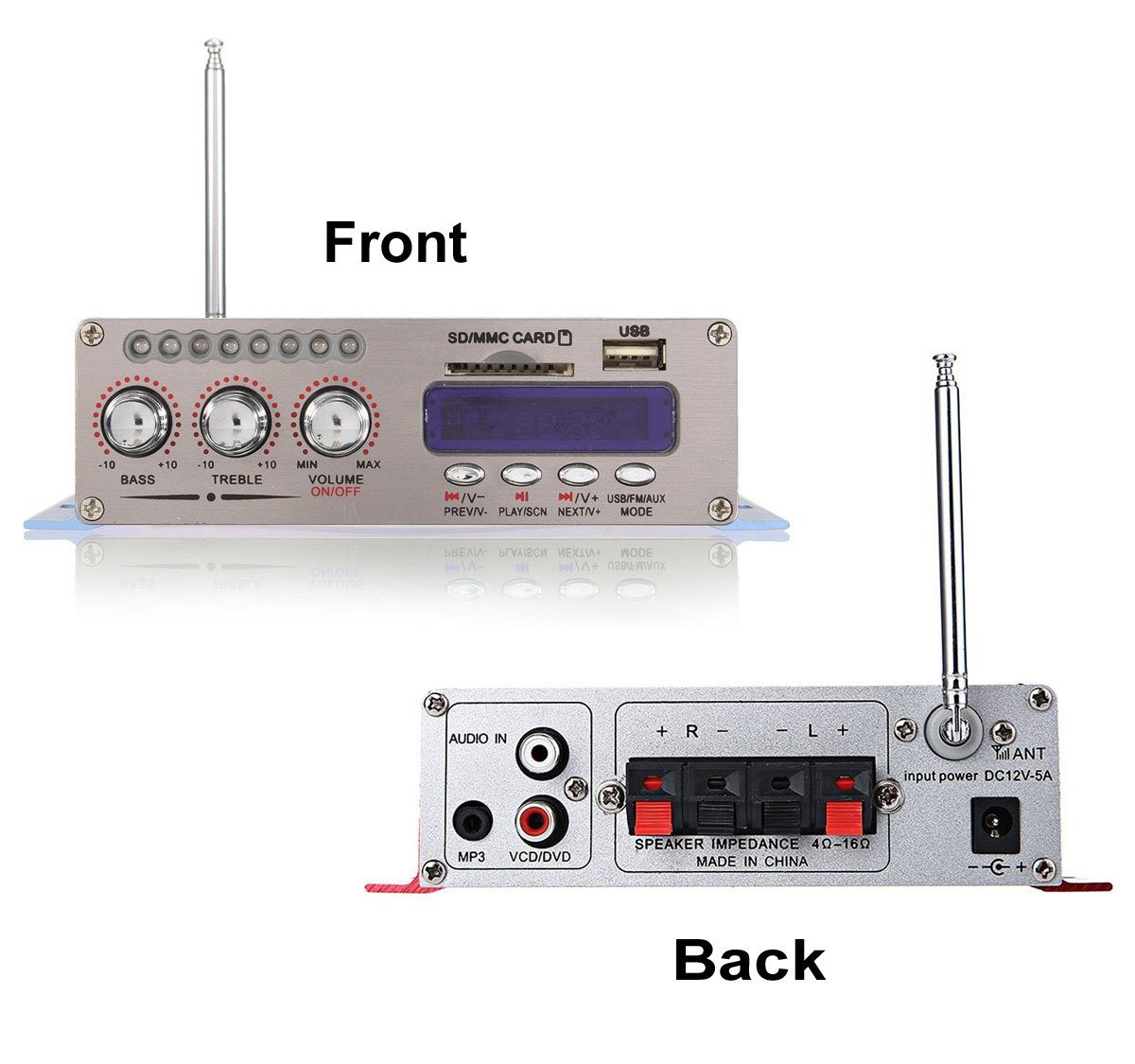
Imatge 1: Davant i posterior view of the WINGONEER 12V Hi-Fi Stereo Digital Audio Amplifier. This image displays the overall layout of the amplifier, showing the front panel with controls and the rear panel with input/output connections.
Controls del panell frontal:
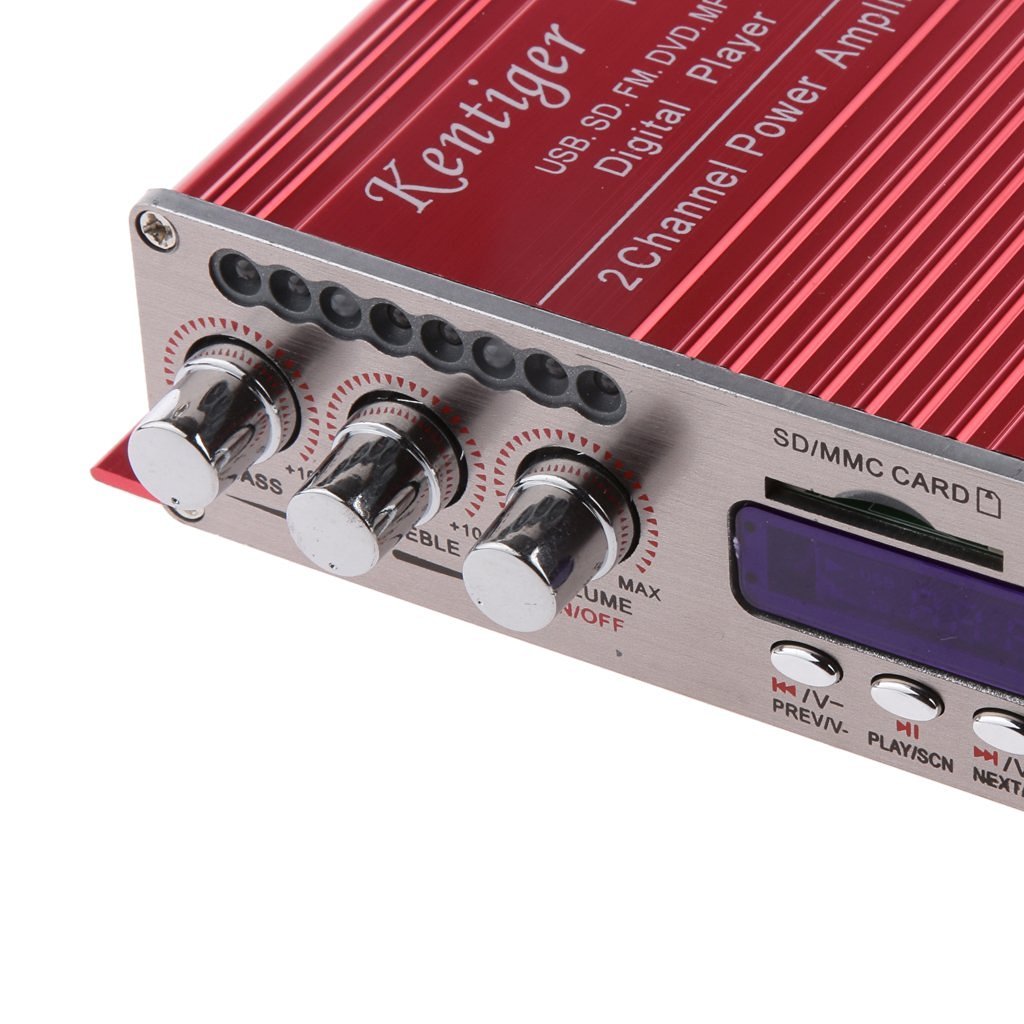
Imatge 2: Primer pla view de la amplifier's front panel controls. This image highlights the Bass, Treble, and Volume/On/Off knobs, along with the digital display, USB port, SD/MMC card slot, and mode/playback buttons.
- Pom BASS: Ajusta la sortida d'àudio de baixa freqüència.
- Controlador TREBLE: Ajusta la sortida d'àudio d'alta freqüència.
- VOLUME ON/OFF Knob: Controls the master volume and powers the unit on/off.
- Pantalla digital: Mostra el mode actual, el número de pista, la freqüència FM, etc.
- Port USB: Per connectar unitats flaix USB.
- SD/MMC CARD Slot: Per inserir targetes de memòria SD o MMC.
- Botó MODE: Switches between USB, SD, FM, AUX, and Bluetooth input modes.
- PREV/V- Button: Short press for previous track/station; long press for volume down.
- PLAY/SCN Button: Plays/pauses audio; in FM mode, short press for auto-scan.
- NEXT/V+ Button: Short press for next track/station; long press for volume up.
Connexions del panell posterior:

Imatge 3: Primer pla view de la amplifier's rear panel connections. This image shows the Audio In (RCA) ports, Speaker Output terminals (L+/L-, R+/R-), 12V DC power input, and the antenna connection.
- AUDIO IN (RCA): Left and Right RCA inputs for external audio sources (e.g., DVD player, VCD, MP3 player).
- SPEAKER OUTPUT (L+/L-, R+/R-): Terminals for connecting passive speakers. Ensure correct polarity.
- INPUT POWER DC 12V-5A: Power input jack for a 12V DC power supply.
- ANT (Antena): Punt de connexió per a l'antena de ràdio FM.
4.2 Control remot
El comandament a distància inclòs permet un funcionament còmode des de la distància.
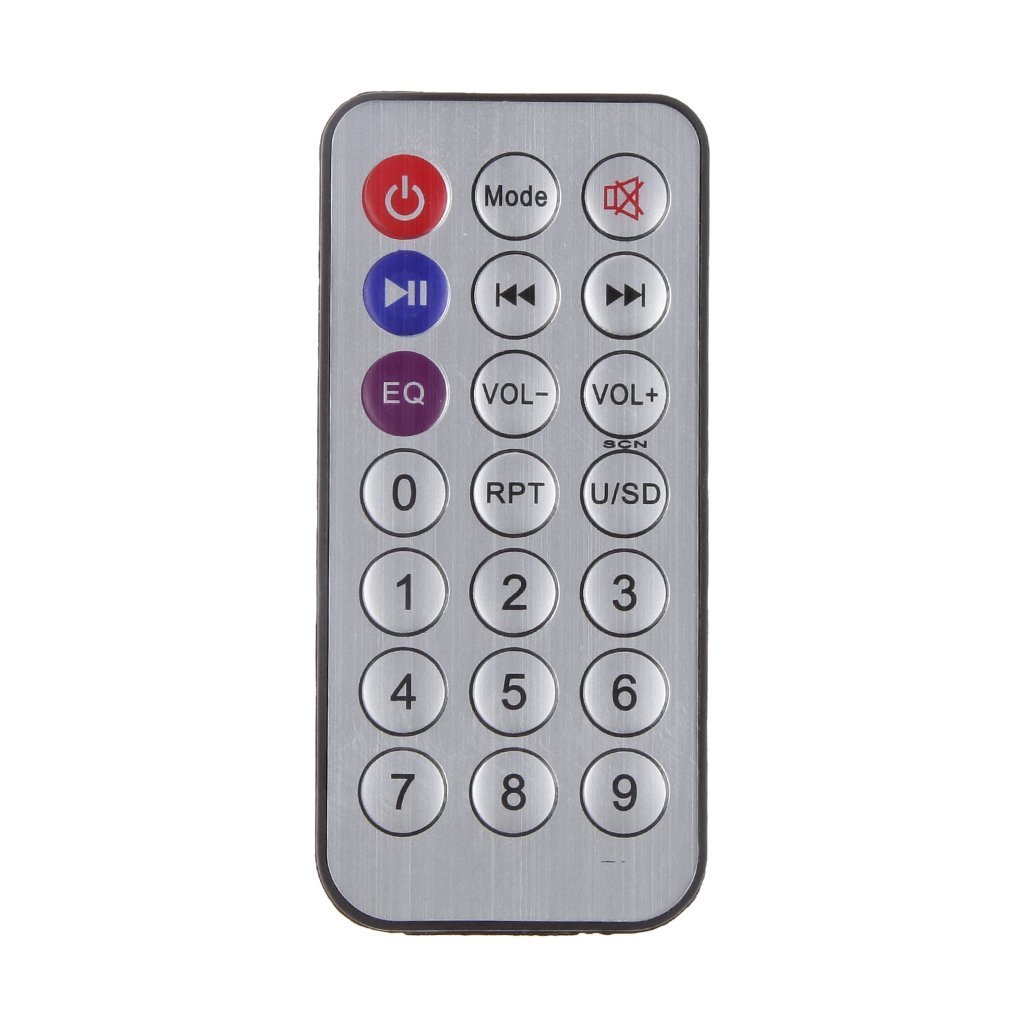
Imatge 4: Remote control for the WINGONEER 12V Hi-Fi Stereo Digital Audio Amplifier. This image displays the layout of the remote control buttons, including power, mode, playback controls, volume, EQ, and number buttons.
- Botó d'encesa: Gira el ampmés viu encès o apagat.
- Botó de mode: Cycles through input modes (USB, SD, FM, AUX, Bluetooth).
- Botó de silenci: Silencia o activa l'àudio.
- Botó Reproduir/Pausa: Reprodueix o posa en pausa la reproducció d'àudio.
- Botons de pista anterior/següent: Salta a la pista/emissora anterior o següent.
- VOL-/VOL+ Buttons: Augmenta o disminueix el volum.
- Botó EQ: Passa ciclísticament pels preajustos de l'equalitzador.
- Botó RPT: Repeteix la pista actual o totes les pistes.
- U/SD Button: Switches between USB and SD card input (if both are inserted).
- Botons numèrics (0-9): Per a la selecció directa de pistes o l'entrada de freqüència FM.
5. Instruccions de configuració
Segueix aquests passos per configurar el teu ampmés viu:
- Connectar els altaveus: Connect your passive speakers to the SPEAKER OUTPUT terminals on the rear panel. Ensure correct polarity (+ to + and - to -) for each speaker.
- Connecteu la font d'àudio (opcional): If using an external audio source (e.g., DVD player), connect it to the AUDIO IN (RCA) ports on the rear panel using appropriate RCA cables.
- Connecteu l'antena FM: Attach the FM antenna to the ANT connection on the rear panel for improved radio reception.
- Connectar l'alimentació: Connect a 12V DC power supply (not included) to the INPUT POWER DC 12V-5A jack. Ensure the power supply meets the specified voltage i requisits actuals.
- Encès: Turn the VOLUME ON/OFF knob clockwise to power on the amplifier. The digital display will illuminate.
6. Instruccions de funcionament
6.1 Funcionament bàsic
- Encès/apagat: Rotate the VOLUME ON/OFF knob clockwise to turn on, counter-clockwise to turn off. Alternatively, use the Power button on the remote.
- Ajust de volum: Rotate the VOLUME ON/OFF knob or use the VOL-/VOL+ buttons on the remote/front panel.
- Bass/Treble Adjustment: Use the BASS and TREBLE knobs on the front panel to adjust audio tone.
- Selecció del mode: Press the MODE button on the front panel or remote to cycle through input sources: USB, SD, FM, AUX, Bluetooth.
6.2 Reproducció des de targeta USB/SD
- Insert a USB flash drive into the USB port or an SD/MMC card into the SD/MMC CARD slot.
- El amplifier will automatically switch to USB or SD mode and begin playing MP3 files. If not, press the MODE button to select the correct source.
- Use the PREV/V-, PLAY/SCN, and NEXT/V+ buttons on the front panel or remote to control playback (previous/next track, play/pause).
- Use the RPT button on the remote for repeat functions.
6.3 Funcionament de la ràdio FM
- Press the MODE button until "FM" appears on the digital display.
- Escaneig automàtic: Press the PLAY/SCN button on the front panel or remote to automatically scan and save available FM stations. The amplifier will store stations and play the first one found.
- Sintonització manual/selecció d'emissores: Use the PREV/V- and NEXT/V+ buttons to navigate through saved stations.
6.4 Funcionament Bluetooth
- Press the MODE button until "BLUE" or "BT" appears on the digital display. The amplifier is now in Bluetooth pairing mode.
- Al dispositiu compatible amb Bluetooth (per exemple, un telèfon intel·ligent o una tauleta), cerqueu els dispositius Bluetooth disponibles.
- Select "BT" or a similar name from the list to pair. Once paired, you will hear a confirmation tone.
- Start playing audio on your connected device. The sound will be transmitted through the ampmés viu.
- Use your connected device or the amplifier's controls (PREV/V-, PLAY/SCN, NEXT/V+) to control playback.
6.5 Funcionament de l'entrada AUX
- Connect your external audio source (e.g., MP3 player, CD player) to the AUDIO IN (RCA) ports on the rear panel.
- Press the MODE button until "AUX" appears on the digital display.
- Play audio from your connected device. The amplifier will output the sound.
7. Especificacions
| Característica | Especificació |
|---|---|
| Entrada Voltage | DC 12V |
| Potència de sortida | RMS 2 x 20W (1KHz) / 100W (Peak) |
| Impedància de l'altaveu | 4.0 - 16 Ohms |
| Resposta de freqüència | 20 Hz - 20 kHz |
| Relació senyal/soroll (SNR) | > 85 dB |
| Distorsió harmònica | < 0.05% |
| Interval de freqüència de ràdio FM | 87.5 ~ 108 MHz |
| High Control (Treble) | 12 dB +/- 10 kHz |
| Control de graves | 12 dB +/- 100 Hz |
| Nivell de senyal | 220 MV 47 K |
| Formats d'àudio compatibles | MP3 (via USB/SD) |
| Material | Alumini lleuger |
| Dimensions (aprox.) | 18.2 x 12.8 x 5.2 cm |
| Pes (aprox.) | 340 grams |
8. Solució De Problemes
| Problema | Causa possible | Solució |
|---|---|---|
| Sense poder | Power supply not connected or faulty; ampmés viu. | Ensure 12V DC power supply is correctly connected and functional. Turn VOLUME ON/OFF knob clockwise. |
| Sense sortida de so | Volume too low; incorrect input mode; speakers not connected or faulty; audio source issue. | Increase volume. Press MODE to select correct input. Check speaker connections and polarity. Verify audio source is playing. |
| Mala qualitat de so / Distorsió | Volume too high; incorrect Bass/Treble settings; poor audio source quality; speaker impedance mismatch. | Reduce volume. Adjust Bass/Treble. Use a higher quality audio source. Ensure speakers are 4-16 Ohms. |
| La targeta USB/SD no es reprodueix | Incorrect format (only MP3 supported); card/drive faulty; incorrect mode selected. | Assegureu-vos files are MP3. Try a different USB/SD card. Press MODE to select USB/SD. |
| Mala recepció de la ràdio FM | Antenna not connected or positioned poorly; weak signal. | Connect and extend the FM antenna. Reposition the antenna for better reception. |
| Bluetooth no emparellat | Amplifier not in Bluetooth mode; device too far; device already paired to another unit. | Press MODE to select Bluetooth. Ensure device is within range. Disconnect from other Bluetooth devices. |
| El comandament a distància no funciona | Battery depleted; line of sight blocked; remote faulty. | Replace remote battery. Ensure clear line of sight to the ampreceptor d'infrarojos del lifer. |
9. Manteniment
- Neteja: Netegeu el amplifier with a soft, dry cloth. Do not use liquid cleaners or abrasive materials.
- Ventilació: Assegureu-vos que les obertures de ventilació estiguin netes de pols i deixalles per evitar el sobreescalfament.
- Emmagatzematge: Quan no s'utilitzi durant períodes prolongats, guardeu-lo amplificador en un lloc fresc i sec, allunyat de la llum solar directa.
10. Garantia i Suport
Per obtenir informació sobre la garantia o assistència tècnica, consulteu el distribuïdor on vau comprar aquest producte. Conserveu el comprovant de compra per a qualsevol reclamació de garantia.
Manufacturer: WINGONEER
ASIN: B01L1DJ2HG
UPC: 662578900078
Ask a question about this manual
Ask about setup, troubleshooting, compatibility, parts, safety, or missing instructions. Manuals+ will review the question and use this page’s manual context to help answer it.