
Introducció
This manual provides detailed instructions for the setup, operation, maintenance, and troubleshooting of your LEZYNE Enhanced Super GPS Cycling Computer. Please read this manual thoroughly before using the device to ensure proper function and longevity.

Imatge: Frontal view of the LEZYNE Enhanced Super GPS Cycling Computer with its screen off, showcasing the device's compact design and button layout.
Configuració
1. Desembalatge i càrrega inicial
En desembalar, comproveu que hi hagi tots els components:
- LEZYNE Enhanced Super GPS Cycling Computer
- cable USB
- Handlebar/stem mount
Before first use, fully charge the device using the provided USB cable. Connect the USB cable to the device's charging port and to a powered USB source (e.g., computer, wall adapter). The charging indicator will show progress.
2. Muntatge del dispositiu
Use the included handlebar/stem mount to secure the device to your bicycle. Follow these steps:
- Position the mount on your handlebar or stem in a location that provides clear visibility and easy access.
- Secure the mount using the provided straps or bolts, ensuring it is tight and stable.
- Align the LEZYNE Enhanced Super GPS with the mount and twist it clockwise until it locks securely into place.

Imatge: Frontal inclinat view of the LEZYNE Enhanced Super GPS Cycling Computer, highlighting the bottom mounting interface for secure attachment to a bicycle.
3. Engegada inicial i configuració bàsica
Press and hold the power button (typically on the side) to turn on the device. Upon first power-on, you may be prompted to set basic preferences such as language, time zone, and unit measurements (e.g., miles/kilometers, Fahrenheit/Celsius). Navigate through the menus using the side buttons and confirm selections with the ENTER button.
Instruccions de funcionament
1. Funcions del botó
The device features several buttons for navigation and control:
- ENTRAR: Confirma les seleccions i inicia/atura l'enregistrament.
- MENÚ: Accesses main menu, navigates back.
- LAP: Marks a lap during a ride, navigates down in menus.
- Up/Down Arrows (or similar): Navigates through menu options or data screens.
2. GPS Navigation and Tracking
The Enhanced Super GPS provides robust navigation features:
- Visualització del mapa: View your current location and planned routes.
- Direction Guidance: Receive turn-by-turn directions.
- Seguiment en directe: Share your ride in real-time with others.
- Live Segments Tracking: Monitor your performance on pre-defined segments.

Image: The LEZYNE Enhanced Super GPS Cycling Computer screen showing a detailed map display, indicating current position and route.
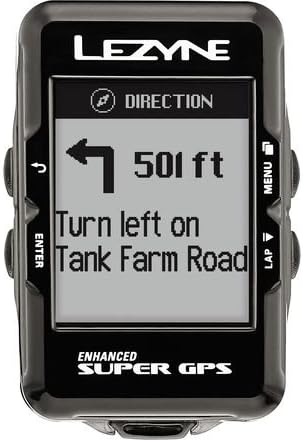
Image: The LEZYNE Enhanced Super GPS Cycling Computer screen providing clear turn-by-turn direction guidance, showing distance to the next turn.
3. Data Display and Metrics
Customize your data screens to view various metrics during your ride:
- Hora: Current time and ride duration.
- Potència: Real-time power output (requires compatible power meter, not included).
- Freqüència cardíaca: Current heart rate (requires compatible heart rate monitor, not included).
- Cadència: Pedaling cadence (requires compatible cadence sensor, not included).
- Other metrics such as speed, distance, elevation, and temperature.
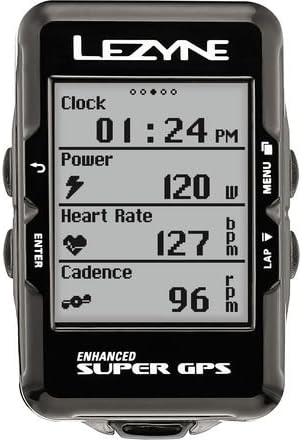
Image: The LEZYNE Enhanced Super GPS Cycling Computer screen showing multiple ride metrics simultaneously, including clock, power, heart rate, and cadence.
4. Message Notifications and Segments
The device can display notifications and segment information:
- Message Display: Receive incoming message notifications from a paired smartphone.
- Segment Completion: Get real-time updates and results upon completing a segment.
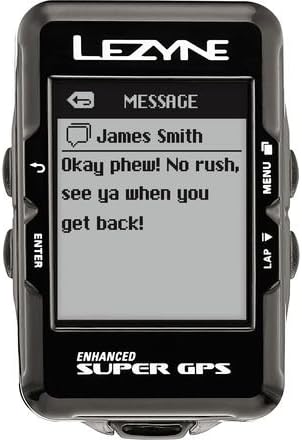
Image: The LEZYNE Enhanced Super GPS Cycling Computer screen showing an incoming message notification from a connected device.

Image: The LEZYNE Enhanced Super GPS Cycling Computer screen indicating "Segment Complete!" with details like segment name and finish time.
Manteniment
1. Neteja
Per mantenir l'aspecte i la funcionalitat del dispositiu:
- Netegeu el dispositiu amb un suau, damp tela.
- Avoid using abrasive cleaners or solvents, as these can damage the screen or casing.
- Ensure the USB port cover is securely closed to prevent water and dust ingress.
2. Cura de la bateria
- Carregueu el dispositiu regularment, sobretot si el guardareu durant un període prolongat.
- Eviteu descarregar completament la bateria amb freqüència, ja que això pot reduir-ne la vida útil.
- Guardeu el dispositiu en un lloc fresc i sec quan no l'utilitzeu.
3. Actualitzacions de programari
Periodically check the LEZYNE website or connect the device to your computer with the LEZYNE GPS Ally app for available software updates. Updates often include performance improvements, bug fixes, and new features.
Resolució de problemes
| Problema | Possible causa/solució |
|---|---|
| El dispositiu no s'encén. | Battery may be depleted. Connect to a power source using the USB cable and charge for at least 30 minutes. |
| Senyal GPS no adquirit. | Assegureu-vos que esteu en una zona oberta amb claredat view of the sky. Avoid dense tree cover or tall buildings. Allow several minutes for initial acquisition. |
| El dispositiu no es connecta a l'ordinador. | Try a different USB port or cable. Ensure the device is powered on. Install necessary drivers if prompted by your computer. |
| Inaccurate data readings. | Ensure sensors (if connected) are properly paired and functioning. Check for firmware updates. Perform a factory reset if issues persist (note: this will erase user data). |
If you encounter issues not listed here or if solutions do not resolve the problem, please refer to the support section.
Especificacions
| Característica | Detall |
|---|---|
| Marca | LEZYNE |
| Número de model | 1-GPS-SPR-V204 |
| Ús recomanat | Ciclisme |
| Dimensions (L x A x A) | 1.69" x 1.08" x 2.67" |
| Pes | 0.06 Kilograms (76 g claimed) |
| Tecnologia de connectivitat | USB |
| Característiques especials | Live Segments Tracking, Live Tracking |
| Tipus de mapa | Carretera |
| Tipus de muntatge | Muntatge de manillar |
| Tipus de visualització | LCD |
| Entrada de la interfície humana | Botons |
| Capacitat d'emmagatzematge de memòria | 16 MB |
| Piles incloses | Sí |
| Components inclosos | SUPER GPS unit, USB cable, Handlebar/stem mount |
Informació de la garantia
The LEZYNE Enhanced Super GPS Cycling Computer comes with a 1 any de garantia del fabricant des de la data de compra. Aquesta garantia cobreix els defectes de materials i fabricació en condicions d'ús normal. No cobreix els danys causats per un mal ús, accidents, modificacions no autoritzades o desgast normal. Conserveu el comprovant de compra per a reclamacions de garantia.
Suport
For further assistance, technical support, or warranty claims, please visit the official LEZYNE website or contact their customer service department. Detailed contact information can typically be found on the product packaging or the manufacturer's weblloc.
Recursos en línia:
- LEZYNE Official Weblloc: www.lezyne.com
- Product Support Pages: Check the website for FAQs, updated manuals, and software downloads.