
1. Introducció
The Honeywell Home T5 Smart Thermostat is designed to provide optimal comfort and energy efficiency in your home. This ENERGY STAR certified device offers flexible programming options, including schedule-based control and location-based temperature adjustments (Geofencing). With Wi-Fi connectivity, you can manage your home's temperature from anywhere using a smartphone or tablet, simplifying climate control and potentially reducing energy costs.

Figura 1: Frontal view of the Honeywell Home T5 Smart Thermostat.
2. Configuració i instal·lació
2.1 Llista de comprovació prèvia a la instal·lació
- Compatibilitat: Ensure your HVAC system is compatible. This thermostat works with forced air (gas, oil, or electric), hot water and steam, and heat pumps with electric backup. It is NOT compatible with electric baseboard heat (120-240V) or mini-split systems.
- Requisit del cable C: A C-wire (common wire) is required for power. Verify your system has a C-wire or consult a professional for installation of a C-wire power adapter if needed.
- Eines: Gather necessary tools such as a screwdriver, wire strippers, and a smartphone or computer for Wi-Fi setup.
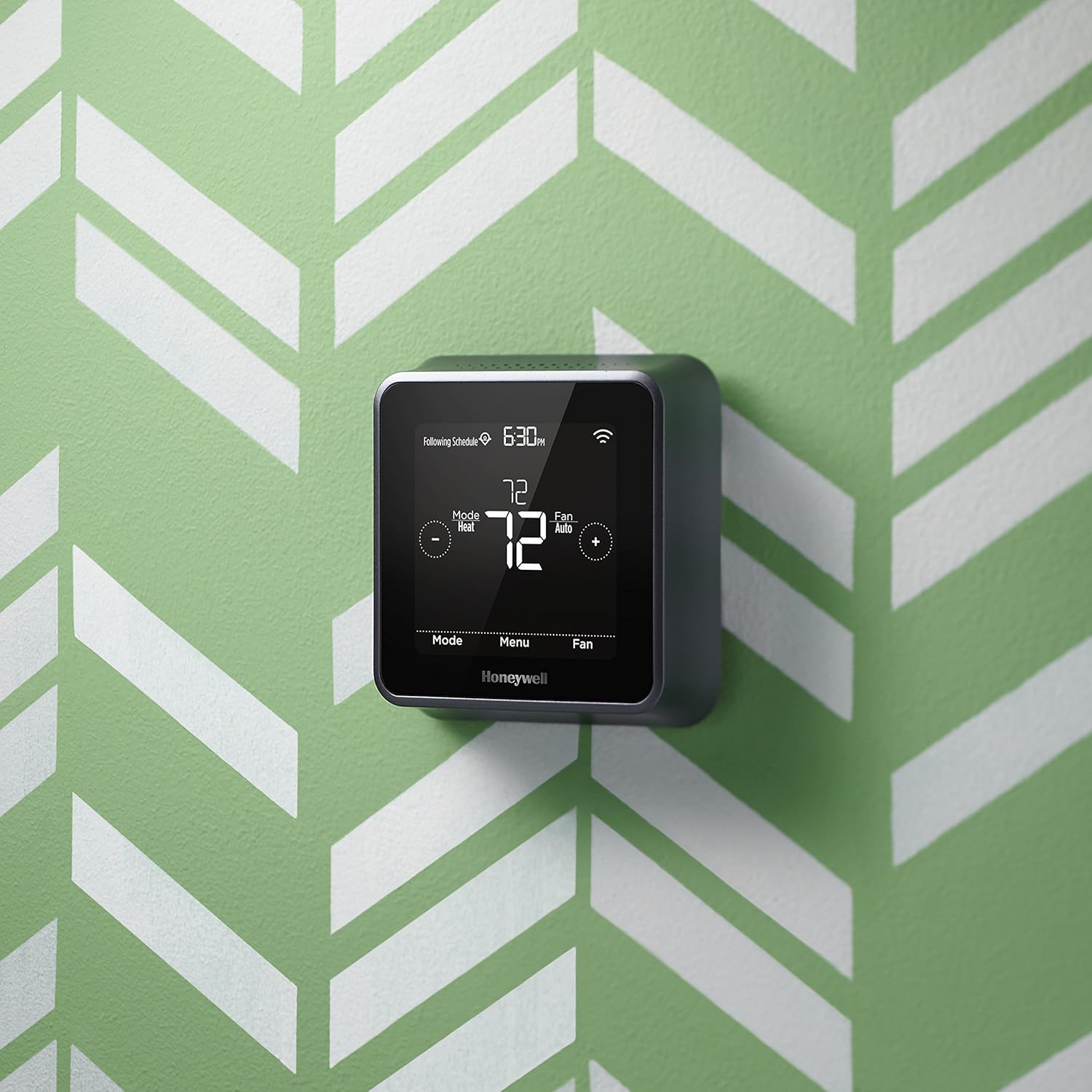
Figure 2: System compatibility chart for the T5 Smart Thermostat.
2.2 Instruccions de cablejat
- Apagar: Before beginning, turn off power to your heating/cooling system at the circuit breaker.
- Elimina el termòstat antic: Traieu amb cura el termòstat antic de la paret. Feu una foto del cablejat com a referència.
- Etiqueta els cables: Etiqueta cada cable amb la lletra del terminal corresponent del teu termòstat antic.
- Muntanya la Nova Base: Install the new thermostat's mounting plate to the wall using the provided screws.
- Connecteu els cables: Connect the labeled wires to the appropriate terminals on the new thermostat base. Ensure the C-wire is connected.
- Connecteu el termòstat: Snap the T5 Smart Thermostat onto its mounting plate.
- Encès: Restore power to your heating/cooling system at the circuit breaker.
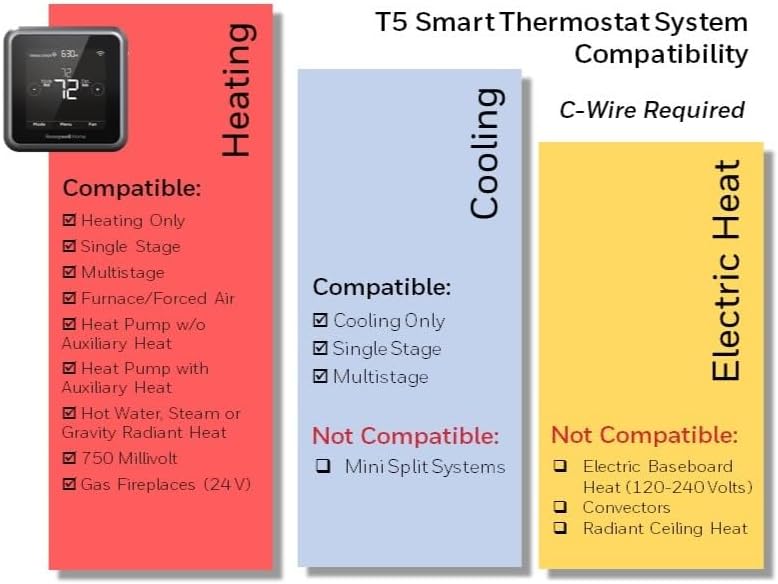
Figura 3: posterior view del termòstat intel·ligent T5 amb terminals de cablejat.
2.3 Connexió Wi-Fi i d'aplicacions
After installation, connect your thermostat to your home Wi-Fi network and the Honeywell Home app for remote control and advanced features.
- Descarregar l'aplicació: Download the Honeywell Home app from your smartphone's app store.
- Crea un compte: Obre l'aplicació i crea un compte o inicia la sessió.
- Afegeix un dispositiu: Follow the in-app instructions to add your T5 Smart Thermostat. This typically involves putting the thermostat into Wi-Fi setup mode and connecting your phone to its temporary Wi-Fi network before selecting your home network.
- Configuració: Complete the guided setup in the app, including system type and scheduling preferences.

Figure 4: The T5 Smart Thermostat and its companion mobile application.
Vídeo 1: Acabatview of the Honeywell Home RCHT8610WF2006 Thermostat, including its features and basic operation.
3. Funcionament del termòstat
3.1 Ajust manual de la temperatura
You can manually adjust the temperature directly on the thermostat's touchscreen. Use the '+' and '-' buttons to increase or decrease the set temperature. The thermostat will hold this temperature until the next scheduled change or until you manually override it.
3.2 Programació
The T5 Smart Thermostat offers 7-day flexible scheduling. You can set different temperatures for various times of the day (e.g., Wake, Away, Home, Sleep) to match your daily routine. This can be configured through the Honeywell Home app.
3.3 Geofencing
Geofencing uses your smartphone's location to automatically adjust the temperature when you leave or approach your home. This feature helps save energy when you're away and ensures your home is comfortable when you arrive. Enable and configure Geofencing within the Honeywell Home app.

Figure 5: Geofencing technology ensures a comfortable home upon arrival.
3.4 Integració de la llar intel·ligent
The T5 Smart Thermostat is compatible with various smart home ecosystems, including Amazon Alexa, Apple HomeKit, Google Assistant, IFTTT, and Cortana. This allows for voice control and integration into broader smart home routines.

Figura 6: El termòstat intel·ligent T5 s'integra amb plataformes domèstiques intel·ligents populars.
4. Manteniment
The Honeywell Home T5 Smart Thermostat requires minimal maintenance. Keep the screen clean by gently wiping it with a soft, damp cloth. Avoid using abrasive cleaners or solvents. Ensure the vents on the thermostat are not obstructed to allow for accurate temperature readings.
5. Solució De Problemes
| Problema | Causa possible | Solució |
|---|---|---|
| El termòstat no té alimentació/pantalla en blanc | No C-wire connection; Blown fuse; Power off at breaker. | Verify C-wire connection; Check circuit breaker; Consult HVAC professional. |
| No es pot connectar a la Wi-Fi | Incorrect Wi-Fi password; Router issues; Thermostat too far from router. | Double-check password; Restart router; Move thermostat closer to router or use a Wi-Fi extender. Ensure 2.4GHz network is used. |
| Temperatura inexacta | Thermostat located near heat source/draft; Obstructed vents. | Relocate thermostat if possible; Clear any obstructions around the thermostat. |
| Heating/Cooling not responding | Incorrect system settings in app; HVAC system issue. | Verify system settings in the Honeywell Home app; Check HVAC unit for power or error codes; Consult HVAC professional. |
6. Especificacions
| Característica | Detall |
|---|---|
| Marca | Honeywell Home |
| Nom del model | Termòstat intel·ligent T5 |
| Dimensions del producte | 4.06 "P x 4.06" W x 1.06" H |
| Tipus de controlador | Amazon Alexa, Apple HomeKit, Assistent de Google |
| Característica especial | Energy Star certified, Wi-Fi Thermostat |
| Color | Negre |
| Tecnologia de connectivitat | Wi-Fi |
| Font d'alimentació | Electric (C-wire required) |
| Pes de l'article | 13.4 unces |
| Tipus de visualització | Pantalla tàctil |
| Tipus de muntatge | Muntatge de paret |
| UPC | 085267865647 |
| Número de model de l'article | RCHT8610WF2006 / W |
7. Garantia i Suport
This Honeywell Home T5 Smart Thermostat comes with a Garantia limitada d'2 any. For detailed warranty information, terms, and conditions, please refer to the documentation included with your product or visit the official Honeywell Home weblloc.
For technical support, troubleshooting assistance, or to register your product, please visit the Honeywell Home support website or contact their customer service. Contact information can typically be found on the product packaging or the official weblloc.