
1. Introducció
The Profoto D2 1000Ws AirTTL Monolight is a high-performance studio flash designed for professional photography. It offers exceptional speed, power, and versatility, making it suitable for various applications including portrait, food, fashion, and sports photography. This manual provides essential information for the safe and effective use of your D2 Monolight.

Figura 1: Frontal view of the Profoto D2 1000Ws AirTTL Monolight, displaying the power setting and control buttons.
2. Què hi ha a la caixa
Verifiqueu que tots els components siguin presents en desembalar-lo:
- Profoto D2 1000Ws AirTTL Monolight
- Bag XS (for transport and storage)
- Cable d'alimentació
3. Configuració
Follow these steps to set up your Profoto D2 Monolight:
- Muntatge: Secure the monolight onto a compatible light stand using its integrated mount. The D2 supports both Hot Shoe Mount and Cold Shoe Mount systems. Ensure the mount is tightened to prevent accidental movement.
- Connexió d'alimentació: Connect the power cable to the monolight's power input and then to a suitable power outlet.
- Reflector/Light Shaping Tool Attachment: The D2 features a built-in reflector. For additional light shaping, attach any compatible Profoto Light Shaping Tool (e.g., softbox, umbrella) to the front of the monolight. Ensure it is securely locked into place.
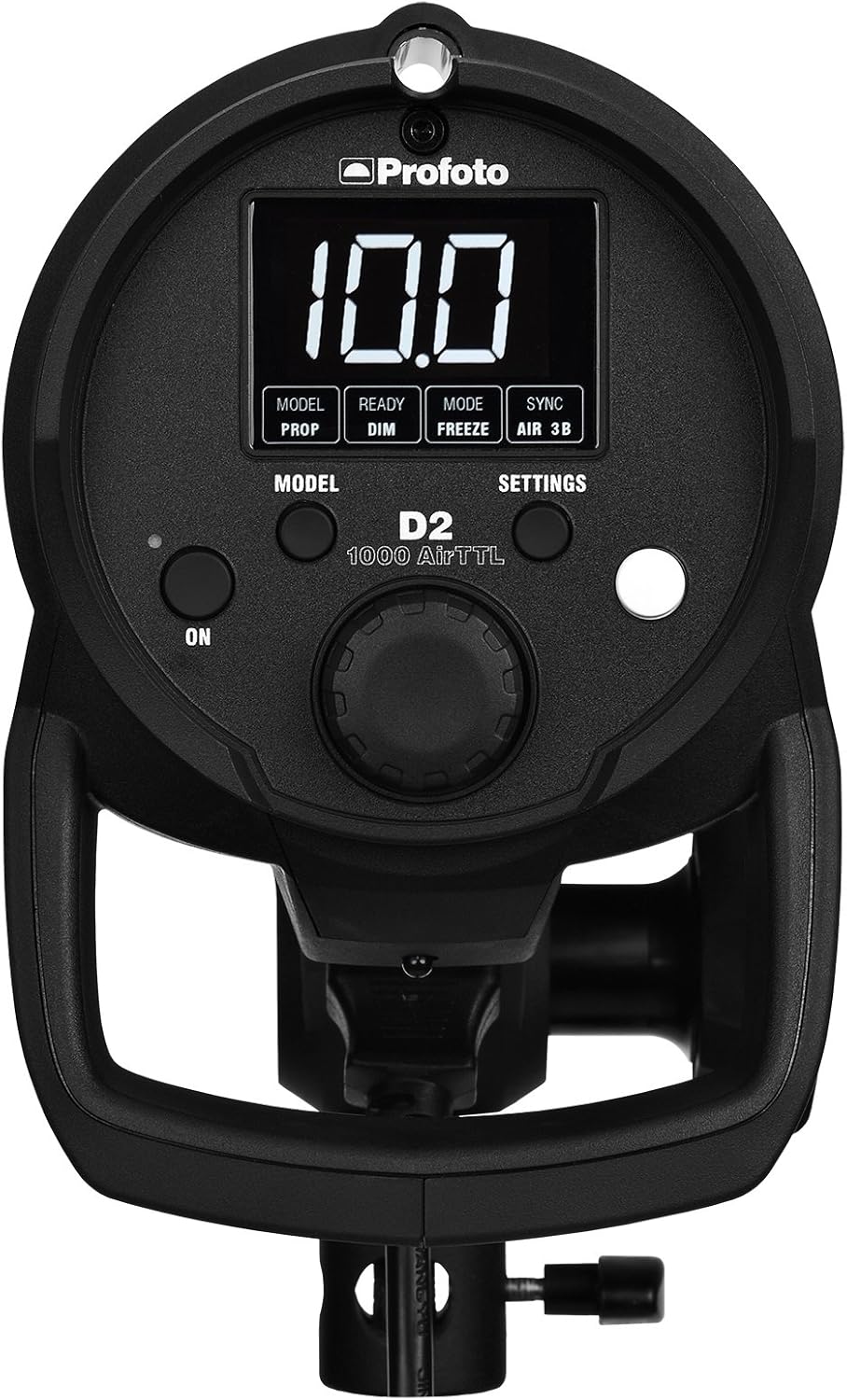
Figura 2: lateral view of the Profoto D2 Monolight, illustrating the robust casing and ventilation for optimal performance.

Figura 3: Primer pla frontal view of the Profoto D2 Monolight, highlighting the flash tube and modeling lamp zona.
4. Instruccions de funcionament
The Profoto D2 Monolight offers advanced control for precise lighting. Familiarize yourself with its key operational features:
4.1 Control de potència
The D2 provides a wide energy range of 10 f-stops (2-1000Ws), adjustable in 1/10 or full f-stop increments. Use the control dial on the back panel to set the desired power output. The high-resolution display will show the current power setting.
4.2 Recycling Time and Flash Duration
Experience rapid performance with recycling times as fast as 0.03-1.2 seconds. The D2 can achieve flash durations up to 1/63,000 of a second, allowing you to freeze fast-moving subjects with exceptional clarity. It can also burst up to 20 flashes per second.
4.3 AirTTL and High-Speed Sync (HSS)
The D2 is fully integrated with Profoto AirTTL flashes, such as the B1 and B2. You can operate the D2 in both TTL (Through-The-Lens) and manual modes. High-Speed Sync (HSS) is available up to 1/8,000s in both manual and TTL modes, enabling you to overpower ambient light or use wider apertures in bright conditions.
4.4 Connectivitat sense fil
The monolight features wireless connectivity via Radio Frequency, allowing for remote control and synchronization with compatible Profoto Air remotes.
Vídeo 1: Un overview of the Profoto Monolight, demonstrating its physical features and use in a studio setting. This video highlights the durability and performance of Profoto lighting equipment.
5. Manteniment
To ensure the longevity and optimal performance of your Profoto D2 Monolight, observe the following maintenance guidelines:
- Neteja: Regularly clean the exterior of the monolight with a soft, dry cloth. Avoid using abrasive cleaners or solvents.
- Ventilació: Assegureu-vos que les obertures de ventilació estiguin lliures de pols i obstruccions per evitar el sobreescalfament.
- Emmagatzematge: When not in use, store the monolight in a dry, dust-free environment, preferably in its protective bag.
- Flashtube: The D2 uses a Quartz flashtube. While designed for high volume, inspect it periodically for any signs of wear or damage. Replacement should be performed by qualified personnel.
6. Solució De Problemes
If you encounter issues with your Profoto D2 Monolight, consider the following common solutions:
- Sense energia: Check the power cable connection at both the monolight and the wall outlet. Ensure the outlet is functional.
- Sense flaix: Verify that the monolight is powered on and not in sleep mode. Check the sync connection (wireless or wired) to your camera or trigger. Ensure the flash duration and power settings are appropriate for your setup.
- Avís de sobreescalfament: If an overheating warning appears, allow the unit to cool down. Ensure proper ventilation and avoid continuous high-power firing without adequate breaks.
- Inconsistent Exposure: Confirm that your camera's settings (ISO, aperture, shutter speed) are correctly configured for flash photography. If using TTL, ensure the AirTTL system is properly communicating with your camera.
For persistent issues, refer to the Profoto support weblloc o contacteu amb el servei d'atenció al client.
7. Especificacions
| Característica | Especificació |
|---|---|
| Marca | Profoto |
| Nom del model | 901013 |
| Energia màxima | 1000 Ws |
| Interval d'energia | 10 f-stops (2-1000Ws) |
| Energy Control Increments | 1/10 or full f-stops |
| Temps de reciclatge | 0.03-1.2 segons |
| Durada del flaix | Fins a 1/63,000s |
| Sincronització d'alta velocitat (HSS) | Fins a 1/8,000s |
| Flashes per Second | Fins a 20 |
| Tecnologia de connectivitat | Wireless (Radio Frequency) |
| Muntatges compatibles | Cold Shoe Mount, Hot Shoe Mount |
| Pes de l'article | 5.3 quilos |
8. Garantia i Suport
The Profoto D2 1000Ws AirTTL Monolight comes with a manufacturer's warranty. Please refer to the official Profoto weblloc web o la documentació de compra per obtenir els termes i condicions detallats de la garantia.
For technical support, service, or additional information, please visit the official Profoto support page or contact their customer service department. Keep your product's model number (901013) and serial number ready when seeking support.