
1. Producte acabatview
The Tenergy 11W Dimmable LED Desk Lamp (Model FY-0001) is designed to provide versatile lighting for various tasks, featuring adjustable brightness, multiple color temperatures, and a convenient USB charging port. Its sleek design and flexible arm make it suitable for home and office environments.

Image: The Tenergy 11W LED Desk Lamp, espectacleasing its modern design and adjustable features.
2. Què hi ha a la caixa
- Tenergy 11W Dimmable LED Desk Lamp
- Cable de càrrega USB
- Adaptador d'alimentació
- Manual d'usuari (aquest document)

Image: The Tenergy 11W LED Desk Lamp and its included accessories laid out on a surface.
3. Configuració
- Traieu amb cura tots els components de l'embalatge.
- Col·loca la lamp base sobre una superfície plana i estable.
- Connecteu l'adaptador d'alimentació a lamp's power input port, typically located at the rear of the base.
- Plug the power adapter into a standard electrical outlet. The lamp's indicator light should illuminate, indicating it is ready for use.
4. Instruccions de funcionament
4.1 Encès/Apagat
Per girar la lamp on or off, gently touch the On/Off button located on the touch control panel on the lampla base.
4.2 Ajust de la brillantor
El lamp offers 5 levels of brightness. Use the + i - buttons on the touch control panel to increase or decrease the light intensity.
4.3 Changing Light Modes (Color Temperature)
El lamp features 4 distinct light modes, each with a different color temperature, optimized for various activities:
- Mode de lectura: Provides a bright, neutral white light ideal for reading.
- Study Mode: Offers a cooler, more focused light to enhance concentration.
- Mode de relaxació: Emits a warm, soft light for a comfortable and calming atmosphere.
- Mode de repòs: Delivers a very warm, dim light suitable for winding down before sleep.
To switch between these modes, repeatedly touch the corresponding icon on the control panel.

Image: Visual representation of the four adjustable light color temperatures available on the lamp.
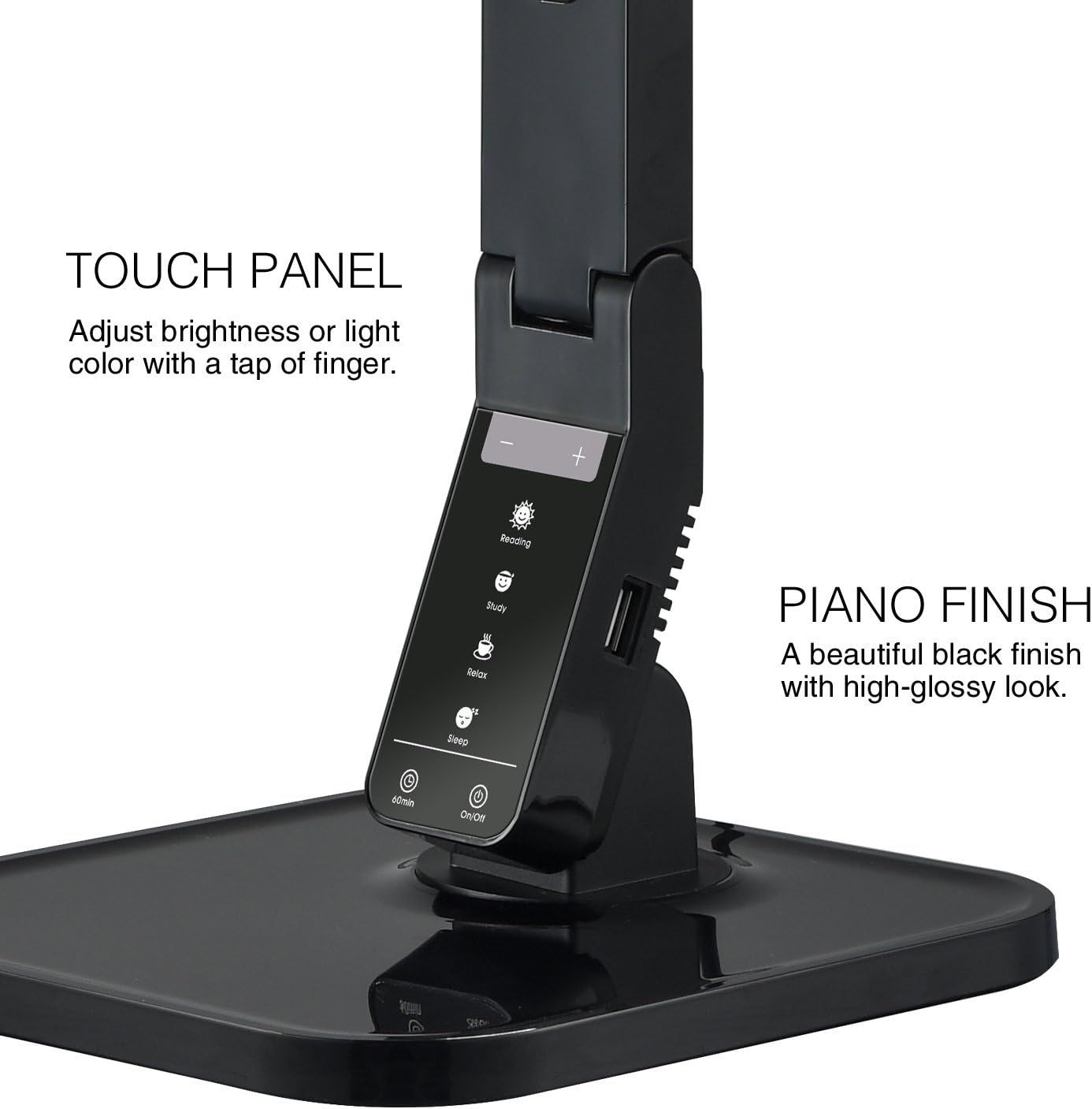
Image: The touch control panel with various light mode and brightness adjustment icons.
4.4 Ús del port de càrrega USB
A USB charging port is integrated into the lamp's base, allowing you to charge compatible devices such as smartphones or tablets. Simply connect your device's USB charging cable to the port.

Image: A smartphone being charged via the integrated USB port on the lampla base.
4.5 Adjusting the Lamp Braç
El lamp features an adjustable arm that allows you to direct the light precisely where needed. The arm can be folded, extended, and swiveled to achieve optimal positioning.

Image: Illustrations demonstrating the flexibility and adjustability of the lamp's arm.
4.6 Funció de temporitzador
El lamp includes a 60-minute timer function. To activate, press the 60 min button on the control panel. The lamp s'apagarà automàticament després de 60 minuts.
4.7 Vídeo oficial del producte
Video: An official product video from Tenergy Corporation demonstrating the features and benefits of the 11W LED Desk Lamp, including its adjustable lighting, USB charging, and sleek design.
5. Manteniment
- Neteja: Per netejar la lamp, especially its glossy finish, use a soft, dry microfiber cloth. Avoid abrasive cleaners or harsh chemicals that may damage the surface.
- Emmagatzematge: Quan no l'utilitzeu durant períodes prolongats, guardeu-loamp en un lloc fresc i sec.
6. Solució De Problemes
- Lamp no s'encén: Assegureu-vos que l'adaptador d'alimentació estigui ben connectat als dos cables lamp and a working electrical outlet. Check if the outlet is receiving power.
- El port USB no carrega: Comproveu la lamp is powered on and the USB cable is properly connected to both the lamp and your device. Ensure your device is compatible with USB charging.
- Llum parpellejant: If the light flickers, try unplugging the lamp for a few minutes and then plugging it back in. If the issue persists, contact customer support.
7. Especificacions
| Número de model | FY-0001 |
| Marca | Tenergy |
| Wattage | 11 watts |
| Tipus de font de llum | LED |
| Nivells de brillantor | 5 |
| Light Colors / Modes | 4 (Reading, Study, Relax, Sleep) |
| Mètode de control | Toca |
| Tecnologia de connectivitat | USB |
| Font d'alimentació | Elèctric amb cable |
| Dimensions del producte | 7 "P x 6.75" W x 16.7" H |
| Tipus de material | Plàstic |
| Tipus d'acabat | brillant |
8. Garantia i Suport
For warranty information or technical support, please visit the official Tenergy weblloc web o poseu-vos en contacte amb el seu departament d'atenció al client. Conserveu el rebut de compra per a qualsevol reclamació de garantia.
Tenergy Store: https://www.amazon.com/stores/Tenergy/page/5AE2FFA8-E197-4708-9169-C4D8CB488E9E