
Introducció
Thank you for choosing the KINGONE K5 Portable Wireless Bluetooth Speaker. This manual provides essential information for the proper setup, operation, and maintenance of your device. Please read it thoroughly before use to ensure optimal performance and longevity of your speaker.
Informació de seguretat
- No exposeu l'altaveu a temperatures extremes, llum solar directa ni humitat elevada.
- Eviteu deixar caure o sotmetre l'altaveu a forts impactes.
- No desmunteu ni intenteu reparar l'altaveu vosaltres mateixos. Això anul·larà la garantia.
- Keep the speaker away from water and liquids. While it is waterproof, prolonged submersion or exposure to high-pressure water jets should be avoided.
- Utilitzeu només el volum de càrrega especificattage (5 V CC).
Contingut del paquet
- KINGONE K5 Portable Wireless Bluetooth Speaker
- Cable de càrrega USB
- Manual d'usuari
Producte acabatview
Familiarize yourself with the speaker's controls and ports.
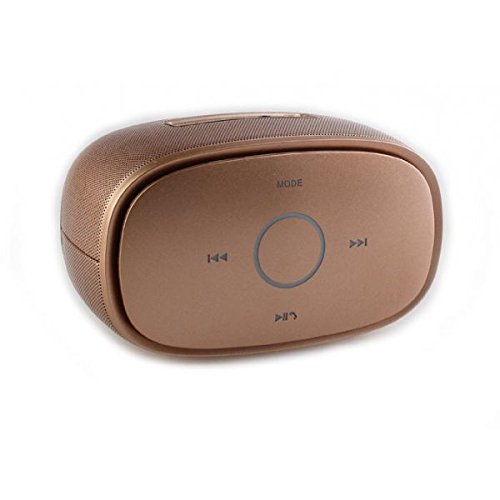
Imatge: A dalt view of the KINGONE K5 Portable Wireless Bluetooth Speaker. The image displays the speaker's top panel, which features a central circular play/pause button, surrounded by four other buttons: 'MODE' at the top, 'previous track' (left), 'next track' (right), and 'volume down/call answer' (bottom). The speaker has a metallic brown finish with a textured grille on the sides.
Botons de control:
- Mode: Press to switch between Bluetooth, AUX, and other available modes.
- Pista anterior (<<): Premeu breument per anar a la pista anterior.
- Pista següent (>>): Premeu breument per anar a la pista següent.
- Reprodueix/Pausa (►▮▮): Press to play or pause music. Long press for power on/off.
- Volume Down/Call Answer (▼): Short press to decrease volume. During an incoming call, press to answer.
- Volume Up/Call End (▲): Short press to increase volume. During a call, press to end. (Note: Volume Up button is not explicitly visible in the provided image but is a standard function for such devices, assuming it's paired with Volume Down or integrated.)
Ports:
- Port de càrrega micro USB: Per carregar l'altaveu.
- Port d'entrada AUX: Per a connexió d'àudio amb cable.
Configuració
1. Carregant l’altaveu
- Connect the small end of the USB charging cable to the Micro USB port on the speaker.
- Connect the larger end of the USB cable to a USB power adapter (DC 5V, not included) or a computer's USB port.
- El llum indicador de càrrega s'il·luminarà. S'apagarà o canviarà de color un cop estigui completament carregat.
- A full charge typically takes approximately 3-4 hours and provides up to 7 hours of playback.
2. Encès / apagat
- Per encendre: Long press the Play/Pause button until you hear an audible prompt or see an indicator light.
- Per apagar: Long press the Play/Pause button again until you hear an audible prompt or the indicator light turns off.
3. Emparellament Bluetooth
- Ensure the speaker is powered on and in Bluetooth mode. If not, press the 'MODE' button to switch to Bluetooth mode. The indicator light will flash, indicating it's ready for pairing.
- Activeu el Bluetooth al vostre telèfon intel·ligent, tauleta o altre dispositiu compatible amb Bluetooth.
- Cerca available Bluetooth devices. You should see "KINGONE K5" in the list.
- Select "KINGONE K5" to connect. Once paired, you will hear a confirmation sound, and the indicator light will stop flashing and remain solid.
- L'altaveu intentarà tornar a connectar-se automàticament amb l'últim dispositiu emparellat quan s'engegui.
4. Connecting via AUX (Audio Input)
- Connecteu un extrem d'un cable d'àudio de 3.5 mm (no inclòs) al port d'entrada AUX de l'altaveu.
- Connect the other end of the audio cable to the headphone jack of your audio device.
- The speaker will automatically switch to AUX mode, or you may need to press the 'MODE' button to select AUX.
En funcionament
Tocant música
- Reproduir/pausa: Premeu el botó Reproduir/Pausa per iniciar o aturar la reproducció.
- Pista següent: Press the Next Track (>>) button to skip to the next song.
- Pista anterior: Press the Previous Track (<<) button to go back to the beginning of the current song or to the previous song.
- Control de volum: Use the Volume Down (▼) and Volume Up (▲) buttons on the speaker to adjust the volume. You can also control the volume from your connected device.
Trucades mans lliures
Quan es connecta mitjançant Bluetooth, l'altaveu es pot utilitzar per a trucades de mans lliures.
- Respon a la trucada: Press the Volume Down (▼) button once to answer an incoming call.
- Finalitzar la trucada: Press the Volume Up (▲) button once to end an ongoing call.
- Rebutja la trucada: Long press the Volume Down (▼) button to reject an incoming call.
Manteniment
Neteja
- Wipe the speaker with a soft, dry, or slightly damp tela.
- No utilitzeu netejadors abrasius, alcohol ni dissolvents químics.
Emmagatzematge
- Guardeu l'altaveu en un lloc fresc i sec, allunyat de la llum solar directa i de temperatures extremes.
- If storing for an extended period, charge the battery periodically (e.g., every 3 months) to maintain battery health.
Cura de la bateria
- Eviteu descarregar completament la bateria amb freqüència.
- Do not leave the speaker connected to a charger for excessively long periods after it is fully charged.
Resolució de problemes
| Problema | Causa possible | Solució |
|---|---|---|
| L'altaveu no s'encén. | La bateria està baixa o esgotada. | Carregueu l'altaveu durant almenys 30 minuts. |
| No es pot emparellar amb un dispositiu Bluetooth. | Speaker is not in pairing mode. Bluetooth is off on your device. Speaker is already connected to another device. | Ensure speaker is in Bluetooth pairing mode (flashing indicator). Turn on Bluetooth on your device. Disconnect from other devices or restart the speaker. |
| Sense so o amb un volum baix. | Volume is too low on speaker or device. Incorrect mode selected. | Increase volume on both the speaker and your connected device. Press the 'MODE' button to select the correct input (Bluetooth/AUX). |
| Distorsió del so. | Volume too high. Device too far from speaker. | Reduce volume on speaker and/or device. Move the device closer to the speaker (within 10 meters). |
Especificacions
- Nom del model: KINGONE K5
- Número de model de l'article: KNG006
- Tecnologia de comunicació sense fils: Bluetooth
- Versió Bluetooth: V2.0 (as per product title)
- Tipus d'altaveu: Prestatgeria (portàtil)
- Mida de l'altaveu: 2 polzades
- Mode de sortida d'àudio: Estèreo (2.0 canals)
- Font d'alimentació: Battery Powered (Built-in Li-ion battery)
- Voltage: DC 5V
- Resposta de freqüència: 3 dB
- Frequency Scope: 170-15KHz
- Mètode de control: Toca
- Impermeable: Sí
- Durada de la bateria: Fins a 7 hores (aprox.)
- Dispositius compatibles: Smartphone, tauleta
Garantia i Suport
Per obtenir informació sobre la garantia o assistència tècnica, consulteu la documentació proporcionada en el moment de la compra o poseu-vos en contacte amb el vostre distribuïdor. Conserveu el comprovant de compra per a reclamacions de garantia.