
BORUIT B10
BORUIT B10 Rechargeable Headlamp Manual d'usuari
Model: B10 | Brand: BORUIT
1. Introducció
The BORUIT B10 Rechargeable Headlamp is designed for various activities including hunting, fishing, camping, hiking, and general outdoor or industrial use. This manual provides essential information for the safe and effective operation, setup, and maintenance of your headlamp.

Image 1.1: The BORUIT B10 Rechargeable Headlamp, espectacleasing its primary light source.
2. Advertències de seguretat
Si us plau, llegiu atentament tots els avisos de seguretat abans d'utilitzar el producte.
- Battery Film: Please tear off the battery protective film before initial use.
- Polaritat de la bateria: Ensure batteries are inserted correctly according to the "+" and "-" polarity markings.
- Battery Over-discharge: Remove batteries when they are at low power to prevent over-discharge, which can damage the batteries.
- Càrrega: Disconnect the power source once batteries are fully charged to prevent overcharging.
- Exposició a la llum directa: Do not look directly at the light source or stare into the beam, as this may cause eye damage.

Image 2.1: Product packaging displaying important safety warnings and product details.
3. Contingut del paquet
Verifiqueu que tots els elements siguin presents al paquet:
- BORUIT B10 Rechargeable Headlamp
- Cable de càrrega USB-C
- 2 x Lithium Ion Batteries (pre-installed or separate)
4. Característiques del producte
The BORUIT B10 Headlamp offers a range of features designed for optimal performance and user convenience:
- High-Output LED: Professional-grade LEDs provide powerful illumination for various environments.
- 4 modes d'il·luminació: High, Low, Strobe, and SOS modes for versatile use.
- Capçal ajustable a 90°: Allows for precise beam positioning.
- Classificació impermeable IPX4: Resistant to splashes and rain, suitable for outdoor use.
- Integrated SOS Whistle: A 120dB emergency whistle for signaling in critical situations.
- Diadema elàstica ajustable: Ensures a stable and comfortable fit.
- USB-C recarregable: Convenient charging via USB-C.
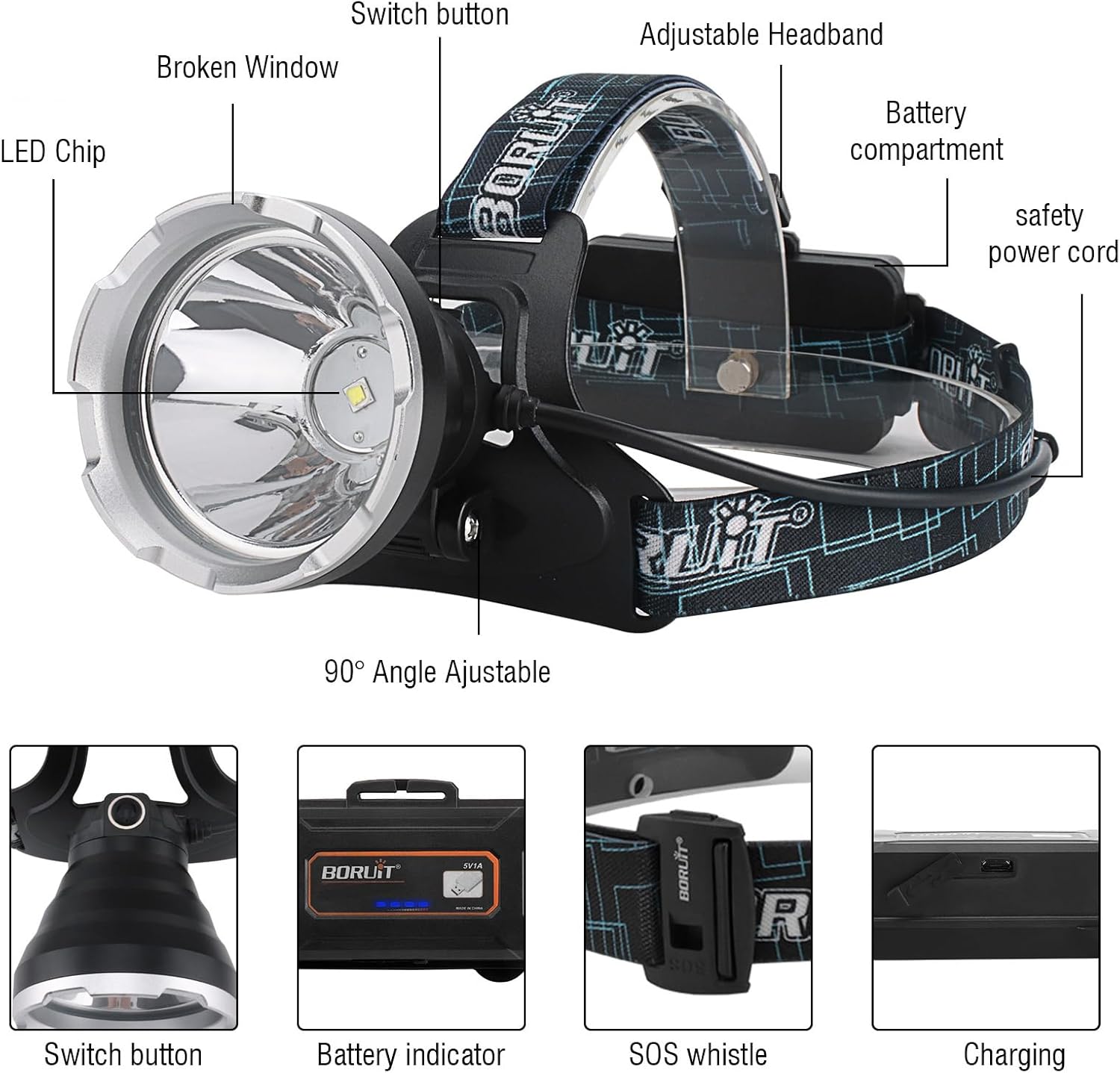
Imatge 4.1: Detallada view del capamp's components and features.

Image 4.2: Key features of the headlamp, including USB rechargeability and waterproof design.
5. Configuració
5.1 Instal·lació de la bateria i càrrega inicial
- Open the battery compartment located at the rear of the headlamp.
- If present, remove any protective film from the included Lithium Ion batteries.
- Insert the two Lithium Ion batteries, ensuring correct polarity (+ and -) as indicated inside the compartment.
- Tanqueu el compartiment de la bateria de manera segura.
- Connect the provided USB-C charging cable to the headlamp's charging port and to a suitable USB power source (e.g., wall adapter, power bank, computer USB port).
- Deixeu que el capamp to charge fully. The battery indicator will show charging status and full charge. Disconnect once fully charged.
5.2 Ajust de la diadema
The elastic headband is adjustable to fit various head sizes and can be worn over helmets or hats. Adjust the straps until the headlamp feels secure and comfortable on your head.
6. Instruccions de funcionament
6.1 Engegada/Apagada i Selecció de Mode
El capamp features a single button control for power and mode selection.
- Encès: Press the power button once to turn on the headlamp in High mode.
- Modes de cicle: Amb el capamp on, press the power button repeatedly to cycle through the modes: High (approx. 6H runtime) → Low (approx. 12H runtime) → Strobe (approx. 8H runtime) → SOS.
- Apagar: Press the power button after the SOS mode to turn off the headlamp. Alternatively, press and hold the button for 2-3 seconds to turn off from any mode.

Image 6.1: Visual representation of the four available lighting modes.
6.2 Ajust d'angle
El capamp's light unit can be tilted up to 90 degrees. Gently adjust the angle of the light head to direct the beam precisely where needed, allowing for hands-free illumination of your desired area.

Image 6.2: Illustration of the 90-degree adjustable headlamp angle.
6.3 SOS Whistle Function
El capamp includes a built-in SOS whistle for emergency signaling. In situations requiring attention, such as during natural disasters or when lost, activate the 120dB whistle to alert others to your location.
7. Manteniment
- Neteja: Netegeu el capamp amb un suau, damp tela. No utilitzeu netejadors abrasius ni dissolvents.
- Exposició a l'aigua: While IPX4 rated for splashes, avoid submerging the headlamp in water. Ensure the charging port cover is securely closed when not charging to maintain water resistance.
- Cura de la bateria: Per a l'emmagatzematge a llarg termini, traieu les piles del capçalamp and store them in a cool, dry place. Recharge batteries periodically if not in use to maintain their lifespan.
- Emmagatzematge: Guardeu el capamp in a dry environment away from direct sunlight and extreme temperatures.
8. Solució De Problemes
- Capamp no s'encén:
- Comproveu si les piles estan inserides amb la polaritat correcta.
- Ensure the battery protective film has been removed.
- Charge the batteries fully.
- La llum és tènue o parpelleja:
- Recarregueu les piles.
- Assegureu-vos que els contactes de la bateria estiguin nets i lliures de residus.
- La càrrega no funciona:
- Verify the USB-C cable is properly connected to both the headlamp i la font d'energia.
- Proveu un cable USB-C o un adaptador d'alimentació diferent.
9. Especificacions

Image 9.1: Product Information Sheet detailing specifications.

Image 9.2: EU Energy Label for the BORUIT GT30 (similar model), indicating energy efficiency. For more details, visit Base de dades EPREL.
10. Garantia i Suport
For warranty information and customer support, please refer to the documentation included with your purchase or contact BORUIT customer service through their official channels. Keep your proof of purchase for warranty claims.
You can visit the official BORUIT store on Amazon for additional product information and support: BORUIT Amazon Store.
Documents relacionatsB10


Ask a question about this manual
Ask about setup, troubleshooting, compatibility, parts, safety, or missing instructions. Manuals+ will review the question and use this page’s manual context to help answer it.