
1. Instruccions de seguretat importants
- Llegiu atentament aquestes instruccions abans de fer funcionar el dispositiu.
- Conserveu aquestes instruccions per a referència futura.
- Do not expose this appliance to dripping or splashing water. Do not place objects filled with liquids, such as vases, on the appliance.
- No bloquegeu cap obertura de ventilació. Instal·leu-ho d'acord amb les instruccions del fabricant.
- No instal·leu a prop de cap font de calor com ara radiadors, registres de calor, estufes o altres aparells (inclosos amplificadors) que produeixen calor.
- Protegiu el cable d’alimentació perquè no es pugui caminar ni pessigar, sobretot als endolls, endolls i el punt on surten de l’aparell.
- Utilitzeu només accessoris/accessoris especificats pel fabricant.
- Desendolleu aquest aparell durant les tempestes amb llamps o quan no l'utilitzeu durant llargs períodes de temps.
- Demaneu tot el servei a personal de servei qualificat. Cal fer servei quan l'aparell s'hagi fet malbé d'alguna manera.
2. Producte acabatview
The Auna MC 120 is a compact vertical stereo system designed for versatile audio playback. It features a CD player, MP3 playback via USB and SD card, an AUX input for external devices, and an FM radio. The system also includes an alarm clock with two programmable alarms and can be wall-mounted or used with its integrated stand. A remote control is provided for convenient operation.
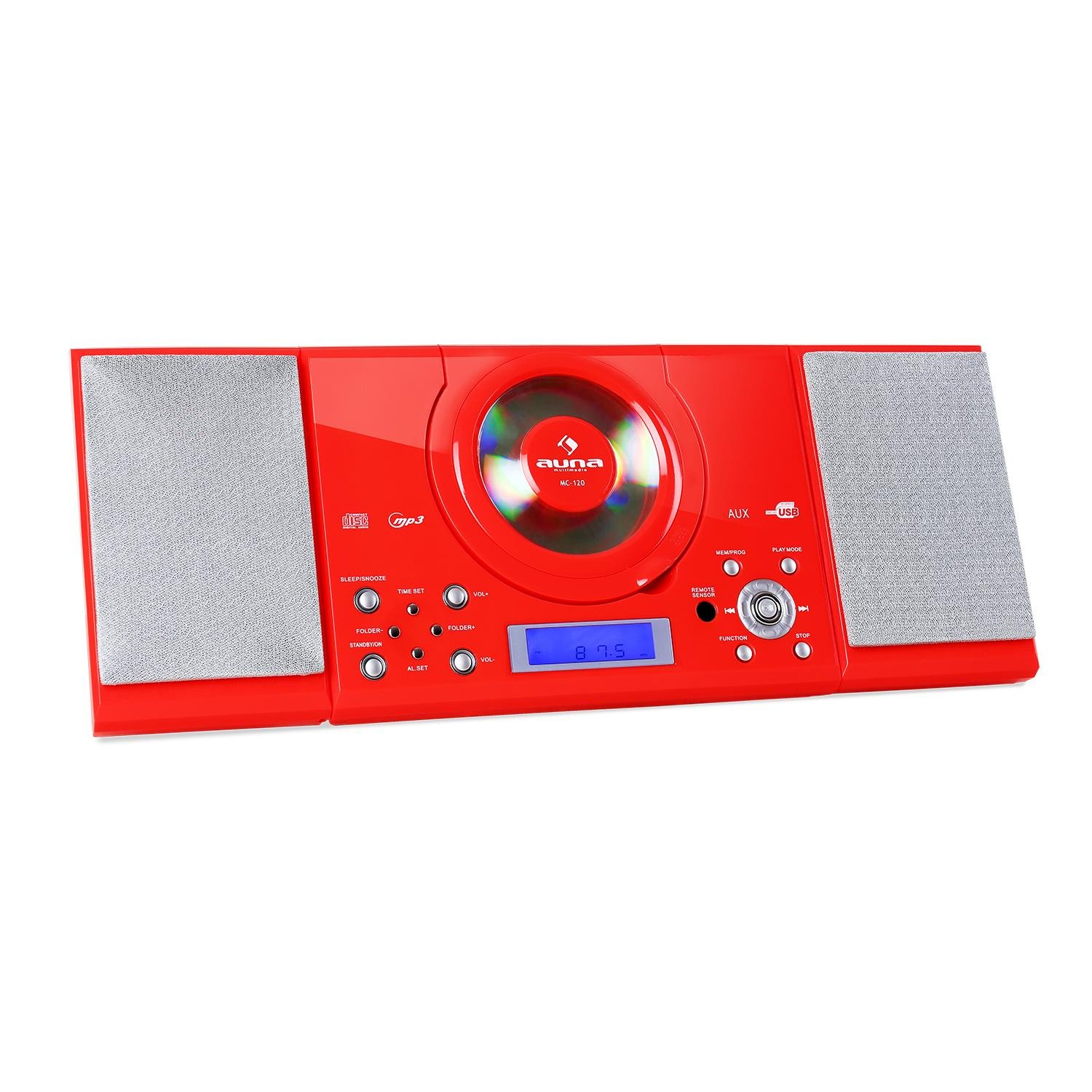
Figura 2.1: Frontal view of the Auna MC 120 Compact Vertical Stereo System, showing the central CD player, display, and control buttons.
3. Contingut del paquet
- Auna MC 120 Stereo System
- Control remot
- Adaptador d'alimentació
- Manual d'usuari
4. Configuració
4.1 Col·locació i connexió d'alimentació
- Choose a stable, flat surface for the stereo system, or prepare a wall for mounting. Ensure adequate ventilation around the unit.
- Connect the power adapter to the DC IN port on the rear of the unit.
- Connecteu l'adaptador d'alimentació a una presa de corrent estàndard.
4.2 Muntatge a la paret
The Auna MC 120 can be mounted on a wall using the integrated mounting holes on the rear panel.
- Identify a suitable wall location, ensuring it can support the weight of the unit.
- Mark the positions for two screws on the wall, matching the spacing of the mounting holes on the unit's rear.
- Perforeu forats pilot i inseriu els ancoratges de paret adequats si cal.
- Insert screws into the wall, leaving a small gap between the screw head and the wall.
- Carefully align the unit's mounting holes with the screws and slide the unit downwards to secure it.

Figura 4.1: posterior view of the Auna MC 120, showing the foldable stand and wall mounting holes.

Figura 4.2: Detallada view of the rear panel, highlighting power input and safety labels.
5. Instruccions de funcionament
5.1 Engegada/Apagada i control de volum
- Premeu el botó PODER button (on unit or remote) to turn the system on or off.
- Ajusteu el volum amb el botó VOL+ i VOL- botons de la unitat o el + i - botons del comandament a distància.
5.2 Selecció del mode
Premeu el botó FUNCIÓ button on the unit or remote to cycle through available modes: CD, USB, SD, AUX, FM.
Reproducció de CD/MP3 de 5.3
- Reproducció de CD: Open the CD compartment, insert a CD with the label side facing up, and close the compartment. The system will automatically switch to CD mode and begin playback.
- Reproducció USB/SD: Inseriu una unitat flaix USB al USB port o una targeta SD al SD slot. The system will switch to USB/SD mode. Use the CARPETA+ / CARPETA- buttons to navigate folders and SALTAR botons per seleccionar pistes.

Figure 5.1: USB stick inserted into the dedicated USB port on the Auna MC 120.
- Reproduir/pausa: Premeu el botó REPRODUCCIÓ/PAUSA botó.
- Omet les pistes: Premeu el botó Saltar endavant or SALTAR ENRERE botons.
- Avançar/rebobinar ràpid: Manteniu premut el botó Saltar endavant or SALTAR ENRERE botons.
- Atura: Premeu el botó STOP botó.
5.4 Funcionament de la ràdio FM
- Canvieu al mode FM utilitzant el botó FUNCIÓ botó.
- Manteniu premut el botó REPRODUCCIÓ/PAUSA button to initiate an automatic scan for FM stations. The system will save found stations as presets.
- Utilitza el CH+ / CH- buttons on the remote or Saltar endavant / SALTAR ENRERE buttons on the unit to navigate through preset stations.
5.5 Entrada AUX
Connecteu un dispositiu d'àudio extern (per exemple, un telèfon intel·ligent o un reproductor MP3) al AUX IN port using a 3.5mm audio cable. Switch the system to AUX mode using the FUNCIÓ botó. L'àudio es reproduirà des del dispositiu connectat.
5.6 Funcions de rellotge i alarma
- Configuració del rellotge: En mode d'espera, manteniu premut el botó HORA CONFIGURADA botó. Utilitza el SALTAR botons per ajustar les hores i els minuts, i HORA CONFIGURADA de nou per confirmar.
- Configuració d'alarmes: En mode d'espera, manteniu premut el botó AL SET botó. Utilitza el SALTAR buttons to set the alarm time and AL SET again to confirm. You can set two alarms (AL1, AL2).
- Activació/desactivació d'alarmes: Premeu el botó AL SET button repeatedly to cycle through AL1 ON, AL2 ON, AL1 OFF, AL2 OFF.
5.7 Sleep/Snooze Function
- Temporitzador de son: Premeu el botó DORMIR button repeatedly to set a sleep timer (e.g., 15, 30, 60, 90 minutes). The system will turn off automatically after the set time.
- Dormitar: Quan soni una alarma, premeu el botó DORMITAR button (on remote) to temporarily silence the alarm for a few minutes.
5.8 Control remot
The remote control provides full functionality for the stereo system. Ensure batteries are correctly inserted.

Figure 5.2: The remote control for the Auna MC 120, showing power, play mode, memory/program, sleep, volume, channel, function, and snooze buttons.
6. Manteniment
6.1 Neteja
- Desconnecteu sempre la unitat de la presa de corrent abans de netejar-la.
- Utilitzeu un drap suau i sec per netejar les superfícies exteriors.
- No utilitzeu netejadors abrasius, ceres o dissolvents, ja que poden danyar l'acabat.
6.2 CD/USB/SD Card Care
- Manipuleu els CD per les vores per evitar empremtes dactilars i ratllades.
- Netegeu els CD amb un drap suau i sense borrissol, netejant des del centre cap a fora.
- Ensure USB drives and SD cards are free of dust and debris before insertion.
7. Solució De Problemes
| Problema | Causa possible | Solució |
|---|---|---|
| Sense poder | Cable d'alimentació no connectat; Presa de corrent defectuosa | Comproveu la connexió del cable d'alimentació; proveu una presa de corrent diferent |
| Sense so | Volume too low; Incorrect mode selected; Mute activated | Increase volume; Select correct mode (CD, USB, AUX, FM); Deactivate mute |
| El CD/USB/SD no es reprodueix | Disc/device inserted incorrectly; Disc/file format not supported; Disc/device damaged | Reinsert disc/device correctly; Ensure MP3 format for USB/SD; Try a different disc/device |
| El comandament a distància no funciona | Batteries depleted/incorrectly inserted; Obstruction between remote and unit | Replace batteries, check polarity; Remove obstructions, ensure line of sight |
| Mala recepció FM | Antenna not extended/positioned correctly; Weak signal | Extend and adjust the FM antenna; Try repositioning the unit |
8. Especificacions tècniques
- Marca: Auna
- Model: MC 120
- Tecnologia de connectivitat: Auxiliar
- Formats d'àudio compatibles: MP3
- Tipus d'altaveu: estèreo
- Font d'alimentació: Elèctric amb cable
- Dispositius compatibles: Reproductor de MP3
- Mode de sortida d'àudio: estèreo
- Fabricant: AUNA
- Número de peça: MG4-MC-120 RED
9. Garantia i Suport
This product is covered by a manufacturer's warranty. For detailed warranty information, please refer to the warranty card included in your package or contact Auna customer support. For technical assistance or service inquiries, please visit the official Auna weblloc web o contacteu directament amb el seu equip d'assistència.


