
Introducció
Thank you for choosing the havit HV-MS55GT Wireless Ergonomic Vertical Mouse. This manual provides essential information for setting up, operating, maintaining, and troubleshooting your new device. Please read these instructions carefully before use to ensure optimal performance and longevity of your mouse.
Producte acabatview
The havit HV-MS55GT is a 2.4GHz wireless optical vertical mouse designed for ergonomic comfort. It features 6 buttons and 3 adjustable DPI settings (800/1200/1600) to suit various tasks and user preferences. Its unique vertical design aims to reduce wrist strain during extended use.
Característiques principals:
- Disseny vertical ergonòmic: Promotes a natural handshake grip to minimize wrist and forearm strain.
- Tecnologia sense fil de 2.4 GHz: Provides a stable connection up to 10 meters.
- DPI ajustable: Easily switch between 800, 1200, and 1600 DPI for precise control.
- 6 Botons: Includes Left, Right, Scroll Wheel, DPI, Forward, and Back buttons.
- Plug and Play: No calen controladors per a la majoria de sistemes operatius.
Contingut del paquet
- 1 x havit HV-MS55GT Wireless Ergonomic Vertical Mouse
- 1 x Nano receptor USB
- 1 x Manual d'usuari
Instruccions de configuració
1. Instal·lació de la bateria
- Localitzeu el compartiment de la bateria a la part inferior del ratolí.
- Obriu la tapa del compartiment de la bateria.
- Insert two AAA batteries (not included) into the compartment, ensuring correct polarity (+/-).
- Tanqueu bé la tapa del compartiment de la bateria.

The underside of the mouse reveals the compartment for two AAA batteries (not included) and a convenient storage slot for the USB Nano receiver, ensuring it is not lost when transporting the mouse.
2. Connecteu el nanoreceptor USB
- Remove the USB Nano receiver from its storage slot on the underside of the mouse.
- Connecteu el nanoreceptor USB a un port USB disponible de l'ordinador.
- Your computer should automatically detect and install the necessary drivers. No additional software installation is typically required.

This image demonstrates the simple plug-and-play setup: insert the USB Nano receiver into your computer's USB port to establish a 2.4GHz wireless connection with a range of up to 10 meters.
3. Engegueu el ratolí
Locate the ON/OFF switch on the underside of the mouse and slide it to the 'ON' position. The mouse is now ready for use.
Instruccions de funcionament
Empunyadura ergonòmica
Hold the mouse with your hand in a natural handshake position. The vertical design aligns your wrist and forearm in a more neutral posture, reducing pronation and potential strain.

This image illustrates the ergonomic design of the havit HV-MS55GT mouse, comparing the natural, handshake-like grip it promotes with the pronated wrist position required by traditional mice. The vertical design helps reduce wrist strain.

This image shows a user's hand resting naturally on the havit HV-MS55GT ergonomic vertical mouse, illustrating how its contoured shape supports the palm and promotes a comfortable, strain-reducing grip.
Funcions del botó
| Botó | Funció |
|---|---|
| Clic esquerre | Funció de clic principal. |
| Clic dret | Funció de clic secundari (menú contextual). |
| Roda de desplaçament | Desplaça't amunt/avall, fes clic amb el botó central. |
| Botó DPI | Canvia ciclísticament pels paràmetres de DPI (800/1200/1600). |
| Botó Endavant | Navega cap endavant web navegadors o file exploradors. |
| Botó enrere | Navega cap enrere web navegadors o file exploradors. |
Ajust de DPI
Premeu el botó Botó DPI located near the scroll wheel to cycle through the three available sensitivity settings: 800 DPI, 1200 DPI, and 1600 DPI. Select the DPI that best suits your task for optimal cursor speed and precision.
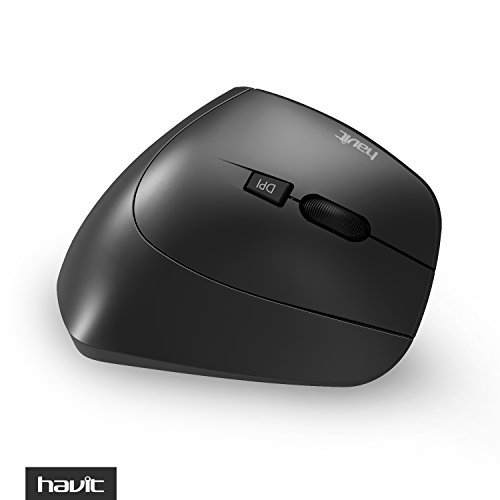
Aquesta imatge ofereix una vista de dalt a baix view of the havit HV-MS55GT mouse, clearly displaying the scroll wheel and the DPI adjustment button, which allows users to switch between 800, 1200, and 1600 DPI settings.
Manteniment
Neteja
To maintain the mouse's appearance and functionality, regularly clean its surface. Use a soft, damp cloth to wipe away dust and smudges. Avoid using harsh chemicals or abrasive cleaners, as these can damage the matte finish. Periodic cleaning helps prevent the buildup of oils and dirt.
Canvi de bateria
When the mouse's performance degrades (e.g., slow response, stuttering cursor), it is likely time to replace the AAA batteries. Follow the battery installation steps outlined in the Setup section.
Resolució de problemes
- El ratolí no respon:
- Ensure the mouse is powered ON using the switch on its underside.
- Comproveu si les piles estan correctament instal·lades i tenen prou càrrega. Substituïu-les si cal.
- Verify that the USB Nano receiver is securely plugged into a working USB port on your computer. Try a different USB port.
- Move the mouse closer to the USB receiver to ensure it is within the 10-meter wireless range.
- Cursor is slow or erratic:
- Substituïu les piles per unes de noves.
- Assegureu-vos que el ratolí estigui sobre una superfície neta i no reflectant.
- Check for potential wireless interference from other 2.4GHz devices.
- DPI setting not changing:
- Ensure you are pressing the dedicated DPI button. Press it repeatedly to cycle through the settings.
- Forward/Back buttons not working on Mac:
- Some operating systems, particularly macOS, may require third-party software or system preference adjustments to enable full functionality of the forward/back buttons.
Especificacions
| Característica | Detall |
|---|---|
| Model | HV-MS55GT |
| Marca | haver |
| Tecnologia sense fils | 2.4 GHz |
| Distància sense fils | Fins a 10 metres |
| Resolució DPI | 800/1200/1600 DPI |
| Nombre de botons | 6 |
| Cicles operatius | 1,000,000 cicles |
| Tipus de bateria | 2 x AAA (no inclòs) |
| Material | ABS + Matte Oil Finish |
| Dimensions (LxWxH) | 12.37 x 6.16 x 6.78 cm |
| Pes | 99.8 g |
| Orientació de la mà | Destra |
| Sistema operatiu compatible | Windows 2000/ME/XP/Vista/7/8/10, MAC, Linux |

This diagram provides the key dimensions of the havit HV-MS55GT mouse, including its height, length, and width, which are approximately 61.58mm, 123.69mm, and 67.91mm respectively.
Informació de la garantia
havit products are manufactured to high-quality standards. This product is covered by a Garantia del fabricant de 1 anys des de la data de compra. Aquesta garantia cobreix els defectes de materials i fabricació en condicions d'ús normal. No cobreix els danys causats per un mal ús, accidents, modificacions no autoritzades o desgast normal. Conserveu el comprovant de compra per a reclamacions de garantia.
Atenció al client
If you encounter any issues or have questions regarding your havit HV-MS55GT Wireless Ergonomic Vertical Mouse that are not addressed in this manual, please contact havit customer support for assistance. Refer to the product packaging or the official havit weblloc per obtenir dades de contacte.