
1. Introducció
This manual provides comprehensive instructions for the installation, operation, and maintenance of your ASUS Prime Z270M-PLUS motherboard. Please read this manual thoroughly before installing or using the product to ensure correct setup and optimal performance.
2. Informació de seguretat
Observeu les següents precaucions de seguretat per evitar danys a la placa base i lesions personals:
- Desconnecteu sempre el cable d'alimentació de la presa de corrent abans de tocar qualsevol component.
- Wear an anti-static wrist strap or frequently touch a grounded object to discharge static electricity before handling components.
- Manipuleu els components per les vores per evitar tocar les parts sensibles.
- Assegureu-vos de ventilar adequadament la carcassa del vostre PC per evitar que s'escalfi.
- Mantingueu la placa base allunyada de la humitat i de les temperatures extremes.
3. Contingut del paquet
Verifiqueu que tots els elements siguin presents al vostre paquet:
- ASUS Prime Z270M-PLUS Motherboard
- Cable(s) SATA
- Manual d'usuari
4. Producte acabatview
The ASUS Prime Z270M-PLUS is a micro-ATX motherboard designed for Intel LGA 1151 socket processors. It features robust hardware safeguards, advanced cooling controls, and high-speed connectivity options.
Característiques principals:
- Protecció 5X III: Hardware-level safeguards to ensure component longevity and reliability against electrical overloads.
- Il·luminació LED: Customizable lighting control for PCIe slots.
- Fan Xpert 4 Core: Advanced fan controls for optimized cooling and reduced noise.
- Dual Native M.2 and NVMe PCIe RAID Support: Provides high-speed storage solutions.
- USB tipus C: Convenient and reversible connectivity.
- Suport de DDR4: Supports memory speeds up to 3866 MHz.
- Àudio: Realtek ALC887 8-channel high-definition audio.
- Suport multi-GPU: Features AMD CrossFireX Technology.

Figura 4.1: De dalt a baix view of the ASUS Prime Z270M-PLUS motherboard, highlighting the CPU socket, RAM slots, and PCIe slots.

Figura 4.2: Angle view of the ASUS Prime Z270M-PLUS motherboard, showcasing its various components and heatsinks.
5. Configuració
5.1. Instal·lació de la CPU
- Localitzeu el sòcol LGA 1151 a la placa base.
- Obriu la palanca del sòcol de la CPU i aixequeu la placa de càrrega.
- Alineeu amb cura la CPU amb el sòcol, assegurant-vos que el triangle daurat de la CPU coincideixi amb el triangle del sòcol.
- Col·loca suaument la CPU al sòcol sense forçar-la.
- Tanqueu la placa de càrrega i premeu la palanca cap avall fins que quedi bloquejada.
5.2. Instal·lació de memòria (RAM)
The motherboard supports DDR4 memory up to 64GB with speeds up to 3866 MHz.
- Obriu els clips dels dos extrems de la ranura DIMM.
- Alineeu l'osca del mòdul de memòria DDR4 amb la clau de la ranura DIMM.
- Introduïu el mòdul de memòria fermament a la ranura fins que els clips encaixin al seu lloc.
5.3. Instal·lació del dispositiu d'emmagatzematge
The motherboard supports SATA III devices and NVMe PCIe M.2 drives.
- Dispositius SATA: Connect SATA data cables from your storage drives (HDDs/SSDs) to the SATA III ports on the motherboard. Connect power cables from your power supply to the drives.
- Dispositius M.2: Locate the M.2 slot. Insert the M.2 drive at an angle and secure it with the provided screw.
5.4. Instal·lació de la targeta d'expansió
The motherboard features PCIe 3.0 slots for graphics cards and other expansion cards.
- Alineeu la targeta d'expansió amb la ranura PCIe adequada.
- Press down firmly until the card is seated correctly and the retention clip locks.
- Fixeu la targeta a la carcassa de l'ordinador amb un cargol.
5.5. Connexions d'alimentació
Connect the 24-pin ATX power connector and the 8-pin ATX 12V power connector from your power supply to the corresponding ports on the motherboard.
5.6. Connexions del panell frontal
Connect the cables from your PC case's front panel (USB ports, audio jacks, power button, reset button, LED indicators) to the corresponding headers on the motherboard. Refer to the motherboard diagram in your physical manual for exact header locations.
5.7. Panell d'E/S posterior
El panell d'E/S posterior proporciona diversos ports per connectar dispositius externs.
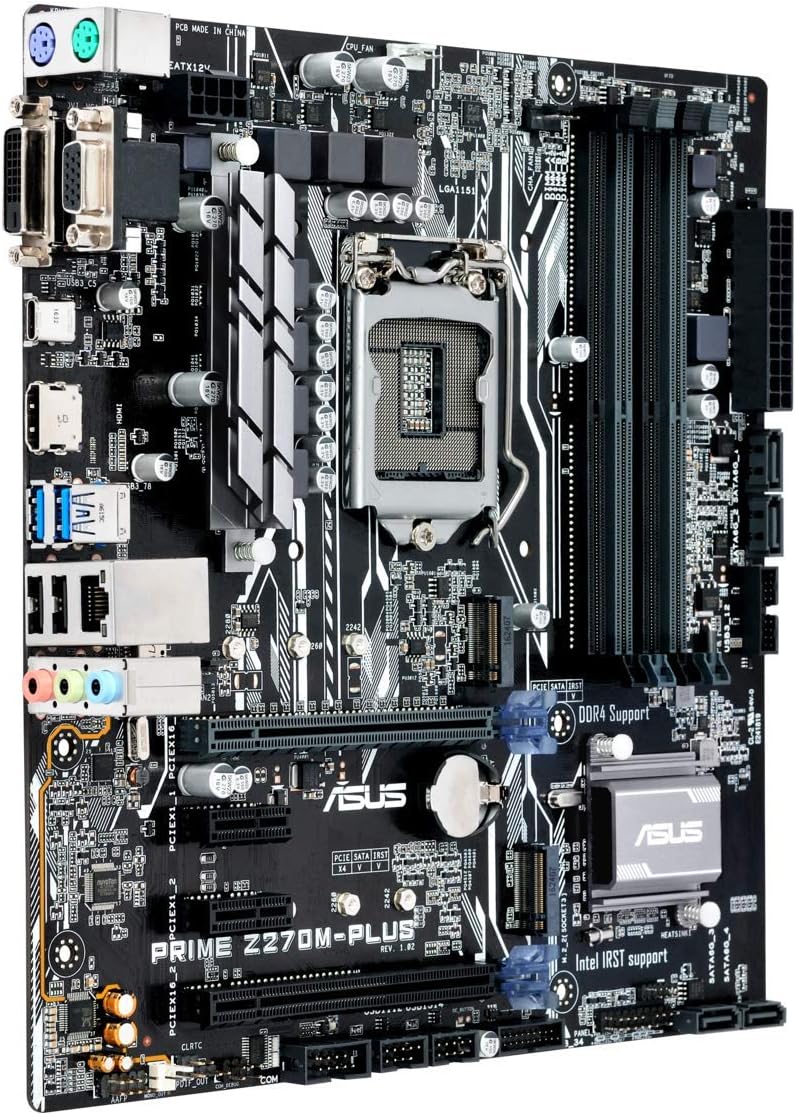
Figure 5.1: Rear I/O panel of the ASUS Prime Z270M-PLUS motherboard, showing various connectivity ports.
Els ports comuns inclouen:
- PS/2 Keyboard/Mouse Combo Port
- Port DVI-D
- Port VGA
- Port HDMI
- Ports USB 3.0
- Ports USB 2.0
- LAN (RJ-45) Port
- Audio Jacks (Line In, Line Out, Microphone)
6. Funcionament
6.1. Arrencada inicial i configuració de la BIOS/UEFI
Upon the first power-on, the system will typically enter the BIOS/UEFI setup utility. Here you can configure system settings, boot order, and monitor hardware status. Press the DEL key during startup to enter the BIOS/UEFI.
6.2. Instal·lació del controlador
After installing your operating system, install the necessary drivers for the motherboard components (chipset, audio, LAN, graphics, etc.). These drivers are typically provided on a support DVD or can be downloaded from the ASUS official weblloc.
6.3. System Boot
Once the operating system and drivers are installed, your system should boot normally. Ensure all peripherals are connected correctly.
7. Manteniment
7.1. Neteja
Netegeu regularment la carcassa i la placa base del vostre PC per evitar l'acumulació de pols, que pot provocar un sobreescalfament i fallades dels components. Feu servir aire comprimit per eliminar la pols dels ventiladors, els dissipadors de calor i altres components. Assegureu-vos que el sistema estigui apagat i desendollat abans de netejar-lo.
7.2. Actualitzacions de la BIOS
Consulteu periòdicament el suport d'ASUS website for BIOS updates. BIOS updates can improve system stability, add support for new hardware, or fix bugs. Follow the instructions provided by ASUS carefully when performing a BIOS update to avoid system damage.
8. Solució De Problemes
If you encounter issues with your motherboard, consider the following general troubleshooting steps:
- Sense energia: Ensure all power cables (24-pin ATX, 8-pin CPU) are securely connected. Check your power supply unit (PSU) for functionality.
- Sense pantalla: Verify that your graphics card is properly seated and connected to the monitor. If using integrated graphics, ensure your monitor is connected to the motherboard's video output. Try reseating RAM modules.
- Inestabilitat/Avaries del sistema: Check for overheating. Ensure all drivers are up to date. Test memory modules individually.
- Component no detectat: Ensure the component (e.g., hard drive, expansion card) is correctly installed and all necessary cables are connected. Check BIOS settings to ensure the component is enabled.
- Restabliment de la BIOS: If system settings become unmanageable, you can clear the CMOS by removing the CMOS battery for a few minutes or using the Clear CMOS jumper (refer to your physical manual for location).
9. Especificacions
| Característica | Especificació |
|---|---|
| Nom del model | Prime Z270M-PLUS |
| Socket de CPU | LGA 1151 |
| Processadors compatibles | Celeron, Core i3, Core i5, Core i7, Pentium (14nm CPUs) |
| Chipset | Intel Z270 |
| Tecnologia de la memòria | DDR4 |
| Capacitat màxima de memòria | 64 GB |
| Velocitat de rellotge de memòria | Fins a 3866 MHz |
| Interfícies d'emmagatzematge | SATA III, Dual Native M.2 (NVMe PCIe support) |
| Ranures d'expansió | PCIe 3.0 |
| Ports USB | USB 3.0, USB 2.0, USB Type-C |
| Sortida de vídeo | HDMI, DVI-D, VGA (via integrated graphics) |
| Àudio | Realtek ALC887 àudio d'alta definició de 8 canals |
| LAN | 1x Gigabit Ethernet |
| Factor de forma | mATX (23 x 20 x 2 cm) |
| Pes | 900 g |
| Número de model del fabricant | B990M80 |
10. Informació de la garantia
The product warranty for the ASUS Prime Z270M-PLUS motherboard is not applicable as per the provided product information. Please refer to your point of purchase or local ASUS support for specific warranty terms and conditions that may apply in your region.
11. Suport
Per obtenir més ajuda, assistència tècnica o descàrregues de controladors, visiteu el lloc web d'assistència oficial d'ASUS. weblloc web. També hi podeu trobar recursos addicionals i preguntes freqüents.
Oficial d'ASUS Weblloc: www.asus.com
Botiga de la marca ASUS: ASUS Spain Store on Amazon