
1. Introducció
Gràcies per la compraasing the Candy X-Range CMXG20DS Microwave with Grill. This manual provides essential information for the safe and efficient operation of your appliance. Please read these instructions carefully before using the microwave oven and retain them for future reference.
Instruccions importants de seguretat
- No intenteu fer funcionar aquest forn amb la porta oberta, ja que això pot provocar una exposició nociva a l'energia de les microones.
- No col·loqueu cap objecte entre la cara frontal del forn i la porta ni deixeu que s'acumuli terra o residus de neteja a les superfícies de segellat.
- No feu funcionar el forn si està malmès. És particularment important que la porta del forn es tanqui correctament i que no hi hagi danys a: (1) la porta (doblegada), (2) les frontisses i els panys (trencats o afluixats), (3) els segells de les portes i les superfícies de segellat.
- El forn no ha de ser ajustat ni reparat per ningú excepte per personal de servei degudament qualificat.
- Assegureu-vos que l'aparell estigui ben connectat a terra.
- No escalfeu líquids ni altres aliments en recipients tancats, ja que poden explotar.
- Utilitzeu només estris adequats per al microones.
- Quan escalfeu aliments en recipients de plàstic o paper, vigileu el forn a causa de la possibilitat d'encesa.
2. Producte acabatview
The Candy X-Range CMXG20DS is a 20-liter microwave oven with an integrated grill function, designed for versatile cooking. It features a digital display, multiple power levels, and automatic programs.
Components
- Unitat de forn microones
- Glass Turntable (25.5 cm diameter)
- Anell de plat giratori
- Grill Grill
- Manual d'instruccions
Diagrama de l'aparell
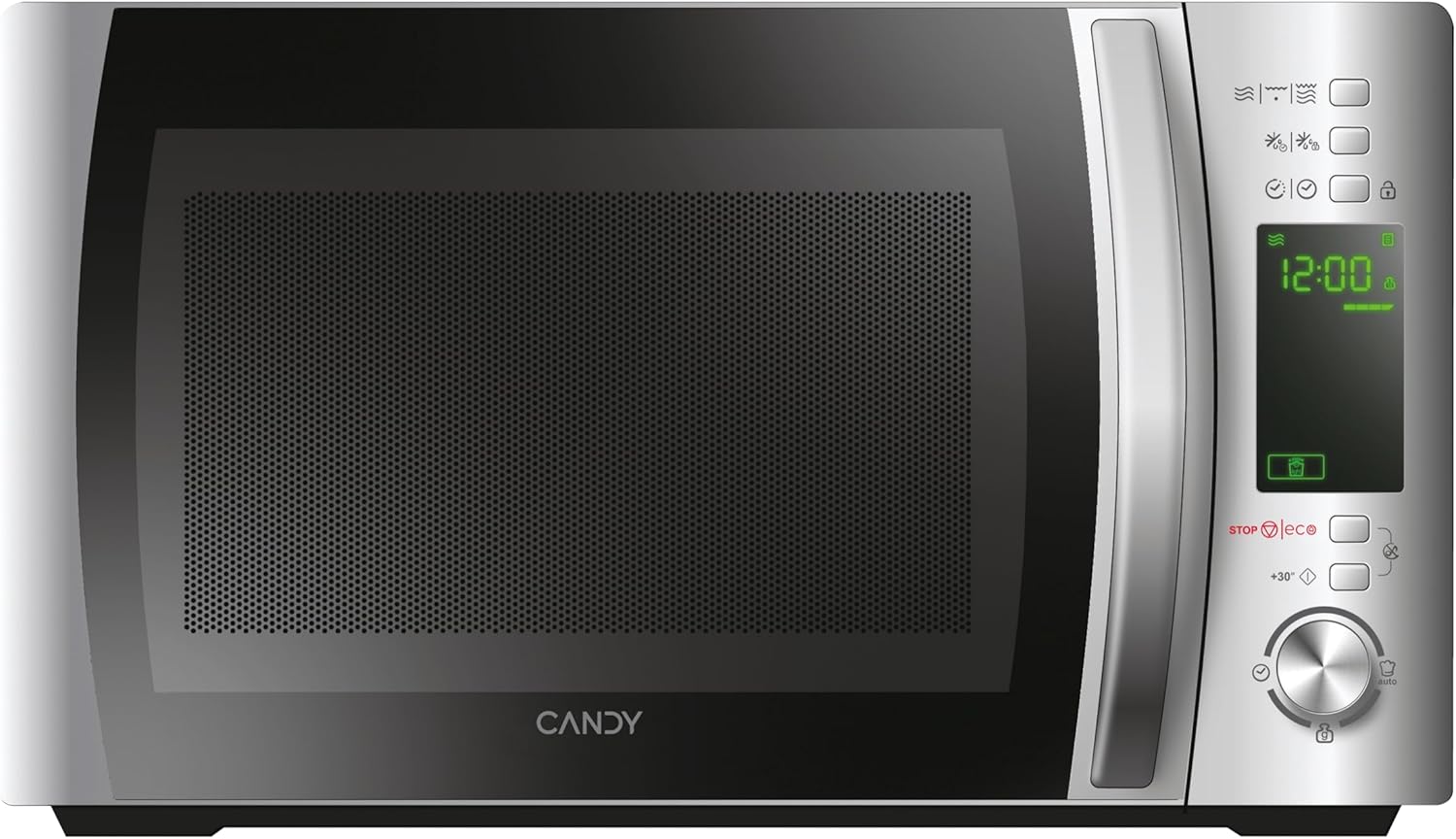

Tauler de control
The control panel features a digital display and various buttons and a dial for setting cooking functions, time, and power levels. Specific functions include:
- Pantalla digital: Mostra el temps, el nivell de potència i els indicadors del programa.
- Botons de nivell de potència: Adjust microwave power.
- Grill Function Button: Activates the grill.
- Botó de descongelació: Per descongelar per pes o temps.
- Automatic Programs Button: Accedeix a programes de cocció preestablerts.
- Botó de bloqueig de seguretat: Engages/disengages child lock.
- STOP/ECO Button: Atura la cocció o activa el mode Eco.
- +30 Seconds Button: Quick start or adds 30 seconds to cooking time.
- Marcador rotatiu: Adjusts time, weight, or program selection.
- Botó d'inici: Initiates cooking.
3. Configuració
Desembalatge i col·locació
- Traieu tots els materials d'embalatge de la cavitat del forn i dels accessoris.
- Inspect the oven for any damage such as dents or a misaligned door. Do not operate if damaged.
- Place the microwave oven on a stable, level surface strong enough to hold the oven and the food being cooked.
- Ensure adequate ventilation. Maintain a minimum clearance of 20 cm above the oven, 10 cm at the rear, and 5 cm on both sides. Do not block any ventilation openings.
- No col·loqueu el forn a prop de fonts de calor ni en llocs publicitaris.amp medi ambient.

Connexió elèctrica
- Plug the power cord into a properly installed and earthed wall socket.
- Assegureu-vos que el voltagcoincideix amb l'etiqueta de classificació de l'aparell.
Configuració inicial: Configuració del rellotge
- When the microwave is first plugged in, the display will show "0:00".
- Press the "Clock" button (if available, otherwise consult specific model instructions for clock setting, often combined with a time setting button).
- Rotate the dial to set the hour. Press the "Clock" button again.
- Rotate the dial to set the minutes. Press the "Clock" button to confirm.
4. Instruccions de funcionament
4.1. Cuina bàsica al microones
- Col·loqueu el menjar en un recipient apte per a microones al plat giratori de vidre. Tanqueu la porta.
- Press the "Microwave" button (or equivalent power level button) repeatedly to select the desired power level (e.g., 700W, 500W, etc.). The display will show the selected power.
- Rotate the dial to set the cooking time.
- Premeu el botó "Inici" per començar a cuinar.
4.2. Funció de graella
- Place food on the grill rack, then place the rack on the turntable.
- Press the "Grill" button. The display will show "G".
- Rotate the dial to set the grilling time.
- Premeu el botó "Inici".
4.3. Combination Cooking (Microwave + Grill)
- Col·loqueu el menjar en un recipient adequat al plat giratori o a la graella.
- Press the "Combi" button (or press Microwave/Grill buttons in sequence to select a combination mode, e.g., C-1, C-2).
- Rotate the dial to set the cooking time.
- Premeu el botó "Inici".
4.4. Funció de descongelació
The CMXG20DS offers defrosting by weight or by time.
Descongelació per pes:
- Col·loqueu els aliments congelats al plat giratori.
- Press the "Defrost" button once. The display will show "dEF1" (or similar for weight defrost).
- Rotate the dial to set the weight of the food.
- Premeu el botó "Inici".
Descongelació per temps:
- Col·loqueu els aliments congelats al plat giratori.
- Press the "Defrost" button twice. The display will show "dEF2" (or similar for time defrost).
- Rotate the dial to set the defrosting time.
- Premeu el botó "Inici".

4.5. Express Cooking (+30 Seconds)
For quick heating at full power, simply press the "+30 Seconds" button. Each press adds 30 seconds to the cooking time. This function can also be used to extend cooking time during operation.
4.6. Automatic Programs (40 Programs)
The microwave features 40 pre-set automatic cooking programs for various food types. These programs are designed to simplify cooking by automatically setting the optimal time and power.
- Press the "Auto Program" button. The display will show "A-1" (or similar).
- Rotate the dial to select the desired program (e.g., A-1 for pizza, B-1 for vegetables). A list of programs and their corresponding codes is typically found on the inside of the microwave door or in a separate section of this manual.
- Premeu el botó "Inici".

4.7. Funció de temporitzador
The microwave can be used as a kitchen timer without cooking.
- Ensure the oven is not in cooking mode.
- Press the "Timer" button (or a dedicated clock/timer button).
- Rotate the dial to set the desired countdown time.
- Press the "Start" button. The timer will count down without activating the microwave function.
4.8. Safety Lock (Child Lock)
Per evitar un funcionament no intencionat, especialment per part de nens:
- Per activar: Press and hold the "Safety Lock" button (often indicated by a lock icon) for 3 seconds. A lock indicator will appear on the display.
- Per desactivar: Press and hold the "Safety Lock" button again for 3 seconds. The lock indicator will disappear.
4.9. Mode Eco
The Eco mode turns off the display to save energy when the microwave is not in use.
- Per activar: Press the "STOP/ECO" button once when the microwave is idle. The display will turn off.
- Per desactivar: Press any button or open the door. The display will reactivate.
4.10. simply-Fi App Integration
The simply-Fi app provides additional functionality, including access to recipes, cooking tips, and product information. Refer to the app's instructions for pairing and usage.

5. Manteniment i Neteja
Una neteja i un manteniment regulars garantiran la longevitat i el rendiment òptim del vostre forn microones.
Neteja general
- Desconnecteu sempre l’aparell de la presa de corrent abans de netejar-lo.
- Netegeu la cavitat del forn després de cada ús amb un anunciamp drap. Per a taques difícils, es pot utilitzar un detergent suau.
- Les superfícies exteriors s'han de netejar amb adamp cloth. Prevent water from seeping into the ventilation openings.
- The door and door seals should be cleaned regularly to ensure proper closing and operation.
Accessoris de neteja
- El plat giratori de vidre i l'anell del plat giratori es poden rentar amb aigua tèbia i sabó o al rentaplats.
- The grill rack should be cleaned with warm soapy water and a non-abrasive sponge.
- Ensure all parts are completely dry before reassembling and using the microwave.
6. Solució De Problemes
Si teniu problemes amb el vostre forn microones, consulteu la taula següent per veure els problemes i les solucions més habituals.
| Problema | Causa possible | Solució |
|---|---|---|
| El forn no s'engega | Cable d'alimentació no ben connectat. Porta no ben tancada. Fusible fundit o interruptor automàtic saltat. | Ensure power cord is plugged in. Close door securely. Check household fuse or reset circuit breaker. |
| El menjar no s'escalfa | Incorrect cooking time or power level set. Microwave-safe dish not used. | Adjust cooking time and power level. Use appropriate microwave-safe cookware. |
| Espurnes dins del forn | Metal or foil in the oven. Food residue on cavity walls. | Remove any metal objects. Clean the oven cavity thoroughly. |
| El plat giratori no gira | Turntable not properly placed on the ring. Obstruction under the turntable. | Ensure turntable and ring are correctly positioned. Remove any obstructions. |
| La pantalla mostra el codi d'error | Mal funcionament intern. | Desendolleu el forn durant uns minuts i torneu-lo a endollar. Si l'error persisteix, poseu-vos en contacte amb el servei d'atenció al client. |
Si el problema persisteix després d'intentar aquestes solucions, poseu-vos en contacte amb l'atenció al client.
7. Especificacions tècniques
- Marca:
- Caramels
- Número de model:
- CMXG20DS
- Color:
- Plata
- Dimensions del producte (P x A x A):
- 44 x 29.5 x 26 cm
- Capacitat:
- 20 litres
- Potència de sortida de microones:
- 700 watts
- Voltage:
- 230 Volts
- Material:
- Acer inoxidable
- Nivell de soroll:
- 44 dB
- Característiques especials:
- Control panel lock, Defrost, Eco mode, Turntable, Programmable, Quick access keys, Timer
- Diàmetre de la placa giratòria:
- 25.5 cm
- Pes:
- 12.2 kg
8. Garantia i Suport
Informació de la garantia
This Candy appliance is covered by a standard manufacturer's warranty. Please refer to the warranty card included with your purchase for specific terms and conditions, including the duration of coverage and what is covered.
Atenció al client
For technical assistance, spare parts, or service requests, please contact Candy customer support. Contact details can typically be found on the manufacturer's official weblloc web o a la documentació de la garantia.
When contacting support, please have your model number (CMXG20DS) and serial number ready.