
1. Introducció
Thank you for choosing the awei A845BL Bluetooth 4.1 Wireless In-Ear Neckband Sports Headphone. This manual provides detailed instructions on how to set up, operate, and maintain your new headphones. Please read this manual carefully before use to ensure optimal performance and longevity of your device.
2. Producte acabatview
The awei A845BL headphones feature a lightweight neckband design, offering a secure and comfortable fit for sports and active lifestyles. They incorporate Bluetooth 4.1 technology for stable wireless connectivity, stereo audio, and a built-in microphone for hands-free calls. The design also includes noise reduction capabilities for an enhanced listening experience.
2.1 Característiques clau
- Bluetooth 4.1 per a una connexió sense fil estable.
- Stereo sound quality.
- In-ear neckband design for secure fit.
- Micròfon integrat per trucades mans lliures.
- Tecnologia de reducció de soroll.
- Lightweight and comfortable for extended wear.
- Integrated controls for music and calls.
2.2 Components del producte
The package typically includes the awei A845BL headphones, ear cushions, and a charging cable. Please check all contents upon unboxing.

Figura 1: awei A845BL Wireless In-Ear Neckband Sports Headphone. This image displays the overall design of the headphones, featuring the black neckband and in-ear components with integrated controls.
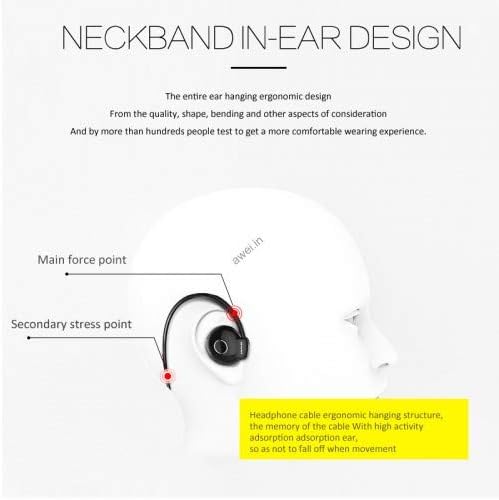
Figura 2: Neckband In-Ear Design. This diagram illustrates the ergonomic design of the neckband and in-ear components, highlighting the main force points and secondary stress points for a secure and comfortable fit during movement.
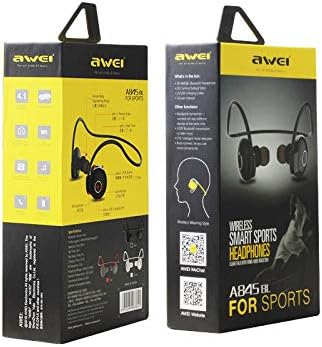
Figura 3: awei A845BL Product Packaging. This image shows the retail packaging of the awei A845BL headphones, displaying branding and key features on the box.
3. Configuració
3.1 Càrrega dels auriculars
Before first use, fully charge your awei A845BL headphones. Use the provided charging cable to connect the headphones to a USB power source (e.g., computer USB port, wall adapter).
- Temps de càrrega: Aproximadament 2 hores per a una càrrega completa.
- Capacitat de la bateria: 100 mAh.
- Temps de joc: Fins a 8 hores amb una càrrega completa.
- Temps d'espera: Fins a 200 hores.
The LED indicator on the headphones will typically show red during charging and turn blue or off when fully charged. Refer to the specific LED behavior in your product's quick start guide if available.
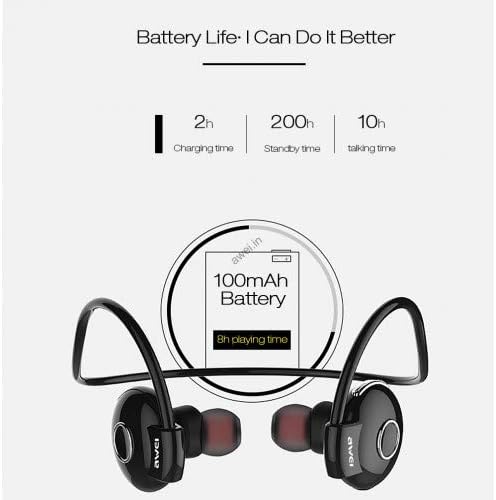
Figura 4: Battery Life Information. This graphic details the battery specifications, including a 2-hour charging time, 200-hour standby time, 10-hour talk time, and 8-hour playing time from a 100mAh battery.
3.2 Emparellament amb un dispositiu Bluetooth
- Assegureu-vos que els auriculars estiguin completament carregats i apagats.
- Press and hold the Multi-function button (usually the power button) on the headphones for approximately 5-7 seconds until the LED indicator flashes red and blue alternately. This indicates pairing mode.
- On your mobile phone or Bluetooth-enabled device, go to the Bluetooth settings and turn Bluetooth on.
- Cerca available devices. You should see "AWEI A845BL" or a similar name appear in the list.
- Select "AWEI A845BL" to connect. Once successfully paired, the LED indicator on the headphones will typically flash blue slowly or turn off, and you may hear an audible confirmation.
- Si se us demana una contrasenya, introduïu "0000" (quatre zeros).
The headphones will automatically attempt to reconnect to the last paired device when turned on, if the device's Bluetooth is active and within range.
4. Instruccions de funcionament
4.1 Encès/Apagat
- Encès: Press and hold the Multi-function button for about 3 seconds until the LED flashes blue and you hear a power-on prompt.
- Apagar: Press and hold the Multi-function button for about 3-4 seconds until the LED flashes red and you hear a power-off prompt.
4.2 Reproducció de música
- Reproduir/pausa: Premeu el botó multifunció una vegada.
- Pista següent: Premeu i manteniu premut el botó de pujar el volum (+).
- Pista anterior: Premeu i manteniu premut el botó per baixar el volum (-).
- Pujar el volum: Press the Volume Up (+) button briefly.
- Baixar el volum: Press the Volume Down (-) button briefly.
4.3 Trucades telefòniques
- Respon a la trucada: Press the Multi-function button once when a call comes in.
- Finalitzar la trucada: Premeu el botó multifunció una vegada durant una trucada.
- Rebutja la trucada: Press and hold the Multi-function button for about 2 seconds when a call comes in.
- Torna a marcar l'últim número: Double-press the Multi-function button when not on a call.
5. Manteniment
Un manteniment adequat garanteix la longevitat i el rendiment dels teus auriculars.
- Neteja: Feu servir un drap suau i sec per netejar els auriculars. No utilitzeu productes químics agressius ni materials abrasius.
- Emmagatzematge: Guardeu els auriculars en un lloc fresc i sec, allunyat de la llum solar directa i de temperatures extremes.
- Exposició a l'aigua: While designed for sports, avoid submerging the headphones in water. Wipe off sweat immediately after use.
- Càrrega: Feu servir només el cable de càrrega proporcionat o un equivalent certificat. Eviteu sobrecarregar-lo.
6. Solució De Problemes
If you encounter issues with your awei A845BL headphones, refer to the following common solutions:
- Els auriculars no s'encenen: Assegureu-vos que els auriculars estiguin completament carregats.
- No es pot emparellar amb el dispositiu:
- Assegureu-vos que els auriculars estiguin en mode d'emparellament (parpellejant en vermell i blau).
- Assegureu-vos que el Bluetooth estigui habilitat al vostre dispositiu.
- Acosta els auriculars al dispositiu.
- Turn off and on both the headphones and your device's Bluetooth.
- Esborra les connexions Bluetooth anteriors del dispositiu i torna a intentar l'emparellament.
- Sense so o so intermitent:
- Comproveu els nivells de volum tant dels auriculars com del dispositiu connectat.
- Ensure the headphones are within the effective Bluetooth range (typically 10 meters/33 feet).
- Reinicieu els dos dispositius.
- Assegureu-vos que no hi hagi interferències fortes (per exemple, encaminadors Wi-Fi o altres dispositius Bluetooth) a prop.
- El micròfon no funciona:
- Assegureu-vos que els auriculars estiguin connectats correctament i seleccionats com a dispositiu d'entrada d'àudio al telèfon.
- Check for any obstructions covering the microphone.
7. Especificacions
| Número de model | A845BL |
| Marca | Awei |
| Tecnologia de connectivitat | Sense fil (Bluetooth 4.1) |
| Col·locació de l'orella | In-Ear (with Over-Ear hook design) |
| Factor de forma | A l'orella |
| Control de soroll | Cancel·lació activa de soroll (ANC) |
| Micròfon | Inclòs |
| Capacitat de la bateria | 100 mAh |
| Temps de càrrega | Aprox. 2 hores |
| Temps de reproducció de música | Fins a 8 hores |
| Temps d'espera | Fins a 200 hores |
| Color | Negre |
| Dimensions del paquet | 16.4 x 9.8 x 4.4 cm |
| Pes de l'article | 140 g |
8. Garantia i Suport
For warranty information and customer support, please refer to the documentation included with your purchase or contact the retailer where the product was acquired. Keep your proof of purchase for any warranty claims.