
1. Introducció
Gràcies per la compraasing the DIGITNOW M422 Portable Vintage Suitcase Vinyl Record Player. This manual provides essential information for the safe and efficient operation of your device. Please read it thoroughly before use and retain it for future reference.
2. Instruccions de seguretat
- No exposeu la unitat a la pluja o la humitat.
- No obriu la c.asing. Demaneu totes les tasques de manteniment a personal qualificat.
- Ensure the power adapter matches your local power supply.
- Col·loqueu la unitat sobre una superfície estable i plana.
- Mantingueu la unitat allunyada de la llum solar directa, de fonts de calor i de camps magnètics forts.
- Netegeu la unitat només amb un drap suau i sec.
3. Contingut del paquet
Verifiqueu que tots els elements siguin presents al paquet:
- DIGITNOW M422 Record Player
- Cable USB
- Cable d'alimentació de xarxa
- CD with Audacity Audio Software (for PC recording)
- Manual d'usuari
- 45-RPM Adapter
- Extra Stylus
4. Producte acabatview
Familiaritzeu-vos amb els components del vostre tocadiscos.

Imatge: Superior view of the DIGITNOW M422 record player, highlighting the control panel, turntable, and built-in speakers.
- Braç de to: Sosté el llapis i segueix els solcs del disc.
- Port AUX-IN: Per connectar dispositius d'àudio externs.
- Interruptor d'aturada automàtica ON/OFF: Controls automatic stopping of the turntable.
- Botó de selecció de mode: Switches between PHONO, AUX, and Bluetooth modes.
- Selector de velocitat: Adjusts playback speed (33, 45, 78 RPM).
- Elevador de braç de to: Manually raises and lowers the tone arm.
- Power Switch & Volume Control: Turns the unit ON/OFF and adjusts speaker volume.
- Indicador de mode: LED light indicating current mode.
- Auriculars Jack: For private listening with headphones.
- Altaveus integrats: Altaveus estèreo integrats per a la sortida d'àudio.

Imatge: Part posterior view of the DIGITNOW M422 record player, showing the DC 5V power input and RCA (R & L) Line Out ports.
- Entrada d'alimentació DC 5V: Connecteu l'adaptador de corrent aquí.
- RCA (R & L) Line Out: Connect to external speakers or an ampmés viu.
5. Configuració
Seguiu aquests passos per a la configuració inicial:
- Desembalar: Traieu amb cura el tocadiscos del seu embalatge.
- Col·locació: Place the unit on a flat, stable surface away from dust and vibrations.
- Connexió d'alimentació: Connect the mains power cable to the DC 5V input on the rear of the unit, then plug the adapter into a wall outlet.
- Tapa: Open the lid of the suitcase to access the turntable.
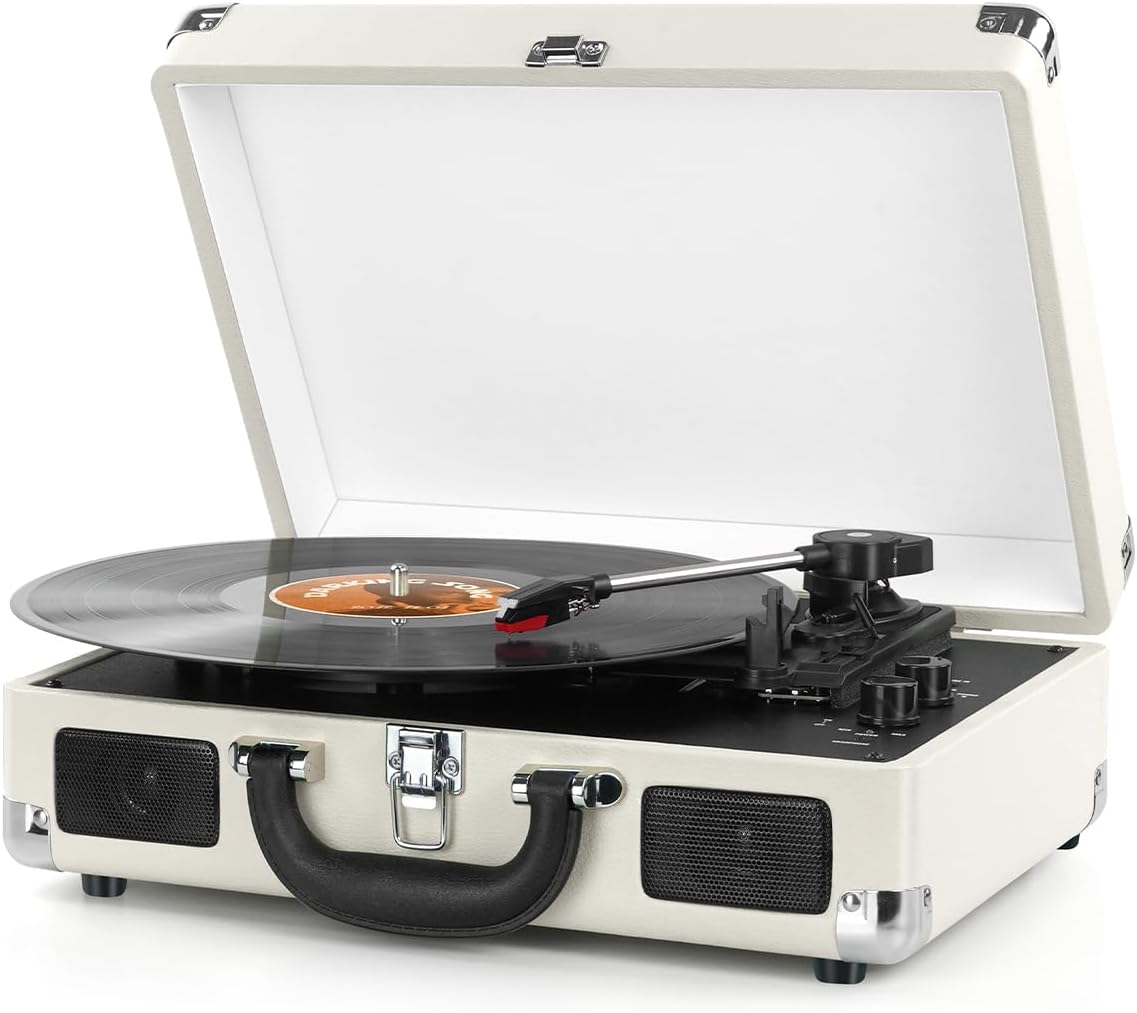
Image: The DIGITNOW M422 record player with its lid open, showing a vinyl record on the platter and the tonearm in position.
6. Instruccions de funcionament
6.1 Playing Vinyl Records (PHONO Mode)
- Encès: Turn the Power Switch/Volume Control knob clockwise to power on the unit.
- Seleccioneu el mode: Turn the Mode Selection knob to 'PHONO'.
- Registre del lloc: Place a vinyl record on the turntable platter. If playing a 45 RPM single, place the 45 RPM adapter on the center spindle first.
- Seleccioneu la velocitat: Set the Speed Selector to the correct speed (33, 45, or 78 RPM) for your record.
- Parada automàtica: Set the Auto Stop ON/OFF switch to ON if you want the turntable to stop automatically when the record finishes. Set to OFF for continuous play.
- Braç inferior: Gently lift the Tone Arm using the Tone Arm Lifter. Move the tonearm over the desired starting point of the record. Slowly lower the tonearm onto the record.
- Ajustar el volum: Adjust the volume using the Power Switch/Volume Control knob.

Imatge: Primer pla views of the record player's stylus, showing its stable design, and the belt-driven platter, designed to absorb vibrations for smooth music playback.
6.2 Mode Bluetooth
The record player can function as a Bluetooth speaker to play audio from your smartphone or other Bluetooth-enabled devices.
- Encès: Turn the Power Switch/Volume Control knob clockwise to power on the unit.
- Seleccioneu el mode: Turn the Mode Selection knob to 'BT' (Bluetooth). The mode indicator light will flash, indicating pairing mode.
- Parella el dispositiu: On your Bluetooth-enabled device (e.g., smartphone), search for 'DIGITNOW' in the Bluetooth settings and select it to pair.
- Confirmació: Once paired, the mode indicator light will stop flashing and remain solid. You can now play audio from your device through the record player's speakers.
- Ajustar el volum: Adjust the volume using the Power Switch/Volume Control knob on the record player and/or your connected device.

Image: A diagram illustrating the Bluetooth wireless connection feature, showing a smartphone connecting to the record player to stream audio.
6.3 Mode AUX-IN
Connect external audio sources like MP3 players to the record player.
- Encès: Turn the Power Switch/Volume Control knob clockwise to power on the unit.
- Seleccioneu el mode: Turn the Mode Selection knob to 'AUX'.
- Connectar el dispositiu: Connect your external audio device to the AUX-IN port using a 3.5mm audio cable (not included).
- Reproduir àudio: Inicieu la reproducció al dispositiu extern.
- Ajustar el volum: Adjust the volume using the Power Switch/Volume Control knob on the record player and/or your connected device.
6.4 Sortida RCA
Connect the record player to external speakers or an amplificador per a un so millorat.
- Connect RCA cables (not included) from the 'RCA (R & L) Line Out' ports on the back of the record player to the corresponding audio input ports on your external audio system.
- Ensure the record player's volume is set appropriately to avoid distortion.
6.5 Presa d'auriculars
For private listening, plug 3.5mm headphones into the headphone jack on the front panel.
- Connecting headphones will mute the built-in speakers.
- Adjust volume using the Power Switch/Volume Control knob.
7. Manteniment
7.1 Neteja del llapis òptic
- Use a soft brush (not included) to gently clean the stylus tip. Brush from back to front.
- Eviteu tocar el llapis amb els dits.
7.2 Neteja de la unitat
- Netegeu l'exterior de la unitat amb un drap suau i sec.
- No utilitzeu netejadors abrasius, ceres ni dissolvents.
7.3 Emmagatzematge
- When not in use, ensure the tonearm is secured with its clip.
- Close the lid to protect the turntable from dust.
- Emmagatzemar en un lloc fresc i sec.
8. Solució De Problemes
| Problema | Causa possible | Solució |
|---|---|---|
| Sense poder | Power adapter not connected; Power outlet not active | Assegureu-vos que l'adaptador de corrent estigui connectat correctament i endollat a una presa de corrent que funcioni. |
| No hi ha so dels altaveus | Volum massa baix; Auriculars connectats; Mode incorrecte seleccionat | Increase volume; Disconnect headphones; Select correct mode (PHONO, AUX, BT). |
| Record skips or sound distortion | Dirty or damaged record; Dirty or worn stylus; Unit not level | Clean record; Clean or replace stylus; Place unit on a level surface. |
| Bluetooth no connectat | Incorrect mode; Device too far; Device already paired elsewhere | Ensure 'BT' mode is selected; Move device closer; Disconnect from other Bluetooth devices. |
| La plataforma giratòria no gira | Power off; Auto Stop engaged (if record finished) | Turn power on; Check Auto Stop switch. |
9. Especificacions
| Característica | Especificació |
|---|---|
| Número de model | M422 |
| Velocitats de reproducció | 33 1/3, 45 i 78 RPM |
| Record Sizes Supported | 7'', 10'', 12'' |
| Connectivitat | Bluetooth, AUX-IN, RCA Line Out, 3.5mm Headphone Jack |
| Altaveus | Altaveus estèreo incorporats |
| Tipus de conducció | Impulsat per corretja |
| Entrada de potència | DC 5V |
| Dimensions (L x A x A) | 13.78 x 11.02 x 4.92 polzades |
| Pes | 5.72 lliures (2.6 quilograms) |
| Material | Cuir |
10. Garantia i Suport
Aquest producte inclou una garantia estàndard del fabricant. Consulteu la targeta de garantia inclosa al paquet per conèixer els termes i condicions específics.
For technical support, troubleshooting assistance, or warranty claims, please contact DIGITNOW customer service. Contact information can typically be found on the product packaging or the official DIGITNOW weblloc.