1. Introducció
The PageFlip Dragonfly Bluetooth Page Turner Pedal provides hands-free control for musicians, teachers, and speakers using digital sheet music and other applications on compatible devices. This manual outlines the features, setup, operation, and specifications of your device to ensure optimal performance.

Image: The PageFlip Dragonfly pedal shown next to an iPad displaying digital sheet music, illustrating its primary use case.
2. Què hi ha a la caixa
Upon unboxing your PageFlip Dragonfly, please ensure all components are present:
- PageFlip Dragonfly Bluetooth Page Turner Pedal
- Cable USB (per carregar)
- Guia d'inici ràpid
- Informació de la garantia de 1 anys
3. Configuració
3.1. Alimentació del dispositiu
The PageFlip Dragonfly can be powered by two AA batteries (providing up to one year of use) or via the included USB-C cable. The device features an auto-sleep mode after 30 minutes of inactivity to conserve power, waking instantly with a tap.
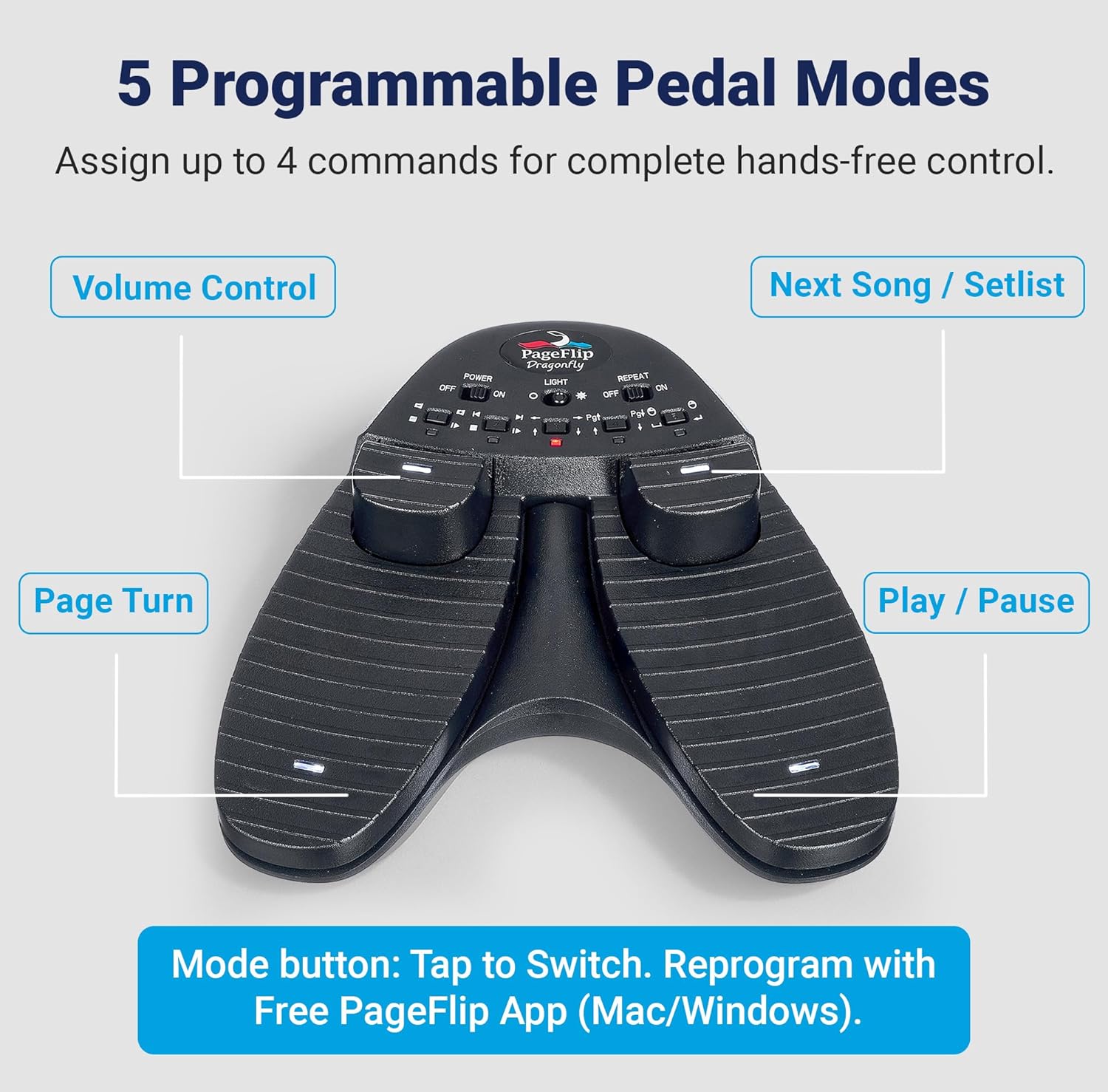
Image: The PageFlip Dragonfly pedal highlighting its dimensions and indicating power options via 2 AA batteries or USB-C.
3.2. Emparellament Bluetooth
To connect your PageFlip Dragonfly to your device (iPad, Android, or PC), follow these steps:
- Ensure the pedal is charged or has fresh batteries.
- Turn on the pedal using the 'Power' switch. The LED indicator will begin to flash, indicating it's in pairing mode.
- Al dispositiu, aneu a la configuració de Bluetooth.
- Locate 'PageFlip Dragonfly' in the list of available devices and select it to pair.
- Once paired, the LED indicator on the pedal will show a steady light, confirming the connection.
For a visual guide on pairing and using the pedal with music applications, refer to the video below:
Video: Demonstrates how to pair the PageFlip Dragonfly pedal and use it with the OnSong app for hands-free page turning.
4. Modes de funcionament
The PageFlip Dragonfly features 4 pedals and 5 reprogrammable modes, allowing for versatile control across various applications. The modes can be switched by pressing the 'Mode' button on the pedal's control panel.

Image: A diagram showing the 5 programmable pedal modes and their default functions, including Page Turn, Volume Control, Next Song/Setlist, and Play/Pause.
4.1. Pedal Functions
- 4 Pedals: Provides hands-free access to four distinct actions.
- 5 Reprogrammable Modes: Adapt the pedal's functions to your preferred apps. Includes free Mac/Windows software for customization.
- Illuminated & Silent: LED-lit pedals are silent, suitable for dark venues.

Image: The PageFlip Dragonfly pedal emphasizing its hands-free page turning capabilities, silent operation, and broad compatibility with various devices.
5. Usage with Applications
The PageFlip Dragonfly is compatible with over 100 music applications, including popular choices like forScore, OnSong, and MobileSheets. Its versatile design allows it to function as a USB foot pedal or a Bluetooth foot switch, adapting to your workflow.

Image: The PageFlip Dragonfly pedal in action, demonstrating its four-pedal control for hands-free operation with an iPad, compatible with numerous music apps.
6. Gestió d'energia
The pedal operates on 2 AA batteries, offering up to a year of power, or can be powered via USB-C. It features a 30-minute auto-sleep mode to conserve battery life and wakes instantly with a tap. A low battery alert ensures you are aware when charging is needed.
7. Especificacions
| Pes de l'article | 1.08 lliures |
| Dimensions del producte | 6.7 x 7 x 2.2 polzades |
| Número de model de l'article | PFDRAGONFLY01 |
| Bateries | Requereix 2 piles AA (alcalines) |
| Dispositius compatibles | Android, iPad (iOS), PC, Mac, Linux |
| Tecnologia de connectivitat | Bluetooth, USB |
| Interfície del maquinari | USB |
| Programari compatible | ForScore, unrealBook, Deepdish Gigbook, and 100+ music apps |
| Tipus de material | Metall, plàstic |
| Nombre de claus | 4 |
| Característica especial | Backlit, Velocity Sensitive Key |
8. Solució De Problemes
If you encounter issues with your PageFlip Dragonfly, consider the following:
- Problemes de connexió: Ensure Bluetooth is enabled on your device and the pedal is in pairing mode. Try restarting both the pedal and your device.
- Funcionalitat: Verify that the correct operating mode is selected on the pedal for your specific application. Different apps may respond to different modes (e.g., Page Up/Down vs. Left/Right Arrow keys).
- Bateria: Check the battery level. Replace batteries or charge via USB-C if low.
9. Garantia i assistència
The PageFlip Dragonfly comes with a 1-year warranty, providing peace of mind for your purchase. For technical support, warranty claims, or further assistance, please refer to the contact information provided in your product packaging or visit the official PageFlip weblloc.